
QwenCloud CLI

Official command-line tool for QwenCloud. Discover models, check usage, manage authentication, and diagnose local setup from a terminal or an AI agent runtime.



English · 中文
QwenCloud is an AI-native cloud for models, tools, and apps. It provides hosted models for text, vision, speech, image generation, video generation, structured output, and agentic applications. Learn more at qwencloud.com and docs.qwencloud.com.
Features
- Interactive and one-shot modes: run
qwencloudwith no arguments for a REPL, or pass a command for scripts, CI, and agent tools. - Model invocation command family: call chat, image, video, and speech models directly via
chat,image,video,audio, andtask, with streaming output, file downloads, and async task polling. - Agent-ready contract: commands support
--format json, standardized exit codes, parseable JSON errors, and--quietfor exit-code-only checks. - Model and usage workflows: browse models, inspect model metadata, search by keyword, and review Free Tier, Coding Plan, and PAYG usage.
- Native credential storage: credentials are stored in the OS keychain when available, with an encrypted file fallback. No
keytaror native Node binding is required. - Self-documenting command tree: every command supports
--help; generated help is the canonical syntax reference.
Installation
Choose the channel that matches your environment. npm and source builds are available.
npm
npm install -g @qwencloud/qwencloud-cliBuild from Source
git clone https://github.com/QwenCloud/qwencloud-cli.git
cd qwencloud-cli
pnpm install
pnpm run build
pnpm link --global
Verify the install:
qwencloud versionQuick Start
For Developers
# 1. Log in with OAuth Device Flow
qwencloud auth login

# 2. List available models
qwencloud models list

# 3. Inspect a model
qwencloud models info qwen3-coder-plus

# 4. Review current usage
qwencloud usage summary

# 5. Check auth, network, config, and local environment
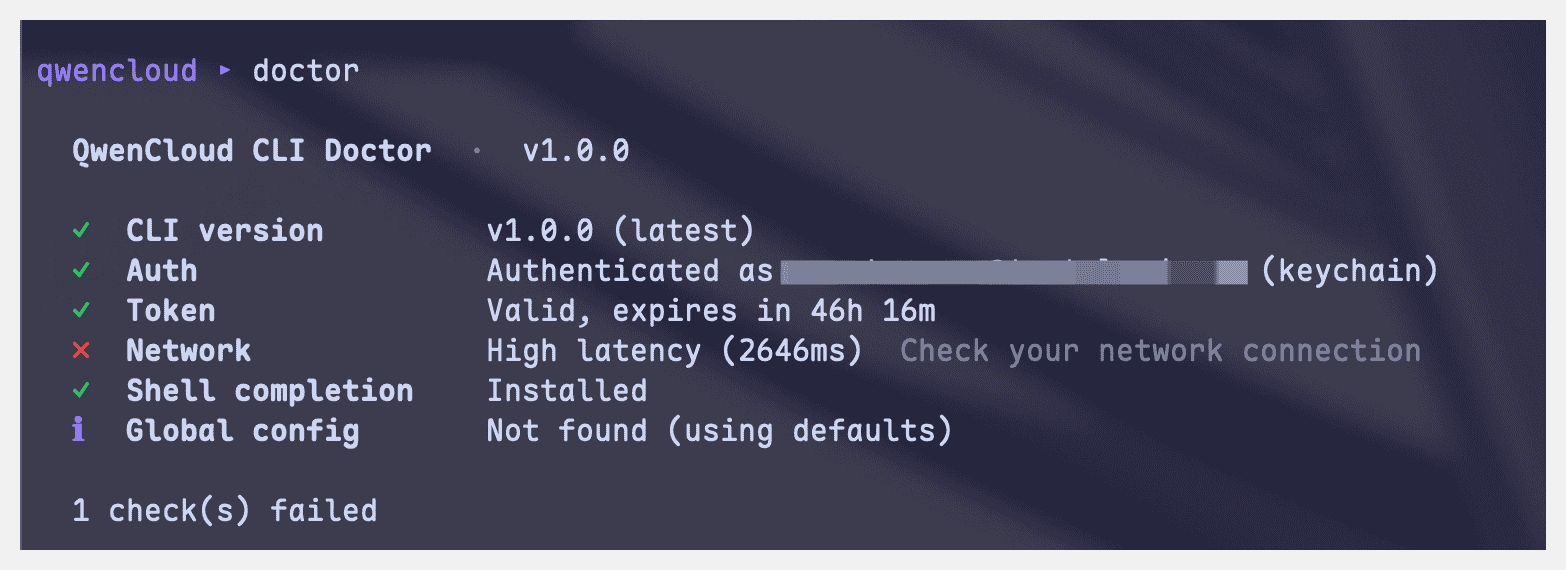
qwencloud doctor
Running qwencloud with no arguments opens the REPL. The REPL uses the same command tree as one-shot mode and adds readline history, tab completion, and rich terminal tables.
For AI Agents
Use one-shot commands and request JSON explicitly:
qwencloud auth status --format json
qwencloud models list --all --format json
qwencloud usage summary --period month --format json
qwencloud doctor --format json
Recommended agent startup flow:
# 1. Check whether credentials are usable
qwencloud auth status --format json

# 2. If auth is missing or expired, initialize non-interactive login
qwencloud auth login --init-only --format json

# 3. Ask the user to open the returned verification URL, then complete polling
qwencloud auth login --complete --format json
For richer agent integrations, see QwenCloud/qwencloud-ai.
Examples
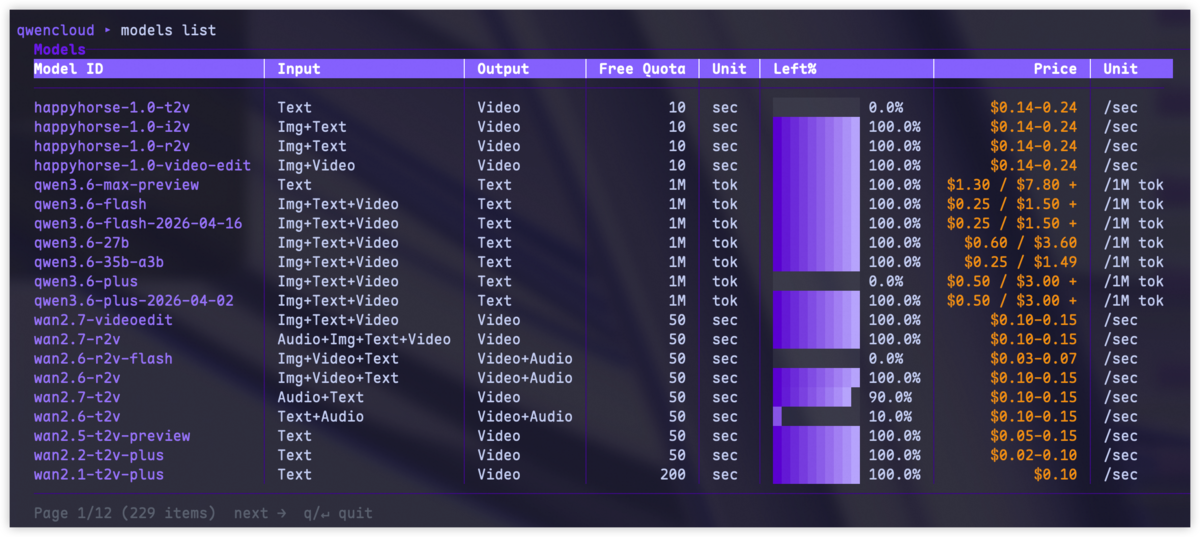
Browse available models and inspect their modality, free tier quota, and pricing from the terminal:
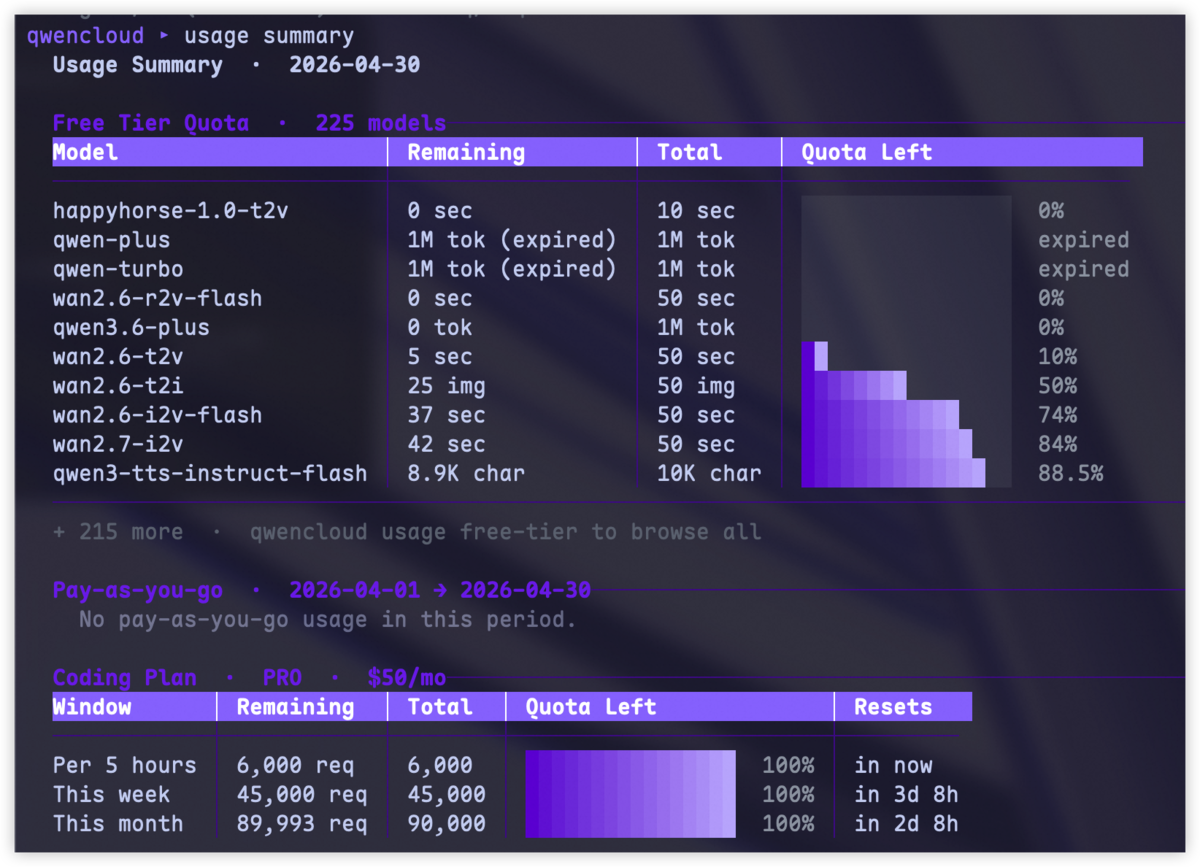
Review account usage across Free Tier, Coding Plan, and PAYG in one command:
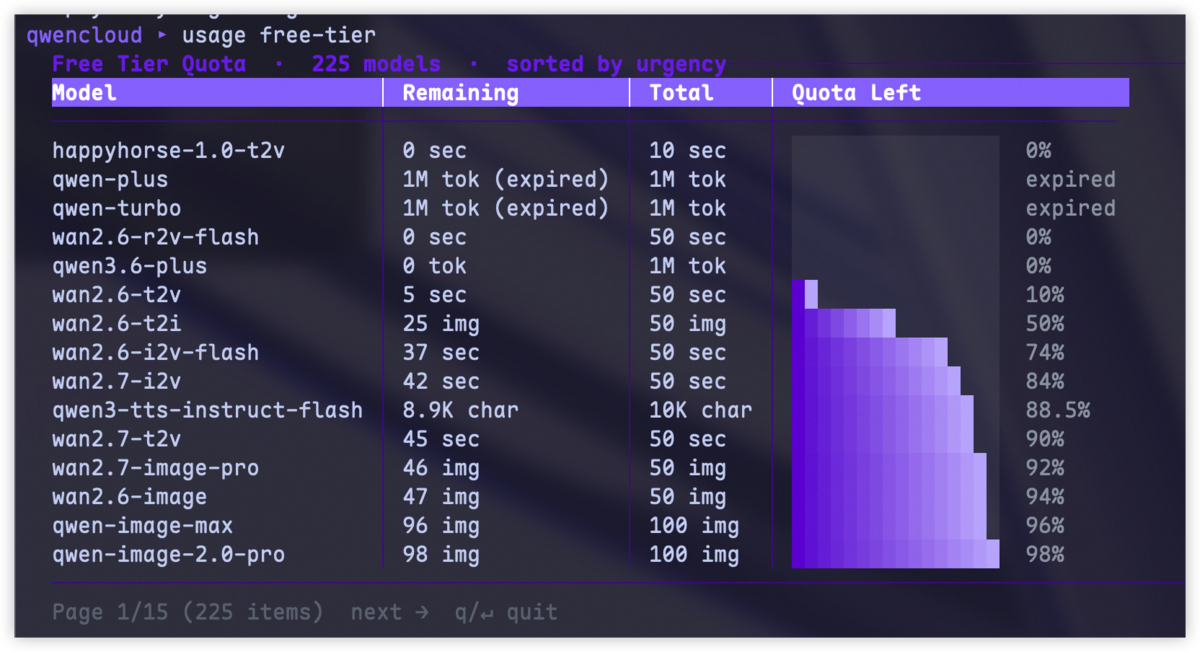
Drill into free tier quota status when you need to choose a model with remaining trial capacity:
Run diagnostics to verify authentication, network access, configuration, and shell completion:
Commands
| Area | Commands | Common flags |
|---|---|---|
| Model invocation | chat create, image generate, video generate, audio transcribe, audio speech, task get |
--model, --stream, --size, --image, --voice, --out, --no-wait, --timeout, --request, --api-key, --format |
| Auth | auth login, auth logout, auth status |
--init-only, --complete, --timeout, --format |
| Models | models list, models info, models search |
--input, --output, --all, --verbose, --page, --per-page, --format |
| Usage | usage summary, usage breakdown, usage free-tier, usage payg, usage logs |
--period, --from, --to, --days, --model, --granularity, --format |
| Billing | billing summary, billing breakdown, billing limit, billing payment-method list, billing payment-method bind |
--from, --to, --period, --group-by, --granularity, --format |
| Workspace | workspace list, workspace limit |
--format |
| Subscription | subscription status, subscription orders, subscription tokenplan status, subscription tokenplan seats |
--format |
| Docs | docs search, docs view |
--format |
| Support | support list, support view, support create, support reply, support close, support rate |
--format |
| Config | config list, config get, config set, config unset |
--format |
| Diagnostics | doctor |
--format |
| Shell | completion install, completion generate |
--shell |
| Version | version |
--check |
Use help for exact syntax:
qwencloud --help
qwencloud models --help
qwencloud usage breakdown --help
Output and Exit Codes
Output format resolution order:
--formatflagoutput.formatfrom config- TTY detection: table in an interactive terminal, JSON when piped or captured
qwencloud models list
qwencloud models list --format json
qwencloud models list --format text
qwencloud --quiet doctor
Exit codes:
| Code | Meaning |
|---|---|
0 |
Success |
1 |
General or usage error |
2 |
Authentication error |
3 |
Network error |
4 |
Configuration error |
130 |
Interrupted |
JSON errors follow a stable shape:
{
  "error": {
    "code": "AUTH_REQUIRED",
    "message": "Not authenticated. Run `qwencloud auth login` first.",
    "exit_code": 2
  }
}
For automation, prefer --format json and treat table output as human-only.
Example JSON output:
{
  "models": [
    {
      "id": "qwen3-coder-plus",
      "modality": { "input": ["text"], "output": ["text"] },
      "pricing": { "tiers": [{ "input": 0.5, "output": 2.0, "unit": "USD/1M tokens" }] }
    }
  ],
  "pagination": { "page": 1, "per_page": 20, "total": 1 }
}
Authentication
qwencloud auth login uses OAuth 2.0 Device Authorization Grant with PKCE.
Interactive login:
qwencloud auth loginNon-interactive login:
qwencloud auth login --init-only --format json
qwencloud auth login --complete --format json
Credentials are stored in the OS keychain when available. If keychain access is unavailable, the CLI falls back to an encrypted local credential file. Set QWENCLOUD_KEYRING=plaintext to force plaintext file storage for debugging; no, 0, false, and off also skip keychain access.
Configuration
QwenCloud CLI uses one global config file:
~/.qwencloud/config.jsonPublic configuration keys:
| Key | Values | Default |
|---|---|---|
output.format |
auto, table, json, text |
auto |
qwencloud config set output.format json
qwencloud config get output.format
qwencloud config list
qwencloud config unset output.format
Contributing
We welcome fixes, documentation improvements, and feature proposals.
- Start from the latest
master. - Create a focused branch, for example
fix/auth-token-expiryordoc/install-options. - Install dependencies with
pnpm install. - Make the change and add or update tests when behavior changes.
- Run the relevant checks before opening a PR:
pnpm run lint
pnpm run format:check
pnpm test
pnpm run build- Commit with Conventional Commits, such as
feat:,fix:,doc:,refactor:, andchore:. - Push your branch and open a pull request against
master. - Fill in the PR template, link related issues, describe user-visible changes, and include screenshots or terminal output for CLI UX changes.
Product-facing changes should include documentation updates and need product and engineering review.
License
This project is licensed under the Apache-2.0 License.