
View in Browser — Publish Leak Audit (HTML)
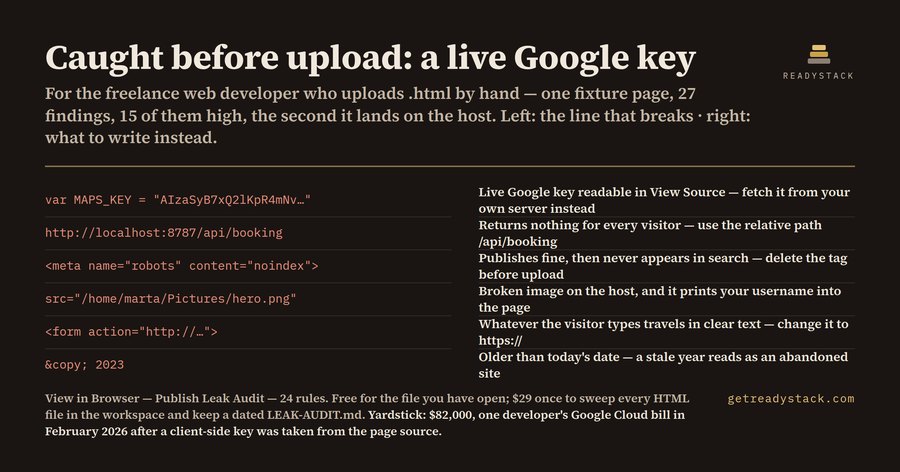
24 rules read the .html file you are about to open in the browser and flag every line that behaves differently once the page has a public URL: live API keys, localhost and file:// paths, http:// resources, a leftover noindex.
Install
npx @readystack/view-in-browser-leak-audit fileNode 18+. The same 24 rules as the VS Code extension, from a terminal or CI.
Free
- Audit the HTML file you are about to open in the browser: all 24 rules, every finding with its severity, line number and fix. The clean fixture returns 0 findings, the dirty one returns 27. No key, no watermark, no locked answers.
--ruleslists every rule
With a licence ($29 once)
- Scope: one command sweeps every HTML file in the workspace instead of the one in front of you, and writes a dated LEAK-AUDIT.md you keep as evidence — forty pages in one pass instead of forty passes.
@readystack/view-in-browser-leak-audit --dir ./templates --report html --out report.htmlIn February 2026 a developer reported an $82,000 Google Cloud bill after a key embedded in client-side Google Maps code was taken from the page source; their normal spend was $180 a month.
Use from an AI agent (MCP)
Claude Code · Cursor · Windsurf · any MCP client - add to your MCP config:
{ "mcpServers": { "view-in-browser-leak-audit": { "command": "npx", "args": ["-y", "@readystack/view-in-browser-leak-audit", "--mcp"] } } }Tools: check_text and check_file (free) · check_dir (licence). The agent gets every finding with the line number.
Use in CI
- name: View in Browser — Publish Leak Audit (HTML)
  run: npx -y @readystack/view-in-browser-leak-audit --dir . --ci
(container: docker run --rm -v "$PWD:/work" getreadystack/view-in-browser-leak-audit --dir /work --ci)
The folder sweep, reports and CI mode need one licence — one payment, no subscription. Set READYSTACK_LICENSE=<key> or run --license <key> once.