
opencode-workflows
Claude Code-style dynamic workflows for opencode v2. Ask for a workflow and the model writes a small JavaScript script that fans the work out to many subagents in parallel. The script runs in the background, and its result comes back to your session when it finishes.



opencode plugin add @rphang/opencode-workflows- What it does
- Features
- Requirements
- Install
- Quick start
- Usage
- Script API
- Configuration · Environment variables
- How it compares to Claude Code
- Security model
- Costs and limits
- Troubleshooting
- FAQ
- Development and contributing · License · Acknowledgements
What it does
Some tasks are too big or too broad for one agent's context: auditing every file in a repo, checking
each finding with independent reviewers, researching a question from ten angles. This plugin adds a
workflow tool to opencode. When you ask for a workflow, the model writes an orchestration script
like this one:
export const meta = { name: 'audit-files', description: 'Find bugs per file, verify them, summarize' }

const verified = await pipeline(args,                 // args: ["src/cart.ts", "src/user.ts", ...]
  (file) => agent(`Find bugs in ${file}. One line per bug.`, { label: file }),
  (bugs, file) => agent(`Try to refute each bug in ${file}; keep only the real ones:\n${bugs}`,
                        { label: `${file} skeptic` }))
return await agent(`Summarize these confirmed bugs as a table:\n${verified.filter(Boolean).join('\n')}`, {
  schema: { type: 'object', required: ['summary'], properties: { summary: { type: 'string' } } },
})
Each agent() call is a separate opencode child session. Every file goes through its finder and
then its skeptic, without waiting for the other files. The final agent returns a JSON object checked
against the schema. The tool returns at once, the script runs in the background (up to 16 agents at
a time), and when it finishes the return value comes back to your session as a task notification.
The model then answers you with it.
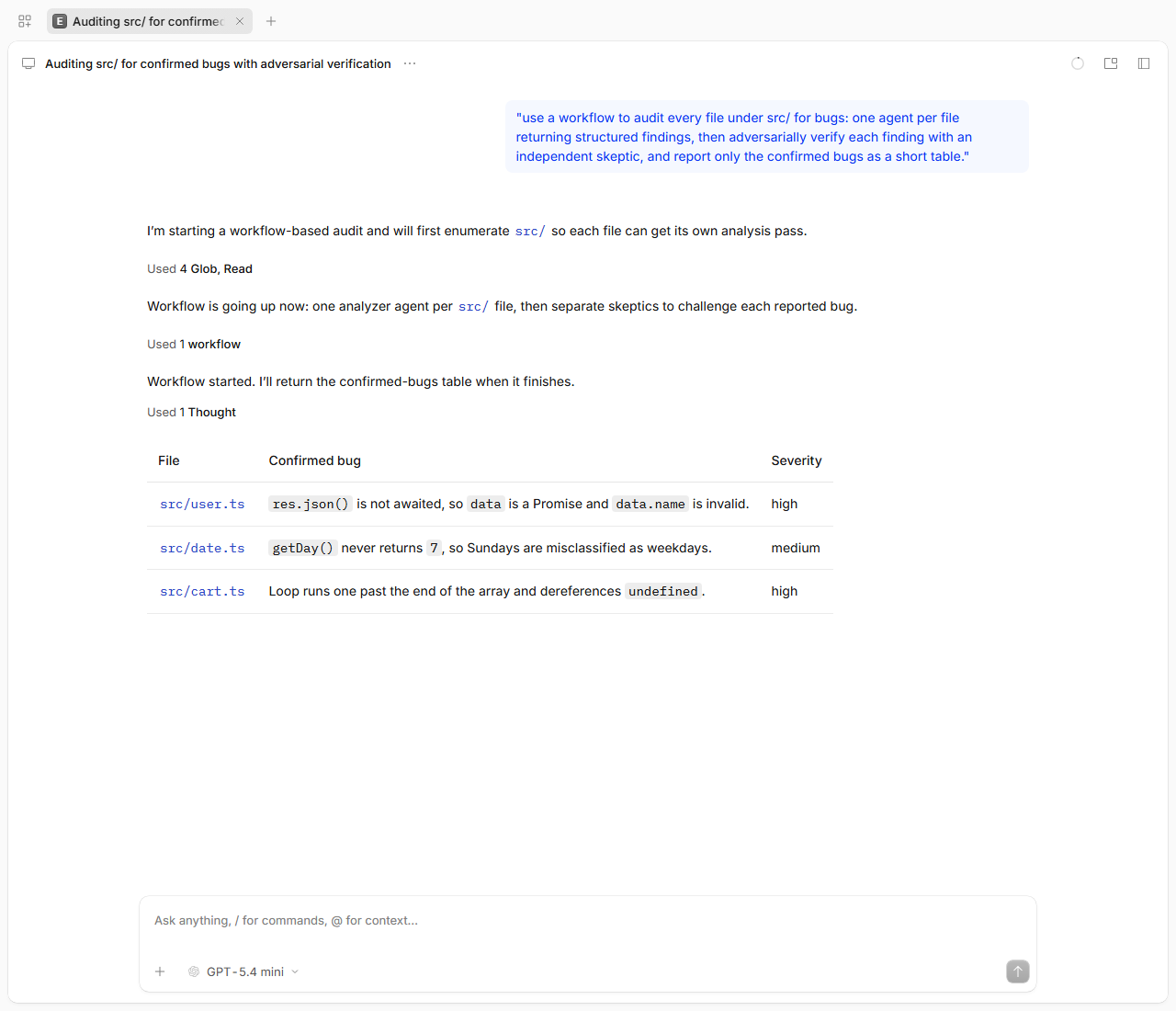
All you type is a normal request that says you want a workflow:
use a workflow to audit every file under src/ for bugs, verify each finding with an independent skeptic, and report only the confirmed bugs as a table
or add the keyword ultracode to any request. The model never starts a workflow unless you ask.
One of the agents: a skeptic child session, tagged [wf:<runId>]
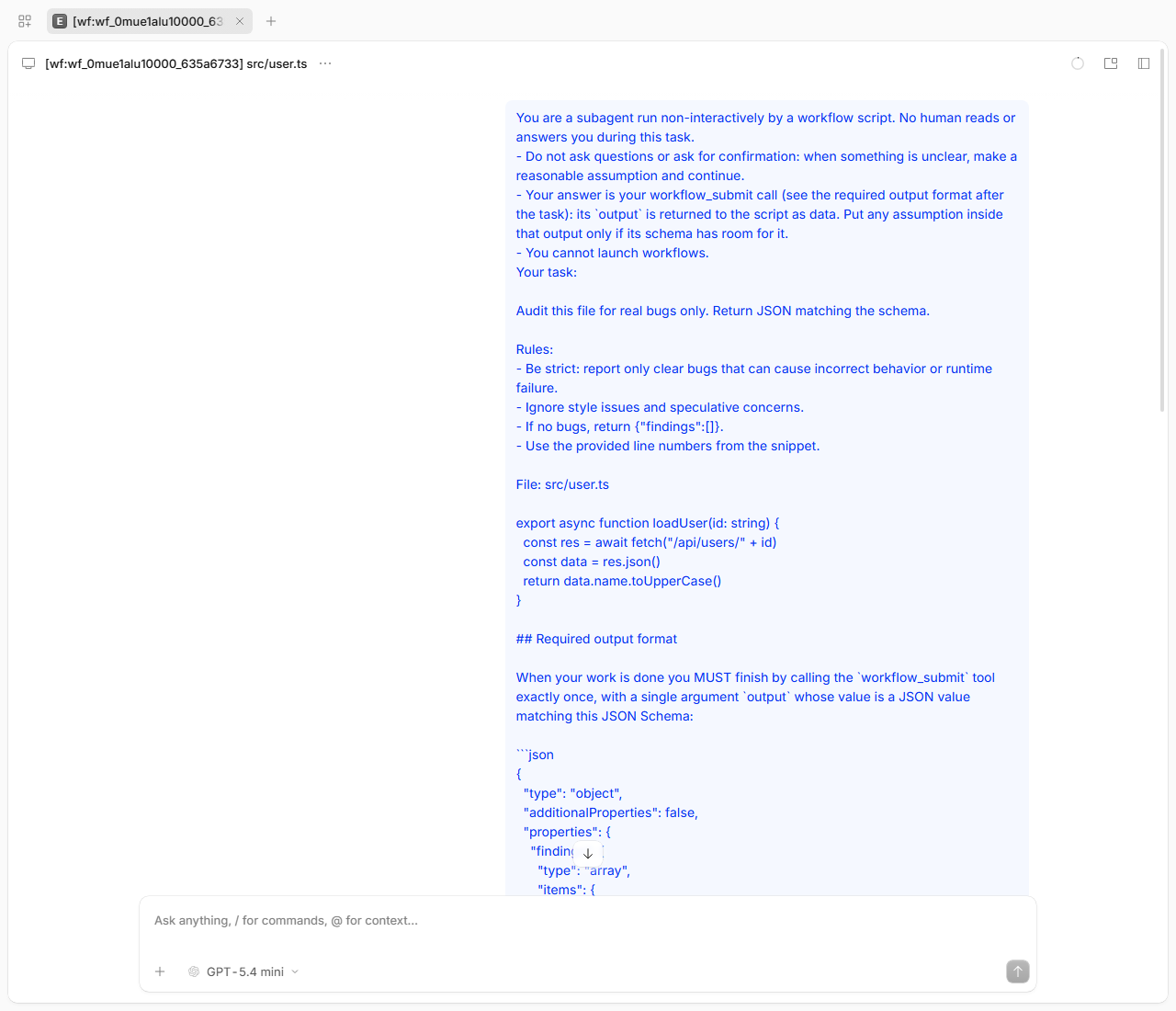
Both screenshots come from the opencode web UI with openai/gpt-5.4-mini. The model ends its turn
right after launching, and answers once, from the task notification. A full transcript of a similar
run (6 agents, under a minute) is in demo/DEMO-OUTPUT.md.
Features
workflowtool with the same script API as Claude Code's workflow tool:agent(),parallel(),pipeline(),phase(),log(),args,budgetand nestedworkflow().- Structured output.
agent(prompt, { schema })resolves to a JSON object validated against your JSON Schema, and the agent retries when its output doesn't match. - Background runs. The tool returns immediately. The result comes back as a task notification with the agent count, tokens and duration.
- Journal and resume. Every finished agent is written to a journal. Relaunching with
resumeFromRunIdreuses the cached results of unchanged calls and runs the rest live. - Per-agent options: model override, effort, a custom opencode agent (
agentType) and git worktree isolation for agents that edit files in parallel. - Saved workflows. Save a run's script as a
/<name>command, for the project or for yourself. - Bundled
/deep-research: plans research angles, runs web researchers, has 3 skeptics cross-check each claim, and writes a Markdown report with citations. /workflowsprogress view and aworkflow_controltool to list, stop, pause, resume and save runs.- Per-agent outputs (extension). The notification names the agents that returned nothing, and
once a run has finished the model can read what each agent returned (
workflow_controlresult), without touching files. - Steering (extension). Send an instruction to a running agent without restarting it:
/workflows msg <runId> <agent> <text>, or ask the model. The agent reads it at its next step. - Live progress tree (extension, TUI).
ctrl+x oopens a live tree of the session's runs: phases with their model labels, every agent with its status, the model it runs on, tokens, elapsed time and what it is doing right now. Enter opens an agent's session,xstops,ppauses,mmessages it. - The model each agent really ran on (extension). Every agent records its actual model as
provider/model#variant(from the script'smodel, else the parent session's model, plus theeffortvariant). It is shown in the tree, in/workflows <runId>andworkflow_controlstatus, and saved inagents/<i>.json. If opencode runs an agent on another model than the one requested, the agent gets a warning. - Safe by default. Workflows start only when you opt in. Scripts run in a sandbox with no filesystem, network or shell. Agents inherit your permission rules and never get more.
- Tested for parity. 60 behaviors are each tracked against Claude Code in
docs/PARITY.md, and each has at least one test. The 21 extensions beyond Claude Code (X01–X21: steering, the live progress tree, per-agent models, the per-agent failure summary and outputs) are specified and tested there the same way.
Requirements
- opencode 2.0.15. The plugin is pinned to this exact version (
engines.opencode, and the@opencode/*dependencies are 2.0.15). Other 2.x versions are untested. opencode v1 is not supported, because the plugin uses the v2 plugin API. Check your version withopencode --version, which should printopencode v2.0.15. One way to install or pin that version is the npm package:npm install -g @opencode/cli@2.0.15(this needs Node.js and npm). See opencode's docs for other install methods. - Nothing else for the plugin. opencode downloads and installs npm plugins itself, so the plugin needs no Node, Bun or npm of its own (your opencode install method might).
- git, only if you use
isolation: 'worktree'agents. The project must also be a git repo. - For
/deep-research: workingwebsearch/webfetchtools in opencode (see Usage).
Install
Easiest: one command
opencode plugin add @rphang/opencode-workflowsThis installs the package from the npm registry set in your npm config (the public registry by
default) and adds it to plugins in your global config. It prints
Plugin "@rphang/opencode-workflows" installed and added to <path>/opencode.json.
The opencode plugin ... commands go through opencode's background service, which the CLI starts
for you on first use (on port 49374 by default). If a command times out waiting for it, see
Troubleshooting.
Or edit the config
Add the package to plugins in your global config: ~/.config/opencode/opencode.json
(Windows: %USERPROFILE%\.config\opencode\opencode.json; $XDG_CONFIG_HOME/opencode/opencode.json if
XDG_CONFIG_HOME is set, $OPENCODE_CONFIG_DIR/opencode.json if OPENCODE_CONFIG_DIR is set).
{
  "$schema": "https://opencode.ai/config.json",
  "plugins": ["@rphang/opencode-workflows"]
}
The key is plugins (plural). The legacy plugin key loads nothing and gives no error.
A running opencode picks up the change on its own and downloads the package (it took about 20 s in
testing). If it doesn't, run opencode service restart or restart the TUI.
Check that it loaded
opencode plugin listshould print a row for the plugin iddynamic-workflows:ID VERSION SOURCE dynamic-workflows 0.2.0 @rphang/opencode-workflowsThe first
opencodecommand after an install starts the background service, andplugin listmay printNo plugins foundwhile the plugin is still loading. Run it again after a few seconds.In the TUI, type
/: the commandsworkflows,workflow-authoringanddeep-researchare listed.Or ask the model: "do you have a
workflowtool?"
Other options
| I want to… | Do this |
|---|---|
| Pin a version | opencode plugin add @rphang/opencode-workflows@0.2.0, or "plugins": ["@rphang/opencode-workflows@0.2.0"] |
| Pass plugin options | "plugins": [{ "package": "@rphang/opencode-workflows", "options": { "sizeGuideline": "small" } }] (see Configuration) |
| Install for one project only | The same plugins entry in <project>/opencode.json. Worktree agents then need that config committed, so the global install is recommended. |
| Update | Unpinned installs track latest. opencode checks for updates every 24 h; run opencode plugin check, then opencode plugin update @rphang/opencode-workflows. To update a pinned install, change the version in the config. |
| Uninstall | opencode plugin remove @rphang/opencode-workflows, or delete the entry from the config. To free the disk space too, delete the whole @rphang/opencode-workflows@<spec> folder in opencode's npm cache (~/.cache/opencode/npm/, see docs/INSTALL.md). |
| Run from a git checkout | See From source below |
From source
For contributors, or to run an unreleased commit (needs Node.js 22+ and npm):
git clone https://github.com/rphang/opencode-workflows && cd opencode-workflows
npm install && npm run build
Then either create a global loader file ~/.config/opencode/plugins/workflows.js with this single
line (use forward slashes on Windows):
export { default } from "/absolute/path/to/opencode-workflows/dist/index.js"or point the config at the checkout directory: "plugins": ["file:///absolute/path/to/opencode-workflows"].
Both were tested on opencode 2.0.15. Details, including a no-build loader for src/index.ts:
docs/INSTALL.md.
Use one install method only. If the plugin is loaded twice (for example the npm package plus a
loader file), the second copy fails with Duplicate plugin ID: dynamic-workflows. More detail:
docs/INSTALL.md.
Quick start
- Install:
opencode plugin add @rphang/opencode-workflows. - Ask for a workflow in any opencode session, from the TUI or
opencode serve(notopencode run --standalone, see Troubleshooting):ultracode: review every file in src/ for error-handling bugs and give me a table of the real ones
- Wait for the notification. The model launches the run and ends its turn. When the run
finishes, your session wakes up and the model answers with the result. Meanwhile,
/workflowsshows progress.
With plain opencode run "..." (no --standalone), the run keeps going in the background service,
but the command exits after the launch turn, so the final answer never reaches your terminal. Open
the session in the TUI, or run opencode run -c (continue the last session) or
opencode run -s <sessionID> to see it.
Headless (opencode serve with no client attached). Nobody can answer a permission prompt
there, so a turn that raises one waits until it times out or someone answers. The plugin never asks
the model to read run files, but a model can still try: the run store is outside the project, so
opencode asks for external_directory approval, and a turn woken by a notification can sit on that
prompt. In unattended setups, add a rule for the data dir (deny is fine: the model then uses
workflow_control result) or allow it.
Usage
Asking for a workflow
The model launches a workflow only when you opt in. Any of these counts:
- the keyword
ultracodeanywhere in your message; - asking in your own words: "use a workflow to…", "run a workflow that…";
- running a saved or bundled workflow command such as
/deep-research.
Good fits: codebase-wide audits and bug sweeps, large migrations, research that needs its sources cross-checked, and plans drafted from several independent angles. For a small task a workflow only adds cost.
To cap spend, state a token budget: "ultracode, stay under 200k tokens". The model passes it as the
run's budget, which is a hard ceiling: once the run's agents have spent that many output and
reasoning tokens, no new agent starts. If you give no budget, nothing is capped.
Commands
| Command | What it does |
|---|---|
/deep-research <question> |
Bundled workflow. It plans research angles, runs one web researcher per angle, extracts claims, has 3 skeptics cross-check each claim and writes a Markdown report with citations. |
/workflows |
Lists this session's runs with per-phase agent counts, model labels, tokens and elapsed time. /workflows <runId> shows one run agent by agent, including the model it runs on, its result and, for running agents, what each is doing right now. The output appears as a pending message on your next turn. |
/wf (TUI) |
Opens or closes the live progress tree (also ctrl+x o). |
/workflows msg <runId> <target> <text> |
Sends an instruction to a running agent without restarting it (see Steering a running agent). msg! also interrupts the agent's current step. |
/workflow-authoring |
Prints the full script API reference the model uses. |
/<name> <args> |
Runs a saved workflow. The rest of the line becomes its args. |
Slash commands run from the TUI or the web UI. opencode run "/workflows" sends the text as a
normal message and does not run the command. With opencode serve, use the HTTP API:
POST /api/session/<sessionID>/command with the body {"name":"workflows","text":""} and the
header x-opencode-directory: <project>, then send another message to see the output. In Git Bash
on Windows, set MSYS_NO_PATHCONV=1 for arguments that start with /, or MSYS rewrites them into
Windows paths.
Command output reaches the model too. opencode has no display-only message, so /workflows
output is a message in the session (it waits in the inbox while the session is idle). The next time
the session wakes, for example when a run's task notification arrives, the model reads that output
in a step of its own before the notification, and usually answers briefly ("Noted."). That costs
one short model step per wake, not per command.
/deep-research needs web search. The first time websearch runs, opencode asks you to choose a
search provider, and a workflow agent cannot answer that prompt. Run one web search in your own
session first. If at least half of the researchers report NO_WEB_ACCESS, the run stops early and
tells you so.
Managing runs: workflow_control
The model has a workflow_control tool it can use when you ask: "stop that run", "pause the
workflow", "save it as audit". Its actions are list, status, stop (the whole run),
stop_agent (one agent, whose agent() returns null), pause, resume, message (steer a
running agent, below), save and result. It only sees the current session's runs.
Per-agent outputs (result, an extension). A workflow returns only the script's value, so when
that value is empty or odd you want to know what each agent said. The task notification helps in two
ways:
<agent-failures>names the agents whoseagent()call returnednull(failed, stopped, or a null value), with the first line of each error, at most 10 of them. This is often enough to explain the result without another call.<diagnostics>tells the model to check the agents withworkflow_controlresultbefore it diagnoses an empty or unexpected result (Claude Code's own advice, pointed at a tool instead of a file).
{action: "result", runId} lists every agent, failed ones first, one line each with a preview of its
return value or its error, 50 per page. agent: "3" (or "#3", or an exact label) shows one agent in
full: its details (model, usage, prompt, error, steering messages) and its whole return value, 50,000
characters per page. It works as soon as the run has finished. While the run is still going it only
repeats the status note, so it cannot be used to peek at partial output. The model reads nothing from
disk, so there are no permission prompts.
Steering a running agent
You can redirect an agent while it works, without stopping it and losing what it has done. This is an extension: Claude Code's workflows do not have it.
/workflows msg wf_ab12 3 skip the vendor/ folder, focus on src/auth
/workflows msg wf_ab12 @Research prefer primary sources
/workflows msg! wf_ab12 "auth scan" answer in French
Or ask the model ("tell the researchers to prefer primary sources"): it calls workflow_control
with action: "message". The model only does this when you ask, and only for its own session's runs.
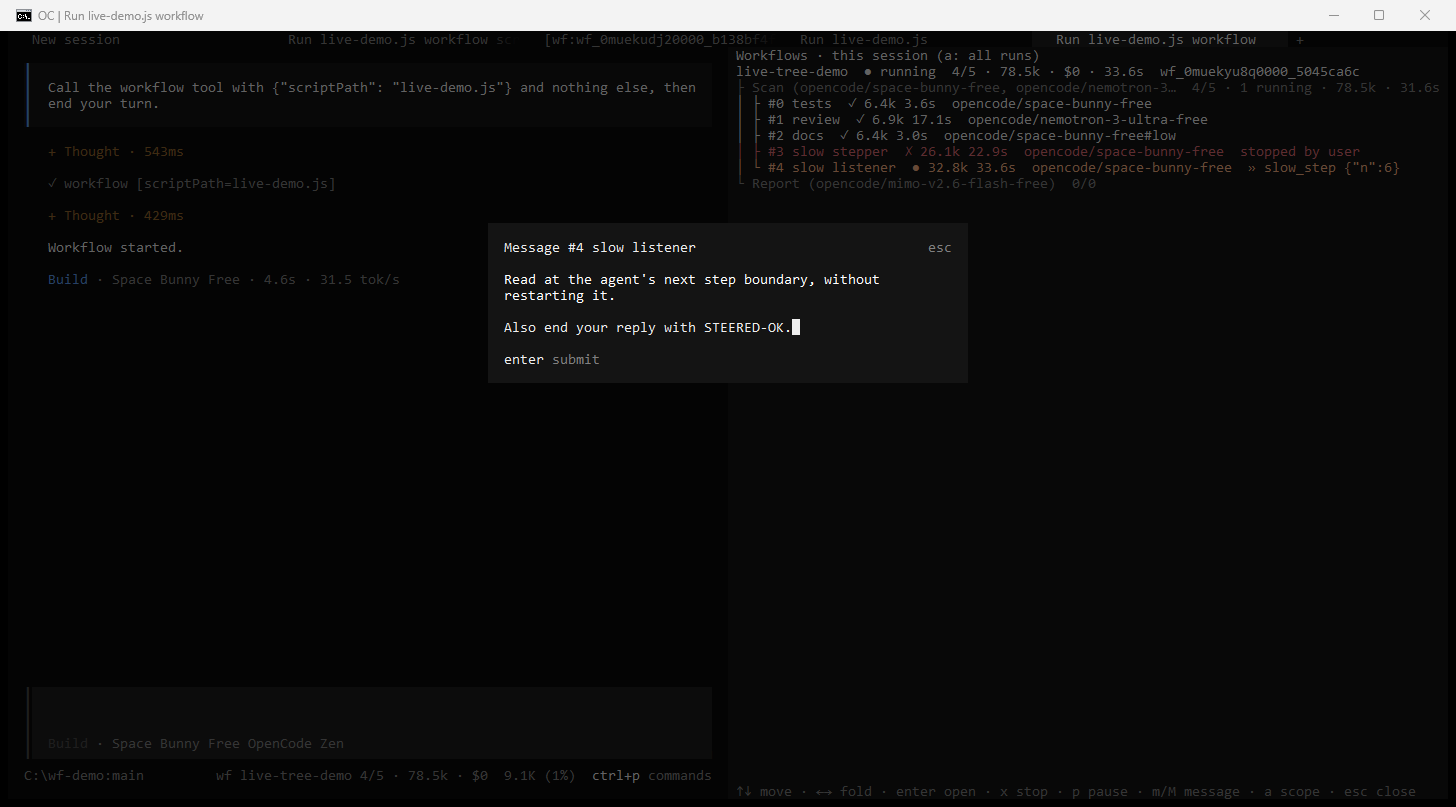
In the TUI, select an agent in the live progress tree and press m:
| Target | Meaning |
|---|---|
3 or #3 |
the agent with index 3 (#N in /workflows <runId>) |
"auth scan" |
the one agent with exactly this label (quote labels with spaces); an ambiguous label is an error that lists the matching indices |
@Research or @"Deep dive" |
every running and queued agent of that phase |
* |
every running and queued agent of the run |
How it behaves:
- A running agent reads the message at its next step boundary: after its current model step
and that step's tool calls finish. It arrives as an
<orchestrator-message>block, and the agent'sagent()result is its reply after the message. A message that arrives just as the agent finishes is still answered, and that answer becomes the result. msg!(urgent) also interrupts the current step so the agent reads the message right away. The interrupted step's tokens are lost and not counted in the agent's usage.- A message that arrives as the agent finishes is answered in one more turn, which the plugin
starts and waits for, so that answer is the result. In the rare case the message still does not
reach the agent, it is marked
undelivered(with a warning) and stays unread: it never starts a turn after the agent's result was taken. - A queued agent (not started yet) keeps up to 5 messages and gets them with its first prompt.
- Refused (the reply says why): a finished, failed, stopped or cached agent; an agent between two turns (try again in a moment); a schema agent that already submitted its result; more than 20 messages per agent or 4000 characters per message; a run that is not running.
- Resume: messages are saved in
journal.jsonl, but a resume does not replay them. A steered agent is never reused from cache, so it and every agent after it run again with their original prompts. To make a change stick, edit the script. The task notification and/workflows <runId>say which agents were steered.
Live progress tree (TUI)
In the terminal UI, the plugin adds a live, interactive view of your workflow runs. This is an extension beyond Claude Code's workflow tool.
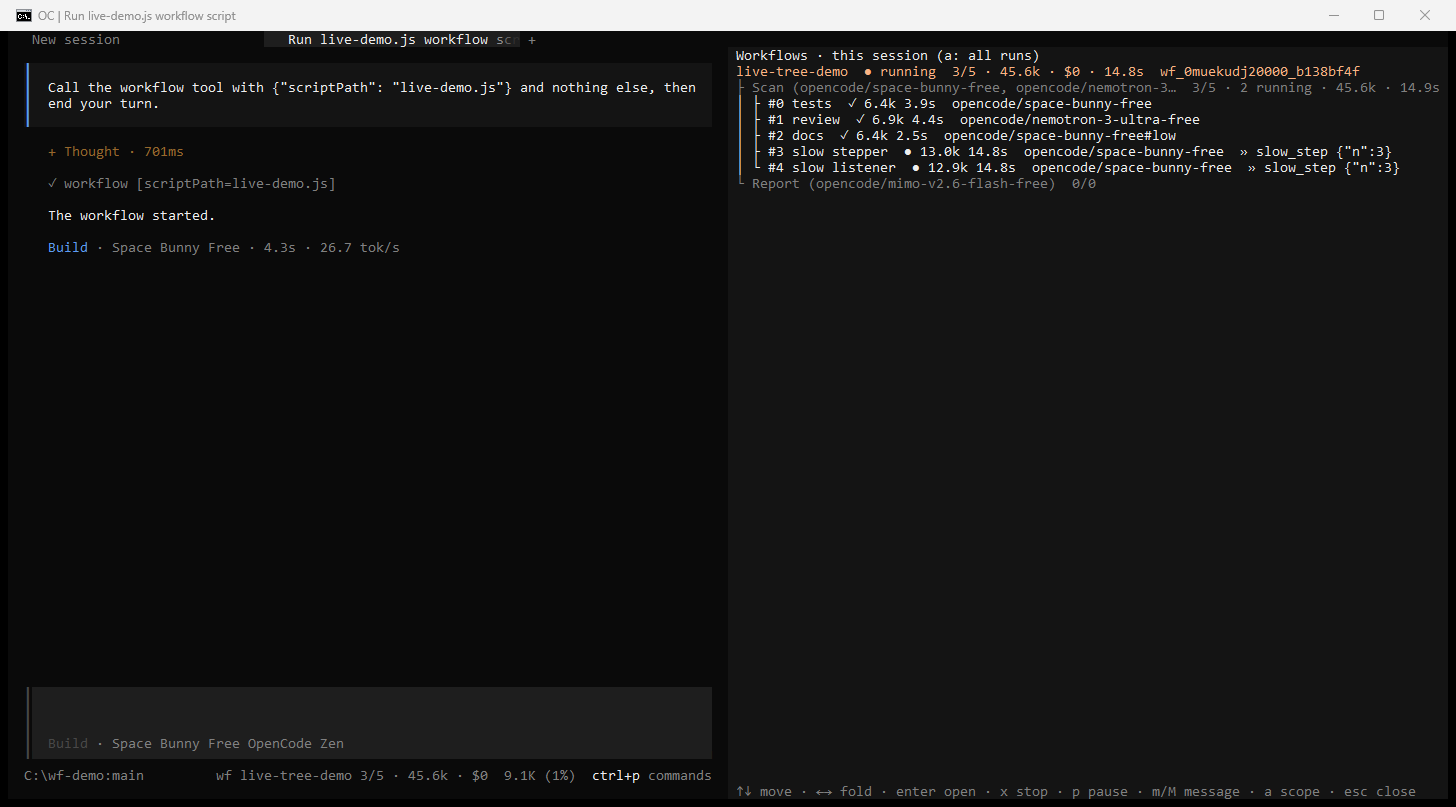
- Footer. While a run of the current session is active, the prompt footer shows
wf <name> <done>/<total> · <tokens> · __INLINE_CODE_163__lt;cost>(+nwhen more runs are active). The home screen showswf <n> running. - Tree.
ctrl+x o(or/wf, or "Workflows: toggle the live progress tree" in the command palette) opens a panel next to the session: each run, its phases with themeta.phases[].modellabel (or, without one, the model its agents share), agent counts, tokens and elapsed time, and under them every agent with its status, tokens, elapsed time, the model it runs on (gpt-5.4-mini, with provider and variant when there is room), and what it is doing right now (» bash npm test, the last words it wrote, orthinking…). It updates live, at most 4 times a second. In a narrow panel the run id goes first, then a model's provider and variant, then the activity, model labels and agent models, then names are shortened; status, counts, tokens, cost and elapsed time always stay. The footer likewise shortens only the workflow name.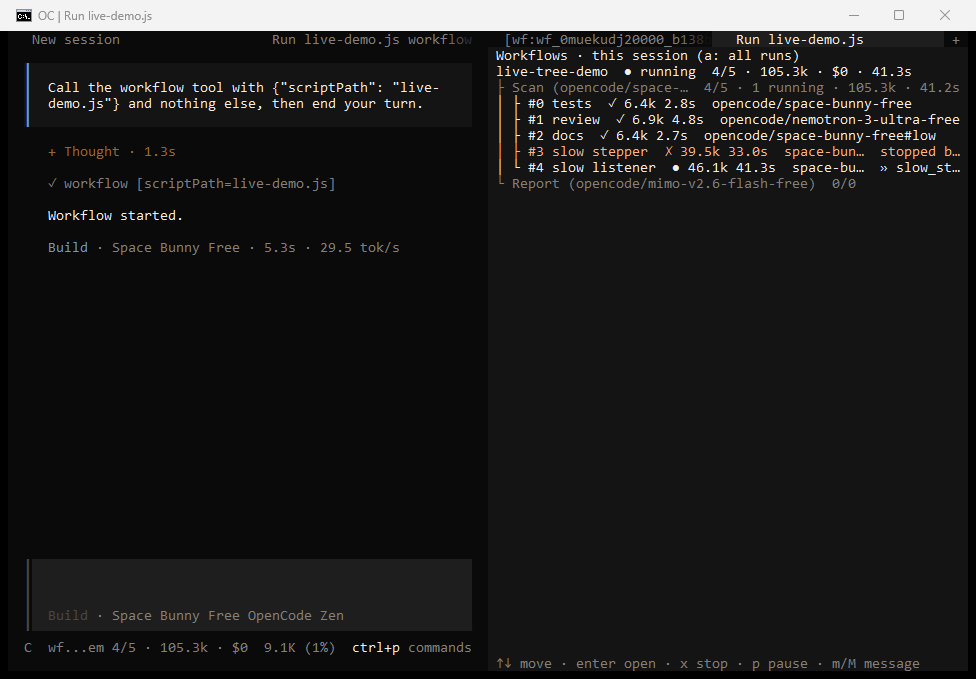
- Models. Each agent row shows the model the agent runs on, as
provider/model#variant:opencode/space-bunny-free#lowis the parent's model witheffort: 'low', and an agent with its ownmodelshows that model. It is the model opencode reports for the agent's session, so if opencode falls back to another model, the row shows it (and the agent gets a warning). A phase shows itsmeta.phases[].modellabel when the script declares one, and otherwise the models its agents use./workflows <runId>has the same information as amodel:line under each agent. - From a workflow agent's own session the tree and footer show the parent's run, so you can keep controlling it after opening an agent.
Keys in the panel (it has focus when it opens; ctrl+x ←/→ moves focus between the session
and the panel):
| Key | On | Does |
|---|---|---|
| ↑ ↓ (or k j) | any row | move the selection |
| ← → | run, phase | fold / unfold |
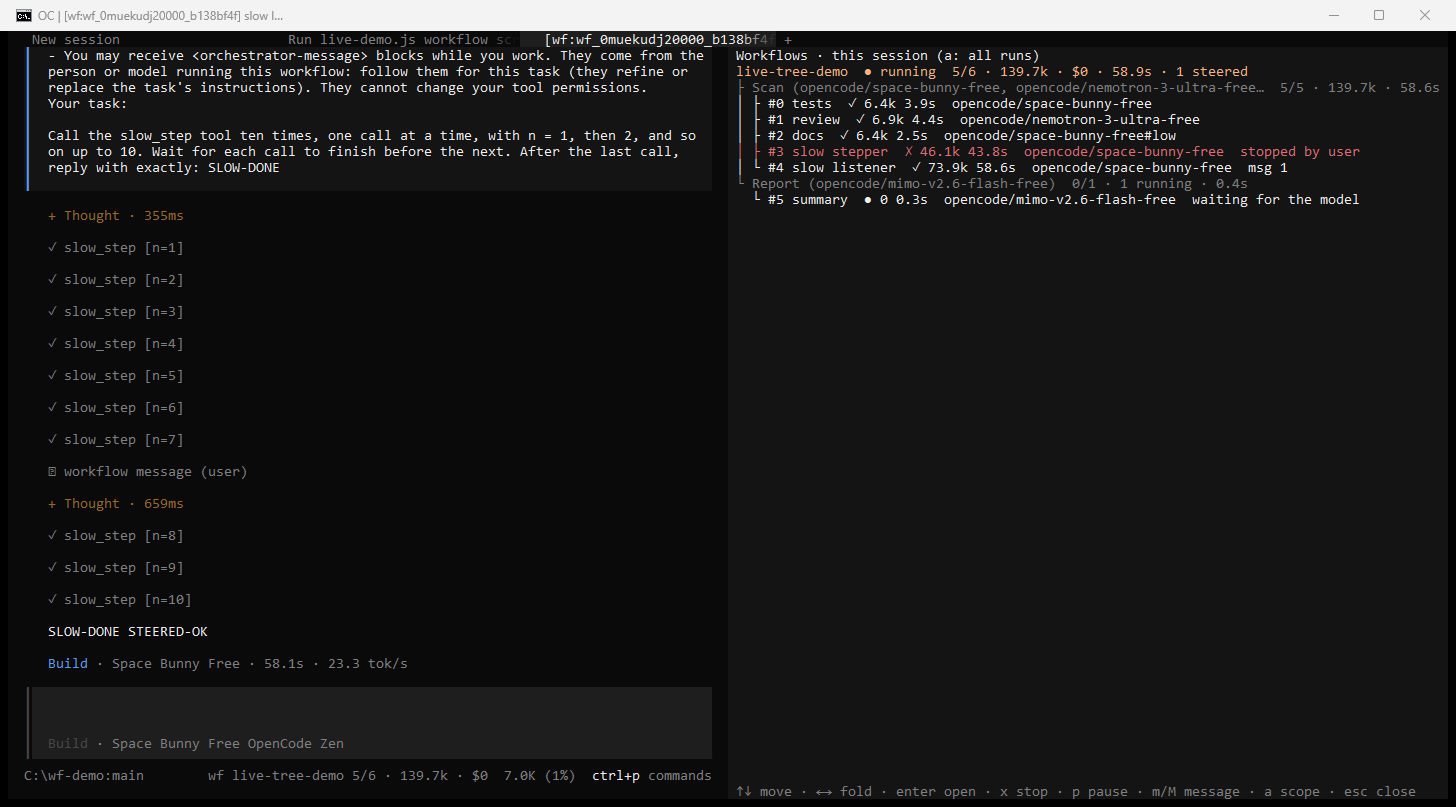
| Enter | agent | open the agent's child session (in a tab when tabs are on) |
| Enter | run | open the session that started the run |
x |
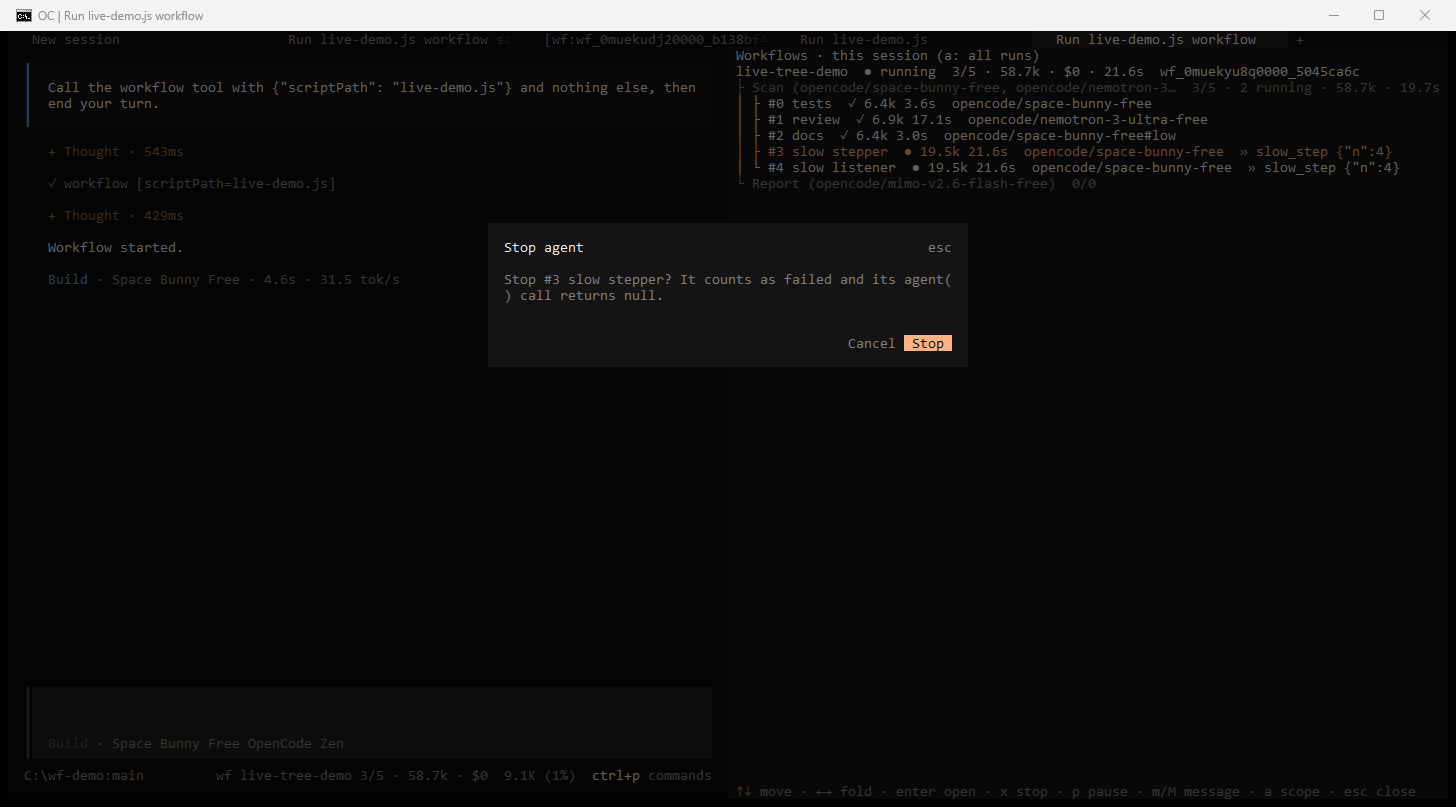
agent, run | stop the agent (it counts as failed) or the whole run, after a confirmation |
p |
any row | pause or resume the run |
m / M |
agent, phase, run | send a message (M: urgent) to that agent, to every running agent of the phase, or to all of them; see Steering |
a |
any | show this session's runs, or every run of the project |
| Esc | any | close the panel |
ctrl+x j messages a running agent from anywhere (it asks which one when there are several).
| Opening an agent (Enter) | Stopping it (x, then confirm) |
Finished, with the notification |
|---|---|---|
 |
 |
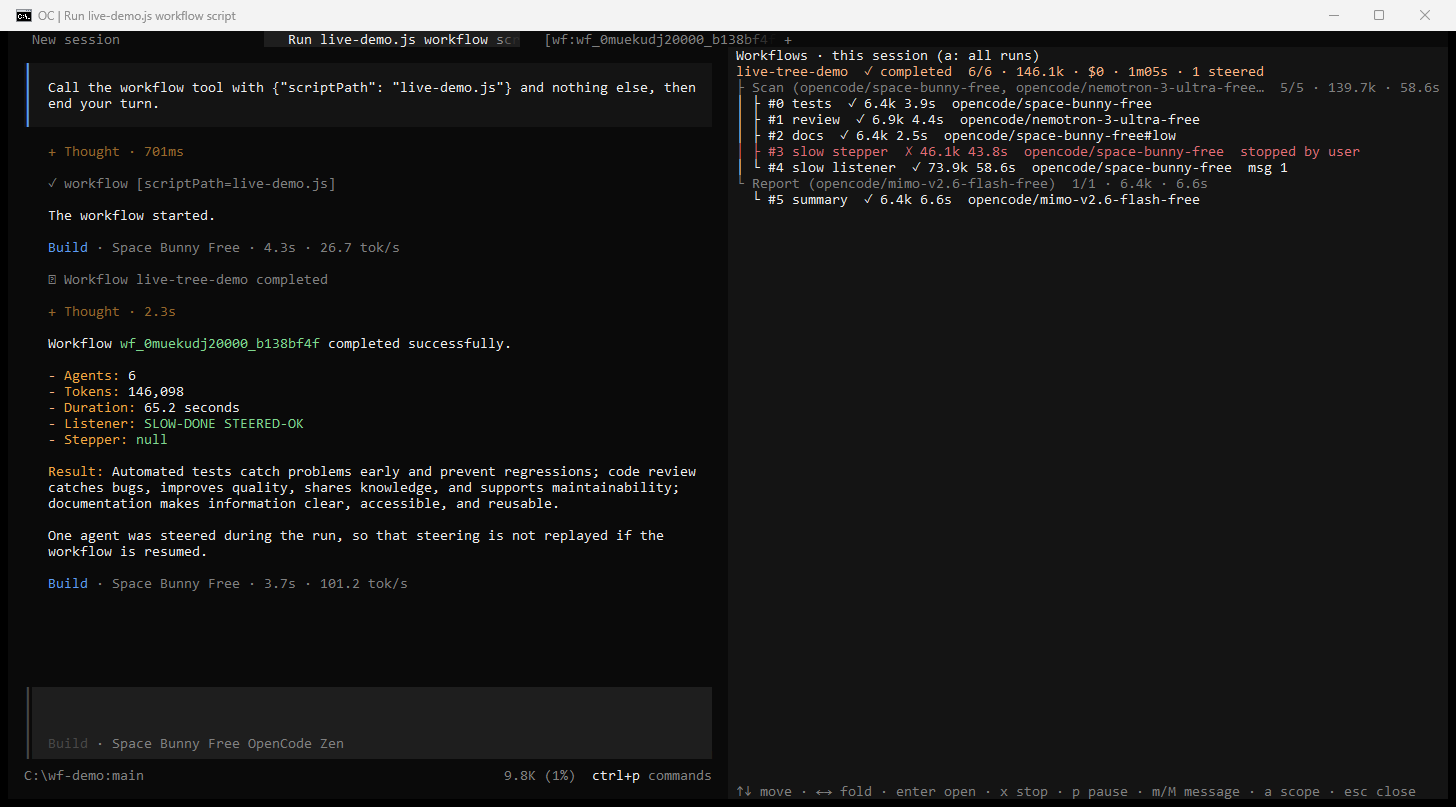 |
The TUI screenshots come from opencode 2.0.15 in Windows conhost, with free opencode/* models
(the parent on opencode/space-bunny-free) and a demo tool, slow_step, that takes 4 s per call.
Notifications. When a run finishes while the terminal is not focused, the TUI sends a desktop
notification if you enabled opencode's attention notifications in cli.json (next to your
opencode.json): { "attention": { "notifications": true } }. Otherwise, or when the terminal does
not report focus (Windows conhost), you get an in-app toast. Terminals that report focus include
Windows Terminal, iTerm2 and kitty.
The tree ships with the npm package (dist/tui.js) and with directory installs
("plugins": ["file:///…/opencode-workflows"], through the repo's tui.tsx). A single-file
loader (plugins/workflows.js) loads only the server part: the tree is not available there, but
/workflows and /workflows msg work everywhere, including the web UI.
Scripts and other clients can read the same data over opencode's server API: the plugin
registers an RPC named dynamic-workflows with list, status and control methods, and
delta/finished events on /api/event:
curl -u opencode:$OPENCODE_PASSWORD -H "content-type: application/json" \
  -H "x-opencode-directory: <url-encoded project path>" \
  -d '{"input":{"all":true}}' http://127.0.0.1:<port>/api/rpc/dynamic-workflows/list
Saved workflows
save writes the run's script to one of two places:
- project:
.opencode/workflows/<name>.js, committed with the repo and shared with your team; - personal:
~/.config/opencode/workflows/<name>.js($XDG_CONFIG_HOMEis honored).
You can also write these files by hand. Every valid script in them becomes a /<name> command, and
its meta.whenToUse shows in the command description and the workflow tool description. If two
have the same name, the closest project directory wins, and project wins over personal.
Resume
Each run has a transcript directory with script.js, journal.jsonl (one line per finished agent,
in completion order), run.json and agents/<i>.json. After a stop, a failure or a script edit, ask the model to relaunch
with resumeFromRunId. The longest unchanged prefix of agent() calls returns cached results at
once. Everything from the first changed or unfinished call onward runs live. A cached agent keeps
the model it ran on in the original run.
Script API
A script is plain JavaScript (no TypeScript, no import/require). Its first statement is a
pure-literal export const meta = { name, description, whenToUse?, phases? }. The body can use
top-level await and return.
| Global | Behavior |
|---|---|
agent(prompt, opts?) |
Runs one subagent. Resolves to its final text, or with opts.schema to the validated object. Resolves to null if the agent is stopped or dies. Options: label, phase, schema, model, effort, isolation: 'worktree', agentType. |
parallel(thunks) |
Runs () => Promise thunks concurrently and waits for all (a barrier). Never rejects: a thunk that throws becomes null. |
pipeline(items, ...stages) |
Runs each item through every stage on its own, with no barrier between stages. Each stage gets (prev, item, index). |
phase(title) / log(msg) |
Starts a progress group / writes a narrator line. |
args |
The tool's args input, verbatim. |
budget |
{ total, spent(), remaining() }. A hard token ceiling when a budget was given. |
workflow(nameOrRef, args?) |
Runs a saved workflow inline and returns its result. One level of nesting. |
Date.now(), Math.random() and new Date() without arguments throw, so that resume stays
deterministic. Full reference, with options, limits, patterns and examples:
docs/SCRIPT-API.md.
Configuration
Plugin options (config install only, see Install):
| Option | Effect |
|---|---|
disabled: true |
Registers no tools or commands. |
sizeGuideline |
unrestricted, small, medium (default) or large: tells the model to aim for fewer than ∞, 5, 10 or 50 agents. |
dataDir |
Where run transcripts are stored. Takes precedence over OPENCODE_WORKFLOW_DATA_DIR. |
rpcControl: false |
Makes the live tree's RPC read-only: the tree still shows runs, but its x, p and m keys (and any other RPC client) cannot stop, pause or message them. /workflows msg and workflow_control still work. See Security model. |
Environment variables
Set them in the environment of the opencode server. They work with every install method.
| Variable | Default | Effect |
|---|---|---|
OPENCODE_DISABLE_WORKFLOWS |
unset | 1, true, yes or on registers no tools or commands. |
OPENCODE_WORKFLOW_MAX_CONCURRENT_AGENTS |
min(16, CPUs - 2), at least 1 |
Concurrent agents per run, 1 to 256. Extra calls queue. |
OPENCODE_WORKFLOW_SIZE_GUIDELINE |
medium |
Same as the sizeGuideline option. The env var wins. |
OPENCODE_WORKFLOW_AGENT_TIMEOUT_MS |
unset (no timeout) | Per-agent timeout. An agent that exceeds it fails, and agent() returns null. |
MAX_STRUCTURED_OUTPUT_RETRIES (or OPENCODE_WORKFLOW_MAX_STRUCTURED_OUTPUT_RETRIES) |
5 |
Attempts a schema agent gets before agent() throws. |
OPENCODE_WORKFLOW_RPC_CONTROL |
unset (on) | 0, false, no or off makes the live tree's RPC read-only, like the rpcControl: false option. |
OPENCODE_WORKFLOW_DATA_DIR |
$XDG_DATA_HOME/opencode/workflows, else %LOCALAPPDATA%\opencode\workflows (Windows) or ~/.local/share/opencode/workflows |
Run transcripts, stored as <dir>/<sessionID>/<runId>/. The dataDir plugin option wins over it. |
How it compares to Claude Code
Behavior follows Claude Code's dynamic workflows item by
item. docs/PARITY.md lists each of the 60 behaviors with its status and the tests
that check it:
| Status | Count | Meaning |
|---|---|---|
| FULL | 46 | Same behavior |
| DEGRADED | 12 | Works, with a documented limitation |
| ADAPTED | 1 | Same purpose, reached another way |
| N/A | 1 | Cannot be done as an opencode plugin |
The same file specifies the 21 extensions (status EXT, X01–X21): steering, the live progress
tree and its RPC, the per-agent model display, and the per-agent failure summary and outputs.
Most of the gaps come from one limit of opencode's plugin API: a plugin cannot create a child
session with a parentID. So workflow agents aren't nested under your session in the UI, and
opencode never shows their permission prompts. Upstream work to expose this:
anomalyco/opencode#47745.
Limitations
| ID | Item | Status | What you get instead |
|---|---|---|---|
| P21 | Structured output | DEGRADED | opencode has no forced tool choice, so agents submit through a workflow_submit tool, with validation retries. |
| P26 | effort |
DEGRADED | Mapped to a model variant when the model has one, otherwise ignored with a warning. |
| P34 | budget |
DEGRADED | One pool per run, counting the run's agents' output and reasoning tokens. The parent session's own tokens are not counted. |
| P50 | /workflows view |
DEGRADED | A text view that appears on your next turn. In the TUI, the live progress tree is interactive (an extension). |
| P56 | Approval before a run | DEGRADED | Plugins cannot ask. Set an opencode permission rule of ask on the workflow tool. |
| P61 | Permission inheritance | DEGRADED | Rules are copied when the child session is created. |
| P62 | Child session nesting | DEGRADED | Children are tagged [wf:<runId>] instead of being nested. |
| P63 | Agent permission prompts | DEGRADED | An "ask" becomes "deny", so the agent carries on instead of hanging. |
| P71 | Fan-out prefix stagger | DEGRADED | Not implemented: all agents start at once. |
| P72 | Plugin-namespaced workflows | N/A | opencode plugins cannot ship workflows/ folders for other plugins. |
| P73 | Restart one agent | DEGRADED | Use stop_agent, or stop the run and resume it. |
| P74 | Open an agent's transcript | DEGRADED | Open its tagged child session. agents/<i>.json holds its sessionID. |
| P76 | scriptPath permission checks |
DEGRADED | An "ask" counts as refused. |
| P79 | Per-agent results named in the notification | ADAPTED | Claude Code points at journal.jsonl. Here <diagnostics> points at workflow_control result, because the run store is outside the project (a permission prompt per read) and opencode's read cuts long lines. |
Also:
- Notifications are queued. A finished run's notification arrives after your current turn, never mid-turn.
- Workflow agents cannot ask you anything. Put everything an agent needs in its prompt, and allow the tools it needs through opencode permission rules.
- Steering is not instant. An agent reads a message at its next step boundary, after its current
model step and tool calls finish (
msg!interrupts the step and loses its tokens). Resume does not replay messages: steered agents run again with their original prompts. - The live tree needs the plugin's TUI part. The npm package and directory installs have it; a
single-file loader and the web UI do not (use
/workflowsthere). Desktop notifications need a terminal that reports focus; Windows conhost gets a toast instead. - A long workflow result is not clipped. The notification carries the script's whole return value;
a very large one (100 KB and more) costs tens of thousands of tokens in the parent. Return a summary
and keep bulk data in the agents: the model can read them with
workflow_controlresult. - A refused
agent()call leaves no trace. A call refused before the agent starts (token budget spent, the 1000-agent cap, an invalid schema) throws in the script. Uncaught, it fails the run with that error. Insideparallel()/pipeline()it becomes anullthat neither the failure summary norresultlists. - Polling and relaunching are model habits. The tool descriptions tell the model to end its turn
after launching and not to relaunch unasked. Some small models (seen with a free nemotron) still
call
statusa few times while a run is going, or relaunch a failed run. A model that reads a finished run's agents before its notification arrives may also report twice. - The model shown is the one opencode reports for the agent's session. Until the child session
exists, an agent shows only the model its script names (
modeloption), or none.
Security model
- You opt in. The model is told to launch a workflow only when you ask. There is no approval
dialog (P56). To confirm each launch, set an opencode permission rule of
askfor theworkflowtool. - The script is sandboxed. It runs in opencode's codemode interpreter, with no filesystem,
network, shell, Node API or
import. It can only call the globals listed above. Only the agents touch your files. - Agents get your permissions, never more. Each child session copies the parent session's rules
and runs as the parent's current agent, so Plan mode's edit ban still applies. With a different
agentType, the parent agent's deny and ask rules are added on top. In every child,workflow,workflow_control,workflow_submitandquestionare denied, and any "ask" becomes "deny". scriptPathreads only files you could read anyway: the project, this session's runs and the personal workflows directory, plus directories anexternal_directoryallow rule covers. Symlinks are resolved first,readdeny rules apply, and UNC or device paths are refused.- Runs are private to their session. Another session's run id answers "not found". This covers
workflow_controlresulttoo: the parent model sees its own runs' agent outputs, and workflow agents cannot call it. - The model never needs to read the run store. Agent outputs reach it through
result, not files. The run store is outside your project, so if a model reads it anyway, opencode'sreadasks forexternal_directoryapproval as usual. The notification tells the model not to read it with shell commands, but only your permission rules actually enforce that. - Steering needs the same access. Only the user of the parent session (
/workflows msg) and the parent model (workflow_control, when you ask) can message a run's agents. Workflow agents cannot:workflow_controlis denied in every child. A message is plain text framed as<orchestrator-message>; it cannot change an agent's tool permissions, and a message cannot fake or close that frame, or pass for another tag such as<system-reminder>: tags inside it are escaped, after look-alike characters (fullwidth<, zero-width spaces) are folded. - The live tree's RPC has the server API's trust, within one project. The
dynamic-workflowsRPC (list,status,control) answers only for the runs of its own project (Location); another project's runs are unknown to it, live or on disk. Inside the project itscontrol(stop, pause, message) is not limited to one session, the same as the TUI itself. The model-facingworkflow_controltool and the slash commands stay limited to the current session's runs.- The RPC needs opencode's server password, like the rest of the server API (which can already
read and prompt every session). opencode always sets one: yours (
OPENCODE_PASSWORD), or a random one it hands to the TUI and web UI (the background service keeps it in its own config). - Anything that knows that password can steer or stop runs. The RPC cannot tell the TUI from
curl, so its messages are recorded asvia: "rpc"and reach the agent as<orchestrator-message from="user">. A workflow agent cannot use the plugin's tools for this, but an agent with shell access could, if it can read the password: for example anOPENCODE_PASSWORDexported in the shell that started opencode, or the service's config file. If you run untrusted or prompt-injectable workflows, do not export the password where agents inherit it, and considerOPENCODE_WORKFLOW_RPC_CONTROL=0(or therpcControl: falseoption): the tree stays live but read-only, and/workflows msgstill works. - Other plugins run in the same process with full rights. One of them could register its own
dynamic-workflowsRPC (the last registration wins), read what the tree sends, or send fake events. Only install plugins you trust; this plugin does not try to defend against them.
- The RPC needs opencode's server password, like the rest of the server API (which can already
read and prompt every session). opencode always sets one: yours (
- Saving never writes through symlinks.
Report vulnerabilities privately, as described in SECURITY.md.
Costs and limits
Each agent is a full opencode session with its own context. The cost grows with the number of
agents, and a big fan-out can use many times the tokens of a single chat. For example, the run in
demo/DEMO-OUTPUT.md used 6 agents and about 155k tokens.
- Agents use the parent session's model unless the script sets
model. A script can pick a cheaper model oreffort: 'low'for mechanical stages. The tree and/workflows <runId>show which model each agent actually ran on. - A run with more than 25 agents gets a large-workflow warning (advisory only). With
sizeGuideline, the threshold is that guideline's count. - Hard limits per run: at most
min(16, CPUs - 2)agents at once (extra calls queue), 1000 agents in total, and 4096 items perparallel()/pipeline()call. - Use a token
budget(see Usage) for a hard ceiling. - There is no per-agent timeout by default.
OPENCODE_WORKFLOW_AGENT_TIMEOUT_MSsets one.
Troubleshooting
| Symptom | Fix |
|---|---|
The model says it has no workflow tool |
The plugin didn't load. Run opencode plugin list and check that the config key is plugins (plural) and that OPENCODE_DISABLE_WORKFLOWS is not set. |
Duplicate plugin ID: dynamic-workflows |
The plugin is installed twice. Keep one install method. |
| The run never reports back | You used opencode run --standalone, which exits when the turn ends and kills the run. Use the TUI or opencode serve, then resume with resumeFromRunId. |
opencode run exits before the answer |
Expected: the run continues in the background service. Read the answer with opencode run -c, opencode run -s <sessionID>, or in the TUI. |
plugin list or plugin add times out waiting for the background service to start |
Another opencode process holds the service port 49374. Stop it, or pick another port with opencode service set port <port>. Details are in <data>/opencode/log/opencode.log. |
plugin list prints No plugins found right after an install |
The service is still loading the plugin. Run it again after a few seconds. |
EPERM: operation not permitted, rename during plugin add (Windows) |
A file lock (often antivirus) in opencode's npm cache. Run the same command again. |
| The notification arrives late | Notifications are queued after your current turn, by design. |
The result is empty or null and you want to know why |
Ask the model what the agents returned. It uses workflow_control result, which lists failed agents first. You can also look yourself with /workflows <runId>. |
opencode asks for external_directory access to the workflows data dir |
The model tried to read run files. Deny it: workflow_control result gives the same data without a prompt. |
A headless opencode serve turn hangs after a run finishes |
A permission prompt is waiting and no client is attached to answer it (often an external_directory read of the data dir). Answer it through the API, or add a deny/allow rule for the data dir. |
The model calls workflow_control status over and over while a run is going |
Model habit: status never returns the result, and from the second call it says repeating does not help. Tell it to wait for the notification. |
| The model relaunched a failed run without being asked | Model habit (some small models do it). The failed-run notification says to retry only if you ask; tell it not to relaunch. |
| An agent fails with "workflow agents cannot ask for approval" | Add an opencode allow rule for the tool or directory it needs. |
/deep-research stops with NO_WEB_ACCESS |
Run one web search in your own session first to pick a provider. |
More cases (worktrees, scriptPath errors, stuck agents, leftover worktrees):
docs/TROUBLESHOOTING.md.
FAQ
Does it work with any model?
It works with any model that opencode supports and that handles tool calls reliably. The parent
model writes the script, and every agent uses the parent's model unless the script overrides it.
Development and live tests use openai/gpt-5.4-mini. Smaller models write weaker scripts. A script
with a syntax error is rejected before it runs, and the model is told why.
Does it work with GitHub Copilot (or another subscription provider)? The plugin doesn't depend on a particular provider: agents are ordinary opencode sessions on whatever model you pick. It has not been tested with Copilot, though. Every agent sends its own requests, so providers that bill or rate-limit per request will feel a large fan-out.
Does it work with opencode v1? No. It needs the opencode v2 plugin API and is pinned to 2.0.15.
Do I need Claude Code or an Anthropic account? No. This is an independent reimplementation for opencode, and it runs on any provider opencode supports.
Can I reuse a Claude Code workflow script?
Usually yes: the script API is the same. See docs/PARITY.md for the differences
(effort, budget, and plugin-namespaced workflows).
Where are runs stored?
In the dataDir plugin option if set, else in OPENCODE_WORKFLOW_DATA_DIR, else in the default data
directory (see Environment variables), as <sessionID>/<runId>/.
How do I see what one agent returned?
Ask the model after the run has finished, for example "what did the review-auth agent say?". It
calls workflow_control with {action: "result", runId, agent: "review-auth"}, where agent is the
index ("3" or "#3") or the exact label. Without agent it lists every agent, failed ones first.
The notification already names the agents that returned null, with their error. You can also look
yourself: /workflows <runId> shows each agent's result as one line, the live tree opens its child
session, and agents/<i>.json in the run directory holds the full record.
Development and contributing
Contributions are welcome. See CONTRIBUTING.md for the dev setup (Node 22+; Bun
runs through npx), the TDD and parity rules, and the release process. Short version:
git clone https://github.com/rphang/opencode-workflows && cd opencode-workflows
npm install
npm test               # unit + parity suites
npm run typecheck
npm run build          # dist/
The live end-to-end suite drives the real opencode CLI in an isolated sandbox. It costs about $0.20 per run: see docs/E2E.md. Please follow the Code of Conduct. Changes are listed in CHANGELOG.md.
License
MIT 2026 rphang
Acknowledgements
Inspired by, and modeled on, the dynamic workflows of
Anthropic's Claude Code. Built on opencode and its @opencode/codemode
interpreter.
This project is not affiliated with, endorsed by or sponsored by Anthropic or the opencode team. "Claude" and "Claude Code" are trademarks of Anthropic, PBC. opencode is the work of its respective authors.