
JavaScript Headless Editor Library
Using this package with an AI coding agent
Before generating Syncfusion code, ask your AI coding agent to run the Syncfusion setup using the following prompt:
Set up this project for Syncfusion before generating code. Fetch
and follow the official instructions at https://ai.syncfusion.com,
then report the detected platform, installed skill pack, MCP
status, and any required licensing action.
The setup detects your project’s platform and loads the appropriate Syncfusion skill pack. No Syncfusion account or MCP key is required to install or read Syncfusion agent skills.
Platform reference: https://ai.syncfusion.com/javascript/llms.txt
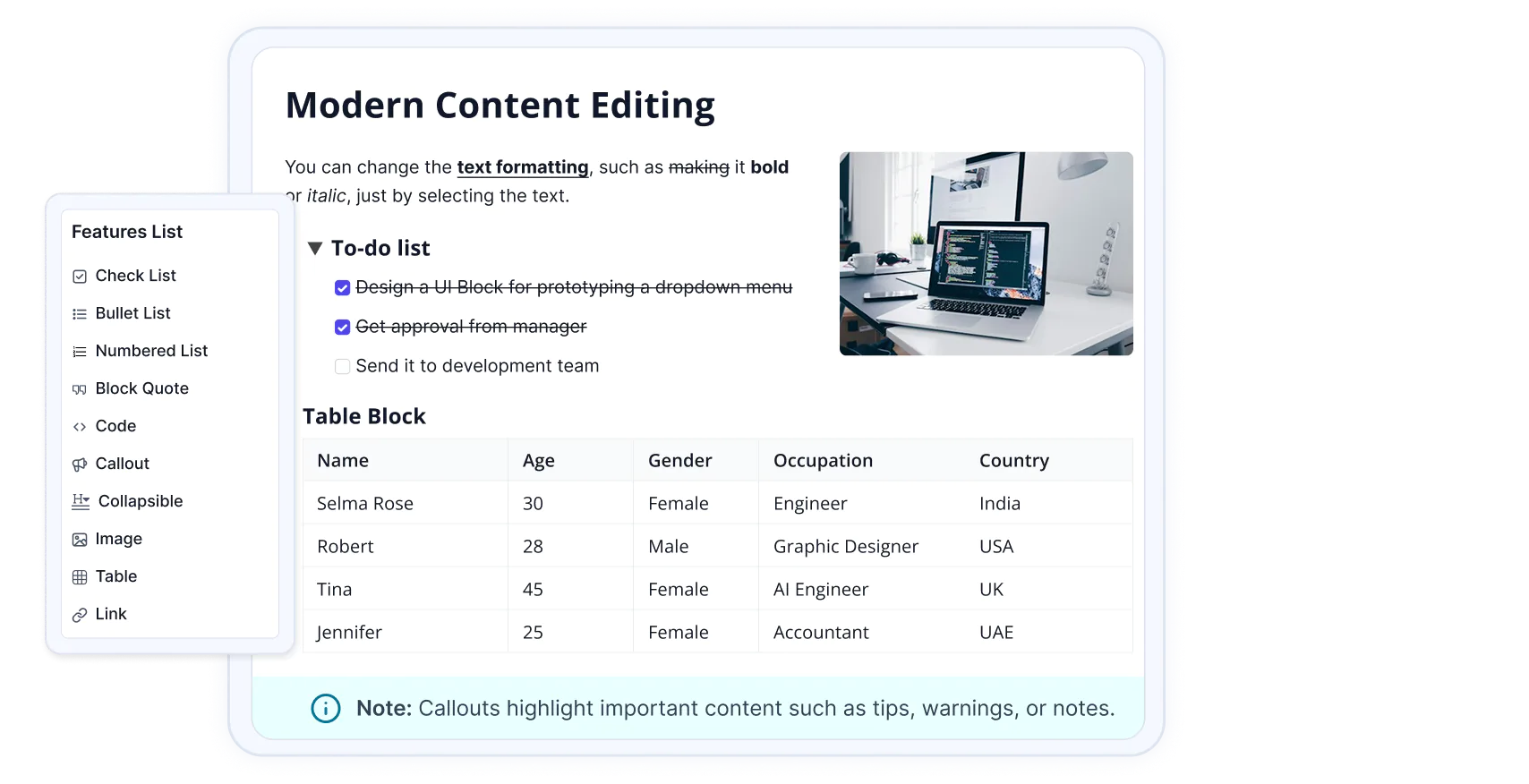
The Syncfusion JavaScript Headless Editor is a framework-agnostic editing foundation built on ProseMirror for creating modern rich-text and structured editing experiences. It provides a modular architecture with a structured document model, extensible commands and extensions, schema management, selection handling, events, NodeViews, and reusable editing services. The Headless Editor is designed to provide a UI-independent editing engine that can be integrated with different editor interfaces and application frameworks.
️ Quick Start
This guide uses Vite as the bundler and development environment for the JavaScript Headless Editor. Install Node.js 24.13.0 or higher before proceeding. For detailed information about Vite's capabilities and configuration options, refer to the Vite documentation.
Create a TypeScript application
To set up a TypeScript application, run the following command.
npm create vite@latest my-app -- --template vanilla-tsThis command will prompt you to install the required packages and start the application. As Syncfusion packages are not installed yet, select the No option.
Then, navigate to the project directory and install the dependencies:
cd my-app
npm install
Install the Headless Editor Library
npm install @syncfusion/ej2-headless-editorAdd the CSS reference
Install the Syncfusion Tailwind 3 theme package:
npm install @syncfusion/ej2-tailwind3-theme --saveThen add the following CSS reference to the src/style.css file:
@import "../node_modules/@syncfusion/ej2-tailwind3-theme/styles/headless-editor/index.css";

#toolbar {
    margin-top: 100px;
    display: flex;
    gap: 4px;
    padding: 6px;
    margin-bottom: 8px;
    border: 1px solid #ddd;
    border-radius: 4px;
    background: #f8f8f8;
}

#toolbar button {
    width: 32px;
    height: 32px;
    border: 0;
    border-radius: 4px;
    background: transparent;
    cursor: pointer;
}

#toolbar button:hover {
    background: #e5e5e5;
}

#headless-editor {
    min-height: 300px;
    padding: 10px;
    border: 1px solid #ddd;
    border-radius: 4px;
}
Add the Headless Editor Library to your application
In the index.html file, add a target element:
<!DOCTYPE html>
<html>
  <body>
     <!-- Your Headless Editor Toolbar -->
    <div id="toolbar">
        <button id="undo" class="e-icons e-undo" title="Undo (Ctrl+Z)"></button>
        <button id="redo" class="e-icons e-redo" title="Redo (Ctrl+Y)"></button>
        <button id="bold" class="e-icons e-bold" title="Bold (Ctrl+B)"></button>
        <button id="italic" class="e-icons e-italic" title="Italic (Ctrl+I)"></button>
        <button id="underline" class="e-icons e-underline" title="Underline (Ctrl+U)"></button>
        <button id="strikethrough" class="e-icons e-strikethrough" title="Strike Through"></button>
        <button id="inlineCode" class="e-icons e-insert-code" title="Inline Code (Ctrl+`)"></button>
        <button id="blockquote" class="e-icons e-blockquote" title="Blockquote (Ctrl+Alt+Q)"></button>
        <button id="bulletList" class="e-icons e-list-unordered" title="Bulleted List"></button>
        <button id="orderedList" class="e-icons e-list-ordered" title="Numbered List"></button>
    </div>
    <!-- Your Headless Editor container -->
    <div id="headless-editor"></div>
    <script type="module" src="/src/main.ts"></script>
  </body>
</html>
In the src/main.ts file, import the Headless Editor Library as shown below:
import { HeadlessEditor, basicExtensions } from '@syncfusion/ej2-headless-editor';
import './style.css';

const editor: HeadlessEditor = HeadlessEditor.create({
  extensions: [basicExtensions]
});
const container: HTMLElement | null = document.getElementById('headless-editor');

if (container) {
  editor.mount(container);
}
document.getElementById('undo')?.addEventListener('click', () => { editor.commands.undo(); });

document.getElementById('redo')?.addEventListener('click', () => { editor.commands.redo(); });

document.getElementById('bold')?.addEventListener('click', () => { editor.commands.toggleBold(); });

document.getElementById('italic')?.addEventListener('click', () => { editor.commands.toggleItalic(); });

document.getElementById('underline')?.addEventListener('click', () => { editor.commands.toggleUnderline(); });

document.getElementById('strikethrough')?.addEventListener('click', () => { editor.commands.toggleStrikethrough(); });

document.getElementById('inlineCode')?.addEventListener('click', () => { editor.commands.toggleCodeMark(); });

document.getElementById('blockquote')?.addEventListener('click', () => { editor.commands.toggleBlockQuote(); });

document.getElementById('bulletList')?.addEventListener('click', () => { editor.commands.toggleBulletList(); });

document.getElementById('orderedList')?.addEventListener('click', () => { editor.commands.toggleOrderedList(); });
Run the application
npm run devNow, open your project in a browser, and the Headless Editor will be displayed!
Key features
- Headless Editing Foundation: Provides a UI-independent editing engine that can be integrated with different editor interfaces and application frameworks.
- ProseMirror-Based Editing: Uses ProseMirror as the underlying document model and editing engine for structured content, transactions, selections, and plugin.
- Extensible Editor Architecture: Provides an extension system for adding, configuring, and composing editor functionality without coupling features to a specific UI.
- Command Framework: Introduces a centralized command system for content manipulation, formatting, selection, lists, and document transformations.
- Structured Document Model: Supports nodes, inline marks, blocks, nested content, and schema-based document structures for reliable content management.
- Rich Content Support: Provides built-in foundations for headings, lists, links, images, tables, code blocks, callout, and collapsible sections.
- Custom NodeView Support: Enables custom rendering and interactive UI for complex document elements such as images, tables, and other structured content.
- Event System: Provides editor life cycle, content, selection, focus, paste, delete, and file events for monitoring and customizing editor behavior.
- Schema Management: Provides schema definition, validation, and migration capabilities to maintain structured and consistent editor content.
- File and Upload Handling: Provides reusable file handling and upload-state infrastructure for media and other file-based editing scenarios.
- Keyboard and Selection Support: Provides configurable keyboard bindings and selection APIs for building customized editing interactions.
- Reusable Editing Foundation: Provides a common foundation that can be used to build different editor experiences, including rich-text and structured content editors.
Trusted by the world's leading companies

Supported frameworks
Input controls are also offered in following list of frameworks.
 Angular |
 React |
 Vue |
 ASP.NET Core |
 ASP.NET MVC |
|---|
Showcase samples
- Full-Featured Editing - Live Demo
Resources
Support
Product support is available through following mediums.
- Support ticket - Guaranteed Response in 24 hours | Unlimited tickets | Holiday support
- Community forum
- GitHub issues
- Request feature or report bug
- Live chat
License and copyright
This is a commercial product and requires a paid license for possession or use. Syncfusion’s licensed software, including this component, is subject to the terms and conditions of Syncfusion's EULA. To acquire a license for 140+ JavaScript UI controls, you can purchase or start a free 30-day trial.
A free community license is also available for companies and individuals whose organizations have less than $1 million USD in annual gross revenue and five or fewer developers.
See LICENSE FILE for more info.
Copyright 2025 Syncfusion, Inc. All Rights Reserved. The Syncfusion Essential Studio license and copyright applies to this distribution.