
Vue Rich Text Editor Component | Vue Markdown Editor
Using this package with an AI coding agent
Before generating Syncfusion code, ask your AI coding agent to run the Syncfusion setup using the following prompt:
Set up this project for Syncfusion before generating code. Fetch
and follow the official instructions at https://ai.syncfusion.com,
then report the detected platform, installed skill pack, MCP
status, and any required licensing action.
The setup detects your project’s platform and loads the appropriate Syncfusion skill pack. No Syncfusion account or MCP key is required to install or read Syncfusion agent skills.
Platform reference: https://ai.syncfusion.com/vue/llms.txt
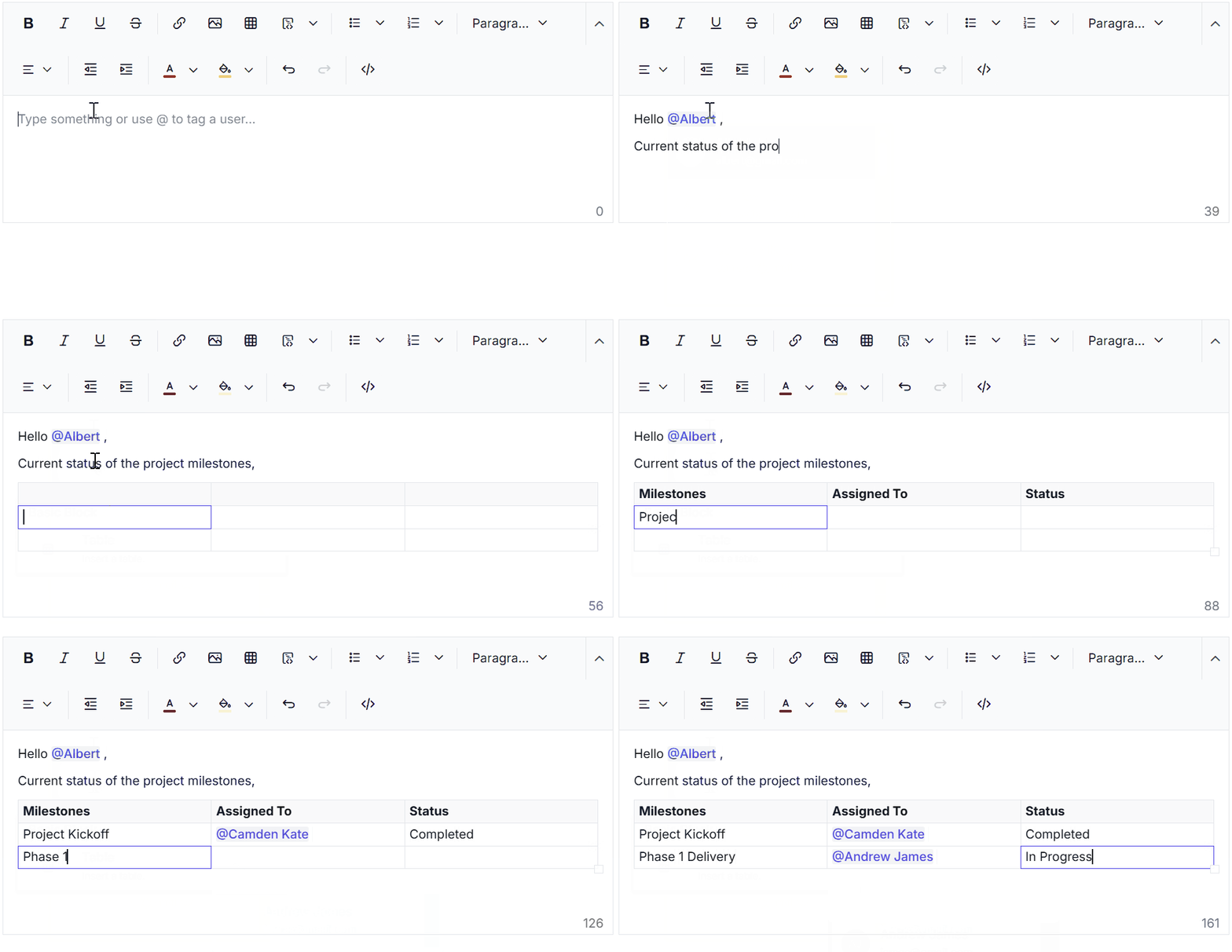
The Vue Rich Text Editor is a feature-rich WYSIWYG HTML editor and Markdown editor. The Rich Text Editor is widely used to create blogs, forum posts, notes sections, comment sections, messaging applications, and more. The control provides an efficient user interface for a better editing experience with mobile support. It has a variety of tools to edit and format rich content, and it return a valid HTML markup or Markdown (MD) content. It allows users to insert images, links, tables, media files and lists with modular architectures.
Trusted by the world's leading companies

️ Quick Start
This guide uses Vite as the bundler and development environment for the Vue Rich Text Editor. Install Node.js 24.13.0 or higher before proceeding. For detailed information about Vite's capabilities and configuration options, refer to the Vite documentation.
Create a Vue application
To set up a Vue application, run the following command.
npm create vite@latest my-app -- --template vueThis command prompts you to install the required packages and start the application. As Syncfusion packages are not installed yet, select the No option when prompted.
Then, navigate to the project directory and install the dependencies:
cd my-app
npm install
Install the Rich Text Editor package
npm install @syncfusion/ej2-vue-richtexteditor --saveAdd the CSS reference
Install the Syncfusion Tailwind 3 theme package:
npm install @syncfusion/ej2-tailwind3-theme --saveThen add the following CSS reference to the src/App.vue file:
@import "../node_modules/@syncfusion/ej2-tailwind3-theme/styles/rich-text-editor/index.css";Add the Rich Text Editor component with required modules
Add the Vue Rich Text Editor component to the src/App.vue file with the basic required modules, Toolbar, Image, Link, HtmlEditor, and QuickToolbar, provided using the provide option:
<template>
    <ejs-richtexteditor ref="defaultRTE" :height="400">
       <p>Start editing your content here.</p>
    </ejs-richtexteditor>
</template>

<script setup>
    import { RichTextEditorComponent as EjsRichtexteditor, Toolbar, Link, Image, HtmlEditor, QuickToolbar } from "@syncfusion/ej2-vue-richtexteditor";
    import { provide } from "vue";

    provide('richtexteditor', [Toolbar, Link, Image, HtmlEditor, QuickToolbar]);
</script>

<style>
@import "../node_modules/@syncfusion/ej2-tailwind3-theme/styles/rich-text-editor/index.css";
</style>
Note:
For detailed information on module injection, refer to the Syncfusion Rich Text Editor Module Documentation.
Run the application
npm run devNow, open your project in a browser, and the Rich Text Editor will be displayed!
Refer to the Getting Started with Vue 2 documentation for using Syncfusion Vue components in Vue 2 applications.
Supported frameworks
Rich Text Editor component is also offered in the following frameworks.
 JavaScript |
 Angular |
 React |
 ASP.NET Core |
 ASP.NET MVC |
|---|
Showcase samples
- Vue HTML editor demo
- Blog posting using Vue rich text editor demo
- Vue Markdown editor demo
- Vue live Markdown editor demo
Key features
AI Assistant - The AI Assistant helps generate, rewrite, summarize, and refine editor content. It is designed to speed up content creation and improve editing productivity.
Paste from MS Word - Paste from MS Word brings content into the editor with formatting cleanup and structure preservation. It helps users reuse Word content without carrying over unwanted styles.
IFrame - IFrame mode renders the editor content inside an isolated document context. It helps improve style encapsulation and reduces interference from external page styles.
@Mentions - Mentions let users tag people, topics, or items with an autocomplete suggestion list. They make collaboration and inline referencing faster and more accurate.
Slash Menu - Slash menu support lets users trigger editor commands by typing a forward slash. It provides a quick way to insert content blocks and formatting actions.
Checklist - Checklist support enables users to create interactive task lists in the editor. It is useful for organizing work items and tracking progress within content.
Accessibility & WCAG 2.0 Compliance - Accessibility support helps the editor work with assistive technologies and keyboard navigation. It ensures the component can be used more effectively by a broader audience.
Preventing Cross-Site Scripting (XSS) - XSS protection helps validate and sanitize editor content before it is used or rendered. It reduces security risks by blocking malicious scripts and unsafe markup.
HTML code editing - HTML code editing lets users view and edit the underlying markup directly. It is helpful when precise control over the document structure is required.
Markdown editor - Markdown editor mode lets users create and edit content using Markdown syntax. It is ideal for lightweight authoring and text-based workflows.
Custom Toolbar Items - Custom toolbar items allow additional actions to be added to the editor toolbar. They help tailor the editing experience to specific application needs.
Quick Toolbar - Quick Toolbar shows contextual actions for selected content such as text, images, and tables. It helps users apply common operations without leaving the editing area.
File Browser - File Browser integration allows users to browse and select files within editor workflows. It supports file-based content management in a more seamless way.
Emoji Picker - Emoji picker support lets users insert emojis into the editor content. It helps make messages and content more expressive and engaging.
Insert Media - Insert Media allows audio and video content to be embedded in the editor. It is useful for creating richer and more interactive documents.
Toolbar - Toolbar support provides editing controls and customization options for the editor. It supports floating behavior, multiple layout types, and toolbar positioning for flexible UI setups.
Export and Import - Export and Import support allows content to be moved between the editor and document formats such as PDF and Word. It simplifies content sharing, archiving, and document processing.
Undo and redo - Undo and redo support lets users reverse or repeat recent editing actions. It improves editing confidence by making changes easier to correct.
Module injection - Module injection lets the editor load only the features that are needed. It helps reduce bundle size and keeps the component more efficient.
Third-party integration - Third-party integration lets the editor work with external libraries and services. It extends the editor with additional capabilities beyond the built-in feature set.
Resources
Support
Product support is available through following mediums.
- Support ticket - Guaranteed Response in 24 hours | Unlimited tickets | Holiday support
- Community forum
- GitHub issues
- Request feature or report bug
- Live chat
Other Popular Vue Components
Explore other popular Syncfusion Vue components curated from UI components, standalone SDKs, and document solution suites.
| Vue DataGrid | Vue Charts | Vue File Manager | Vue Gantt Chart | Vue Diagram |
| Vue Scheduler | Vue DOCX Editor | Vue PDF Viewer | Vue Spreadsheet Editor | Vue Maps |
Change log
Check the changelog here. Get minor improvements and bug fixes every week to stay up to date with frequent updates.
License and copyright
This is a commercial product and requires a paid license for possession or use. Syncfusion licensed software, including this component, is subject to the terms and conditions of Syncfusion EULA. To acquire a license for 140+ Vue UI components, you can purchase or start a free 30-day trial. A free community license is also available for companies and individuals whose organizations have less than $1 million USD in annual gross revenue and five or fewer developers. See LICENSE FILE for more info.
Copyright 2026 Syncfusion Inc. All Rights Reserved. The Syncfusion Essential Studio license and copyright applies to this distribution.