







@ts-graphviz/adapter
Cross-platform interfaces for executing Graphviz DOT commands in various JavaScript runtimes.









It is part of the ts-graphviz library, which is split into modular packages to improve maintainability, flexibility, and ease of use.
This library enables rendering DOT language strings into different output formats through platform-specific implementations for Node.js, and Deno.
Graphviz must be installed so that the dot command can be executed.
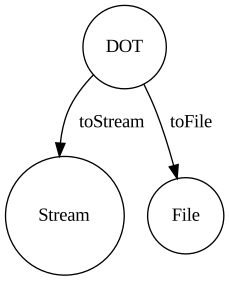
Execute the dot command to output a DOT language string to a stream or file.
Core Functions
The adapter provides two main functions for working with DOT language strings:
toStream
The toStream function converts a DOT language string to a readable stream of the specified output format.
import { toStream } from '@ts-graphviz/adapter';

const dot = `
  digraph example {
    node1 [
      label = "My Node",
    ]
  }
`;

const stream = await toStream(dot, { format: 'svg' });
// Node.js
stream.pipe(process.stdout);
// Deno
await stream.pipeTo(Deno.stdout.writable);
toFile
The toFile function writes the rendered output directly to a file at the specified path.
import { toFile } from '@ts-graphviz/adapter';

const dot = `
  digraph example {
    node1 [
      label = "My Node",
    ]
  }
`;

await toFile(dot, './result.svg', { format: 'svg' });
Both functions accept configuration options to customize the rendering process.
Configuration Options
Security Considerations
The dotCommand and library options are intended to be configured by application developers, not derived from end-user input:
dotCommand: Specifies the path to the Graphviz executable. This should be a trusted, hardcoded path in your application configuration.library: Specifies external libraries to load. These should be trusted library names defined in your application code.
Important: This library executes external commands using spawn (Node.js) or Deno.Command (Deno), which do not invoke a shell interpreter. This prevents shell injection attacks through metacharacters (;, `, |, $, etc.). However, these options should not be exposed to end-user input.
Processing User-Provided DOT Files
When rendering DOT files uploaded by users or generated from user input, implement validation before passing them to this library:
Validation Steps:
- Syntax validation: Verify the DOT file is well-formed and parseable
- Attribute filtering: Check for potentially dangerous attributes that reference file system resources:
image,shapefile- Can reference arbitrary image filesfontpath,fontname- Can reference font filesimagepath- Defines search path for images
- Content sanitization: Consider using a DOT parser to rebuild the graph with only allowed attributes
- Sandboxing: Run Graphviz in a sandboxed environment with restricted file system access when processing untrusted input
Example Risk Scenario:
Warning: The following is an example of unsafe DOT content that should be rejected by validation:
digraph G {
  node [image="/etc/passwd"];  // ⚠️ DANGEROUS: Attempts to access sensitive file
  node1;
}
While Graphviz will handle file access errors gracefully, processing untrusted DOT files without validation may expose information about your file system or cause unexpected behavior. Always validate and sanitize user-provided DOT files before processing.
Example: Validating and Sanitizing User-Provided DOT Files
Here's an example of how to use the @ts-graphviz/ast package to parse, validate, and sanitize DOT files:
import { parse, stringify } from '@ts-graphviz/ast';

// Potentially dangerous attributes that can access file system
const DANGEROUS_ATTRIBUTES = new Set([
  'image',
  'shapefile',
  'fontpath',
  'fontname',
  'imagepath',
]);

/**
 * Validates and sanitizes a DOT file by removing dangerous attributes
 */
function validateAndSanitizeDOT(dotString: string): string {
  try {
    // Parse the DOT string into an AST
    const ast = parse(dotString);

    // Remove dangerous attributes from the AST
    sanitizeAST(ast);

    // Convert back to DOT string
    return stringify(ast);
  } catch (error) {
    throw new Error(`Invalid DOT syntax: ${error.message}`);
  }
}

/**
 * Recursively sanitize AST nodes by removing dangerous attributes
 */
function sanitizeAST(node: any): void {
  if (!node || typeof node !== 'object') return;

  // Handle nodes with children
  if (Array.isArray(node.children)) {
    node.children = node.children.filter((child: any) => {
      // Filter out dangerous attribute nodes
      if (child.type === 'Attribute') {
        const attributeName = child.key?.value;
        if (DANGEROUS_ATTRIBUTES.has(attributeName)) {
          console.warn(`Removed dangerous attribute: ${attributeName}`);
          return false;
        }
      }
      // Recursively sanitize child nodes
      sanitizeAST(child);
      return true;
    });
  }
}

// Usage example
const userUploadedDOT = `
  digraph G {
    node [image="/etc/passwd"];
    node1 [label="Safe label"];
  }
`;

const sanitizedDOT = validateAndSanitizeDOT(userUploadedDOT);
// Result: digraph G { node1 [label="Safe label"]; }
Best Practices:
- Use the default
dotcommand when possible - If you need to customize
dotCommand, use a hardcoded path or environment variable controlled by the deployment environment - Do not allow end-user input to control the configuration options
- Validate and sanitize DOT strings from untrusted sources before rendering
- Consider using a whitelist approach for allowed attributes when processing user-provided DOT files
- Run Graphviz in a restricted environment when handling untrusted input
Contributors
Thanks goes to these wonderful people (emoji key):


This project follows the all-contributors specification. Contributions of any kind welcome!
Changelog
See CHANGELOG.md for more details.
License
This software is released under the MIT License, see LICENSE.