
Support hubs as data. Vue 2. Crypto + Fiat.
One JSON array of providers. Live fiat + crypto tiles, copy-to-clipboard addresses, white-labelable branding. Ship a support page in minutes, not days.


Docs · GitHub · Playground · Pro
Why?
@wbc-ui2/pay replaces the bespoke "Support me / Buy me a coffee / Donate crypto" page that every OSS maintainer and indie dev rewrites from scratch.
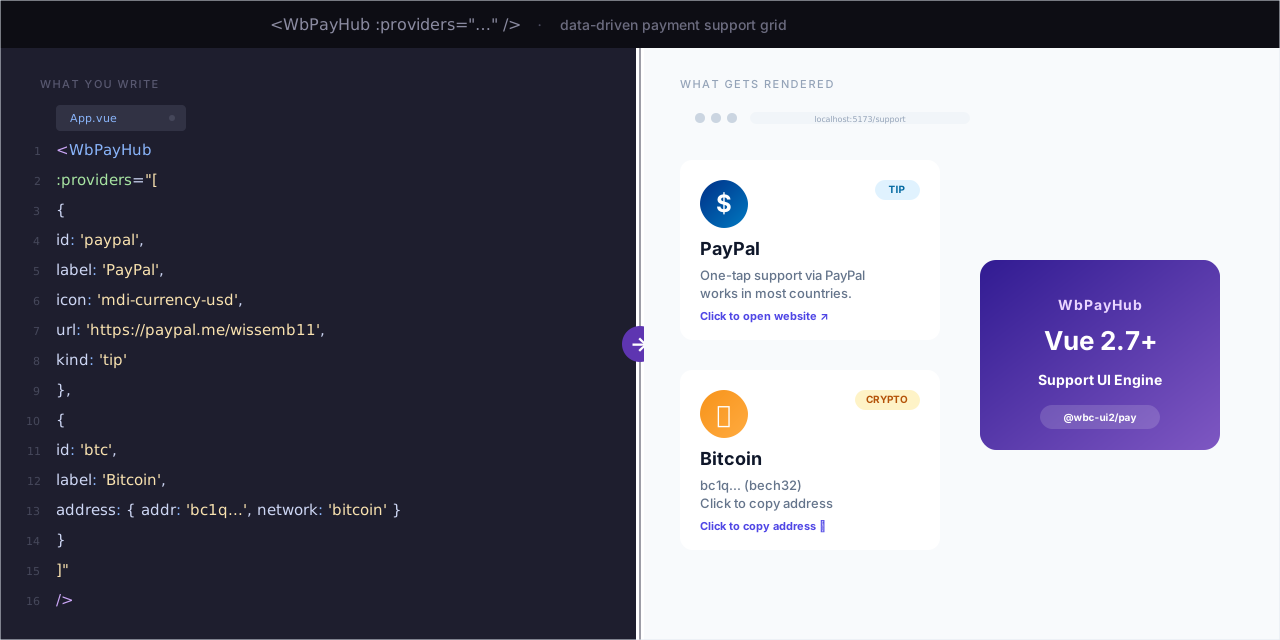
Write a support page in one component
// Before: per-provider tiles, per-network logic, per-tile QR code, custom copy-to-clipboard
// After: one <WbPayHub /> driven by data.
<WbPayHub :providers="PAYMENT_PROVIDERS" :product="'wb-code'" :recipient="ME" />
The component understands fiat providers (Stripe, PayPal, Wise, Payoneer, Skrill, Buy Me a Coffee, GitHub Sponsors) and crypto networks (BTC, ETH, USDC, SOL, Lightning) natively — uniform tile UI, clipboard-copy for on-chain addresses, new-tab open for hosted-checkout URLs.
Host-owned data, package-owned UI
// You curate the array. The package renders it. No vendored secrets, no shared addresses.
const PAYMENT_PROVIDERS = [
  { id: 'stripe',     label: 'Stripe',   icon: 'mdi-credit-card', url: 'https://...', kind: 'commercial' },
  { id: 'crypto-btc', label: 'Bitcoin',  icon: 'mdi-bitcoin',     address: { addr: 'bc1q...', network: 'bitcoin', format: 'bech32' } },
  { id: 'crypto-sol', label: 'Solana',   icon: 'mdi-currency-sign', address: { addr: '...',   network: 'solana',  format: 'base58' } },
  // ...
];
Tiles dispatch on kind / address
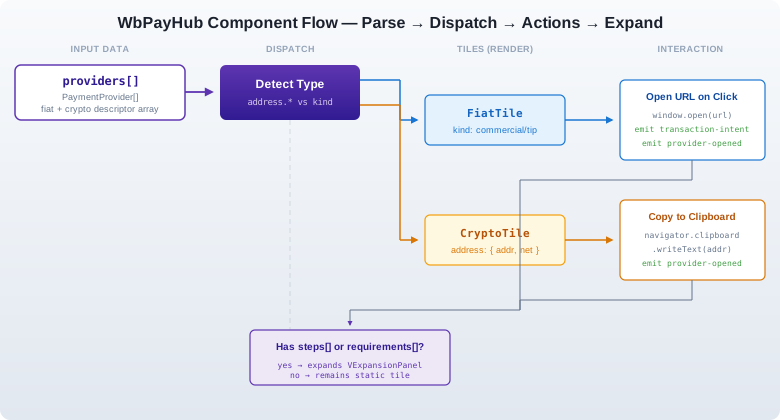
<!-- fiat tile → new-tab to provider URL on click, emits transaction-intent -->
<!-- crypto tile → copy-to-clipboard the address, shows network + format -->
<!-- expansion panels → optional steps[] / requirements[] arrays per provider -->
<WbPayHub :providers="MIXED_FIAT_AND_CRYPTO" :product="'wb-code'" :recipient="ME" />
White-labelable branding
// Pass your own gradient + accent colors per host app. The package ships only the renderer.
const BRANDING = {
  heroGradient: 'linear-gradient(135deg, #1a237e 0%, #311b92 100%)',
  accentColor:  'deep-purple',
  ctaButtonColor: 'deep-purple',
};
One component. One
<WbPayHub>tag. No per-provider component. No vendored addresses. Everything is data.
What is @wbc-ui2/pay?
A Vue 2.7+ component that renders a polymorphic payment-provider grid from a single array of plain JSON descriptors. Pairs with @wbc-ui2/core but is independently installable.
| Surface | Role |
|---|---|
<WbPayHub :providers="..." :product="..." :recipient="..."> |
The renderer — top-level component, expansion panels, copy-to-clipboard, analytics events |
PaymentProvider interface |
The host-owned data shape (fiat: url + kind; crypto: address.{addr, network, format}). Stable contract |
Per-provider steps[] / requirements[] |
Optional expansion-panel content for each tile — provider-specific copy and links |
Default pattern slot |
The package's built-in tile-grid layout. Overridable for white-label hosts |
Who's it for? OSS maintainers, indie devs, monetizing solo creators, and ecosystem packages that need a polished support / donation hub without rolling their own Vuetify card grid plus per-network logic.
Usage Examples
Level 1 — Single fiat tile
<WbPayHub :providers="[
  { id: 'bmac', label: 'Buy Me a Coffee', icon: 'mdi-coffee', url: 'https://buymeacoffee.com/wbc-ui', kind: 'tip' }
]" :product="'wb-code'" :recipient="{ name: 'Wissem', contactEmail: 'me@wbc-ui2.com' }" />
→ Renders one tile. Click → opens buymeacoffee.com/wbc-ui in a new tab. Emits transaction-intent + provider-opened events. ½ second of typing.
Level 2 — Mixed fiat + crypto
<WbPayHub
  :product="'wb-code'"
  :providers="[
    { id: 'stripe',     label: 'Stripe',   icon: 'mdi-credit-card-outline', url: 'https://...', kind: 'commercial' },
    { id: 'crypto-btc', label: 'Bitcoin',  icon: 'mdi-bitcoin',
      address: { addr: 'bc1q...', network: 'bitcoin', format: 'bech32' } },
    { id: 'crypto-sol', label: 'Solana',   icon: 'mdi-currency-sign',
      address: { addr: '...',     network: 'solana',  format: 'base58' } }
  ]"
  :recipient="{ name: 'Your Name', contactEmail: 'you@example.com', taglineCommercial: 'Available for consulting.' }"
  :branding="{ heroGradient: 'linear-gradient(135deg, #1a237e 0%, #311b92 100%)', accentColor: 'deep-purple' }"
  @transaction-intent="onIntent"
  @provider-opened="onOpened"
/>
Level 3 — With per-tile expansion content
const PAYMENT_PROVIDERS = [
  {
    id: 'crypto-lightning',
    label: 'Bitcoin Lightning',
    icon: 'mdi-flash',
    address: { addr: 'me@walletofsatoshi.com', network: 'bitcoin-lightning', format: 'lightning-address' },
    steps: [
      'Open a Lightning wallet (Wallet of Satoshi, Phoenix, Strike)',
      'Send any amount of sats to the Lightning address above',
      'Confirmation in seconds, fees in cents'
    ],
    requirements: [
      'Recipient supports Lightning addresses (compatible with most modern wallets)',
      'For sub-$5 tips Lightning beats on-chain BTC by ~100× on fees'
    ]
  }
];
→ The tile expands on click to surface the steps and requirements lists. No extra props — the component dispatches on the presence of those keys.
Try it in 30 seconds
# Sandbox playground at pay2.wbc-ui.com (live interactive lab — paste any providers JSON, see it render)
open https://pay2.wbc-ui.com/lab
While a starter template is being finalized, the easiest way to explore the component is the live demo at pay2.wbc-ui.com — paste your own
PAYMENT_PROVIDERSarray, see the grid render in real time, copy the integration snippet back to your project.
Installation
Prerequisites
- Node.js ≥ 18 (the package declares this; older versions may work but are not tested)
- Vue 2.7.x (the component targets Vue 2 specifically; Vue 3 support tracked separately as
@wbc-ui3/pay) - Vuetify 2.7.x (used for
VCard,VBtn,VExpansionPanels,VIconprimitives) - A bundler that understands ESM exports: Vite (recommended), Webpack 5, or Vue CLI 5
npm (recommended)
npm install @wbc-ui2/pay

# Peer dependencies — install once per project
npm install vue@^2.7.16 vuetify@^2.7.2
Yarn / pnpm
# Yarn
yarn add @wbc-ui2/pay
yarn add vue@^2.7.16 vuetify@^2.7.2

# pnpm
pnpm add @wbc-ui2/pay
pnpm add vue@^2.7.16 vuetify@^2.7.2
Vue 2 component registration
// main.js — option 1: global registration
import Vue from 'vue';
import { WbPayHub } from '@wbc-ui2/pay';
Vue.component('WbPayHub', WbPayHub);
// option 2: local registration (one component at a time)
import { WbPayHub } from '@wbc-ui2/pay';
export default {
components: { WbPayHub },
// ...
};Named imports
import { WbPayHub } from '@wbc-ui2/pay';Pairs with @wbc-ui2/core
// If you already use @wbc-ui2/core, WbPayHub can render inside a <WBC> tree:
<WBC :item="{
  comp: 'WbPayHub',
  options: {
    props: { providers: PAYMENT_PROVIDERS, product: 'wb-code', recipient: ME, branding: BRANDING }
  }
}" />
Troubleshooting common install errors
| Symptom | Cause | Fix |
|---|---|---|
Vue.use is not a function |
Two copies of Vue are loaded (typically: your app has Vue 2, but a dependency hoisted Vue 3) | Pin a single Vue version: add "resolutions": { "vue": "^2.7.16" } (yarn/pnpm) or use npm overrides. Then rm -rf node_modules && reinstall. |
Cannot find module '@wbc-ui2/pay' |
npm couldn't resolve the package | Confirm install: npm ls @wbc-ui2/pay. If empty, npm install @wbc-ui2/pay@latest. |
peer dep missing: vuetify@^2 |
Vuetify wasn't installed — it's a peer dep, not a hard one | npm install vuetify@^2.7.2 (and any other peer deps the warning names). |
| Tiles render but unstyled | Vuetify CSS isn't loaded | Import once in main.js: import 'vuetify/dist/vuetify.min.css'; |
| Crypto tile clipboard-copy silently fails | Browser blocks clipboard write outside a user-gesture context | Confirm the copy is triggered from a click handler; check console for NotAllowedError. |
| Hero gradient doesn't apply | branding.heroGradient value rejected by Vuetify |
Pass a CSS-valid linear-gradient string starting with linear-gradient(...) — not a hex color. |
For a longer walkthrough with worked examples, see the documentation hub at pay2.wbc-ui.com.
The Component Under the Hood
Mermaid diagram (interactive fallback)
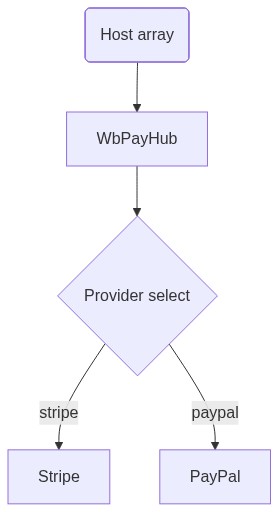
- Polymorphic dispatch: tiles dispatch on
kind(fiat) vs presence ofaddress.*(crypto) — no separate components to register - Host-owned data:
providersarray is yours; the package vendors no URLs, no addresses, no defaults - Branding props:
recipient+brandingflow into the hero block and tile styling; the defaultpatternis overridable for full white-label - Analytics events:
transaction-intent(fiat tile click) andprovider-opened(after navigation / copy) — wire into your tracker of choice
Free vs Pro
@wbc-ui2/payis fully open-source today, and most of it will stay that way. The free package is a complete support hub: provider tiles, expansion panels, clipboard-copy for on-chain addresses, branding props, custompatternoverrides. It is enough to run a real tip jar or donation hub for a personal project or OSS package.The Pro lane is intentionally narrow and demand-driven — we don't paywall speculatively. One Pro surface is currently planned because it's genuinely Pro-shaped (security-sensitive, hard to do correctly yourself); other Pro features will be added only if real consumers ask for them.
| Capability bucket | Free (today) | Pro (planned) |
|---|---|---|
| Fiat tile dispatch (Stripe, PayPal, Wise, Payoneer, Skrill, Buy Me a Coffee, GitHub Sponsors) | Full | Full |
| Crypto tile dispatch (BTC, ETH, USDC, SOL, Lightning, …) | Full | Full |
| Clipboard-copy for on-chain addresses | ||
transaction-intent / provider-opened events |
||
White-label branding props |
||
Override the default pattern slot |
||
Server-side intent verification helper (planned) — a small helper your backend imports to verify signed transaction-intent payloads, prevent tampered redirect URLs, and bind events to a maintainer-controlled secret |
— |
This is the whole Pro lane today. Maintainer review of additional Pro candidates is tracked in packages/wb-pay/guides/monetize/ — if you want a feature gated (or, more commonly, want a Pro feature ungated), open an issue.
Monetization guide → · Buy Pro (planned) →
Ecosystem
@wbc-ui2/pay is a sibling package in the @wbc-ui2 monorepo. Every package is published to npm and shares the same versioning line.
| Package | What it adds | Status |
|---|---|---|
@wbc-ui2/core |
"UI as Data" engine — the foundation | GA |
@wbc-ui2/code |
Monaco-powered code editor | GA |
@wbc-ui2/chart |
ECharts integration | GA |
@wbc-ui2/dataviewer |
JSON / data-table explorer | GA |
@wbc-ui2/latex |
LaTeX math rendering | GA |
@wbc-ui2/mermaid |
Diagram-as-code rendering | GA |
@wbc-ui2/alert |
Notification / toast system | GA |
@wbc-ui2/press |
Markdown-driven docs engine | GA |
@wbc-ui2/pay |
Fiat + crypto support hub component (this package) | GA |
License
MIT Wissem Boughamoura · wi-bg.com · wbc-ui.com