



Overview
Zephyr3D is a TypeScript-based 3D rendering engine for the web, with
- unified WebGL/WebGPU backends
- a code‑generated shader system (JS/TS → GLSL/WGSL)
- and a full web-based visual editor.
Lightweight · Modular · Developer-friendly · Visual creation empowered by code.
Core Features
Unified WebGL / WebGPU backend (RHI)
One rendering abstraction layer, multiple backends. Switch between WebGL, WebGL2 and WebGPU without rewriting your scene code.JS/TS‑based shader builder
Build shaders in TypeScript/JavaScript and generate backend‑specific GLSL/WGSL plus WebGPU bind group layouts from a single source.Modern scene rendering
PBR, image‑based lighting, clustered lighting, shadow maps, terrain, FFT‑based water, post‑processing, and more.TypeScript‑first architecture
Strong typing, modular packages, and IDE‑friendly APIs for engine and tool development.Web‑based visual editor
Scene, material, terrain editors and TypeScript scripting — all running directly in the browser.NPM‑ready, modular packages
Use the parts you need: base math, device/RHI, backends, scene layer, or the full editor.
JS/TS‑based Shader Builder
Instead of hand‑writing raw GLSL/WGSL strings, Zephyr3D lets you define shaders in JavaScript/TypeScript and generates backend‑specific code for you.
A single JS program:
const program = device.buildRenderProgram({
  vertex(pb) {
    this.$inputs.pos = pb.vec3().attrib('position');
    this.$inputs.uv  = pb.vec2().attrib('texCoord0');
    this.$outputs.uv = pb.vec2();

    this.xform = pb.defineStruct([pb.mat4('mvpMatrix')])().uniform(0);

    pb.main(function () {
      this.$builtins.position =
        pb.mul(this.xform.mvpMatrix, pb.vec4(this.$inputs.pos, 1));
      this.$outputs.uv = this.$inputs.uv;
    });
  },

  fragment(pb) {
    this.$outputs.color = pb.vec4();
    this.tex = pb.tex2D().uniform(0);

    pb.main(function () {
      this.$outputs.color = pb.textureSample(this.tex, this.$inputs.uv);
    });
  }
});
From this single source, Zephyr3D generates:
- WebGL 1 GLSL (attributes/varyings, classic uniforms)
- WebGL 2 GLSL (UBOs with layout(std140), explicit outputs)
- WebGPU WGSL shaders
- Matching WebGPU bind group layouts (textures, samplers, uniform buffers with computed layouts)
So you:
- write shader logic once in JS/TS
- get correct GLSL/WGSL for each backend
- keep bindings and shader code in sync automatically
- avoid maintaining N slightly different shader variants
For more advanced examples, see the User Manual
Zephyr3D Editor — Web-based Visual Tool
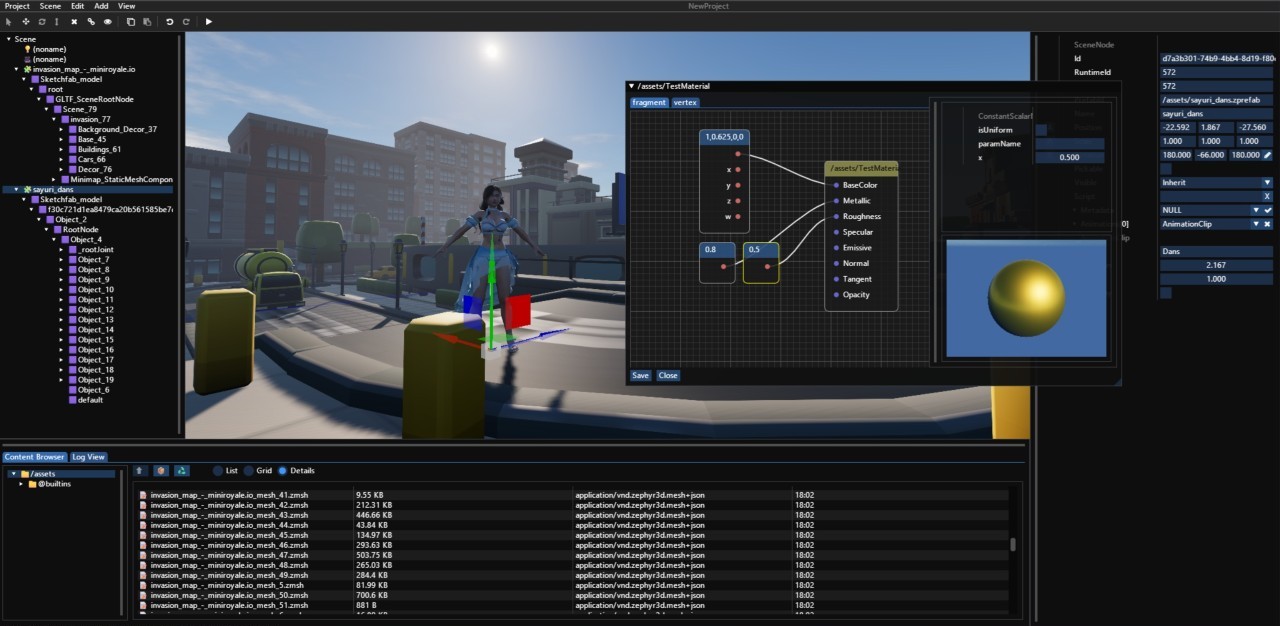
Highlights
- Scene, Material, Terrain editors
- TypeScript scripting & animation tools
- Built with Zephyr3D Scene + Device APIs
- Instant preview & 1-click export
Architecture Overview
| Layer | Description |
|---|---|
| Base | Math / VFS / Events / SmartPtr |
| Device (RHI) | Abstract graphics API layer + shader builder / resource binding |
| Backend-WebGL / WebGPU | Platform‑specific rendering backends |
| Scene | Scene system, materials, animation, post FX |
| Editor | Browser-native editor built atop Scene layer |
Installation
npm install --save @zephyr3d/device
npm install --save @zephyr3d/backend-webgl
npm install --save @zephyr3d/backend-webgpu
npm install --save @zephyr3d/scene
Use with your preferred bundler (Vite / Webpack / Rollup).
Example — Scene API
import { Vector3, Vector4 } from '@zephyr3d/base';
import {
  Scene, Application, LambertMaterial, Mesh,
  OrbitCameraController, PerspectiveCamera,
  SphereShape, DirectionalLight
} from '@zephyr3d/scene';
import { backendWebGL2 } from '@zephyr3d/backend-webgl';

const app = new Application({
  backend: backendWebGL2,
  canvas: document.querySelector('#my-canvas')
});

app.ready().then(() => {
  const scene = new Scene();
  new DirectionalLight(scene).lookAt(Vector3.one(), Vector3.zero(), Vector3.axisPY());
  const mat = new LambertMaterial();
  mat.albedoColor = new Vector4(0.9, 0.1, 0.1, 1);
  new Mesh(scene, new SphereShape(), mat);
  scene.mainCamera = new PerspectiveCamera(scene, Math.PI / 3, 1, 100);
  scene.mainCamera.lookAt(new Vector3(0,0,4), Vector3.zero(), Vector3.axisPY());
  scene.mainCamera.controller = new OrbitCameraController({ center: Vector3.zero() });
  getInput().use(scene.mainCamera.handleEvent, scene.mainCamera);
  getEngine().setRenderable(scene, 0);
  app.run();
});
Status
Actively developed
Zephyr3D is used for my own experiments, demos and tools, and is under active development. APIs may still change, but it is already suitable for:
- graphics / Web rendering experiments
- learning engine and rendering architecture
- building custom tools and in‑house editors
Support
Zephyr3D is developed and maintained in my free time. If this engine, the editor, or any related tools or posts have helped you, you can support my work here:
Ko‑fi: https://ko-fi.com/gavinyork2024
Your support helps cover hosting, testing tools, and gives me more focused time to:
- Build new engine features and improve performance
- Maintain documentation and examples
- Explore experimental rendering ideas and tooling
Thank you for any kind of support — even just trying Zephyr3D and giving feedback is greatly appreciated.
License
Zephyr3D is released under the MIT License.
2025 Zephyr3D — Built with in TypeScript for the Web3D world.