
SkillBoard
Use the right AI-agent skills without managing another checklist.
Ask your AI normal questions: "what skills can you use?", "which skill should write tests first?", or "can you make this reviewed skill available here?" SkillBoard runs behind the scenes so you get the benefit: the right skill, a short disclosure of what was used, and fewer setup interruptions when skills overlap.
The burden stays low:
- No global install is required; use
npx --yes --package agent-skillboard. - Most use is read-only:
brief,route,doctor, andguard useanswer what is safe now. - Nothing changes until you approve a policy action.
- Project cleanup is conservative and previewable with
skillboard uninstall --dry-run;--purgeremoves SkillBoard's policy footprint while preserving local skills.
Status: public alpha. The current config schema is config schema v1; breaking
changes may still happen before 1.0.0 and are documented in release notes.
Under the hood, SkillBoard is workflow-scoped skill priority and routing for AI agents. Installed user skills are usable by default unless runtime, user, or local instructions disable them; SkillBoard helps agents resolve overlap, policy, and workflow priority instead of guessing from raw skill files.
Start with normal requests:
- "What skills can you use in this project?"
- "Which skill should you use to write tests first?"
- "Can you make
anthropic.docxavailable for this workflow?" - "Why is this skill blocked?"
Your AI runs SkillBoard behind the scenes, reads the current brief, checks the guard automatically before invoking an allowed skill, and asks only before policy-changing actions. For already-allowed skills, it should say which skill it is about to use and which skill it used, not interrupt you for another approval. That disclosure is an audit trace, not a permission prompt. You do not need to memorize the SkillBoard command loop.
A normal allowed-skill turn can look like this:
- You: "Which skill should you use to write tests first?"
- AI: "I will use matt.tdd for this request."
- AI: "I used matt.tdd for this request."
Names you may see in setup and logs:
SkillBoard: the product and policy model.agent-skillboard: the npm package.skillboard: the CLI binary.
Use SkillBoard when your agent setup has grown beyond one trusted skill folder
and you want workflow-scoped control without turning skill governance into a
manual checklist. If you are changing routing, brief, bridge, policy, or
workflow UX, read AI Skill Routing Goal first;
it defines the non-blocking observe → route → work → explain briefly → ask after → remember policy loop that development should preserve.
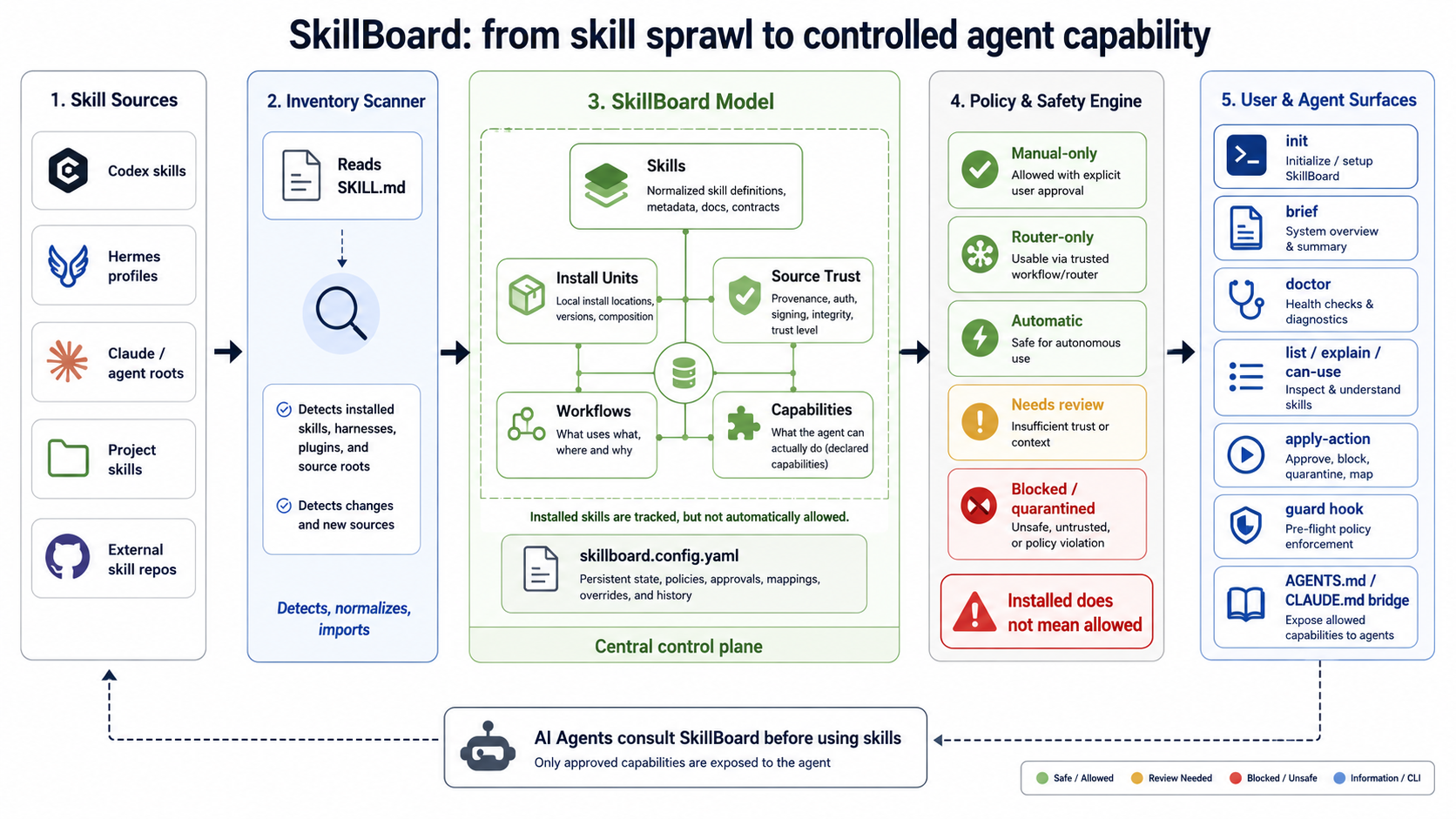
Why Not Just List /skills?
A raw skill list answers what is declared. SkillBoard answers what can safely run now.
Same fixture, different answer:
| Raw skill list | SkillBoard brief |
|---|---|
matt.tdd active workflow-auto |
AI can use now: 0 |
| no policy health | Blocked for safety: 8, Policy errors: 2 |
That gap is the product. SkillBoard separates installed from allowed,
checks policy health, and gives agents a brief they can use without guessing
from raw SKILL.md files. The same proof also routes "write tests before
implementation" to matt.tdd, returns private.tdd-work-continuity as the
fallback, and gives the AI exact start and finish disclosure text.
See Tested Value Proof for the executable proof.
5-Minute Quick Start
Install the CLI. On a normal global install, SkillBoard auto-connects the agent layer for detected Codex, Claude, OpenCode, and Hermes user skill roots:
AI/automation/operator details:
npm install -g agent-skillboardIf your system npm requires elevated permissions, sudo npm install -g agent-skillboard is also supported. In that flow, install-time setup resolves
SUDO_USER and writes the user-level guidance skill under the invoking user's
agent homes. Managed guidance files written under the user's home are restored
to the invoking user's ownership, while the skillboard binary still lands in
the global prefix used by that npm command.
The install-time setup writes a user-level skillboard guidance skill under
detected agent homes. For Codex, detection includes CODEX_HOME/skills,
AGENTS_HOME/skills, ~/.agents/skills, and ~/.codex/skills.
If ~/.agents already exists, setup creates ~/.agents/skills because that is
the shared Codex-visible skill tree in LazyCodex-style environments.
It does not create skillboard.config.yaml,
.skillboard/, AGENTS.md, or CLAUDE.md in projects.
No separate setup command is required after a normal global install or update:
npm lifecycle scripts rerun the agent-home scan, refresh managed SkillBoard
guidance files, and add newly detected supported agent roots.
Run skillboard setup --agent codex,claude,opencode,hermes --yes later only
after adding another supported agent, enabling a new agent home, or installing
with lifecycle scripts disabled. Restart or refresh agents that cache user
skills, then ask normal questions:
- "Which skill should you use to write tests first?"
- "What skills can you use here?"
- "Use the Codex test-first skill in OpenCode too."
- "When two skills overlap, which one should take priority?"
When a target agent needs a skill from another agent, it can use
skillboard import-skill --from codex --to opencode --skill <skill> --json
behind the scenes. Compatible skills are copied into the target agent's user
skill root. If the source contains agent-specific instructions, the agent asks
before creating an adapted target-agent SKILL.md and installs that file with
provenance.
If you intentionally maintain local workspace policy files, use the explicit operator commands for that layer:
npx --yes --package agent-skillboard skillboard init
npx --yes --package agent-skillboard skillboard doctor --summary
npx --yes --package agent-skillboard skillboard brief --workflow <workflow-from-init>
Remove the project bridge when you are done:
npx --yes --package agent-skillboard skillboard uninstall --dir /path/to/your/project --dry-run
npx --yes --package agent-skillboard skillboard uninstall --dir /path/to/your/project
Uninstall preserves local skills and policy files by default, and reports what it removed or preserved.
Remove SkillBoard's policy influence entirely while keeping local skill files:
npx --yes --package agent-skillboard skillboard uninstall --dir /path/to/your/project --purge --dry-run
npx --yes --package agent-skillboard skillboard uninstall --dir /path/to/your/project --purge
--purge deletes SkillBoard config, bridge blocks, and the entire
.skillboard/ project state directory while leaving skills/*/SKILL.md in
place.
See docs/install.md for global installs, --dir, GitHub
builds, clone-based development, Hermes bridge setup, refresh, and uninstall.
What SkillBoard Gives You
- Inventory that separates installed skills from callable skills.
- Workflow-scoped policy instead of global "everything is active" behavior.
brief,route,can-use, andguard usesurfaces for AI-mediated selection and availability.import-skillfor agent-layer skill reuse across Codex, Claude, OpenCode, and Hermes.- Workflow conflict checks so overlapping skills cannot quietly degrade an answer.
- Action cards that apply one approved policy change, then re-resolve state.
- Source and install-unit review for plugins, hooks, MCP servers, harnesses, commands, LSPs, and package-manager dependencies.
- Impact, reconcile, rollout, and dashboard output before cleanup or migration.
- Manual skill variant lifecycle for relationships such as
a -> claude.a, with draft, approval, drift, and reset checkpoints.
SkillBoard is priority-first at the agent layer: installed user skills are
usable unless runtime, user, or local instructions disable them. Local workspace
policy files can still model stricter workflow, source, and invocation
decisions when a team needs that control.
For action cards, use skillboard apply-action <action-id> --yes --json; raw
skillboard hook install ... --dry-run --json previews are underlying manual
operator detail, not the primary action-card flow.
What Works Today
SkillBoard currently supports:
- YAML policy config parsing and semantic checks.
- Recursive
SKILL.mddiscovery. - Source-profile import for cloned or installed skill repositories.
- Agent runtime install-unit inventory when manifest metadata is available.
- Markdown dashboard and machine-readable brief generation.
- Disable-impact analysis and reconcile plans.
- Workflow-scoped activation, blocking, preference, and guard checks.
- Action-card approval and post-apply brief refresh.
- Agent-layer skill import with compatible copy or user-approved AI-mediated adaptation.
- Manual variant registration, fork, status, approval, and reset.
For the full command catalog and config shape, use docs/reference.md.
Tested Value Proof
A raw list says matt.tdd is active. SkillBoard says the same workflow has 0
usable skills because policy health fails.
| Question | Raw list | SkillBoard brief |
|---|---|---|
Does matt.tdd look enabled? |
active, workflow-auto |
blocked by policy health |
| Can the agent safely use anything now? | not answered | 0 usable skills, 8 blocked skills |
| Why? | not answered | Policy errors: 2, Policy warnings: 1 |
The action-card flow is tested too. Applying
activate-skill:anthropic.docx in a temporary project changes the next brief
from 2 usable skills to 3 and moves anthropic.docx into the manual-allowed
set. SkillBoard applies one approved change, then re-resolves the next state.
Run the proof with:
node --test test/readme-value-proof.test.mjsSee the full reproducible proof for exact commands, fixtures, and assertions.