
AI Gauge
Real-time usage monitor for Claude Code, OpenCode and OpenAI Codex. Tracks rate limits with countdown timers and desktop notifications.
Runs on Linux (Waybar) and macOS (native menubar app).






✦ 44% 2h31m · 15%wFeatures
- Waybar module (Linux) — live 5-hour %, weekly %, reset countdown in your status bar
- Native menubar app (macOS) — Swift MenuBarExtra, same data in your menu bar
- Desktop notifications — alert at 80% usage, auto-clear below 50%
- Right-click menu — refresh, copy stats, change plan / token source with checkmarks (macOS), open settings
- StreamDock plugin — usage stats on a physical key (Fifine AmpliGame D6)
- Multiple token sources — Claude Code CLI, OpenCode, or OpenAI Codex CLI
- OpenCode tri-mode — when OpenCode has Anthropic, OpenAI, and/or GitHub Copilot OAuth logins, the tooltip shows all three providers' usage side-by-side in a single view
- Codex JSONL fallback — if
chatgpt.com/wham/usageis unreachable, parses~/.codex/sessions/*.jsonlfor the latest rate-limit snapshot - WebSocket architecture — one server broadcasts to all clients in real time
- systemd / launchd service — starts on login, auto-restarts on failure
- Zero dependencies — runs on Bun, no npm packages
Why ai-gauge?
A few other tools do similar things. Which one fits depends on what you actually need, so here's an honest side-by-side.
| Feature | ai-gauge | waybar-ai-usage | ai-quota-waybar | ClaudeBar |
|---|---|---|---|---|
| Native macOS menubar app | Swift MenuBarExtra | — | — | — |
| Linux Waybar module | ||||
| Real-time WebSocket push | (60s poll, instant broadcast) | — polling | — polling | — polling |
| Supported providers | 6 real + 2 stubs | 4 | 3 | 2 |
| GitHub Copilot support | — | — | ||
| Gemini CLI support | — | — | — | |
| Browser cookie auth (no API keys) | — | Chrome/Firefox | — | — |
| StreamDock physical-key plugin | Fifine D6 | — | — | — |
| Claude + Codex + Copilot side-by-side view | OpenCode tri-mode | — | — | — |
| Auto-update system | npm registry | — | — | — |
| Zero npm runtime dependencies | — (browser_cookie3) | pure Bash | — | |
| Stack | Bun JS + Swift | Python | Bash + jq | TypeScript + Bun |
Where ai-gauge is unique
- The only tool with a native macOS menubar app (Swift, no Electron, no browser window)
- Multi-provider unified view: Claude and Codex usage in a single tooltip when using OpenCode
- StreamDock plugin for physical hardware key display
- Provider registry covers Z.ai, MiniMax, OpenRouter, Komilion and others beyond the big two
Where competitors are stronger
- NihilDigit/waybar-ai-usage is the right pick if you want browser-cookie auth (no credential files to manage, works with Chrome/Firefox sessions out of the box)
- komagata/ai-quota-waybar is the right pick if you use Gemini CLI and want a zero-dependency pure Bash solution with no Bun requirement
- andresreibel/ClaudeBar has a clean click-to-toggle UX between Claude and Codex and handles 429 backoff gracefully with cached payloads
LLM Agent Install
Read and follow the installation guide:
https://raw.githubusercontent.com/merely04/ai-gauge/master/docs/LLM_INSTALL.md
Install
bun add -g ai-gauge
ai-gauge setup
To uninstall:
ai-gauge uninstall
bun remove -g ai-gaugeLinux: requires Bun and a desktop with Waybar (Hyprland, Sway, or any wlroots compositor).
macOS: requires Bun and macOS 13+. ai-gauge setup installs a native Swift menubar app and a launchd LaunchAgent instead of Waybar and systemd.
Note: GitHub Releases do not ship a standalone
.appdownload. The macOS menubar app is a UI client only — it requires theai-gauge-serverdaemon which lives inside the npm package and is configured byai-gauge setup. Always install viabun add -g ai-gauge.
macOS Gatekeeper — if the menubar icon doesn't appear
The .app bundle is ad-hoc signed (not notarized with an Apple Developer ID). ai-gauge setup automatically runs xattr -dr com.apple.quarantine to let macOS launch it, but a few edge cases may still trigger "cannot verify developer":
Fix: one-liner that handles most cases
xattr -dr com.apple.quarantine "$(bun pm -g bin)/../lib/node_modules/ai-gauge/bin/AIGauge.app"
launchctl bootout gui/$(id -u)/com.ai-gauge.menubar 2>/dev/null
launchctl bootstrap gui/$(id -u) ~/Library/LaunchAgents/com.ai-gauge.menubar.plist
Still blocked? → System Settings → Privacy & Security
- Open System Settings → Privacy & Security
- Scroll to the bottom — if you see a
"AIGauge" was blocked…notice, click Allow Anyway - Reload the menubar agent (one-liner above)
Check if quarantine is still set
xattr -l "$(bun pm -g bin)/../lib/node_modules/ai-gauge/bin/AIGauge.app/Contents/MacOS/AIGauge"If you see com.apple.quarantine in the output, the flag is still present — run the fix above.
Edge cases (rare)
- Lockdown Mode (System Settings → Privacy & Security → Lockdown Mode): ad-hoc signed apps are refused. Disable Lockdown Mode to use ai-gauge, or use only notarized software.
- "Allow applications downloaded from: App Store only": change to App Store and identified developers in System Settings → Privacy & Security.
- MDM / corporate device: your admin may block unsigned binaries. Ask them to whitelist
com.ai-gauge.menubar, or install a local build from source.
What it shows
Bar: ✦ <5h%> <countdown> · <weekly%>w
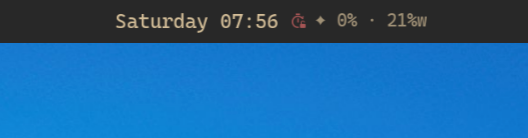
Tooltip (hover):
Claude Code Usage
───────────────
5-hour:  44%  (resets in 2h 31m)
Weekly:  15%  (resets in 6d 17h 54m)
Sonnet:  0%
───────────────
Extra: $171.22/$200 (86%)
When tokenSource: opencode and your OpenCode auth file carries any combination of Anthropic, OpenAI, and GitHub Copilot OAuth logins, the tooltip shows all of them side-by-side in a single view:
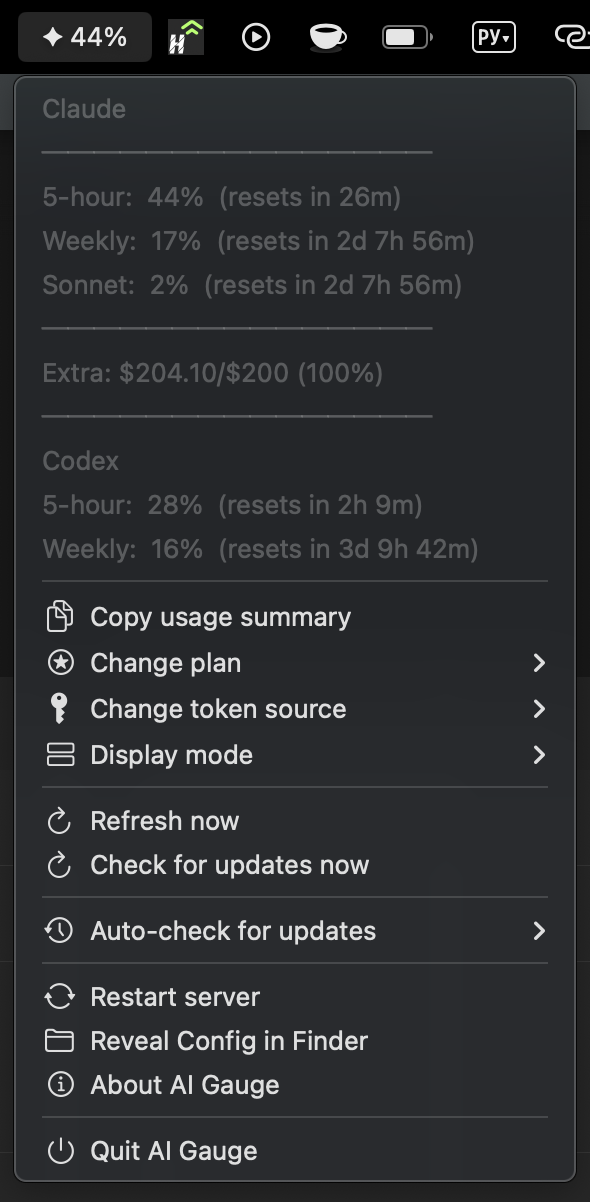
Claude
───────────────
5-hour:  31%  (resets in 2h 29m)
Weekly:  16%  (resets in 2d 9h 59m)
Sonnet:   2%  (resets in 2d 9h 59m)
───────────────
Extra: $204.10/$200 (100%)
───────────────
Codex
5-hour:  24%  (resets in 4h 12m)
Weekly:  15%  (resets in 3d 11h 44m)
───────────────
GitHub Copilot
Plan:    pro
Premium: 50%  (150/300)
Resets:  in 3d 12h
OpenCode logs into Copilot via Device Flow OAuth (opencode auth login github-copilot), storing the gho_* token in ~/.local/share/opencode/auth.json. ai-gauge picks it up automatically — no extra configuration needed when tokenSource: opencode.
The current plan and token source are reflected as checkmarks in the submenu (macOS) and in the Linux tooltip footer.
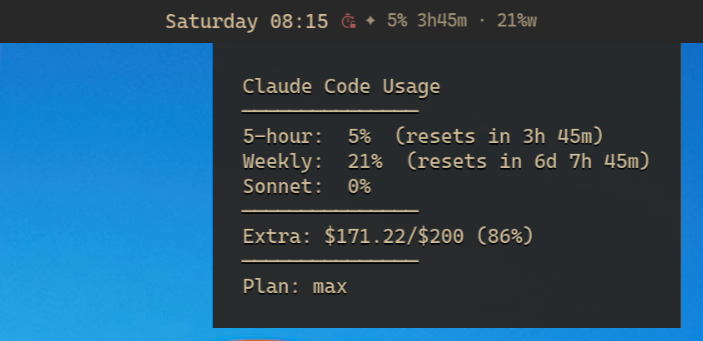
States:
| State | Color | Condition |
|---|---|---|
| normal | system text color | < 50% |
| warning | yellow | 50-79% |
| critical | red | >= 80% (sends desktop notification once) |
| waiting | very dim | Connecting to server (starting up or server down) |
macOS — Native Menu Bar
Same data, native Mac UI. Lives in the menu bar (no Dock icon thanks to LSUIElement).
In the menu bar:

Click to open the full menu — usage breakdown on top, actions below:
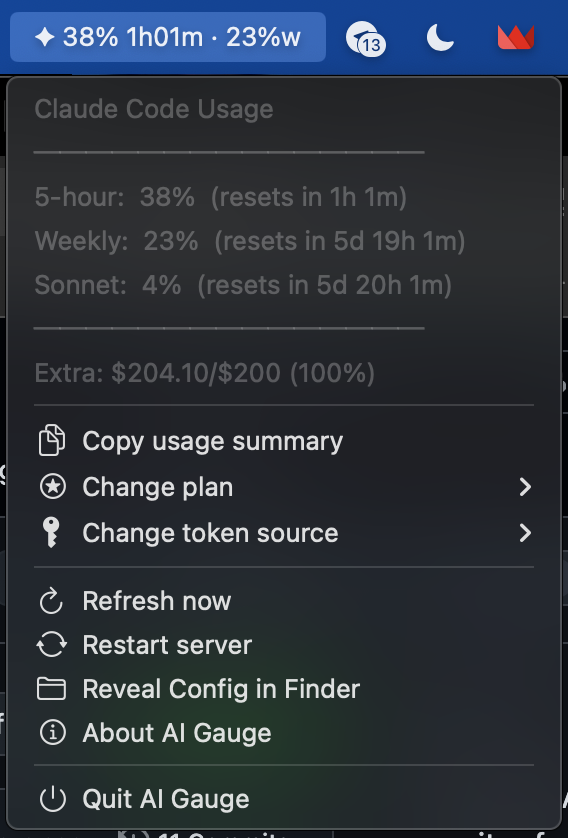
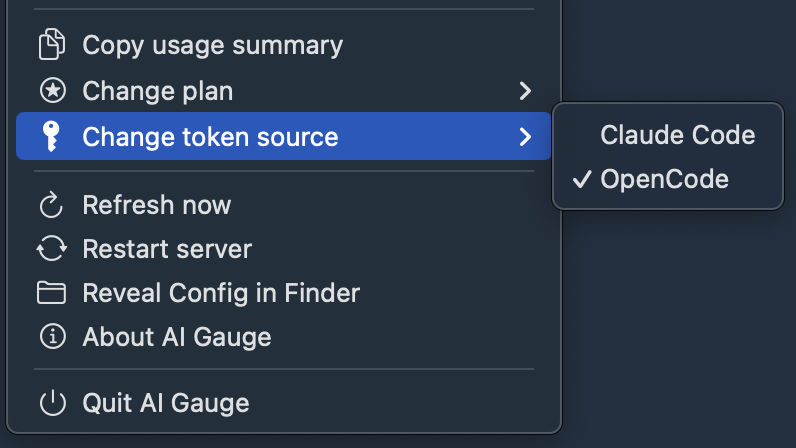
Submenus show current selection with a checkmark — change plan or token source on the fly:
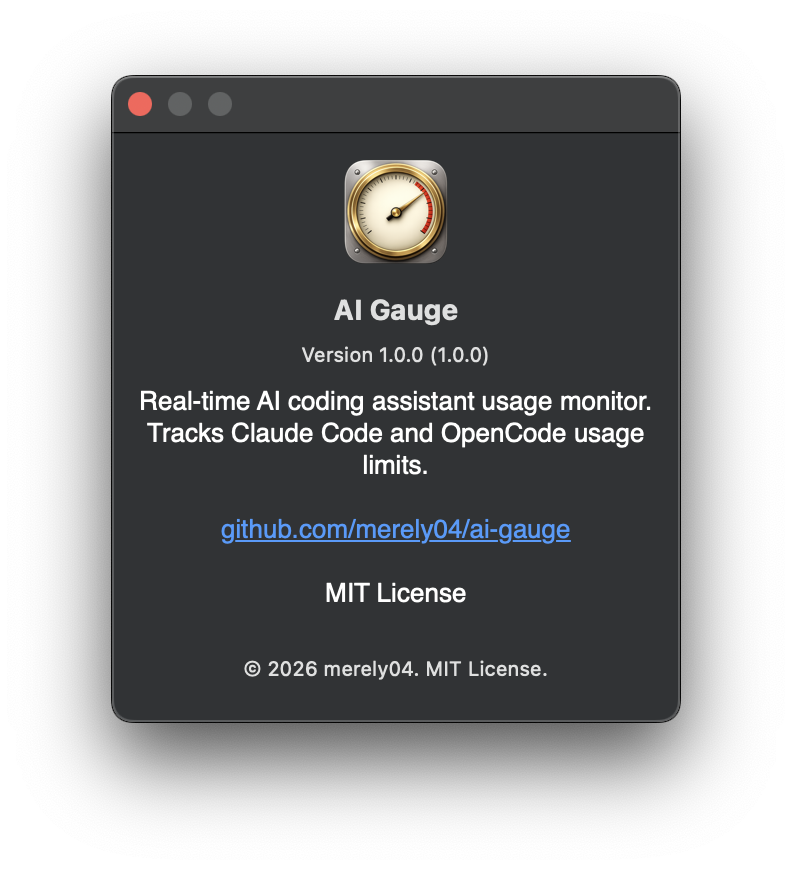
About panel — standard macOS About with version, license, GitHub link:
Menu (right-click on Linux, click on macOS):
- Copy usage summary (clipboard)
- Raw data (clipboard)
- Token source: <current> ▸ (Linux: direct one-click to source selection with checkmarks)
- Plan: <current> ▸ (Linux: direct one-click to plan selection with checkmarks)
- Display mode: <current> ▸ (inline submenu)
- Change plan ▸ (macOS submenu — current marked with ✓)
- Change token source ▸ (macOS submenu — current marked with ✓)
- Settings (advanced configuration)
- ↻ Refresh now
- Restart server
- Reveal Config in Finder (macOS) / Open settings (Linux)
- About AI Gauge (macOS — shows version, license, GitHub link)
- Quit
Configuration
Config file: ~/.config/ai-gauge/config.json
{"tokenSource": "claude-code", "plan": "max"}On first install, ai-gauge setup auto-detects which token source to use by checking which credential files exist:
- OpenCode (
~/.local/share/opencode/auth.jsonon Linux,~/Library/Application Support/opencode/auth.jsonon macOS) - Pi (
~/.pi/agent/auth.json) - OpenAI Codex (
~/.codex/auth.jsonor$CODEX_HOME/auth.json) - Claude Code (Keychain on macOS,
~/.claude/.credentials.jsonon Linux)
If multiple sources exist, the most recently modified one wins (with fixed priority opencode > pi > codex > claude-code as a tiebreaker). Auto-detect runs only on first install — subsequent ai-gauge setup runs preserve your existing choice.
To switch later, use the menu (macOS submenu / Linux right-click → " Token source") or CLI:
ai-gauge-config set tokenSource opencode| Field | Values | Description |
|---|---|---|
tokenSource |
claude-code (default), opencode, pi, codex, github, ollama-cloud, claude-settings:<name> |
OAuth credential source |
plan |
max, pro, team, enterprise, unknown (Anthropic) plus, pro, business, enterprise, edu (Codex) |
Subscription plan (shown in tooltip) |
displayMode |
full (default), percent-only, bar-dots, number-bar, time-to-reset |
Display format for menubar/waybar |
Change settings via menu (macOS submenu / Linux walker UI) or CLI (works on both):
ai-gauge-config set tokenSource opencode
ai-gauge-config set plan max
ai-gauge-config get
GitHub Copilot
ai-gauge can monitor your Copilot monthly premium-request quota for Individual plans (Free, Pro, Pro+).
# Works with default gh storage (Keychain on macOS, Secret Service on Linux, or --insecure-storage plaintext)
gh auth login
ai-gauge-config set tokenSource github
systemctl --user restart ai-gauge-server   # Linux
# macOS: launchctl kickstart -k gui/$(id -u)/com.ai-gauge.server
ai-gauge calls gh auth token --hostname github.com at each poll, so any gh storage backend (Keychain on macOS, Secret Service on Linux, or --insecure-storage plaintext) works out of the box.
Headless / CI mode: If gh binary is unavailable, copy a gho_* OAuth token (obtained via gh auth token --hostname github.com on a workstation) into ~/.config/ai-gauge/copilot-token (single-line plain text file). The daemon falls back to this file when both Tier 1 (shell-out) and Tier 2 (hosts.yml plaintext) fail.
Important — PAT compatibility: Classic Personal Access Tokens (
ghp_*) and fine-grained PATs (github_pat_*) do not work for Copilot quota monitoring — the/copilot_internal/v2/tokenendpoint requires the OAuth token (gho_*) issued bygh auth login. ai-gauge will reject any other token format with a clear error log.
Limitations: v1 supports Individual plans only (Free/Pro/Pro+). Business/Enterprise quotas deferred to v1.1. GitHub Enterprise Server not supported. Multi-account gh CLI uses first github.com: block only.
Note: ai-gauge mirrors official VS Code Copilot extension headers to authenticate the internal API. If GitHub changes their internal API contract, ai-gauge may break temporarily — please file an issue.
OpenAI Codex (ChatGPT subscription)
ai-gauge can monitor Codex CLI usage from a ChatGPT Plus / Pro / Business / Enterprise / Edu subscription.
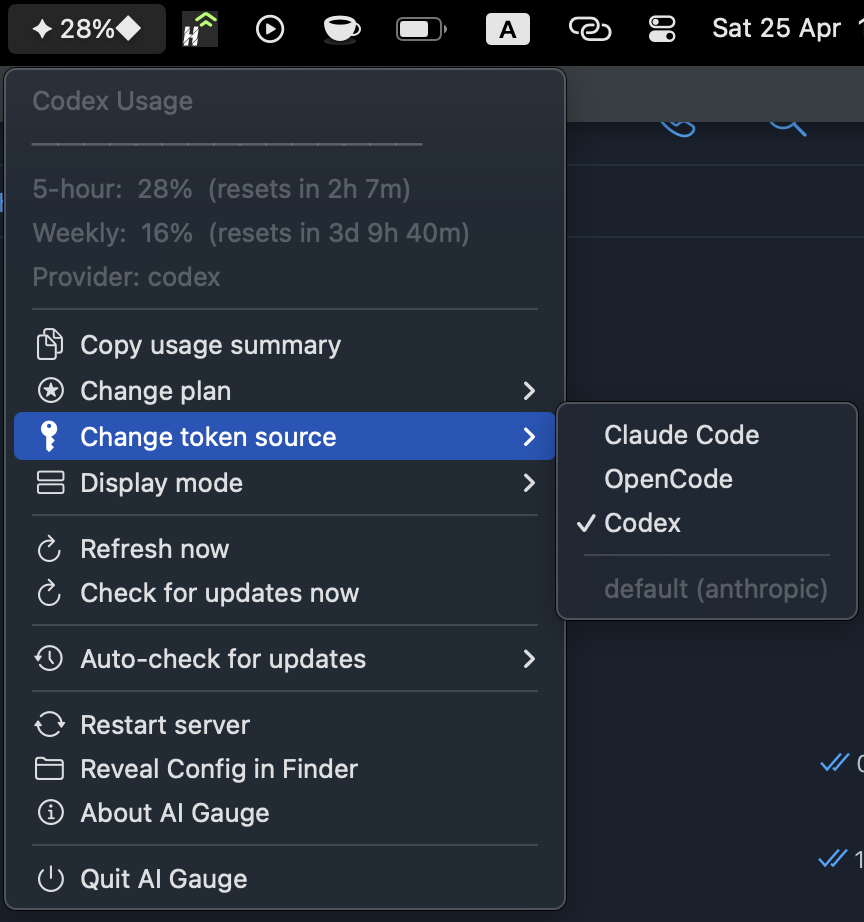
# Make sure Codex CLI is logged in (if you haven't already):
codex auth login

# Tell ai-gauge to read from ~/.codex/auth.json:
ai-gauge-config set tokenSource codex
The daemon will fetch https://chatgpt.com/backend-api/wham/usage (the same endpoint Codex CLI itself uses) once a minute. The tooltip then shows 5-hour and weekly windows, plus the code-review window and credit balance when present.
Note:
/wham/usageis an undocumented internal endpoint. We mirror Codex CLI's headers (Authorization: Bearer ...,ChatGPT-Account-Id: ...,User-Agent: codex_cli_rs/...). If the endpoint changes upstream, ai-gauge falls back to parsing~/.codex/sessions/YYYY/MM/DD/rollout-*.jsonlfor the latesttoken_countevent so you still see something.
codex requirements
- Codex CLI installed and logged in (
codexwill create~/.codex/auth.jsonon first login) - Credentials stored in file mode — the default. If you set
cli_auth_credentials_store: "macOS_keychain"in~/.codex/config.toml, ai-gauge cannot read your tokens (background launchd agents can't show interactive Keychain prompts) and will degrade to JSONL session parsing. - Plain OpenAI API keys (
sk-...) are not supported — the/wham/usageendpoint requires the OAuthaccess_tokenfromcodex auth login.
Pi Coding Agent
ai-gauge can monitor usage from Pi (badlogic/pi-mono), a multi-provider coding agent that stores credentials in ~/.pi/agent/auth.json.
# Make sure Pi is logged in (pi auth login or equivalent)
ai-gauge-config set tokenSource pi
Pi's auth.json is a provider-keyed object. ai-gauge maps each supported block to an existing provider adapter:
| Pi block | Adapter | Notes |
|---|---|---|
anthropic |
Anthropic OAuth | Primary by default |
openai-codex |
Codex | Shown in secondary field |
github-copilot |
Copilot | Shown in copilot field; ghu_ token required; GHES (enterpriseUrl) skipped |
openrouter |
OpenRouter | Credit balance |
zai |
Z.ai | Rate limits via https://api.z.ai |
Unsupported blocks (e.g. ollama-cloud, synthetic) are skipped gracefully.
Primary provider selection is hybrid: if ~/.pi/agent/settings.json has a defaultProvider that maps to a supported block with usable credentials, that provider is used. Otherwise the daemon falls back to fixed priority [anthropic, codex, zai, openrouter]. (defaultModel is not used for routing.)
The broadcast uses the same 3-slot layout as OpenCode: primary usage in rateLimits/balance, the next-highest supported provider in secondary, and Copilot quota in copilot. Expired OAuth tokens are reported and skipped — no automatic refresh.
Ollama Cloud
ai-gauge can monitor your Ollama Cloud session and weekly usage. Ollama Cloud has no usage API — ai-gauge scrapes the authenticated web dashboard instead.
Credential: a browser session cookie stored in ~/.config/ai-gauge/ollama-cookie (single line, full Cookie: header value).
How to get the cookie:
- Log in at
https://ollama.com/settings - Open DevTools → Network tab → reload the page
- Click the
settingsdocument request → Request Headers → copy the entireCookie:value
Alternatively: DevTools → Application → Cookies → ollama.com → copy __Secure-session (required) and cf_clearance (may be needed to pass Cloudflare).
# Paste the cookie value into the file (single line, no trailing newline needed)
echo 'aid=…; cf_clearance=…; __Secure-session=…' > ~/.config/ai-gauge/ollama-cookie

ai-gauge-config set tokenSource ollama-cloud
systemctl --user restart ai-gauge-server   # Linux
# macOS: launchctl kickstart -k gui/$(id -u)/com.ai-gauge.server
The daemon fetches https://ollama.com/settings with your cookie and a browser User-Agent, parses the HTML for session and weekly usage percentages, and maps them to five_hour and seven_day — so waybar and the menubar render Ollama Cloud exactly like any other provider.
Caveats:
- The session cookie expires periodically. When it does, ollama.com returns a 302 redirect, which the daemon rejects gracefully — you'll see an empty/cached broadcast rather than a crash. Re-extract the cookie to restore data.
- The HTML parser is pinned to the current ollama.com DOM. If the page structure changes, usage data degrades to empty rather than crashing.
ollama-cloudis not auto-detected at setup — you must place the cookie file manually before switching to this token source.- No OAuth or automatic token refresh.
Using a Different Claude Provider
You can monitor usage from alternative Claude API providers by creating a settings file in ~/.claude/:
# Create a settings file for your provider
cat > ~/.claude/settings.myprovider.json << 'EOF'
{
  "env": {
    "ANTHROPIC_BASE_URL": "https://api.yourprovider.com/anthropic",
    "ANTHROPIC_AUTH_TOKEN": "your-token-here"
  }
}
EOF

# Set it as your token source
ai-gauge-config set tokenSource claude-settings:myprovider
Then restart the server: systemctl --user restart ai-gauge-server (Linux) or launchctl kickstart -k gui/$(id -u)/com.ai-gauge.server (macOS).
Supported Providers
| Provider | ANTHROPIC_BASE_URL |
Auth | Balance |
|---|---|---|---|
| Z.ai | https://api.z.ai/api/anthropic |
Token (no Bearer) | Rate limits |
| MiniMax | https://api.minimax.io/api/anthropic |
Bearer token | Rate limits |
| OpenRouter | (fixed URL) | Bearer token | Credit balance |
| Komilion | (fixed URL) | Bearer token | Wallet balance |
| Packy | (no public API) | — | — |
Notes
- Anthropic API keys (
sk-ant-*) cannot fetch usage via this tool. The usage endpoint requires OAuth tokens (from Claude Code CLI or OpenCode). Settings files with a plain Anthropic API key will show the source asunknownwith no quota data. - Packy has no public balance API. Selecting it will show the provider name but no usage data.
- File names must match
[a-zA-Z0-9_][a-zA-Z0-9_.-]*(e.g.settings.z.json,settings.mywork.json). settings.local.jsonis excluded from discovery (reserved for local overrides).
Update Notifications
ai-gauge automatically checks for updates every 24 hours (with a 30-second initial delay after startup) and notifies you via the menubar/waybar.
What you'll see
macOS: An orange dot appears in the menu bar icon. Click to open the menu — an "Update to vX.Y.Z" item appears at the top. Click it to update. You'll also get a native notification.
Linux (Waybar): The waybar text gains a suffix and turns yellow (update-available CSS class). Use the right-click menu → " Update to vX.Y.Z" to trigger the update.
If the automatic update fails (e.g., due to permissions), the install command is copied to your clipboard.
Manual check
- macOS: Menu → "Check for updates now"
- Linux: Right-click menu → " Check for updates"
- CLI:
echo '{"type":"checkUpdate"}' | bun lib/send-ws.js
Disable update checks
Permanently (per-machine):
ai-gauge-config set autoCheckUpdates falseSession: Set NO_UPDATE_NOTIFIER=1 in the environment before starting the daemon.
CI environments: Update checks are automatically skipped when any of these env vars are set: CI, CONTINUOUS_INTEGRATION, GITHUB_ACTIONS, GITLAB_CI, CIRCLECI, JENKINS_HOME, BUILDKITE, DRONE, TRAVIS.
Testing / development env vars (not for production use):
| Variable | Effect |
|---|---|
AIGAUGE_DETECT_SKIP_KEYCHAIN=1 |
Skip macOS Keychain during auto-detect (useful in headless/SSH sessions) |
AIGAUGE_SETUP_DRY_RUN=1 |
Run setup without side effects — creates ~/.config/ai-gauge/config.json only, skips systemctl/launchctl/waybar patching |
AIGAUGE_SETUP_PLATFORM=<linux|darwin> |
Override platform detection in setup scripts (testing only) |
Dismiss a specific version
To silence a specific version without disabling checks entirely:
echo '{"type":"dismissUpdate","version":"2.0.0"}' | bun lib/send-ws.jsThe notification is suppressed until a newer version appears or you run:
echo '{"type":"undismissUpdate"}' | bun lib/send-ws.jsRunning without a service manager (Docker, minimal Linux)
ai-gauge is designed around systemd (Linux) and launchd (macOS). After a successful update, the daemon calls process.exit(0) and relies on the service manager to restart it.
If you run the daemon in an environment without a service manager — e.g. a Docker container, tmux session, or PID 1 of a minimal Linux install — the process will terminate on update and not come back automatically. Either:
- Disable auto-update:
ai-gauge-config set autoCheckUpdates false - Wrap the daemon in your own restart loop (supervisord, runit,
while true; do ai-gauge-server; sleep 1; done)
The update still works in the sense that the new version is installed via npm/bun/pnpm, but the running process is not replaced until you manually start it again.
StreamDock (Fifine D6)
The plugin shows usage stats on a physical key of the Fifine AmpliGame D6 stream controller.
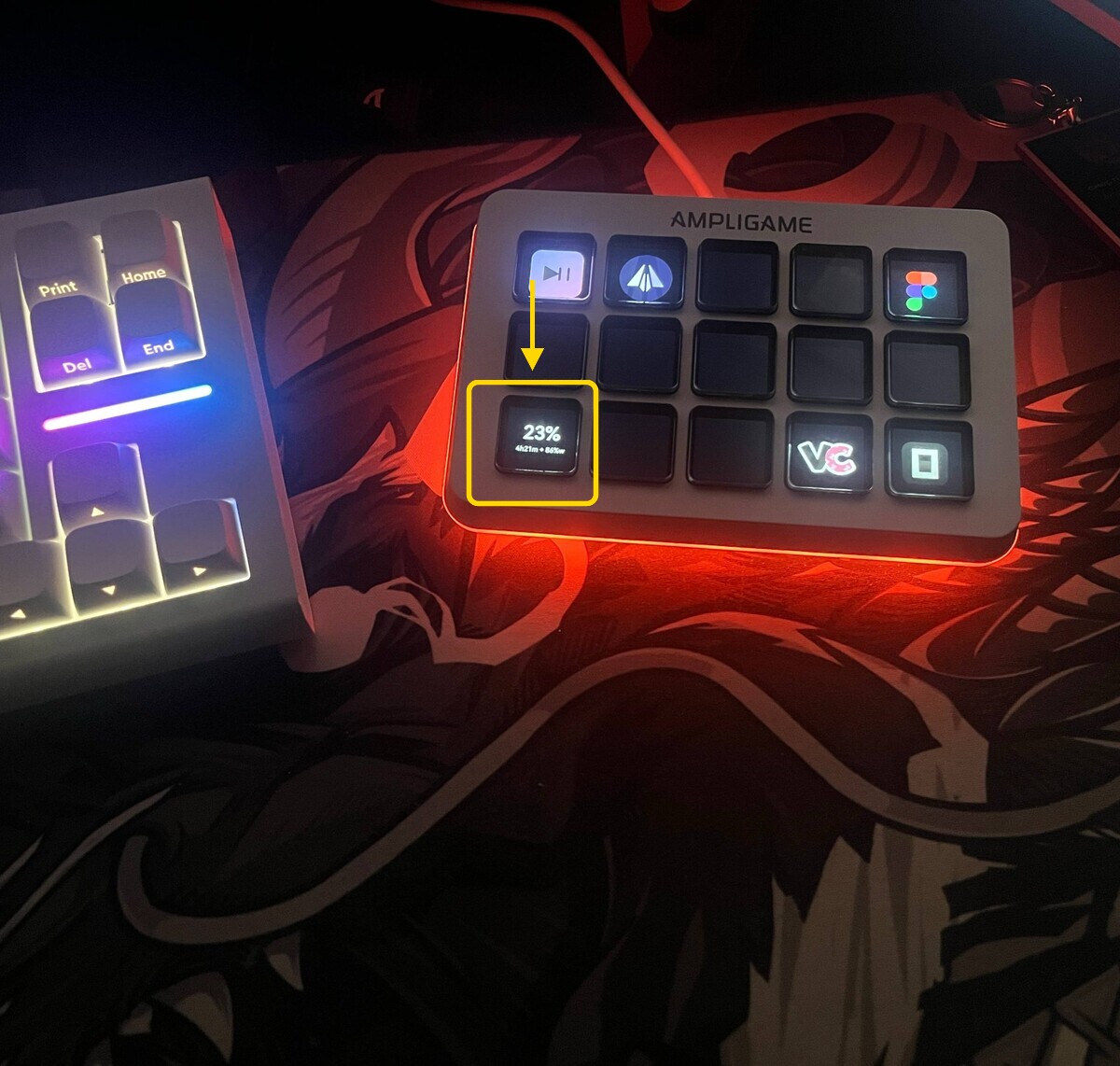
Requirements: Fifine D6 + StreamDock app running via Wine on Linux.
Setup: ai-gauge setup copies the plugin automatically. Open StreamDock → find AI Gauge in the action list → drag it onto a key.
The button connects to ai-gauge-server via WebSocket and updates in real time. If the server is not running, the button shows --.
How it works
ai-gauge-server runs as a background daemon (systemd on Linux, launchd on macOS) and polls the relevant provider's usage API every 60 seconds:
- Claude Code / OpenCode (Anthropic OAuth) →
https://api.anthropic.com/api/oauth/usage - OpenAI Codex →
https://chatgpt.com/backend-api/wham/usage(with JSONL fallback to~/.codex/sessions/) - OpenCode tri-mode → all available endpoints fetched in parallel; broadcast carries a top-level
secondaryfield for Codex/OpenAI and a top-levelcopilotfield for GitHub Copilot, when those OAuth blocks are present in the OpenCode auth file - GitHub Copilot →
https://api.github.com/copilot_internal/v2/token(authenticated viagh auth tokenshell-out → fallback to~/.config/gh/hosts.yml→ fallback to~/.config/ai-gauge/copilot-token) - Custom
claude-settings:*providers → whateverANTHROPIC_BASE_URLyou configure (Z.ai, MiniMax, OpenRouter, Komilion, Packy)
Results are broadcast to all connected WebSocket clients on ws://localhost:19876.
On Linux, ai-gauge-waybar is a thin WebSocket client that renders each update as waybar-compatible JSON. On disconnect it shows a waiting state and reconnects automatically.
On macOS, bin/ai-gauge-menubar is a native Swift app using MenuBarExtra. It connects to the same WebSocket server and shows usage in the system menu bar.
The server writes usage.json atomically to $XDG_RUNTIME_DIR/ai-gauge/ on Linux or $TMPDIR/ai-gauge/ on macOS, so other tools can read it too.
Files
| File | Purpose |
|---|---|
bin/ai-gauge |
Main CLI — setup, uninstall, status |
bin/ai-gauge-server |
WebSocket server — fetches Anthropic API, broadcasts to clients (port 19876) |
bin/ai-gauge-waybar |
Thin WS client — renders waybar JSON from server data (Linux) |
bin/ai-gauge-menubar |
Native Swift menubar app binary — universal arm64+x86_64 (macOS) |
bin/ai-gauge-menu |
Click menu — refresh, copy, settings |
bin/ai-gauge-config |
Settings CLI/UI — token source, plan name |
lib/ai-gauge-server.service |
systemd user service unit template (Linux) |
lib/ai-gauge-server.plist.template |
launchd LaunchAgent plist template (macOS) |
lib/ai-gauge-menubar.plist.template |
launchd plist for the menubar app (macOS) |
bin/AIGauge.app/ |
Pre-built macOS app bundle (universal arm64+x86_64, ad-hoc signed) |
macos/AIGauge/ |
Swift source for the native menubar app (SPM project) |
scripts/build-macos-binary.sh |
Reproducible build: swift build + lipo + codesign --deep + bundle wrap |
scripts/generate-icon.sh + generate-icon.swift |
Procedural app icon renderer (Swift Core Graphics → .icns) |
lib/notify.js |
Cross-platform notification helper (notify-send on Linux, no-op on macOS) |
lib/bash-helpers.sh |
Portable is_macos, resolve_path, sed_inplace for bash scripts |
lib/streamdock-plugin/ |
StreamDock (Fifine D6) button plugin |
Both setup and uninstall are idempotent.
Community & Feedback
ai-gauge is early — first users still arriving. Feedback at any level helps:
- Questions, install issues, "how do I do X" → Discussions / Q&A
- Feature ideas, brainstorming → Discussions / Ideas
- Confirmed bugs with repro steps → Open an Issue
- Request a new AI provider (DeepSeek, Groq, Gemini, Cursor, etc.) → Provider Request
- Show off your setup → Discussions / Show and tell
Read the welcome post for the full triage map.