
0.0.2 • Published 3d ago
aty-editor-vue3
Licence
MIT
Version
0.0.2
Deps
3
Size
6.9 MB
Vulns
0
Weekly
0
vue3-tiptap-editor
vue3-tiptap-editor是基于最新tiptap框架开发的vue3富文本组件,非法内容过滤以及防止XSS攻击、插入图片、插入表格等功能。
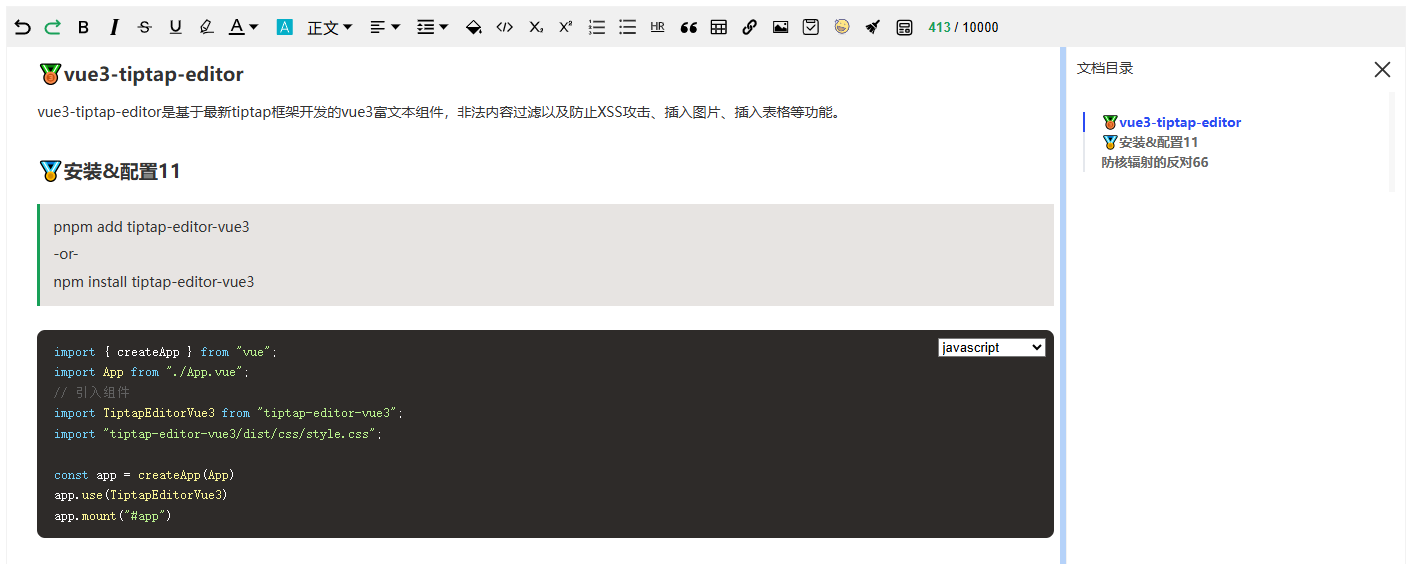
更新日志
- 2026.02.04 支持批量拖拽和粘贴图片到编辑器,优化图片上传逻辑
- 2026.02.04 优化打包逻辑,样式优化,避免被宿主项目覆盖
- 2026.02.02 新增图片裁剪功能,原图片大小裁剪,不压缩
- 2026.02.02 修复多图片tiptap图片菜单问题,使用popover替换
说明
- 遇到问题可以到GitHub issues反馈
- 更多定制化开发或者扩展功能,联系作者:qq群(994723302)@管理员
功能清单
- 撤回/重做"
- 清空文档
- 加粗
- 斜体
- 字体背景色和字体颜色
- 下划线
- 删除线
- 代码背景块和代码块
- 引用
- 上标和下标
- 链接
- 有序列表
- 无序列表
- 水平分割线
- 标题
- 段落间距
- 任务列表
- 插入图片
- 插入表格,表格列和行操作
- 表情
- 目录
- 行拖拽 ....待开发更多功能....
安装
pnpm add tiptap-editor-vue3
-or-
yarn add tiptap-editor-vue3
-or-
npm install tiptap-editor-vue3
配置说明
import { createApp } from "vue";
import App from "./App.vue";
import router from "./router";
// 引入组件
import TiptapEditorVue3 from "tiptap-editor-vue3";
import "tiptap-editor-vue3/dist/css/style.css";

const app = createApp(App)
app.use(TiptapEditorVue3)
app.use(router)

app.mount("#app")
使用组件
<template>
    <div class="app_wrapper">
        <section class="cus-header">
            <h2 class="h2" style="margin-right: 0.2em;">TiptapEditorVue3</h2>
            <a href="https://github.com/qiunanya/vue3-major-editor.git" target="_blank">
                <svg height="32" aria-hidden="true" viewBox="0 0 16 16" version="1.1" width="32" data-view-component="true" class="octicon octicon-mark-github v-align-middle color-fg-default">
                    <path d="M8 0c4.42 0 8 3.58 8 8a8.013 8.013 0 0 1-5.45 7.59c-.4.08-.55-.17-.55-.38 0-.27.01-1.13.01-2.2 0-.75-.25-1.23-.54-1.48 1.78-.2 3.65-.88 3.65-3.95 0-.88-.31-1.59-.82-2.15.08-.2.36-1.02-.08-2.12 0 0-.67-.22-2.2.82-.64-.18-1.32-.27-2-.27-.68 0-1.36.09-2 .27-1.53-1.03-2.2-.82-2.2-.82-.44 1.1-.16 1.92-.08 2.12-.51.56-.82 1.28-.82 2.15 0 3.06 1.86 3.75 3.64 3.95-.23.2-.44.55-.51 1.07-.46.21-1.61.55-2.33-.66-.15-.24-.6-.83-1.23-.82-.67.01-.27.38.01.53.34.19.73.9.82 1.13.16.45.68 1.31 2.69.94 0 .67.01 1.3.01 1.49 0 .21-.15.45-.55.38A7.995 7.995 0 0 1 0 8c0-4.42 3.58-8 8-8Z"></path>
                </svg>
            </a>
            <button style="margin: 0 10px;" @click="getHtml">获取HTML</button>
            <button style="margin-right:10px;" @click="getJson">获取Json</button>
            <button style="margin-right:10px;" @click="getText">获取Text</button>
            <button style="margin-right:10px;" @click="previews">预览</button>
            <button style="margin-right:10px;" @click="clearText">清空文档</button>
            <button style="margin-right:10px;" @click="setCustomString">自定义字符串</button>
            <button style="margin-right:10px;" @click="router.go(-1)">返回</button>
        </section>
        <!-- v-model:content="htmlContent" -->
        <TiptapEditorVue3
            ref="vue3TiptapEditorRef"
            v-model:content="htmlContent"
            :isEditable="true"
            :extensions="[]"
            :editorWrapperClass="'vue3-tiptap-editor-wrapper'"
            :defaultConfig="defaultConfig"
            @onCreated="onCreated"
            @onUpdate="onUpdate">
        </TiptapEditorVue3>

        <n-drawer v-model:show="isVisible" :width="502" placement="right">
            <n-drawer-content title="预览" closable>
                <div v-html="previewContent"></div>
            </n-drawer-content>
        </n-drawer>
    </div>
</template>

<script setup lang="ts">
    import { ref } from "vue";
    import { NDrawerContent, NDrawer } from "naive-ui";
    import { AnyExtension, Editor, Bold, Italic } from "tiptap-editor-vue3"
    import { useRouter } from 'vue-router'

    const router = useRouter();
    const isVisible = ref(false)
    const previewContent = ref('')
    // 自定义工具栏,不需要可以不用传递参数即可显示全部工具栏
    const extensions = ref<AnyExtension[]>([Bold, Italic])
    const vue3TiptapEditorRef = ref<Vue3TiptapEditorOptions | null>(null)
    const htmlContent = ref(`
        <p>欢迎使用vue3-tiptap-editor编辑器 🎉</p>欢迎订阅交流,
        <a href="https://en.wikipedia.org/wiki/World_Wide_Web">world wide web</a>
        <a href="https://www.baidu.con">66666</a>`)

    // 编辑器实例,更多功能参考tiptap官方文档https://tiptap.dev/docs
    let editors: Editor;
    // 自定义图片上传,严格遵循下面配置规则,否则不生效
    const defaultConfig = {
        uploadImage: {
            // 图片连接
            imageLink: (link: string) => {
                console.log(link, editors, 'imageLink')
                editors.commands.setImage({ src: link })
            },
            // 自定义上传图片
            customUpload: (file: FileList) => {
                console.log(file, editors, 'customUpload')
                for (let i = 0; i < file.length; i++) {
                    if (file[i]) {
                        setImageOne(file[i])
                    }
                }
            }
        }
    }

    const setImageOne = (file: File) => {
        const reader = new FileReader();
        reader.onload = (event) => {
            const base64 = event.target?.result as string;
            editors.commands.setImage({ src: base64 })
        }
        reader.readAsDataURL(file)
    }
    const onCreated = (editor: Editor) => {
        editors = editor
    }
    const onUpdate = (editor: Editor) => {
        console.log(editor, 'update')
    }

    function getHtml() {
        if (editors) {
            console.log('HTML:',editors.getHTML());
        }
    }
    function getJson() {
        if (editors) {
            console.log('JSON:',editors.getJSON());
        }
    }
    function getText() {
        if (editors) {
            console.log('TEXT:',editors.getText());
        }
    }
    function previews() {
        if (!editors) return
        previewContent.value = editors.getHTML()
        isVisible.value = !isVisible.value
    }
    const clearText = () => {
        if (editors) {
            editors.commands.clearContent()
        }
    }
    const setCustomString = () => {
        if (editors) {
            editors.commands.insertContent('${setCustomString}')
        }
    }
</script>
<style lang="scss">
.n-dialog.n-modal {
    width: 600px;
}
.app_wrapper {
    padding:15px;
    margin: 0;
    height: 100vh;
    box-sizing: border-box;
    .h2 {
        margin: 5px 0;
        color: #646cff;
    }
    .cus-header {
        display: flex;
        align-items: center;
    }
}
// 调整文本编辑器高度,important表示优先级最高
.vue3-tiptap-editor-wrapper {
    height: calc(100vh - 99px) !important;
}
</style>
组件传递参数
| 参数 | 类型 | 描述 | 默认值 |
|---|---|---|---|
| isEditable | Boolean | 启用编辑器 | true |
| isEnabledContent | Boolean | 是否启用文档目录 | true |
| isShowToolbar | Boolean | 启用工具栏 | true |
| characterCount | Number | 字数提示 | 10000 |
| extensions | AnyExtension[] | 自定义工具栏,比如加粗,倾斜等到 | [] |
| placeholder | String | 输入提示文本 | 请输入内容... |
| editorWrapperClass | String, Array, Object | 编辑器自定义class名 | "" |
| editorToolkitClass | String, Array, Object | 工具栏自定义class名 | "" |
| editorContentClass | String | 编辑器内容自定义class名 | "" |
| editorContentsNavClass | String, Array, Object | 编辑器内容导航自定义c | "" |
工具栏清单
- History 撤回/重做
- Bold 加粗
- Italic 倾斜
- Strike 删除线
- Underline 下划线
- Highlight 高亮
- Color 颜色
- BackgroundColor 背景颜色
- Heading 标题
- TextAlign 对齐方式
- LineHeight 行高
- Code 代码背景
- CodeBlockLowlight 代码块
- Subscript 上标
- Superscript 下标
- OrderedList 有序列表
- BulletList 无序列表
- HorizontalRule 水平线
- Blockquote 引用
- Table 表格
- Link 链接
- Image 图片
- TaskItem 任务列表
- Clear 清空文档内容
- Emojis 表情