axios-cache-data v1.20.3-beta-4
axios-cache-data
(https://badgen.
net/badge/axios/^1.2.2/green?icon=github)
axios官方文档在这 axiosTip:被缓存后所有的响应信息都是初次请求状态,服务器删除该数据或者修改该数据都不会有感知 ,可以设置缓存时间
Tip:代理 axios 对象 实现缓存 Tip: 取消 axios adapter 的实现方式
1. 创建缓存实例
import { http } from "lib/index";

const axiosInstance = http.proxy(/*你的axios对象*/,/*配置*/)/*返回一个被代理axios的实例*/
const axiosInstance = http(/*全局配置*/)/*返回一个被代理axios的实例*/
//...
2. 强制更新或使用缓存
import { http } from "lib/index";

const axiosInstance = http.proxy(/*你的axios对象*/,/*配置*/)/*返回一个被代理axios的实例*/
const axiosInstance = http(/*全局配置*/)/*返回一个被代理axios的实例*/
axiosInstance.post(url, {}, { force: true }); //缓存会失效 并且删除缓存 重新走网络请求
axiosInstance.post(url, {}, { hit: true }); //在没有全局开启缓存这个会开启缓存
axiosInstance.clear()//
// 或使用
const instance = axios.withCache(options); //使用代理对象时会代理clear属性
instance.clear();
2.1. 序列化数据
import axios    from "axios";
import { http } from "lib/index";

http({
	     message: {
		     /*配置自己的序列化反序列化 注: 两个都要同时实现,保持 序列化和反序列化的一致性*/
	     }
     });
3. 参数说明
export interface CacheInstance extends AxiosRequestConfig {
	/**
	 * @default 1000*60*60
	 */
	readonly maxAge?: number;
	readonly key?: string;
	//存储缓存 {window.sessionStorage| localStorage | 自实现的Storage}

	readonly storage?: Storage;

	readonly proxy?: Method[];

	readonly enableCache?: boolean;

	/**
	 * 公共的key前缀 生成key需要获取到 因为可以根据prefix删除和网络请求有关的请求
	 */
	readonly prefix?: string;

	/**
	 * 消息转换
	 * 可以在里面配置 敏感信息加密
	 */
	readonly message?: {
		serialization: Serialization; deserialization: Deserialization;
	};

	/**
	 * 验证返回值是否合法 排除错误信息 被保存到了缓存里,导致脏数据
	 * @param {AxiosResponse} response
	 * @return {boolean}
	 */
	valid?(response: AxiosResponse): boolean;

	// 生成一次请求唯一次的key 需要保持一个请求在一个请求参数下保持唯一
	generateKey?(key: string | undefined, url: string | undefined, method: any, header: any, params: string,
	             data: string): string;
}

axiosInstance.get(url, {
	hit: true,//开启缓存
	force: true, //强制更新 优先级高于hit
	expire: number, //设置缓存时间 优先级高于 base maxAge
	valid(res): boolean
	...
})
3.1. 创建适配器的公共参数
| 参数 | 介绍 | 默认值 |
|---|---|---|
| maxAge | 缓存最大时间 | 1000 60 60 (单位毫秒) |
| key | 生成 key 标识 | HTTP_CACHE_CACHE |
| storage | 缓存组件 | window.sessionStorage |
| prefix | 网络缓 key 存前缀 | AXIOS-CACHE |
| enableCache | 开启全局缓存 | false |
| generateKey | 生成一个请求唯一标识 key | |
| message | 消息序列化和反序列化 | |
| valid | 验证消息是否正确防止消息错误却被缓存 | |
| proxy | 指定缓存方法request get post delete... | "get","post" |
3.2. 每一个请求缓存参数
| hit | 是否需要命中缓存(优先级高于全局配置) |
|---|---|
| force | 强制走网络请求,并刷新缓存(如果开启了缓存的) |
| expire | 过期时间 |
| valid | 验证消息是否正确防止消息错误却被缓存 |
hit false 全局开启缓存也不会命中缓存
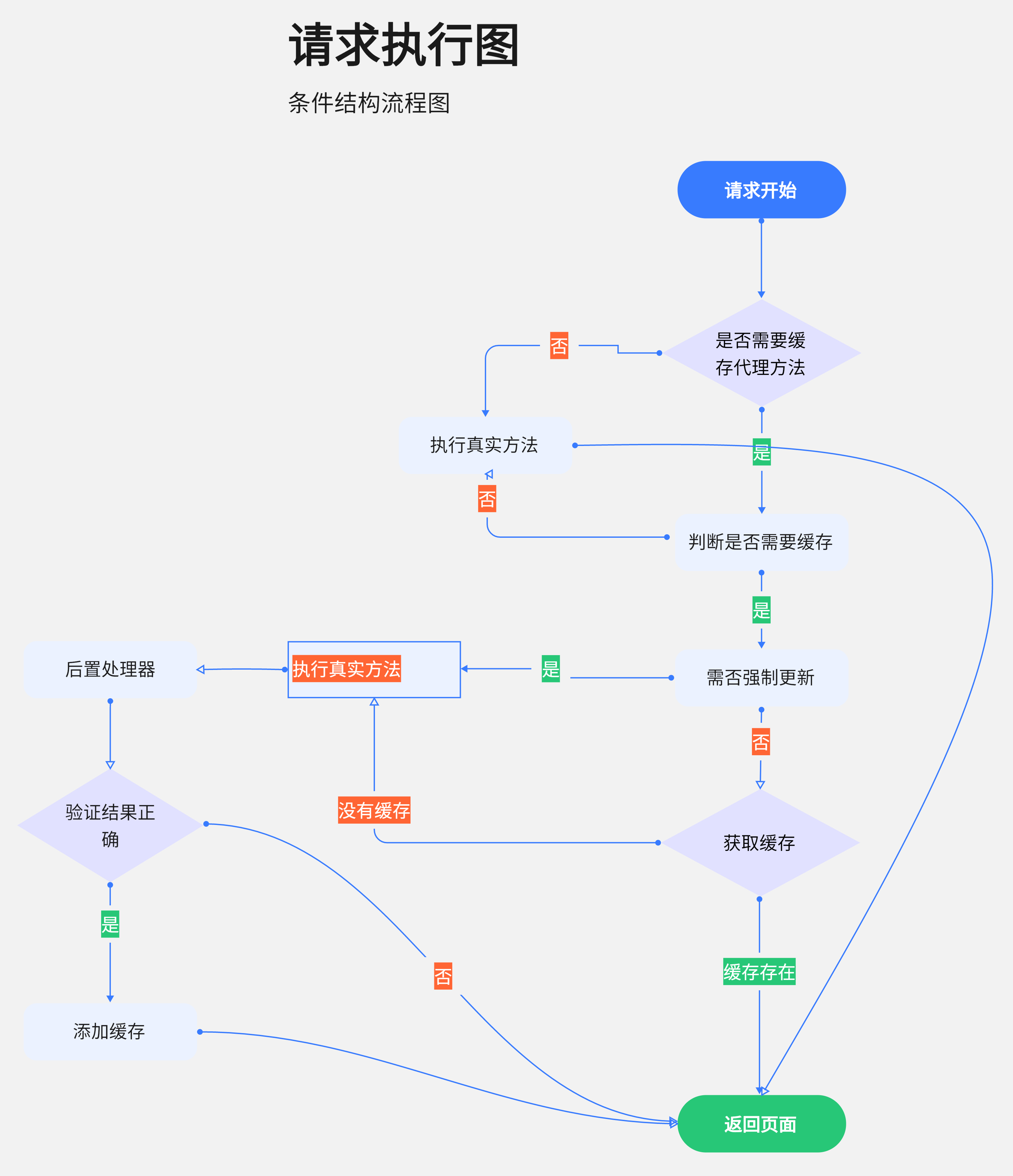
4. 执行流程图
3 years ago
3 years ago
3 years ago
3 years ago
3 years ago
3 years ago
3 years ago
3 years ago
3 years ago
3 years ago
3 years ago
3 years ago
3 years ago
3 years ago
3 years ago
3 years ago
3 years ago
3 years ago
3 years ago
3 years ago
3 years ago
3 years ago
3 years ago
3 years ago
3 years ago
3 years ago
3 years ago
3 years ago
3 years ago
4 years ago
4 years ago
4 years ago
4 years ago
4 years ago
4 years ago
4 years ago
4 years ago
4 years ago
4 years ago
4 years ago
4 years ago
4 years ago
4 years ago
4 years ago
4 years ago
4 years ago
4 years ago
4 years ago
4 years ago
4 years ago
4 years ago
4 years ago
4 years ago