
BEignite
BEignite is a CLI tool to generate boilerplate code for backend applications using Node.js, Express, and MongoDB.
Features
- Quickly scaffolds a backend project structure
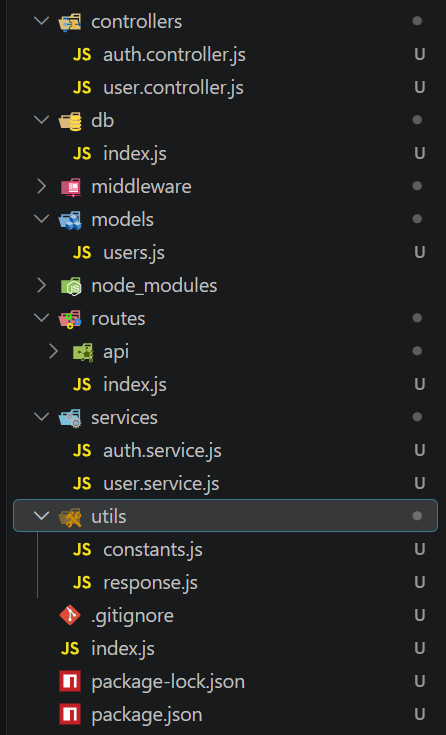
- Generates controllers, models, routes, middleware, services, and utility files
- Sets up MongoDB connection and JWT authentication
- Includes ready-to-use user authentication and CRUD endpoints
Getting Started
1. Create a New Project
Run the following command in your terminal:
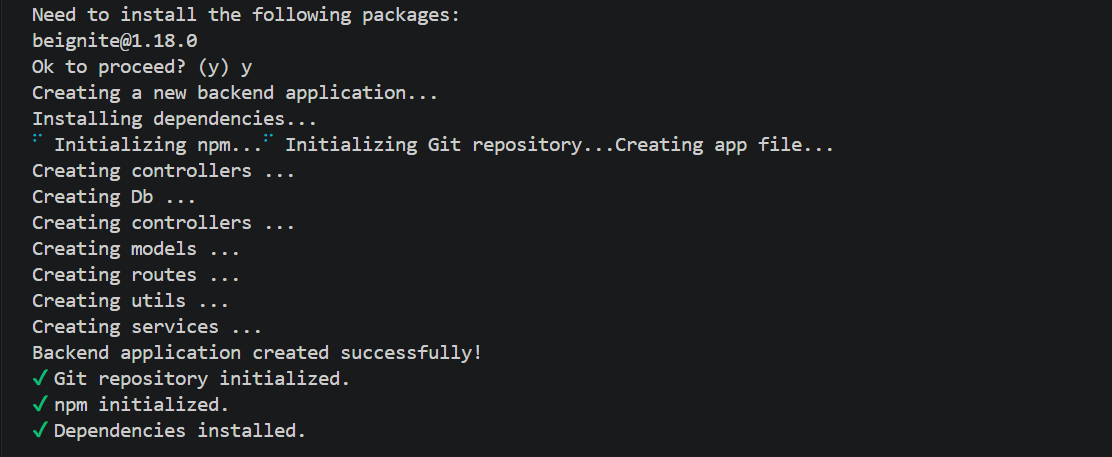
npx beignite boot-be-appThis will generate the project structure and install all necessary dependencies.
2. Configure Environment Variables
Create a .env file in your project root (or copy from .env.example) and set the following variables:
JWT_SECRET=your_jwt_secret
PORT=3000
DB_NAME=your_db_name
DB_URL=db_connection_url (use if you want to connect to MongoDB Atlas or a direct MongoDB URL)
Note: Fall-back values have been added for these environment variables. Setting them in your
.envfile is recommended, but not compulsory—the application will use default values if any are missing.
DB Connection Behavior
If
DB_URLis provided, the app will use it directly for the database connection.In that case, you can skip
DB_NAMEbecauseDB_URLtakes priority.If you want to use a local MongoDB connection through Mongoose, provide
DB_NAMEand the app will build the local connection string using that value.This means:
DB_URL→ direct connection, usually for MongoDB Atlas or any custom remote/local URIDB_NAME→ local Mongoose connection setup
controllers/models/routes/middleware/services/utils/db/index.js(entry point)
4. Run Your Application
node index.jsYour server will start on the port specified in your .env file (or the default if not set).
Screenshots
Below are a few screenshots from the project assets showing the CLI workflow and generated output:

License
This project is licensed under the MIT License.