

bundlesize - version 2 preview

Jump to:
Setup
npm install bundlesize2 --save-dev

# or

yarn add bundlesize2 --dev
Usage
Add it to your scripts in package.json
"scripts": {
  "test": "bundlesize"
}
Or you can use it with npx from NPM 5.2+.
npx bundlesize2
Configuration
- Option 1: Create a
bundlesize.config.json(recommended)
Format:
{
  "files": [
    {
      "path": "./build/vendor.js",
      "maxSize": "30 kB"
    },
    {
      "path": "./build/chunk-*.js",
      "maxSize": "10 kB"
    }
  ]
}
The file is expected to be at the project root. But, you can give a different path by using the --config flag:
bundlesize --config configs/bundlesize.jsonOption 2: You can also put the config in package.json
{
  "name": "your cool library",
  "version": "1.1.2",
  "bundlesize": [
    {
      "path": "./build/vendor.js",
      "maxSize": "3 kB"
    }
  ]
}
Notice that the key here is bundlesize instead of files.
Customisation
Fuzzy matching
If the names of your build files are not predictable, you can use the glob pattern to specify files.
This is common if you append a hash to the name.
{
  "files": [
    {
      "path": "build/**/main-*.js",
      "maxSize": "5 kB"
    },
    {
      "path": "build/**/*.chunk.js",
      "maxSize": "50 kB"
    }
  ]
}
It will match multiple files if necessary and create a new row for each file.
Compression options
By default, bundlesize
gzipsyour build files before comparing.If you are using
brotliinstead of gzip, you can specify that with each file:{ "files": [ { "path": "./build/vendor.js", "maxSize": "5 kB", "compression": "brotli" } ] }If you do not use any compression before sending your files to the client, you can switch compression off:
{
  "files": [
    {
      "path": "./build/vendor.js",
      "maxSize": "5 kB",
      "compression": "none"
    }
  ]
}
Build status and Checks for GitHub
If your repository is hosted on GitHub, you can set bundlesize up to create a "check" on every pull request.
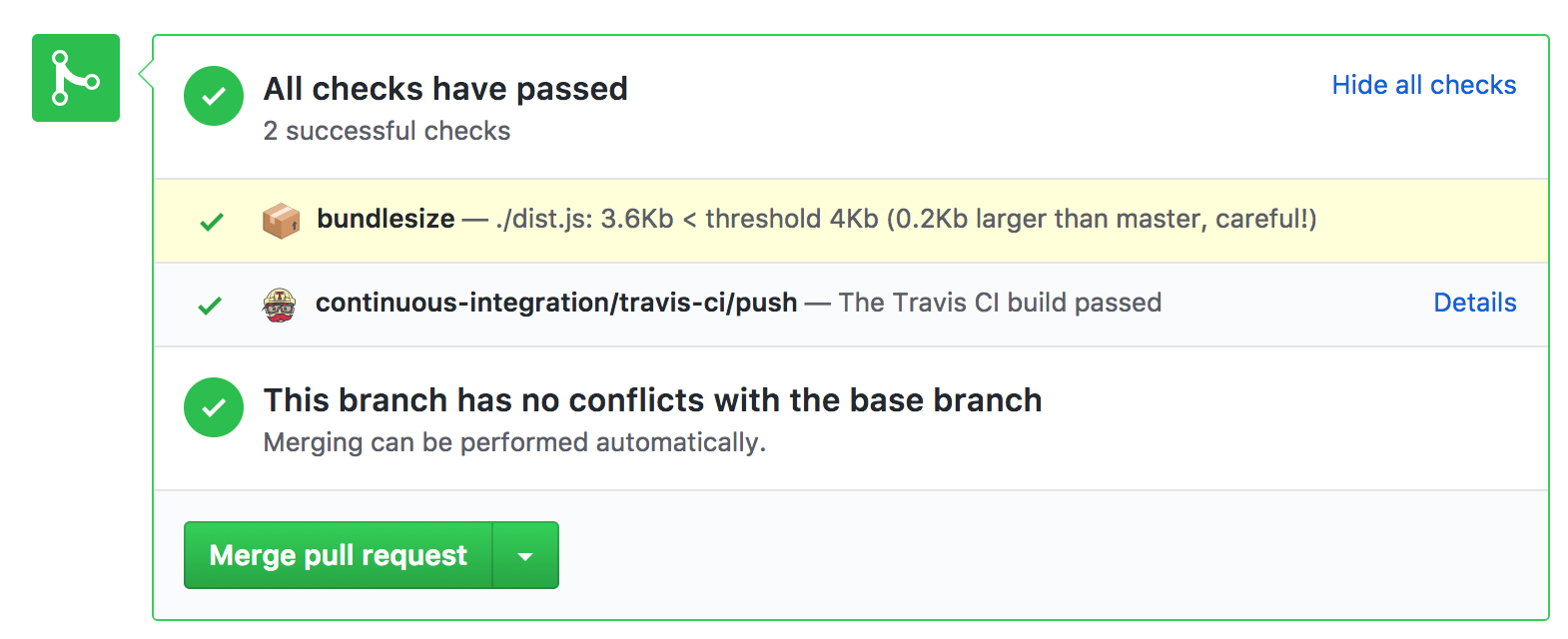
To enable checks,
- Run
bundlesizewith the flagbundlesize --enable-github-checks. - authorize
bundlesizeto add checks (Does not need access to your code)
Checks work with GitHub Actions, Travis CI, CircleCI, Wercker, and Drone.
Using a different CI? You will need to supply an additional 5 environment variables.
CI_REPO_OWNERgiven the repohttps://github.com/myusername/myrepowould bemyusernameCI_REPO_NAMEgiven the repohttps://github.com/myusername/myrepowould bemyrepoCI_COMMIT_MESSAGEthe commit messageCI_COMMIT_SHAthe SHA of the CI commit, in Jenkins you would use${env.GIT_COMMIT}CI=trueusually set automtically in CI enviroments
Migration from bundlesize@0.18.0
- Use the npm package
bundlesize2instead ofbundlesize - If you'd like status reported back to github, use the flag
--enable-github-checks+ authorize bundlesize2 app. More in the docs - Remove
BUNDLESIZE_GITHUB_TOKEN, it's not required anymore - If anything breaks, let me know :)
Note: When this package is feature complete, it will be merged back into the original project as bundlesize@2.0.0
license
MIT siddharthkp