
Claude Usage Tracker
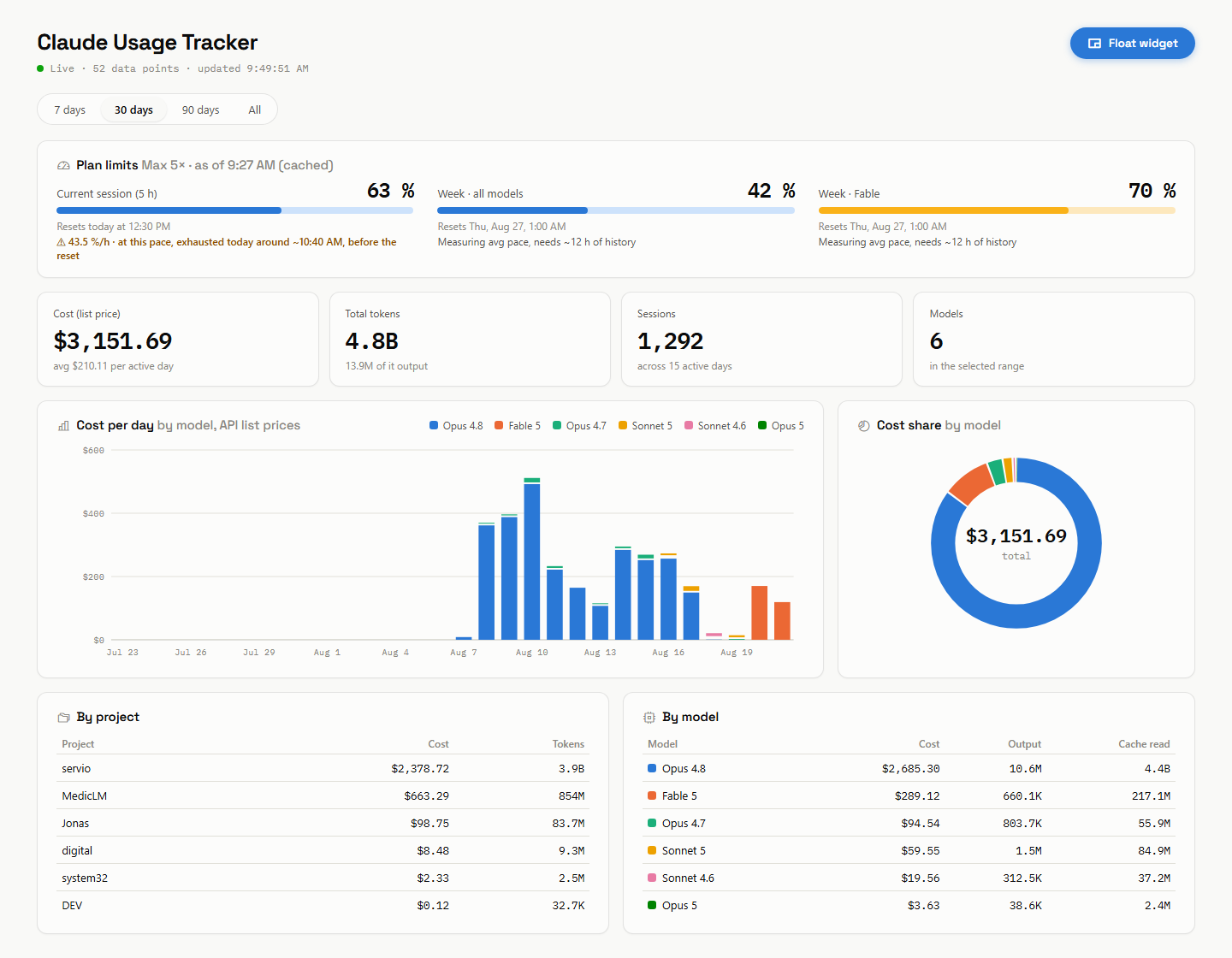
A local, zero-dependency dashboard for your Claude Code token usage, costs, and plan limits — with live updates, pace predictions, and a floating picture-in-picture widget.




Features
- Usage analytics — daily cost per model as a stacked bar chart, plus breakdowns by project and model, computed from your local Claude Code transcripts
- Live plan limits — session (5 h) and weekly limits with progress meters, fetched live from Anthropic's OAuth usage endpoint using the token Claude Code already maintains
- Pace predictions — burn rate per limit and an estimate of when it runs out. The session limit uses a short window ("at this pace, exhausted at ~09:50"), weekly limits use a 72-hour average including idle time, since bursts are capped by the session limit anyway
- Real-time updates — a file watcher on
~/.claude/projectspushes changes to the browser via Server-Sent Events; the chart ticks while your sessions run - Popout widget — a compact always-on-top mini window via the Document Picture-in-Picture API (Chromium). Grows responsively: wider windows reveal reset times and stat tiles
- CLI mode —
npm run clirenders the same limits, pace, and today's cost as a self-refreshing terminal widget - Light & dark — follows your system theme, with an accessible, CVD-safe chart palette
- Live pricing — model prices are fetched from the community-maintained LiteLLM price database (daily refresh, disk-cached), with a built-in table as fallback
- Zero runtime dependencies — TypeScript, run natively by Node.js (type stripping). No frameworks, no build step for the server, nothing phoning home
Install
npm install -g claude-code-usage-trackerThat gives you the claude-usage command:
claude-usage            # live terminal widget (limits, pace, today's cost)
claude-usage serve      # web dashboard in the foreground
claude-usage start      # web dashboard as a background daemon
claude-usage stop       # stop the daemon
claude-usage status     # is the daemon running?
Open http://localhost:3789 once the dashboard runs (PORT env var to change). State and logs live in ~/.claude-usage-tracker/.
Requirements: Node.js ≥ 20 and a machine where Claude Code has been used (transcripts in ~/.claude/projects).
From source
git clone https://github.com/jonax1337/claude-usage-tracker.git
cd claude-usage-tracker
npm start               # Node >= 23.6 (runs the .ts natively)
How it works
| Data | Source |
|---|---|
| Tokens & costs | ~/.claude/projects/**/*.jsonl — Claude Code's session transcripts. Each assistant message carries a usage block (input, output, cache read/write tokens). Costs are computed at public API list prices, so they are informative even on a subscription plan. |
| Plan limits | https://api.anthropic.com/api/oauth/usage, authenticated with the OAuth token Claude Code stores in ~/.claude/.credentials.json. Falls back to Claude Code's own cache in ~/.claude.json if the live fetch fails. |
| Pace history | Sampled every 5 minutes and persisted to pace-history.json (gitignored) so predictions survive restarts. |
| Model pricing | LiteLLM price database, refreshed daily and cached to pricing-cache.json (gitignored). Falls back to a built-in table when offline. |
The server parses transcripts with per-file mtime caching and deduplicates streaming entries by message ID, so reloads stay fast even with large histories.
CLI mode
A live terminal widget that keeps re-rendering in place — plan limits with colored meters, pace predictions, and today's cost:
claude-usage # (or npm run cli from a checkout)Claude Usage Tracker Max 5× · ● live 7:33:06 PM
Session (5 h) █████████████░░░░░░░░░░░ 55% resets ~10:49 PM
34.0 %/h · exhausted ~8:52 PM, before reset
Week · all ██████████████░░░░░░░░░░ 59% resets Thu ~12:59 AM
Week · Fable █████████████████████░░░ 86% resets Thu ~12:59 AM
Today $185.77 list price · 154.7M tokens
refreshes every 30 s · Ctrl+C to quitWeb dashboard and CLI share the same data layer (lib.ts), including the pace history — run either or both.
Popout widget
Click Popout in the header to get a floating mini window (Chromium's Document Picture-in-Picture — stays on top of everything). Firefox and others get a small regular window instead. You can also open http://localhost:3789/?widget=1 directly.
Configuration
| Env var | Default | Description |
|---|---|---|
PORT |
3789 |
HTTP port |
Development
npm install          # TypeScript tooling (dev-only)
npm run build        # compile src/app.ts → public/app.js
npm run check        # typecheck server + frontend (strict mode)
server.ts runs natively via Node's type stripping — no bundler, no transpile step. The frontend source lives in src/app.ts; the compiled public/app.js is committed so a clone runs without building.
Privacy
Everything runs locally. The only outbound request is the limits call to Anthropic's own API, using credentials already on your machine. No telemetry, no third-party services.
Disclaimer
Cost figures are computed API list prices, not what you are billed — on Pro/Max subscriptions they serve as a consumption indicator. Predictions are linear extrapolations and intentionally approximate. This is an unofficial community tool, not affiliated with Anthropic.