
ClipJoin
Merge your videos into one file: fast, lossless, and right from your terminal.
The best, easiest way to merge your clips. No editor, no re-encoding, no fuss.



Back from a trip with a memory card full of GoPro clips? Select them, stitch them into one file, and upload the whole adventure to YouTube in one shot, public or unlisted, your call.
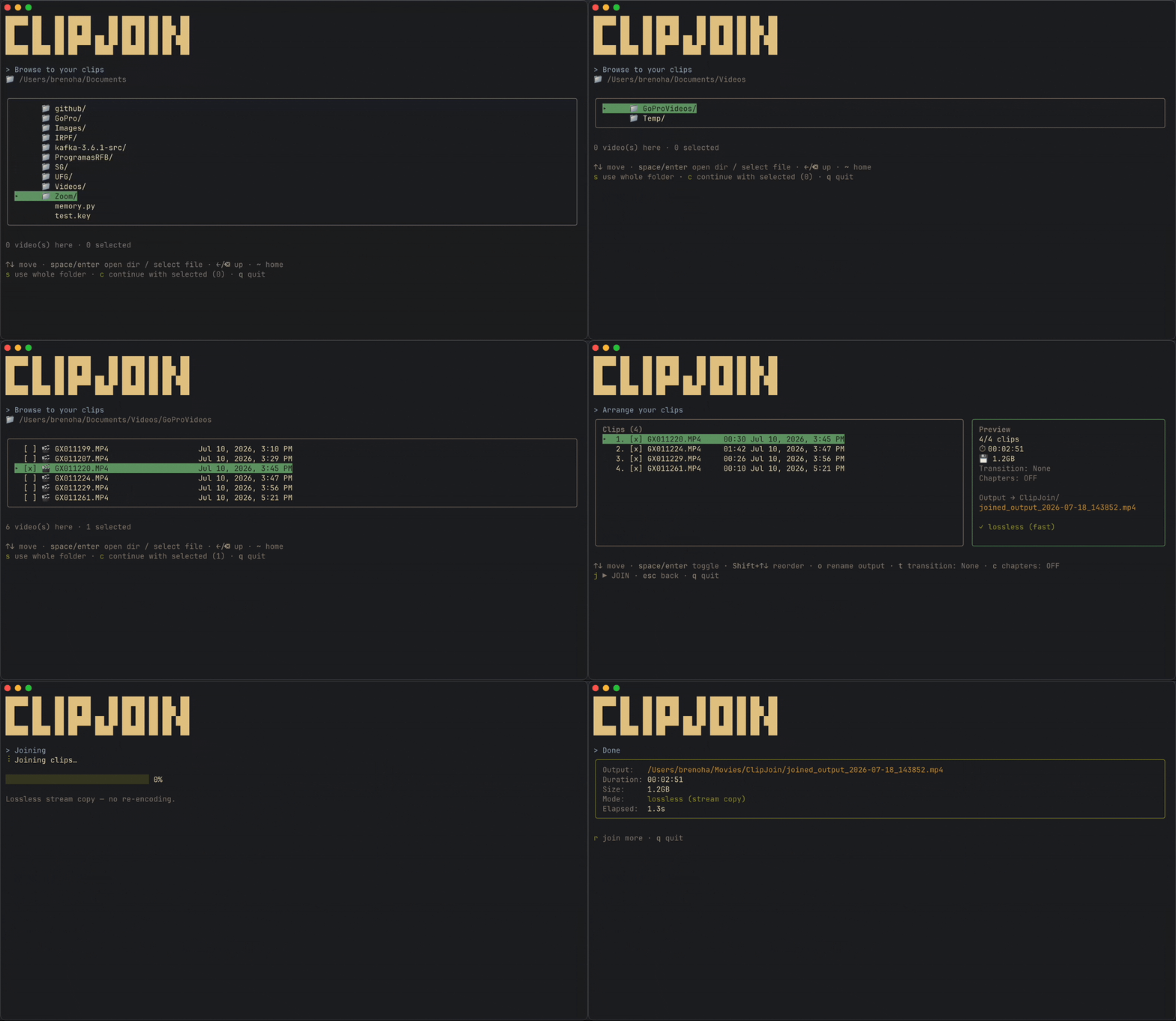
Run ClipJoin, pick the files you want, reorder them, and hit join. Simple as that.
Matching clips merge losslessly in seconds, with no re-encoding and no quality loss (40×1GB in seconds, not hours). Different formats? ClipJoin re-encodes them for you. No flags, no config, just a clean keyboard-driven flow from folder to finished file.
Install
Install once with npm:
npm install -g clip-joinClipJoin uses ffmpeg on your
PATH. Install it before runningclipjoinfollow the steps bellow if you don't have it installed yet.
Then run it from any folder:
clipjoin # launch anywhere (clip-join works too, same command)Just trying it out? Run it once, no install:
npx clip-joinffmpeg (required)
ClipJoin uses ffmpeg (which bundles ffprobe). Install it with your package manager:
brew install ffmpeg        # macOS
sudo apt install ffmpeg    # Debian / Ubuntu
winget install ffmpeg      # Windows  (or: choco install ffmpeg / scoop install ffmpeg)
Optional: one-line installer
Prefer a single command that also checks Node + ffmpeg for you and fixes your PATH?
curl -fsSL https://raw.githubusercontent.com/BrenoHA/clip-join/main/install.sh | bashIt just wraps npm install -g clip-join with a few pre-flight checks.
Where your videos are saved
Every joined file lands in a fixed ClipJoin folder in your home, so it's always in the
same predictable place no matter which directory you run clipjoin from:
- macOS →
~/Movies/ClipJoin - Linux / Windows →
~/Videos/ClipJoin
Files get a timestamped default name (joined_output_YYYY-MM-DD_HHMMSS.mp4), so repeated
joins never overwrite one another. Send the output somewhere else for a run with --out:
clipjoin --out ~/Desktop         # write joined videos to ~/Desktop instead
clipjoin ~/clips --out ~/Desktop # start in ~/clips, save to ~/Desktop
How it works
- A short clips-merging animation plays on launch while ClipJoin checks for ffmpeg.
- Browse the filesystem to a folder of clips (or select individual files).
- Each clip's embedded
creation_time(falling back to file mtime) sets the true capture order, which you can then reorder by hand. - Toggle clips in/out and rename the output, watching the live preview (clip count, total duration, size, lossless-vs-re-encode).
- On join, ClipJoin first tries a lossless concat (
ffmpeg -c copy), which keeps full quality and works when clips share a codec/resolution. If that fails (e.g. mixed formats or codecs) it re-encodes automatically (H.264/AAC, slower but always works).
Optionally, add a crossfade transition between clips (press t on the arrange screen).
It's off by default; enabling it re-encodes the output (transitions can't be done losslessly).
Usage
Everything is keyboard-driven.
clipjoin                 # launch and browse from the current folder
clipjoin ~/clips         # jump straight into a folder
clipjoin --out ~/Desktop # change where joined files are saved
clipjoin --version       # print the installed version (alias: -v)
No need to memorize anything, every available shortcut is shown right on the terminal as you go, so you always know your options at each step.
Building from source
git clone https://github.com/BrenoHA/clip-join.git
cd clip-join
npm install
npm run build            # then: npm start
npm run dev              # or run straight from source (via tsx), no build step
Requires Node.js 18+ and ffmpeg on your PATH.
Project structure
The interface is built with Ink (React for the terminal), the same UI framework behind Claude Code, with the video engine kept cleanly separate from it:
src/
  index.tsx            # CLI entry (bin: clipjoin / clip-join)
  config.ts            # extensions, output dir, default name, encode settings
  core/                # domain logic, no UI, unit-testable
    videos · probe · join · output · format · types
  ui/                  # Ink presentation layer
    App.tsx            # phase router (splash → browse → edit → join → summary)
    theme.ts
    screens/           # SplashScreen, BrowseScreen, EditScreen, JoinScreen, SummaryScreen
    components/        # Banner, Header, PreviewPanel, ProgressBar, KeyHints
    hooks/             # useFullscreen
core/ never imports Ink, so the engine can be exercised without a terminal.
Testing
Unit tests cover core functionality and can be run without ffmpeg installed:
npm test                # run all unit tests
npm test -- --watch     # run tests in watch mode during development
npm run test:ui         # open test UI in browser
Tests use Vitest and cover formatting utilities, video sorting,
codec detection, and join logic. See src/core/*.test.ts for examples.
Roadmap
- Per-clip trimming (in/out points).
- Audio normalization.
Mixed file types / codecs already work today via the automatic re-encode fallback.
Contributing
Contributions are welcome. See CONTRIBUTING.md for setup, coding conventions, and the PR process.
Notes
- A successful lossless stream copy doesn't guarantee every player handles a file with slightly different per-clip encoding perfectly. If playback looks off, the clips likely need re-encoding (ClipJoin falls back automatically when stream copy fails).
- Original files are never modified or deleted.
- Output names are always confined to the output folder (a path typed into the rename
field is reduced to its basename); use
--out <dir>to change the folder itself.
License
MIT BrenoHA