
ctxfold
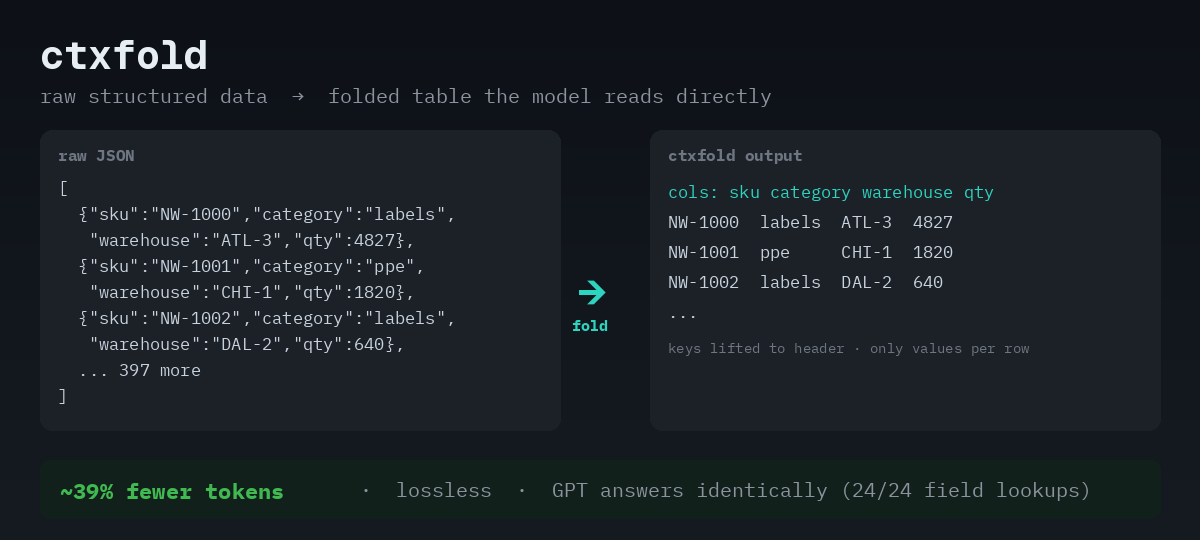
Reduce LLM prompt tokens on structured data — losslessly.
Logs, JSON, and CSV are the bulkiest, most repetitive things we put into prompts. ctxfold folds their repeated structure into a compact, readable table the model reads directly — cutting tokens without dropping a byte.
How: the same keys, prefixes, and templates repeat on every row, so ctxfold lifts them into a one-time header and keeps only what varies.
Why it matters: an LLM doesn't need the repeated structure — it needs the information inside it. Strip the repetition, keep the data, and the model answers exactly as it would from the raw input.
Lossless or no-op. Never lossy. Every encoder ships with a decoder, and
compress()verifies that decoding its output reproduces the input before returning it. If it can't, you get your original text back, untouched.
The contract
ctxfold operates on repeated records. If your data can be viewed as rows with shared structure, ctxfold folds it. If it can't, ctxfold intentionally does nothing — it never guesses, and never drops data.
It's a data contract, not a prompt trick: either the model receives an
equivalent representation, or the pipeline declines the optimization. The schema
is derived from the data at encode time and the round-trip self-check verifies
they agree, so the header can't silently drift from the rows. validate(payload)
re-checks that consistency on any folded payload (catches a dropped cell, a
truncated rows section, an out-of-range code) — note it confirms a payload is
sound and decodable, not that it matches an original it never saw.
It isn't a replacement for semantic compression — it's the other half. Summarize to extract a subset; ctxfold to shrink repetition without losing anything. It shines on structured data, not prose.
Benchmarks
Measured with gpt-4o-mini and the GPT tokenizer. "Exact match" = field-level
lookups scored against ground truth (folded vs. raw, same questions). The CSV
result was confirmed on gpt-4o as well (0/24 on mini).
| Dataset | Metric | Raw | Folded | Result |
|---|---|---|---|---|
| JSON (400 recs) | exact-match lookup | 24/24 | 24/24 | reads identically |
| JSON (400 recs) | prompt tokens | 18,052 | 10,956 | 39% fewer |
| Logs (1,200 ln) | exact-match lookup | 23/24 | 23/24 | reads identically |
| Logs (1,200 ln) | prompt tokens | 45,416 | 27,602 | 39% fewer |
| CSV / TSV (400r) | exact-match lookup | 24/24 | ≤9/24 | not direct-readable |
| CSV / TSV (400r) | prompt tokens | 12,042 | 8,686 | 27.9% fewer — pipeline only |
Install
npm install ctxfoldZero runtime dependencies. Provider-agnostic — it operates on text, not on an API.
Quick start
const { compress } = require("ctxfold");

const { text, stats } = compress(bigBlob);
// Send `text` in your prompt instead of the original.
console.log(stats.encoder, `${(stats.tokenRatio * 100).toFixed(0)}% fewer tokens`, "lossless:", stats.lossless);
The model reads text directly — there is no decode step at runtime. The
decoder exists to prove losslessness (and is exposed as decompress(text) if
you ever want the data back programmatically).
For exact token stats, pass your tokenizer:
const { encode } = require("gpt-tokenizer");
compress(bigBlob, { countTokens: (s) => encode(s).length });
CLI
cat app.log | ctxfold --stats        # compress stdin -> stdout, stats to stderr
ctxfold data.json > packed.txt        # compress a file
ctxfold --profile data.json           # analyze: where tokens go, what's foldable
ctxfold --dictionary data.json        # opt-in: dictionary-code low-cardinality columns
ctxfold --decompress packed.txt       # reverse it
Token profiler
--profile answers "where do this prompt's tokens go, and what would folding
save?" — without transforming anything the model reads.
$ ctxfold --profile users.json

[ctxfold profile]
format      JSON array — 300 records × 7 fields
size        65,614 chars ≈ 16,404 tokens (estimated; pass a tokenizer for exact)

where the characters go
  keys         27%   repeated field names (with quotes)
  syntax        7%   braces, brackets, commas, colons
  values       36%   the data itself (with string quotes)
  whitespace   30%   indentation and spacing

foldable (lossless, verified by round-trip)
  fold             -66%   direct-readable — validated 24/24 vs raw
  + --dictionary   -73%   readability tradeoff — off by default, see README

verdict: fold it — 16,404 → ~5,595 tokens (~66% fewer)
The numbers follow the same rules as the benchmark table:
- Composition is measured in characters and attributed exactly — the categories sum to the input size. Attributing individual tokens to categories would be false precision, so token figures are totals only, marked estimated unless you pass a real tokenizer.
- The "foldable" figures come from actually running
compress()on your input — the profiler can never promise more than the encoder delivers. - Readability claims mirror the measured results: JSON and logs are validated direct-readable; CSV is flagged pipeline-only.
If nothing folds, the profiler says why (quoted CSV, nested JSON, too few records, prose) instead of silently no-opping.
Programmatic use returns structured data:
const { profile, renderProfile } = require("ctxfold");
const report = profile(text);                 // { format, composition, foldable, verdict, ... }
console.log(renderProfile(report));           // the CLI's text report
Try it with zero setup — no API key needed:
node examples/profile-demo.jsDictionary coding (opt-in)
For JSON, low-cardinality string columns (a status, category, or region
field with only a handful of distinct values repeated across many rows) can be
dictionary-coded: each distinct value becomes a small integer, with the
code → value map declared once in the header. It's lossless and pushes JSON
savings from ~39% to ~46% on suitable data.
const { text, stats } = compress(jsonArray, { dictionary: true });
// or: ctxfold --dictionary data.json
It's off by default, on purpose. In testing, models read the coded columns
slightly less reliably than plain values — they have to resolve region=1 back
to EU through the header, and occasionally don't. So the extra savings come
with a readability cost when the model reads the table directly.
Use it when:
- you call
decompress()to restore real values before the model sees them (then the codes never reach the model and readability is irrelevant), or - you've measured that your model + data resolve the dictionary reliably.
Otherwise, leave it off — the default (~39%, fully readable) is the safe choice. The round-trip self-check still gates it, so it can never be lossy either way.
CSV folding is pipeline-mode
CSV is the one format where folding is not validated for direct model reading — by measurement, not caution.
The reason is structural. JSON and logs fold by removing syntax — keys, braces, quotes, log templates — and every value the model needs stays verbatim in the row. CSV has no syntax to remove; it's already a compact table. The only redundancy left is inside the values, so the CSV encoder affix-factors the data itself and rows carry only each field's varying middle.
Models don't reliably reconstruct prefix + middle at read time. Measured with
the same harness as JSON/logs (examples/gpt-csv-equivalence.js): folded CSV
scored 0/24 on gpt-4o-mini and 6–9/24 across runs on gpt-4o against 24/24 raw —
wrong rows matched, prefixes dropped. It's the dictionary-coding tradeoff again, but total:
indirection through a header costs readability, and here the savings are the
indirection.
So fold CSV only when the model never sees the folded form — lossless
transit/storage compression in a pipeline that calls decompress() before the
prompt is built. For direct model reading, send CSV raw: it's already near its
readable minimum, which is exactly why there was nothing safe to fold.
JSON and logs remain validated for direct reading.
What it handles
| Input | Detector | Typical token reduction |
|---|---|---|
Templated logs (timestamp / level / [scope] / key=value) |
newline-delimited, structured lines | ~35–40% |
JSON array of flat objects — bare […] or wrapped {"results":[…]} |
top-level array, or an object with one records array | ~39% |
| CSV / TSV (simple, unquoted) | consistent delimiter + header + rows | ~24–28% — pipeline only, not direct-readable (see above) |
Anything it doesn't recognize — prose, nested JSON, quoted CSV, an already-tight table — passes through untouched.
How it works
One shared primitive does most of the work: per-column affix factoring. If
every value in a column shares a prefix or suffix (reqId=…, 2026-06-…,
USR-…, [service]), that repeated part is written once in a header and
each row keeps only what varies. Constant columns collapse to empty cells.
Repeated JSON keys and log templates are lifted into a one-time schema. The
result is a compact, self-labeling table with a cols: header the model reads
like a spreadsheet.
Rows that don't fit the dominant template are kept verbatim, so the transform is always reversible.
What "lossless" means
- Logs, CSV/TSV: byte-for-byte identical after round-trip.
- JSON: value-identical — the same data when parsed. (Whitespace and number
formatting like
1.0vs1are not data; key order is preserved.)
Either way, compress() checks the round-trip before returning, so you never get
a lossy result.
Not a semantic compressor
ctxfold doesn't summarize and won't help with prose — for that, use semantic compression (to extract a subset) or retrieval (to send only relevant chunks). The two compose: summarize to pick what matters, then ctxfold to shrink the repetition in what's left.
Tests & benchmark
npm test                       # lossless round-trips across all three formats
npm i -D gpt-tokenizer         # optional, exact token counts
npm run bench [file]           # token reduction on logs (or your own file)
The examples/ folder has GPT readability checks: they ask a model to read
records out of the compressed form and score against exact ground truth. In
testing, compressed read as accurately as raw (logs 23/24 vs 23/24, JSON 24/24
vs 24/24) at ~39% fewer tokens.
Scope (v0)
- JSON objects are flat — records with nested objects/arrays are kept verbatim (nesting is a planned increment).
- CSV/TSV is simple/unquoted — quoted fields (commas/newlines inside cells) pass through, by design, to guarantee byte-exactness.
Roadmap
ctxfold's focus is to be the best tabular structural folder — not to cover every format.
Next up
- One level of JSON nesting — flatten
user.name-style paths into columns
Planned
- More tabular formats that map cleanly to the same core (SQL result sets, Markdown tables, HTML tables)
- Quoted CSV/TSV support — RFC 4180 field parsing so quoted cells fold; scoped to byte-exactness only, since CSV folding is pipeline-mode
- Real-world datasets and benchmarks
- Middleware/integrations for common LLM frameworks
Exploring
- Dictionary-coding readability — close the gap so
--dictionarycan be safe by default - Readable CSV folding — the current affix mechanism is pipeline-only; a direct-readable variant needs a different approach, if one exists
- Python port (
pip install ctxfold) — open an issue if you want it
Not in scope
Hierarchical data (YAML, XML, deeply nested JSON) needs a different algorithm;
if it happens, it'll live as a separate ctxfold-hierarchical rather than blur
this one's identity.
License
MIT — see LICENSE.