dcldash v0.0.33-20220510003659.commit-3f01d4b

A suite of entities, debug utilities and helper functions that will speed up your decentraland SDK development.

Installation
npm install -b dcldash@latest
Contributing / Community
- Every Wed at 5:30 PM EST we have a live stream SDK Workshop. Feel free to ask questions, show off your current project or make suggestions for future dcldash updates. Meetup
- Feel free to submit a ticket for a feature request, or submit a pull request for a feature you've made that you'd like to add.
- Join us on the DCLConnect Discord server - Discord
- Reach out to me directly on Discord (patmacs#8139)
Note Some features are in the library but are not yet documented. Start typing
Dash_in your code editor to see a list of everything available.
Features
- Debug Utilities - Tweaker, ZoneMaker
- Entities SimplePoster, BoxHighlight, TriggerZone, Zone
- Animation AnimationQueue, OnUpdateFrame, DynamicImage, DynamicImageBar, Ease
- Materials Colors, Textures
- Utilities (Helper Functions) Cache, OnFirstMove, GlobalCanvas, Countdown, CheckWithinVolume, GetSceneData, Wait
- Utilities (UV) Dash_UV_Crop_Video, Dash_UV_Curved_Image, Dash_UV_Curved_Video, Dash_UV_Image, Dash_UV_Video, Dash_UV_Plane_Crop_Image
- Utilities (UI) Dash_UI_Crop_Image, Dash_UI_Generate_StaticButton, Dash_UI_Generate_StaticButtons, Dash_UI_Generate_StaticImages, Dash_UI_StaticImag
Debug Utilities
Tweaker
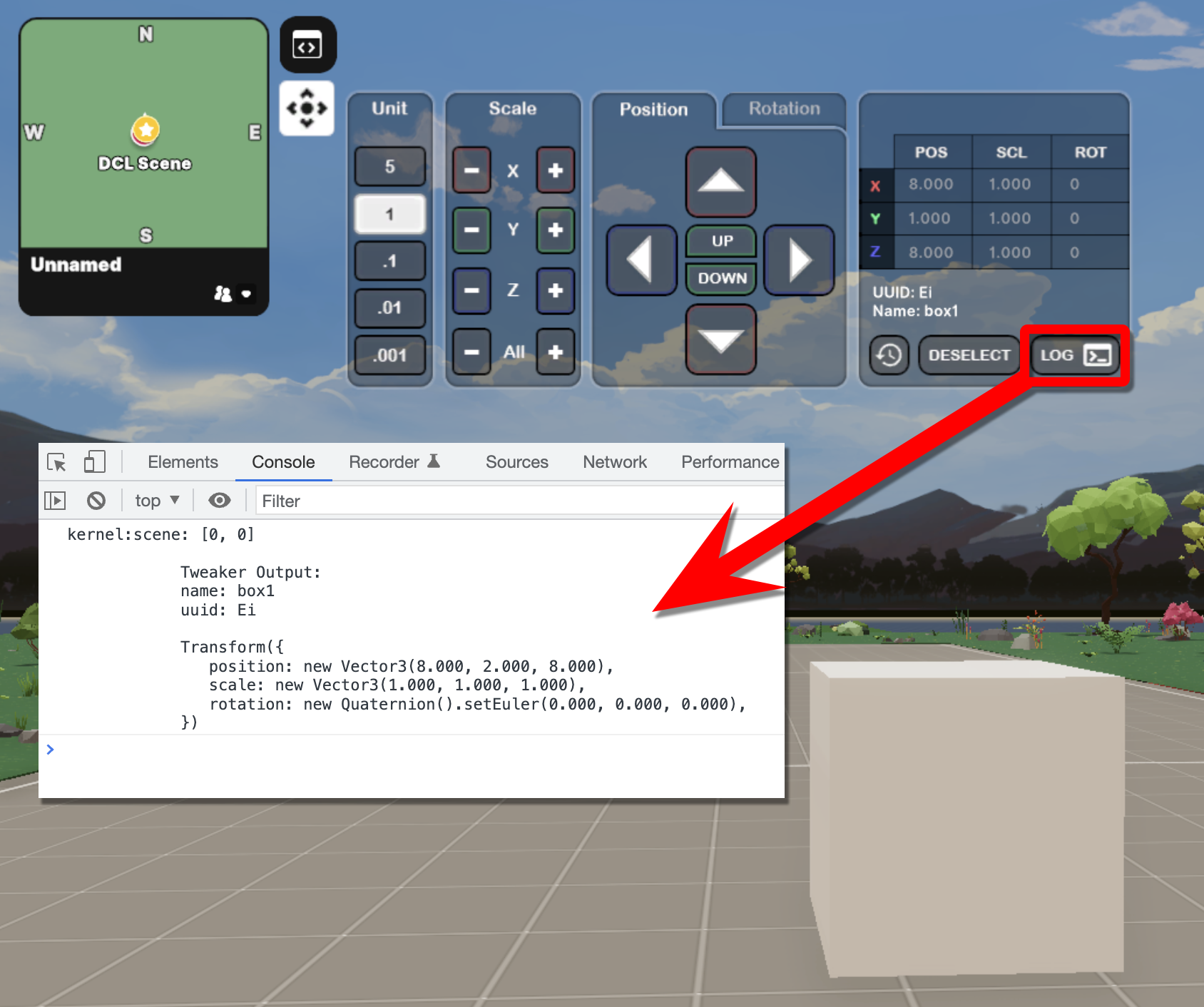
Purpose: Placing entities in the correct location can be tough and time-consuming. With this utility you can quickly place it exactly where you want and then copy the transform values that are outputted to the console.
import { Dash_Tweaker } from "dcldash"

const testEntity = new Entity("testBox")
testEntity(new BoxShape())
testEntity(new Transform({
  position: new Vector3(8, 2, 8),
}))

Dash_Tweaker(testEntity)
Notes
- You can select/deselect the current entity. (This feature will only work with entities that have a collider).
- You can also log the output of the Transform by htting the 'Log' button.
- Reset the transform to it's original state with the 'Revert' button.

ZoneCreator (UI Coming Soon)
Purpose: Drop a zone creation cube into the scene and then move around the area to define the size of the zone. Then click a button to export the Transform information.

SimplePoster
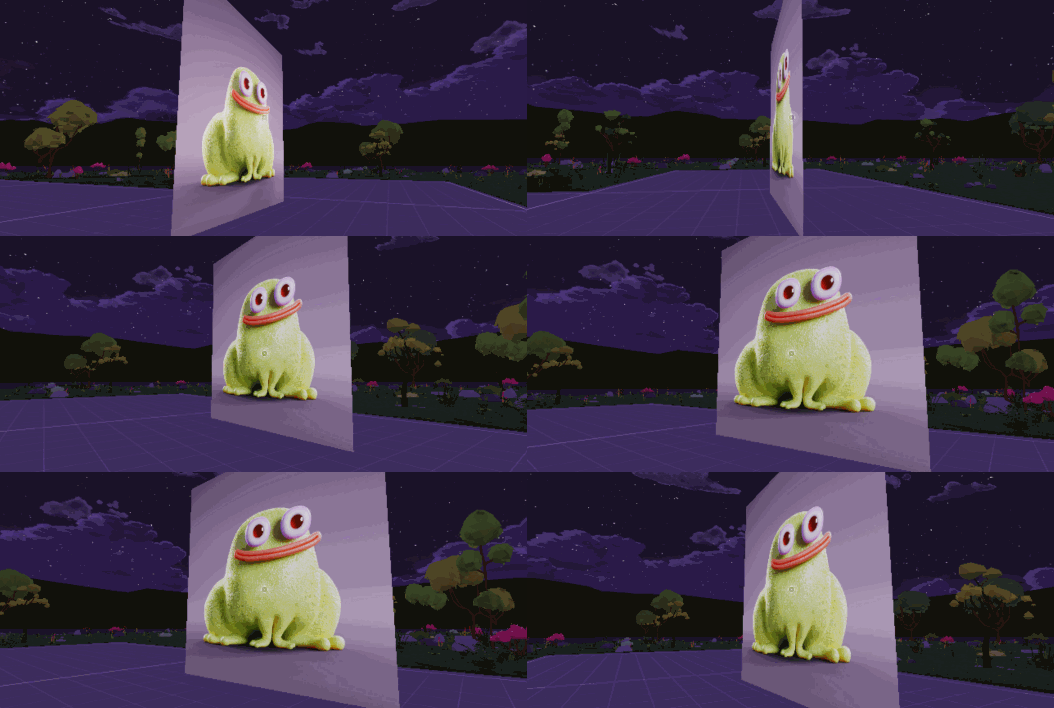
Purpose: A very simple poster that allows you to set up an image and/or hyperlink (clickable event) to go to a specific URL (optional). This component will also automatically set up the plane's UVs so that both sides are facing the correct direction.
import { Dash_SimplePoster } from 'dcldash'

const myPoster = new Dash_SimplePoster()
myPoster.addComponentOrReplace(new Transform({
    position: new Vector3(8,3,8),
    scale: new Vector3(5,5,1)
}))
myPoster.show()
// myPoster.hide()
myPoster.setHyperlink('https://github.com/pmacom/dcldash')
myPoster.setImageUrl('https://pmacom.github.io/assets/croakz.png')
TriggerZone
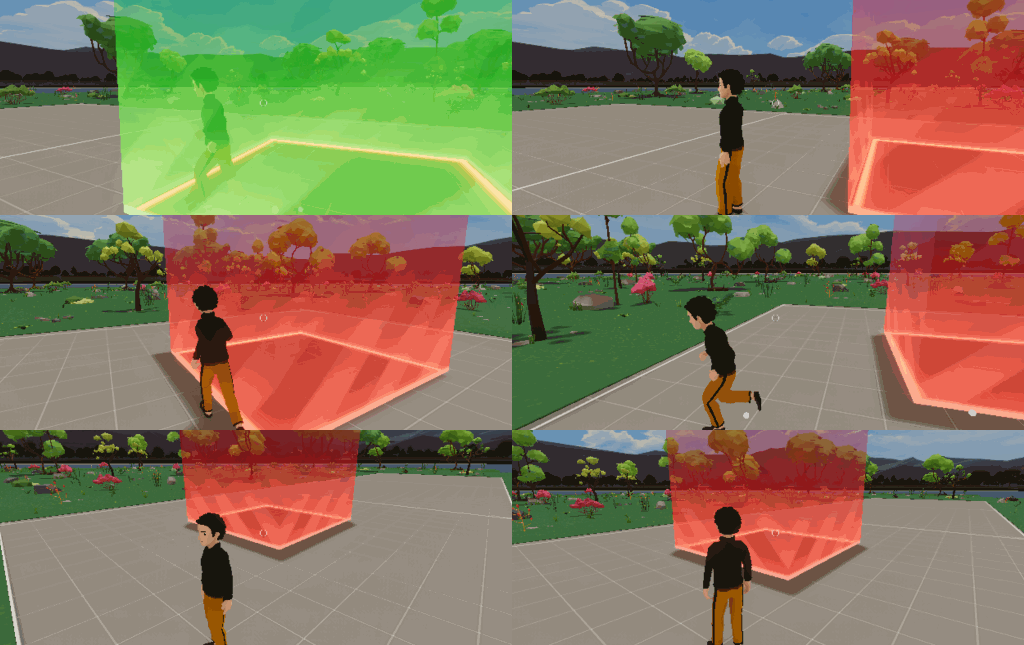
Purpose: Easily create a triggerZone with a visual indicator (debug mode) for when a user enters/leaves the zone.
Usage
import { Dash_TriggerZone } from 'dcldash'

// Create the TriggerZone (It's just like a regular Entity)
const myTriggerZone = new Dash_TriggerZone()
myTriggerZone.addComponent(new Transform({
    position: new Vector3(8,2.5,8),
    scale: new Vector3(5,5,5),
}))

// Make it visible while debugging
myTriggerZone.enableDebug()

// Turn the trigger events on
myTriggerZone.enable()

// Turn the trigger events off
// testTriggerZone.disable()

myTriggerZone.onEnter = () => {
    log('User has entered the zone')
}

myTriggerZone.onExit = () => {
    log('User has left the zone')
}
Notes
- Although it's a regular Entity, rotation seems to mess this up a bit.
Zone
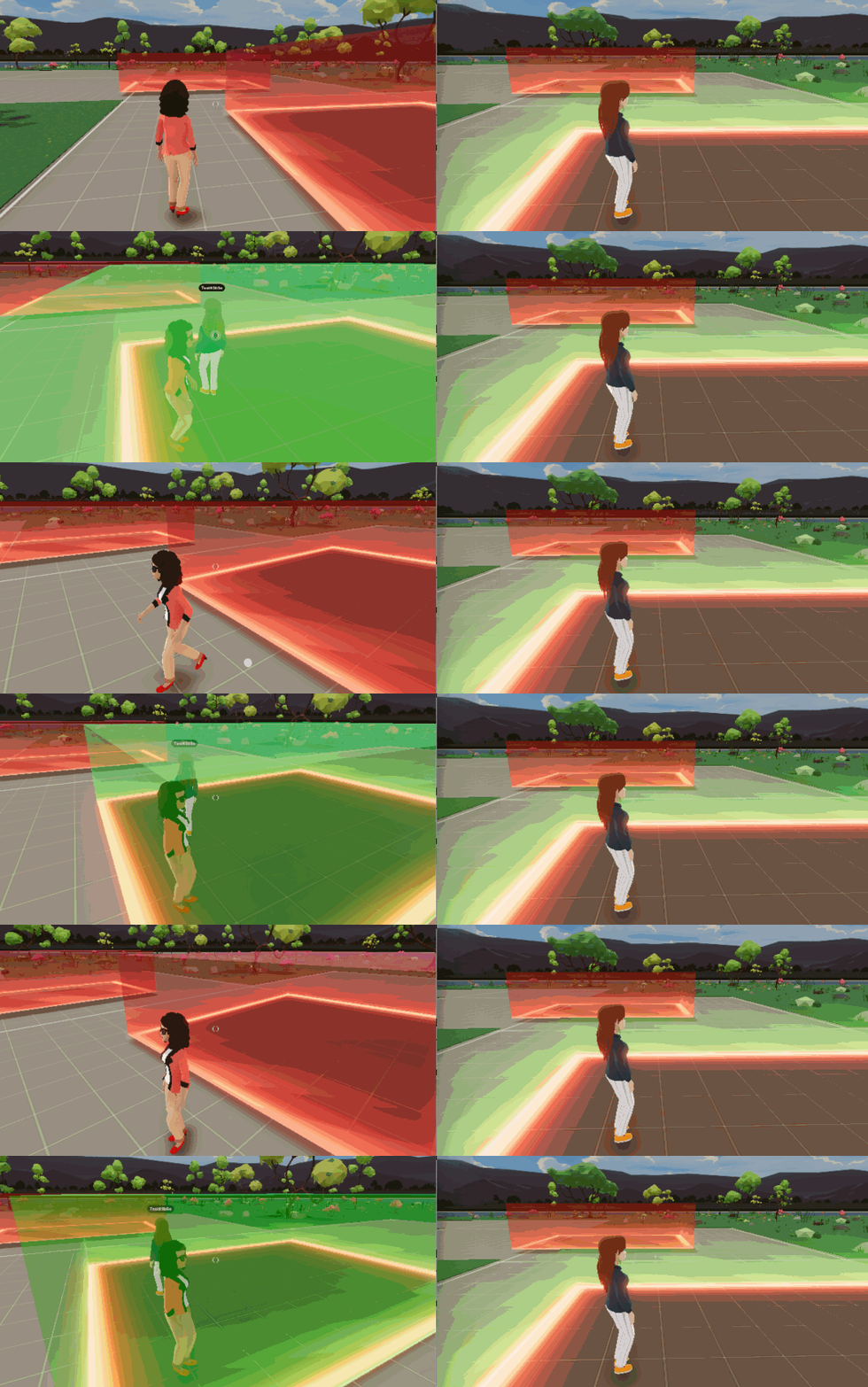
Purpose: An extension of TriggerZone which hides users that are not currently in the same zone. Zones will see a massive upgrade in upcoming months. Visit our Discord channel for mor inforamtion
import { Dash_Zone } from 'dcldash'
const zone1 = new Dash_Zone('zone1', new Transform({
    position: new Vector3(3, 1.5, 3),
    scale: new Vector3(4.5, 3, 4.5)
}))
zone1.enableDebug()

const zone2 = new Dash_Zone('zone2', new Transform({
  position: new Vector3(9, 1.5, 10),
  scale: new Vector3(4.5, 3, 4.5)
}))
zone2.enableDebug()
Notes
- A tutorial/explainer video will be posted soon
Animation
AnimationQueue
Purpose: Quickly create a simple animation without having to create a new ISystem every single time.
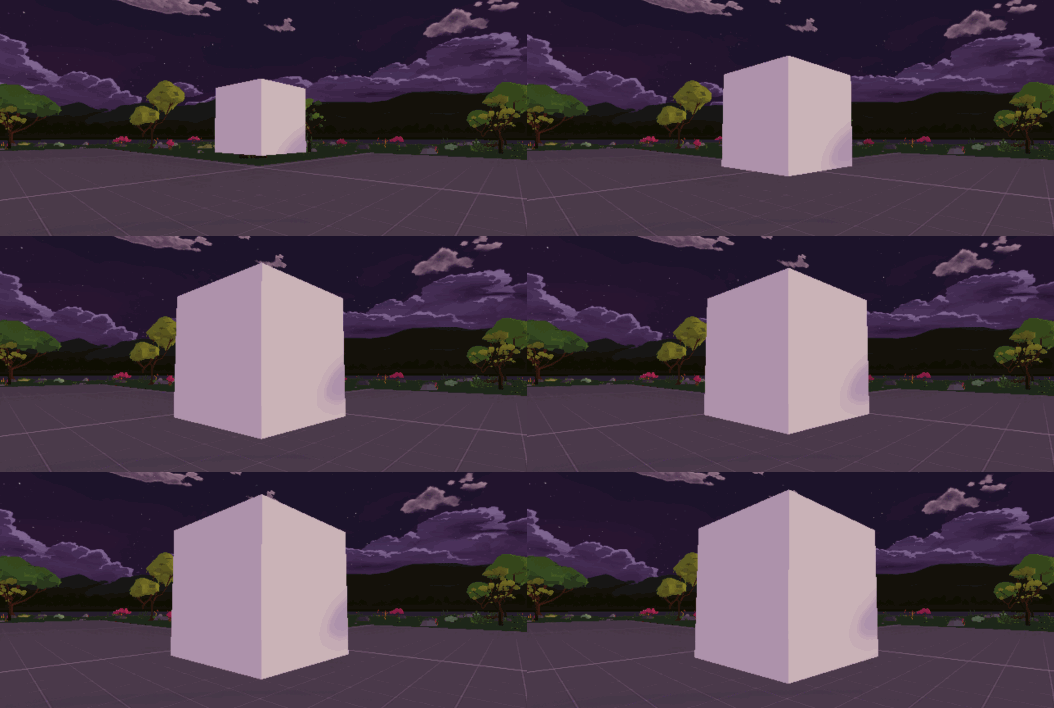
const box = new Entity()
box.addComponent(new BoxShape())
box.addComponent(new Transform({
    position: new Vector3(8, 2, 8),
    scale: new Vector3(1,1,1)
}))
engine.addEntity(box)

const startScale = 1
const endScale = 2
Dash_AnimationQueue.add({
    duration: 2,
    data: { someval: 'foo' }, // optionally pass along some data that is accessible every frame
    onFrame: (progress, data) => {
        const transform = box.getComponent(Transform)
        const easeValue = Scalar.Lerp(startScale, endScale, Dash_Ease.easeOutBounce(progress))
        transform.scale.setAll(easeValue)
    },
    onComplete: () => {
        log('Animation Done!')
    }
})
OnUpdateFrame
Purpose: Simplify your animations/physics code by creating togglable onUpdateFrame functions.
DynamicImage
Purpose: Animate UIImage size, position and cropping with ease
DynamicImageBar
Purpose: A very fast, performant and easy to implement image progress bar
Materials
Purpose: Easily implement common materials for testing and debugging purposes
Utils
Wait
Purpose: Sometimes you want to call a setTimeout function anywhere within your code and not just add it as a component to an entity
import { Dash_Wait } from 'dcldash'

Dash_Wait(() => {
  log('This code will run after 5 seconds')
}, 5)
UVs
Purpose: When you attach a video or image material to a primative shape (BoxShape, PlaneShape, ect) the rotation of the texture will be rotated or flipped incorrectly. Instead of rotating the entire entity, you can leverage one of these functions to just alter the UVmap for how the material is applied to the entity.
import { Dash_UV_Crop_Video } from 'dcldash'

const videoPlane = new PlaneShape()
videoPlane.uvs = Dash_UV_Crop_Video(
    videoWidth: number,   // The full width of your video
    videoHeight: number,  // The full height of your video
    cropWidth: number,    // Width of the crop area
    cropHeight: number,   // Height of the crop area
    cropSourceX: number,  // The x position to start the crop
    cropSourceY: number,  // The y position to start the crop
)
OnFirstMove
Purpose: The webbrowser instance of decentraland requires that you interact with the site before a video or audio file will play. Adding any video/audio play events to an onFirstMove will ensure that it plays more consistently
GlobalCanvas
Purpose: Generating a new
UICanvasmore than once is not preferred for performance purposes. Use the globalcanvas whenever possible instead of generating a new one each time
import { Dash_GlobalCanvas } from 'dcldash'Ease
Purpose: Easily add ease animations to your AnimationQueues and DynamicImages
import { Dash_Ease } from 'dcldash'Countdown
Purpose: Invoke a countdown event that allows you to listen for every frame or every second with a callback function when it is completed
3 years ago
3 years ago
4 years ago
4 years ago
4 years ago
4 years ago
4 years ago
4 years ago
4 years ago
4 years ago
4 years ago
4 years ago
4 years ago
4 years ago
4 years ago
4 years ago
4 years ago
4 years ago
4 years ago
4 years ago
4 years ago
4 years ago
4 years ago
4 years ago
4 years ago
4 years ago
4 years ago
4 years ago
4 years ago
4 years ago
4 years ago
4 years ago
4 years ago
4 years ago
4 years ago
4 years ago
4 years ago
4 years ago
4 years ago
4 years ago
4 years ago
4 years ago
4 years ago
4 years ago
4 years ago
4 years ago
4 years ago
4 years ago
4 years ago
4 years ago
4 years ago
4 years ago
4 years ago
4 years ago
4 years ago
4 years ago
4 years ago
4 years ago
4 years ago
4 years ago
4 years ago
4 years ago
4 years ago
4 years ago
4 years ago
4 years ago
4 years ago
4 years ago
4 years ago
4 years ago
4 years ago
4 years ago
4 years ago
4 years ago
4 years ago