
Dir Parser v2
dir-parser



Parse a directory and generate it's structure tree.
Read this in other languages: English | 简体中文
- dir-parser
1. What is dir-parser
1.1 Introduction
Dir parser is a powerful folder analysis tool based on nodejs, which can be used in command line or JavaScript code. There are many practical parameters that can be set to help you get the formatted folder tree and internal information.
1.2 Installation
1.2.1 Global install
- yarn:
$ yarn global add dir-parser - npm:
$ npm install -g dir-parser
1.2.2 Local install
- yarn:
$ yarn add dir-parseror$ yarn add dir-parser -D - npm:
$ npm install dir-parseror$ npm install dir-parser -D
2. Command Line
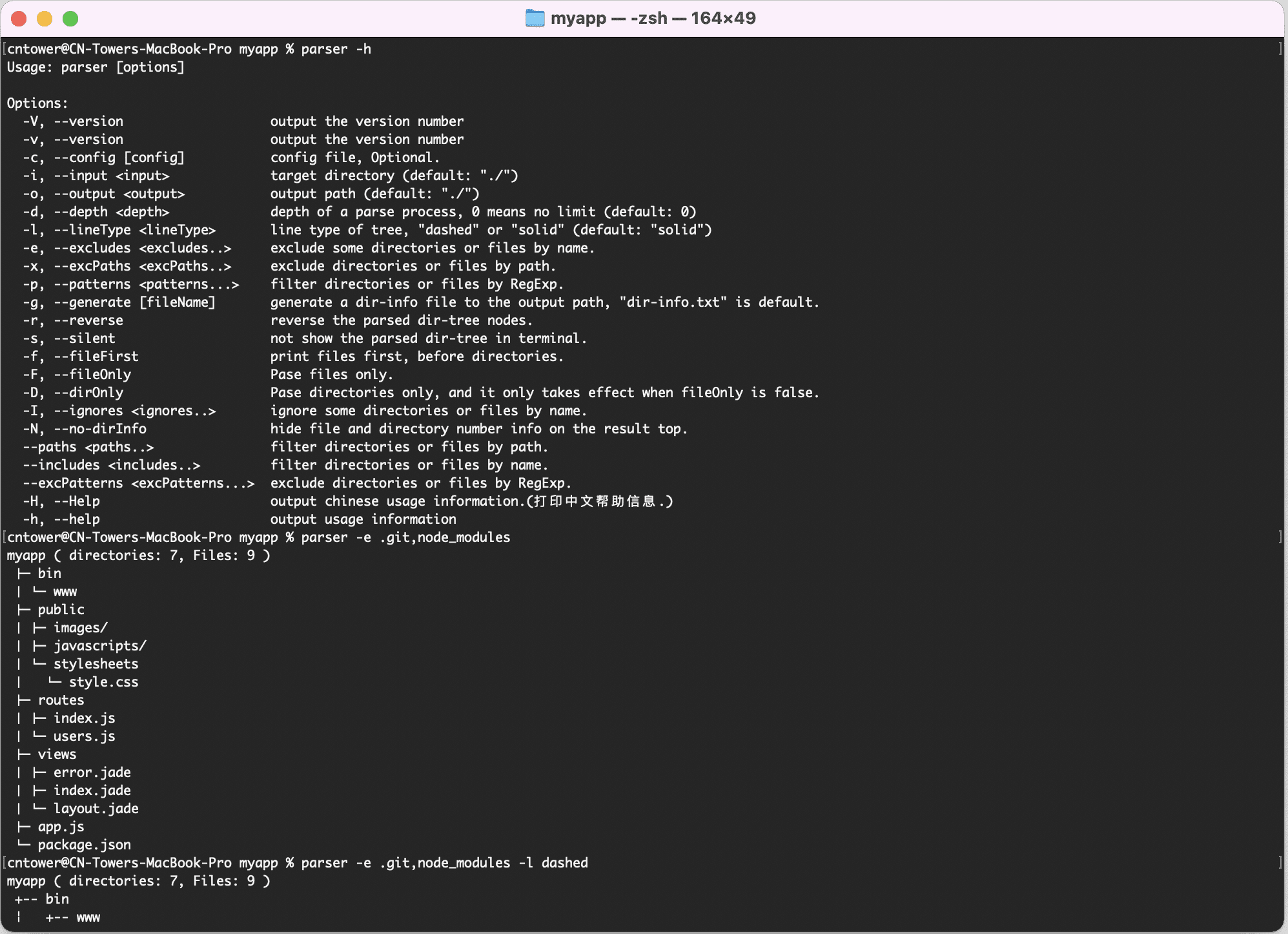
2.1 Print help info
$ dp -h (or: $ dp --help)
Usage: dp [options]

Options:
  -V, --version                   output the version number
  -v, --version                   output the version number
  -c, --config [config]           config file, Optional.
  -i, --input <input>             target directory (default: "./")
  -o, --output <output>           output path (default: "./")
  -d, --depth <depth>             depth of a parse process, 0 means no limit (default: 0)
  -l, --lineType <lineType>       line type, "s(solid) | d(dash) | ss(short-solid) | sd(short-dash)" (default: "s")
  -e, --excludes <excludes..>     exclude some directories or files by name.
  -x, --excPaths <excPaths..>     exclude directories or files by path.
  -p, --patterns <patterns...>    filter directories or files by RegExp.
  -g, --generate [fileName]       generate a dir-info file to the output path, "dir-info.txt" is default.
  -r, --reverse                   reverse the parsed dir-tree nodes.
  -s, --silent                    not show the parsed dir-tree in terminal.
  -f, --fileFirst                 print files first, before directories.
  -F, --fileOnly                  pase files only.
  -D, --dirOnly                   pase directories only, and it only takes effect when fileOnly is false.
  -I, --ignores <ignores..>       ignore some directories or files by name.
  -N, --no-dirInfo                hide file and directory number info on the result top.
  -G, --glob <glob>               filter files with glob patterns.
  --paths <paths..>               filter directories or files by path.
  --includes <includes..>         filter directories or files by name.
  --excPatterns <excPatterns...>  exclude directories or files by RegExp.
  -H, --Help                      output chinese usage information.(打印中文帮助信息.)
  -h, --help                      output usage information
2.2 Generate dir-tree
To run demo, you need to install express-generator:
Run:
$ npm install -g express-generator
$ express myapp
$ cd myapp
$ dp
myapp ( Directories: 7, Files: 9 )
├── bin
│   └── www
├── public
│   ├── images/
│   ├── javascripts/
│   └── stylesheets
│       └── style.css
├── routes
│   ├── index.js
│   └── users.js
├── views
│   ├── error.jade
│   ├── index.jade
│   └── layout.jade
├── app.js
└── package.json
2.3 With parameters
2.3.1 excludes
Exclude some directories or files by name.
$ # git init
$ npm install
$ dp -e .git,node_modules,public
or: $ dp --excludes .git,node_modules,public
myapp ( Directories: 3, Files: 9 )
├── bin
│   └── www
├── routes
│   ├── index.js
│   └── users.js
├── views
│   ├── error.jade
│   ├── index.jade
│   └── layout.jade
├── app.js
├── package-lock.json
└── package.json
Name has white space:
$ touch 'white space.txt'
$ dp -e '[".git", "node_modules", "public", "white space.txt"]'
$ rm -rf white\ space.txt
myapp ( Directories: 3, Files: 9 )
├── bin
│   └── www
├── routes
│   ├── index.js
│   └── users.js
├── views
│   ├── error.jade
│   ├── index.jade
│   └── layout.jade
├── app.js
├── package-lock.json
└── package.json
2.3.2 ignores
Ignore some directories or files by name.
$ dp -e node_modules -I bin,public
or: $ dp -e node_modules --ignores bin,public
myapp ( Directories: 4, Files: 8 )
├── bin/
├── public/
├── routes
│   ├── index.js
│   └── users.js
├── views
│   ├── error.jade
│   ├── index.jade
│   └── layout.jade
├── app.js
├── package-lock.json
└── package.json
2.3.3 glob
Filter by glob pattern. Note: glob pattern must be enclosed in quotation marks
$ dp -e node_modules -G '**/*.js'
or: $ dp -e node_modules --glob '**/*.js'
myapp ( Directories: 1, Files: 3 )
├── routes
│   ├── index.js
│   └── users.js
└── app.js
2.3.4 patterns
Filter directories or files by RegExp.
$ dp -e node_modules -p .js$
or: $ dp -e node_modules --patterns .js$
myapp ( Directories: 1, Files: 3 )
├── routes
│   ├── index.js
│   └── users.js
└── app.js
2.3.5 lineType
Line type of tree, s(solid) | d(dash) | ss(short-solid) | sd(short-dash) [default: "s"]
$ dp -e bin,node_modules -l d
or: $ dp -e bin,node_modules --lineType d
myapp ( Directories: 6, Files: 9 )
+-- public
¦   +-- images/
¦   +-- javascripts/
¦   +-- stylesheets
¦       +-- style.css
+-- routes
¦   +-- index.js
¦   +-- users.js
+-- views
¦   +-- error.jade
¦   +-- index.jade
¦   +-- layout.jade
+-- app.js
+-- package-lock.json
+-- package.json
2.3.6 depth
Depth of a parse process, 0 means no limit (default: 0)
$ dp -e node_modules,views -d 2
or: $ dp -e node_modules,views --depth 2
myapp ( Directories: 6, Files: 6 )
├── bin
│   └── www
├── public
│   ├── images/
│   ├── javascripts/
│   └── stylesheets/*
├── routes
│   ├── index.js
│   └── users.js
├── app.js
├── package-lock.json
└── package.json
2.3.7 reverse
Reverse the parsed dir-tree nodes.
$ dp -e node_modules,views -d 2 -r
or: $ dp -e node_modules,views -d 2 --reverse
myapp ( Directories: 6, Files: 6 )
├── routes
│   ├── users.js
│   └── index.js
├── public
│   ├── stylesheets/*
│   ├── javascripts/
│   └── images/
├── bin
│   └── www
├── package.json
├── package-lock.json
└── app.js
2.3.8 fileFirst
Print files first, before directories.
$ dp -e node_modules,bin,views -f
or: $ dp -e node_modules,bin,views --fileFirst
myapp ( Directories: 5, Files: 6 )
├── app.js
├── package-lock.json
├── package.json
├── public
│   ├── images/
│   ├── javascripts/
│   └── stylesheets
│       └── style.css
└── routes
    ├── index.js
    └── users.js
2.3.9 fileOnly
Pase files only.
$ dp -e node_modules,bin,views -F
or: $ dp -e node_modules,bin,views --fileOnly
myapp ( Directories: 3, Files: 6 )
├── public
│   └── stylesheets
│       └── style.css
├── routes
│   ├── index.js
│   └── users.js
├── app.js
├── package-lock.json
└── package.json
2.3.10 dirOnly
Pase directories only, and it only takes effect when fileOnly is false.
$ dp -e node_modules,bin,views -D
or: $ dp -e node_modules,bin,views --dirOnly
myapp ( Directories: 5 )
├── public
│   ├── images/
│   ├── javascripts/
│   └── stylesheets/
└── routes/
2.3.11 dirInfo
Hide file and directory number info on the result top.
$ dp -e node_modules,bin,public -N
or: $ dp -e node_modules,bin,public --no-dirInfo
myapp
├── routes
│   ├── index.js
│   └── users.js
├── views
│   ├── error.jade
│   ├── index.jade
│   └── layout.jade
├── app.js
├── package-lock.json
└── package.json
2.3.12 excPaths
Exclude directories or files by path.
$ dp -e node_modules,bin -x myapp/public
or: $ dp -e node_modules,bin -excPath myapp/public
myapp ( Directories: 2, Files: 8 )
├── routes
│   ├── index.js
│   └── users.js
├── views
│   ├── error.jade
│   ├── index.jade
│   └── layout.jade
├── app.js
├── package-lock.json
└── package.json
2.3.13 excPatterns
Exclude directories or files by RegExp.
$ dp -e node_modules,bin --excPatterns .jade$,.css$
myapp ( Directories: 6, Files: 5 )
├── public
│   ├── images/
│   ├── javascripts/
│   └── stylesheets/
├── routes
│   ├── index.js
│   └── users.js
├── views/
├── app.js
├── package-lock.json
└── package.json
2.3.14 silent
Not show the parsed dir-tree in terminal.
$ dp -e node_modules,bin,public -s
or: $ dp -e node_modules,bin,public --silent
2.3.15 generate
Generate a dir-info file to the output path, "dir-info.txt" is default.
$ dp -e node_modules,bin,public -sg
or: $ dp -e node_modules,bin,public -s --generate
$ cat dir-info.txt
myapp ( Directories: 2, Files: 8 )
├── routes
│   ├── index.js
│   └── users.js
├── views
│   ├── error.jade
│   ├── index.jade
│   └── layout.jade
├── app.js
├── package-lock.json
└── package.json
2.3.16 config
Config file, Optional.
$ touch dp.conf.json
$ vi dp.conf.json
{
  "directory": "./",
  "excludes": [ ".git", "node_modules", "bin", "public", "dp.conf.json" ],
  "depth": "2",
  "generate": "info.txt"
}
$ dp -c ./dp.conf.json
myapp ( Directories: 2, Files: 9 )
├── routes
│   ├── index.js
│   └── users.js
├── views
│   ├── error.jade
│   ├── index.jade
│   └── layout.jade
├── app.js
├── dir-info.txt
├── package-lock.json
└── package.json
2.4 Use multiple commands together
dp -e node_modules,bin -I views -d 2 -Nr
myapp
├── views/
├── routes
│   ├── users.js
│   └── index.js
├── public
│   ├── stylesheets/*
│   ├── javascripts/
│   └── images/
├── dp.conf.json
├── package.json
├── package-lock.json
├── info.txt
├── dir-info.txt
└── app.js
3. In JavaScript
3.1 Interface
3.1.1 Main Function-dirParser
dirParser(dirPath: string, options: Options): Promise<Parsed>3.1.2 Options
interface Options {
  depth?: number;
  reverse?: boolean;
  fileFirst?: boolean;
  fileOnly?: boolean;
  dirOnly?: boolean;
  getFiles?: boolean;
  getChildren?: boolean;
  dirTree?: boolean;             // default: true
  dirInfo?: boolean;             // default: true
  lineType?: 'solid' | 'dash'; // default: 'solid'
  excludes?: Array<string>;      // eg: [ '.git', 'node_modules', '.idea' ];
  excPaths?: Array<string>;      // eg: [ 'src/app' ];
  excPatterns?: Array<string>;   // eg: [ 'src/*.js ]';
  ignores: Array<string>;        // eg: [ 'public' ];
  includes: Array<string>;       // eg: [ 'app.js' ];
  paths?: Array<string>;         // eg: [ 'src/public' ];
  patterns?: Array<string>;      // eg: [ '*.js ]';
  glob?: string;                 // eg: '**/*.js';
}
3.1.3 Parsed
interface Parsed extends DirInfo {
  dirTree: string;
  children: Array<DirInfo | FileInfo>
  files: Array<FileInfo>
}
3.1.4 DirInfo
interface DirInfo {
  name: string;
  type: 'directory';
  size: number;
  size_kb: number;
  path: string;
  absPath: string;
  dir: string;
  absDir: string;
  dirNum: number;
  fileNum: number;
  children: Array<DirInfo | FileInfo>
}
3.1.5 FileInfo
interface FileInfo {
  name: string;
  base: string;
  ext: string;
  type: 'file';
  size: number;
  size_kb: number;
  path: string;
  absPath: string;
  dir: string;
  absDir: string;
}
3.2 Get dir-tree
3.2.1 Make dir-tree example
$ npm install dir-parser funclib
$ touch test.js
$ vi test.js
const fn = require('funclib');
const dirParser = require('dir-parser');

dirParser('./', {
  excludes: ['.git', 'node_modules'],
  // lineType: 'dash',
  // fileFirst: true,
}).then(parsed => {
  fn.log(parsed.dirTree, '# parsed.dirTree');

  // fn.log(fn.pick(parsed, prop => prop !== 'dirTree'), '# parsed result info');
  // fn.log(parsed.children, '# parsed.children');
  // fn.log(parsed.files, '# parsed.files');
});
3.2.2 Run dir-tree example
$ node test.js
==================================================================
                  [09:48:55] # parsed.dirTree
------------------------------------------------------------------
myapp
├── bin
│   └── www
├── public
│   ├── images/
│   ├── javascripts/
│   └── stylesheets
│       └── style.css
├── routes
│   ├── index.js
│   └── users.js
├── views
│   ├── error.jade
│   ├── index.jade
│   └── layout.jade
├── app.js
├── dir-info.txt
├── info.txt
├── package-lock.json
├── package.json
├── dp.conf.json
└── test.js
==================================================================
3.3 Get dir-info
3.3.1 Make dir-info example
$ vi test.js
dirParser('./', {
  excludes: ['.git', 'node_modules'],
  // lineType: 'dash',
  // fileFirst: true,
}).then(parsed => {
  console.log(fn.pretty(fn.pick(parsed, prop => prop !== 'dirTree')));

  // fn.log(parsed.dirTree, '# parsed.dirTree');
  // fn.log(parsed.children, '# parsed.children');
  // fn.log(parsed.files, '# parsed.files');
});
3.3.2 Run dir-info example
$ node test.js
{
  "name": "myapp",
  "type": "directory",
  "path": "./",
  "absPath": "/Users/cntower/code/@cntower/dir-parser/myapp",
  "dir": ".",
  "absDir": "/Users/cntower/code/@cntower/dir-parser",
  "dirNum": 7,
  "fileNum": 14
}
3.3.3 Make dir-children example
$ vi test.js
dirParser('./', {
  excludes: ['.git', 'node_modules', 'public'],
  getFiles: true,    // Default is false, If true, returns will conatins an array of all subfiles's info;
  getChildren: true, // Default is false, If true, returns will conatins an object of all children's info;
  dirTree: false     // Default is true, returns will conatins a tree of the directory;
}).then(parsed => {
  console.log(fn.pretty(parsed.children));
  // fn.log(parsed.files, '# parsed.files');
});
3.3.4 Run dir-children example
$ node test.js
[
  {
    "name": "bin",
    "type": "directory",
    "size": 1591,
    "size_kb": "1.55kb",
    "path": "bin",
    "absPath": "/Users/cntower/code/@cntower/dir-parser/myapp/bin",
    "dir": ".",
    "absDir": "/Users/cntower/code/@cntower/dir-parser/myapp",
    "dirNum": 0,
    "fileNum": 1,
    "children": [
      {
        "name": "www",
        "base": "www",
        "ext": "",
        "type": "file",
        "size": 1591,
        "size_kb": "1.55kb",
        "path": "bin/www",
        "absPath": "/Users/cntower/code/@cntower/dir-parser/myapp/bin/www",
        "dir": "bin",
        "absDir": "/Users/cntower/code/@cntower/dir-parser/myapp/bin"
      }
    ]
  },
  {
    "name": "routes",
    "type": "directory",
    "size": 408,
    "size_kb": "0.4kb",
    "path": "routes",
    "absPath": "/Users/cntower/code/@cntower/dir-parser/myapp/routes",
    "dir": ".",
    "absDir": "/Users/cntower/code/@cntower/dir-parser/myapp",
    "dirNum": 0,
    "fileNum": 2,
    "children": [
      {
        "name": "index.js",
        "base": "index",
        "ext": ".js",
        "type": "file",
        "size": 205,
        "size_kb": "0.2kb",
        "path": "routes/index.js",
        "absPath": "/Users/cntower/code/@cntower/dir-parser/myapp/routes/index.js",
        "dir": "routes",
        "absDir": "/Users/cntower/code/@cntower/dir-parser/myapp/routes"
      },
      {
        "name": "users.js",
        "base": "users",
        "ext": ".js",
        "type": "file",
        "size": 203,
        "size_kb": "0.2kb",
        "path": "routes/users.js",
        "absPath": "/Users/cntower/code/@cntower/dir-parser/myapp/routes/users.js",
        "dir": "routes",
        "absDir": "/Users/cntower/code/@cntower/dir-parser/myapp/routes"
      }
    ]
  },
  {
    "name": "app.js",
    "base": "app",
    "ext": ".js",
    "type": "file",
    "size": 1075,
    "size_kb": "1.05kb",
    "path": "app.js",
    "absPath": "/Users/cntower/code/@cntower/dir-parser/myapp/app.js",
    "dir": "",
    "absDir": "/Users/cntower/code/@cntower/dir-parser/myapp"
  },
  {
    "name": "dir-info.txt",
    "base": "dir-info",
    "ext": ".txt",
    "type": "file",
    "size": 277,
    "size_kb": "0.27kb",
    "path": "dir-info.txt",
    "absPath": "/Users/cntower/code/@cntower/dir-parser/myapp/dir-info.txt",
    "dir": "",
    "absDir": "/Users/cntower/code/@cntower/dir-parser/myapp"
  },
  {
    "name": "info.txt",
    "base": "info",
    "ext": ".txt",
    "type": "file",
    "size": 301,
    "size_kb": "0.29kb",
    "path": "info.txt",
    "absPath": "/Users/cntower/code/@cntower/dir-parser/myapp/info.txt",
    "dir": "",
    "absDir": "/Users/cntower/code/@cntower/dir-parser/myapp"
  },
  {
    "name": "package-lock.json",
    "base": "package-lock",
    "ext": ".json",
    "type": "file",
    "size": 68550,
    "size_kb": "66.94kb",
    "path": "package-lock.json",
    "absPath": "/Users/cntower/code/@cntower/dir-parser/myapp/package-lock.json",
    "dir": "",
    "absDir": "/Users/cntower/code/@cntower/dir-parser/myapp"
  },
  {
    "name": "package.json",
    "base": "package",
    "ext": ".json",
    "type": "file",
    "size": 347,
    "size_kb": "0.34kb",
    "path": "package.json",
    "absPath": "/Users/cntower/code/@cntower/dir-parser/myapp/package.json",
    "dir": "",
    "absDir": "/Users/cntower/code/@cntower/dir-parser/myapp"
  },
  {
    "name": "dp.conf.json",
    "base": "dp.conf",
    "ext": ".json",
    "type": "file",
    "size": 145,
    "size_kb": "0.14kb",
    "path": "dp.conf.json",
    "absPath": "/Users/cntower/code/@cntower/dir-parser/myapp/dp.conf.json",
    "dir": "",
    "absDir": "/Users/cntower/code/@cntower/dir-parser/myapp"
  },
  {
    "name": "test.js",
    "base": "test",
    "ext": ".js",
    "type": "file",
    "size": 554,
    "size_kb": "0.54kb",
    "path": "test.js",
    "absPath": "/Users/cntower/code/@cntower/dir-parser/myapp/test.js",
    "dir": "",
    "absDir": "/Users/cntower/code/@cntower/dir-parser/myapp"
  }
]
3.3.5 Make dir-files example
$ vi test.js
dirParser('./', {
  excludes: ['.git', 'node_modules', 'public'],
  getFiles: true,
  getChildren: true,
  dirTree: false
}).then(parsed => {
  // fn.log(parsed.children, '# parsed.children');
  console.log(fn.pretty(parsed.files));
});
3.3.6 Run dir-files example
$ node test.js
[
  {
    "name": "www",
    "base": "www",
    "ext": "",
    "type": "file",
    "size": 1591,
    "size_kb": "1.55kb",
    "path": "bin/www",
    "absPath": "/Users/cntower/code/@cntower/dir-parser/myapp/bin/www",
    "dir": "bin",
    "absDir": "/Users/cntower/code/@cntower/dir-parser/myapp/bin"
  },
  {
    "name": "index.js",
    "base": "index",
    "ext": ".js",
    "type": "file",
    "size": 205,
    "size_kb": "0.2kb",
    "path": "routes/index.js",
    "absPath": "/Users/cntower/code/@cntower/dir-parser/myapp/routes/index.js",
    "dir": "routes",
    "absDir": "/Users/cntower/code/@cntower/dir-parser/myapp/routes"
  },
  {
    "name": "users.js",
    "base": "users",
    "ext": ".js",
    "type": "file",
    "size": 203,
    "size_kb": "0.2kb",
    "path": "routes/users.js",
    "absPath": "/Users/cntower/code/@cntower/dir-parser/myapp/routes/users.js",
    "dir": "routes",
    "absDir": "/Users/cntower/code/@cntower/dir-parser/myapp/routes"
  },
  {
    "name": "error.jade",
    "base": "error",
    "ext": ".jade",
    "type": "file",
    "size": 84,
    "size_kb": "0.08kb",
    "path": "views/error.jade",
    "absPath": "/Users/cntower/code/@cntower/dir-parser/myapp/views/error.jade",
    "dir": "views",
    "absDir": "/Users/cntower/code/@cntower/dir-parser/myapp/views"
  },
  {
    "name": "index.jade",
    "base": "index",
    "ext": ".jade",
    "type": "file",
    "size": 66,
    "size_kb": "0.06kb",
    "path": "views/index.jade",
    "absPath": "/Users/cntower/code/@cntower/dir-parser/myapp/views/index.jade",
    "dir": "views",
    "absDir": "/Users/cntower/code/@cntower/dir-parser/myapp/views"
  },
  {
    "name": "layout.jade",
    "base": "layout",
    "ext": ".jade",
    "type": "file",
    "size": 125,
    "size_kb": "0.12kb",
    "path": "views/layout.jade",
    "absPath": "/Users/cntower/code/@cntower/dir-parser/myapp/views/layout.jade",
    "dir": "views",
    "absDir": "/Users/cntower/code/@cntower/dir-parser/myapp/views"
  },
  {
    "name": "app.js",
    "base": "app",
    "ext": ".js",
    "type": "file",
    "size": 1075,
    "size_kb": "1.05kb",
    "path": "app.js",
    "absPath": "/Users/cntower/code/@cntower/dir-parser/myapp/app.js",
    "dir": "",
    "absDir": "/Users/cntower/code/@cntower/dir-parser/myapp"
  },
  {
    "name": "dir-info.txt",
    "base": "dir-info",
    "ext": ".txt",
    "type": "file",
    "size": 277,
    "size_kb": "0.27kb",
    "path": "dir-info.txt",
    "absPath": "/Users/cntower/code/@cntower/dir-parser/myapp/dir-info.txt",
    "dir": "",
    "absDir": "/Users/cntower/code/@cntower/dir-parser/myapp"
  },
  {
    "name": "info.txt",
    "base": "info",
    "ext": ".txt",
    "type": "file",
    "size": 301,
    "size_kb": "0.29kb",
    "path": "info.txt",
    "absPath": "/Users/cntower/code/@cntower/dir-parser/myapp/info.txt",
    "dir": "",
    "absDir": "/Users/cntower/code/@cntower/dir-parser/myapp"
  },
  {
    "name": "package-lock.json",
    "base": "package-lock",
    "ext": ".json",
    "type": "file",
    "size": 68550,
    "size_kb": "66.94kb",
    "path": "package-lock.json",
    "absPath": "/Users/cntower/code/@cntower/dir-parser/myapp/package-lock.json",
    "dir": "",
    "absDir": "/Users/cntower/code/@cntower/dir-parser/myapp"
  },
  {
    "name": "package.json",
    "base": "package",
    "ext": ".json",
    "type": "file",
    "size": 347,
    "size_kb": "0.34kb",
    "path": "package.json",
    "absPath": "/Users/cntower/code/@cntower/dir-parser/myapp/package.json",
    "dir": "",
    "absDir": "/Users/cntower/code/@cntower/dir-parser/myapp"
  },
  {
    "name": "dp.conf.json",
    "base": "dp.conf",
    "ext": ".json",
    "type": "file",
    "size": 145,
    "size_kb": "0.14kb",
    "path": "dp.conf.json",
    "absPath": "/Users/cntower/code/@cntower/dir-parser/myapp/dp.conf.json",
    "dir": "",
    "absDir": "/Users/cntower/code/@cntower/dir-parser/myapp"
  },
  {
    "name": "test.js",
    "base": "test",
    "ext": ".js",
    "type": "file",
    "size": 303,
    "size_kb": "0.3kb",
    "path": "test.js",
    "absPath": "/Users/cntower/code/@cntower/dir-parser/myapp/test.js",
    "dir": "",
    "absDir": "/Users/cntower/code/@cntower/dir-parser/myapp"
  }
]