
This is a simple File tree react component for usage in projects like CodeSandbox or Replit and many others.
Getting Started
Installation
npm i ftree4587Usage
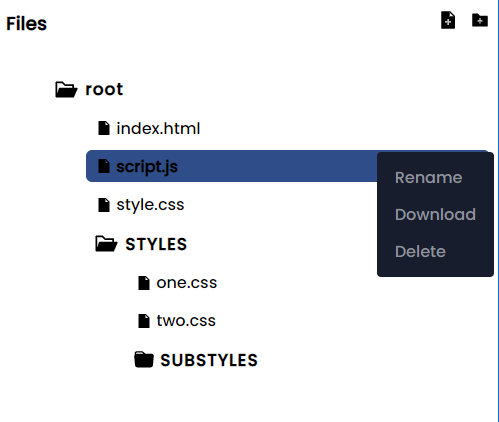
import {useState} from 'react'
import FileTree from 'ftree4587'

const testFiles =
[
      {
        "id": "cb05122d4c3347ce90bea515cca4c858",
        "name": "STYLES",
        "children": [
          {
            "id": "0caca625dc324a6cb8f319a51dc2ae0b",
            "name": "one.css",
            "language": "css",
            "content": ".one{}"
          },
          {
            "id": "87fb7d03745049459ff343eb07e8568e",
            "name": "two.css",
            "language": "css",
            "content": ".two{}"
          },
          {
            "name": "SUBSTYLES",
            "id": "fb7d03745049459ff343eb07e8568e",
            "children": [
              {
                "name": "substyle1.css",
                "id": "substyle1ID"
              },
              {
                "name": "substyle2.css",
                "id": "substyle2ID"
              }
            ]
          }
        ]
      },
      {
        "id": "2e094d54f8d040408df66af33f08b3c6",
        "name": "index.html",
        "language": "html",
        "content": "\n<html lang=\"en\">\n<head>\n  <meta charset=\"UTF-8\">\n  <meta http-equiv=\"X-UA-Compatible\" content=\"IE=edge\">\n  <meta name=\"viewport\" content=\"width=device-width, initial-scale=1.0\">\n  <link rel=\"stylesheet\" href=\"style.css\">\n  <title>My Virt</title>\n</head>\n<body>\n  \n  <script type=\"text/javascript\" src=\"script.js\"></script>\n</body>\n</html>\n         "
      },
      {
        "id": "1d46ebb14b034b449384d8244a3c1bc7",
        "name": "script.js",
        "language": "javascript",
        "content": ""
      },
      {
        "id": "3fe10c8a29df4723a6802ce26fa10a4e",
        "name": "style.css",
        "content": "body{\r\n    background-color: black;\r\n}",
        "language": "css"
      }
    ]


export default function Test(){

    const [files, setFiles] = useEffect(testFiles)

    const getCurrentFile = (file) =>{

        console.log(file) //Outputs the currently clickes/selected file
    }


    return <FileTree files={files} setFiles={setFiles} getCurrentFile={getCurrentFile}/>
}
Props
| Name | Value | Description |
|---|---|---|
| files | Array | These the files to display. An array of json representative of files, each having a unique ID. |
| setFiles | function | When you update the files; either by renaming a file, modifying a file's content, creating a new file or deleting a file; the new files will be recieved by this function. |
| getCurrentFile | function | This function will recieve the currently clicked or selected file and you can do whatever you want to do with the data, such as displaying the content of the file. |