
glyphdust
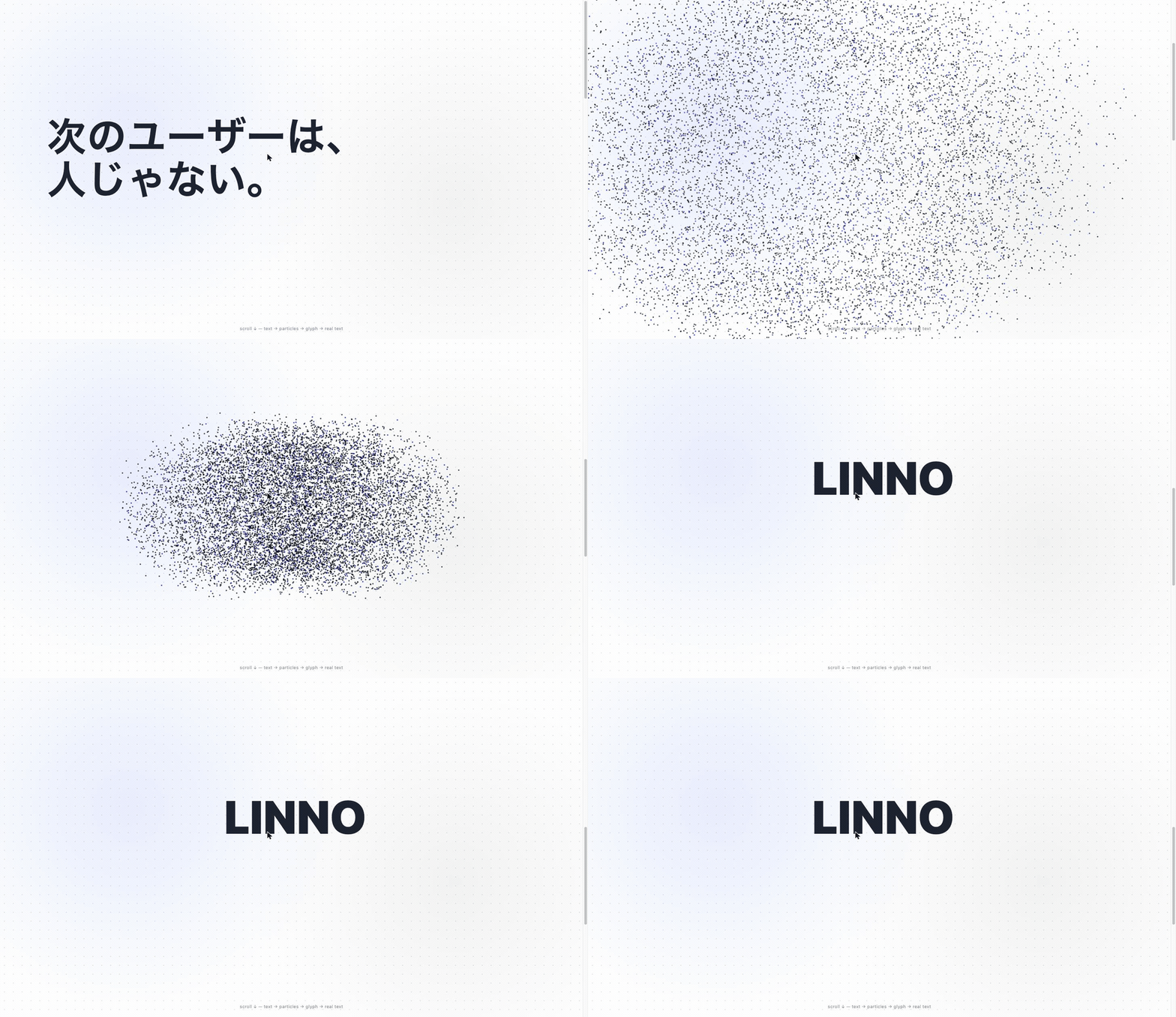
Scroll-driven text → particles → glyph → real-text resolve, in one declarative react-three-fiber component.
Pass any text and glyphdust dissolves it into thousands of GPU particles, scatters them into a cloud, reforms them into the next glyph, and finally resolves into crisp, real DOM text — all driven by a single scroll progress 0 → 1.
Building with an AI agent / codegen? glyphdust is designed to be generated and driven by agents: one import + one call, safe defaults, a single
progress 0→1you drive from anything (scroll, timer, agent, audio), and a machine-readable spec atllms.txt(CDN:https://cdn.jsdelivr.net/npm/glyphdust/llms.txt). Zero-install<script>usage below.
<GlyphDust
  keyframes={[
    { type: "text", text: "Hello", domSelector: "#headline" },
    { type: "scatter", spread: 1 },
    { type: "text", text: "WORLD", dense: true, resolveToDom: true },
  ]}
/>
That's the whole thing. Scroll, and it animates.
No React? One call.
Don't want to set up react-three-fiber and a <Canvas>? Reach for glyphText() —
a framework-free function that boots three.js for you, fills any box, and autoplays.
One import, one call:
import { glyphText } from "glyphdust";

glyphText("#hero", "LINNO");          // particles fly in, settle into the word, hold
It returns a handle (destroy() / pause() / play() / restart()), needs no React,
and is preset-driven so it looks right with zero config. See glyphText() below.
Want zero install — just a <script> tag in plain HTML? See Use from a CDN.
Why glyphdust?
Existing tools each cover a slice — but none give you "text → particles → another glyph → resolve back to selectable real text" declaratively from one scroll driver.
| particles | text → particles | particle → another glyph | resolve to real DOM text | scroll-driven, declarative | |
|---|---|---|---|---|---|
| tsParticles | partial | — | — | — | |
| GSAP + custom | manual | manual | manual | manual | |
| three.js shape-morph demos | manual | — | — | ||
| glyphdust |
- Resolves to real text. The finale isn't a picture of letters — particles cross-fade into actual, selectable, accessible DOM text, pixel-aligned to the glyph they formed (
resolveToDom+domSelector). - One driver, any number of keyframes.
text → scatter → text → scatter → text …; timing is auto-distributed (override withtiming). - Never blanks.
prefers-reduced-motionor no-WebGL falls back to your own static markup.
Install
npm i glyphdust three @react-three/fiber
# or: pnpm add glyphdust three @react-three/fiberthree, @react-three/fiber, react, and react-dom are peer dependencies (React 18+, three 0.160+).
Using only the
glyphText()one-call API (no React)? You just needthree:npm i glyphdust three.
Use from a CDN (zero install)
No build step, no npm install, no bundler. Drop two <script> tags into any HTML
file and call glyphText(). three.js is bundled in — nothing else to load.
<div id="hero" style="width:100vw;height:100vh"></div>

<script src="https://cdn.jsdelivr.net/npm/glyphdust"></script>
<script>
  glyphdust.glyphText("#hero", "LINNO");   // particles fly in, settle into the word, hold
</script>- The script exposes a global
glyphdustwithglyphText()andVERSION. - Same API and options as the npm
glyphText()below — e.g.glyphdust.glyphText("#hero", "Hello", { preset: "glow", loop: true }). - Pin a version for production:
https://cdn.jsdelivr.net/npm/glyphdust@0.6.0(or unpkg:https://unpkg.com/glyphdust). - The bundle is ~140 KB gzipped (three.js included). For React apps or
tree-shaking, prefer the
npm iroute above instead.
Quick start (5 minutes)
A scroll hero that reads a real headline, dissolves it into particles, and resolves into a wordmark:
import { GlyphDust } from "glyphdust";

export function Hero() {
  return (
    <main>
      <GlyphDust
        keyframes={[
          // 1. Read an existing DOM heading, pixel-aligned (particles overlap it exactly).
          { type: "text", text: "Next user\nisn't human.", domSelector: "#headline" },
          // 2. Scatter into a cloud.
          { type: "scatter", spread: 1 },
          // 3. Reform as a dense wordmark, then cross-fade to real text.
          { type: "text", text: "LINNO", dense: true, resolveToDom: true },
        ]}
        driver={{ type: "scroll", triggerHeight: 2.4 }}
        colors={{ ink: "#1b2330", accent: "#0055ff", accentRatio: 0.18 }}
        fallback={<h1>Next user isn't human.</h1>}
      />

      {/* The heading the first keyframe aligns to. */}
      <h1 id="headline">Next user isn't human.</h1>
    </main>
  );
}- The
<canvas>is aposition: fixedfull-viewport layer;triggerHeight(×100vh) controls how much scroll the animation spans. domSelectormakes particles land exactly on an existing element's box and font — no jump on cross-fade.resolveToDomon the final keyframe hands off from particles to crisp real text.
Just drop in text — no scroll choreography
For anything that isn't a full-screen scroll hero, use the autoplay driver. It
fits its parent box and plays once when it scrolls into view — drop it anywhere and it
just animates:
<div style={{ width: 480, height: 220 }}>
  <GlyphDust
    driver={{ type: "autoplay", duration: 3.5 }}   // loop / pingpong / delay too
    preset="minimal"                                 // tasteful out of the box
    keyframes={[
      { type: "scatter" },
      { type: "text", text: "glyphdust", dense: true },
    ]}
  />
</div>
Pick a look with presets (then tweak)
<GlyphDust preset="glow" style={{ size: 1.2 }} keyframes={[/* … */]} />preset is a tasteful starting point; style overrides just the fields you name.
Drive it yourself (manual)
const [p, setP] = useState(0); // 0 → 1 from time, GSAP, a slider, anything

<GlyphDust
  keyframes={[/* … */]}
  driver={{ type: "manual", progress: p }}
/>
API
glyphText() (vanilla, one call)
A React-free entry point. It creates the <canvas>, boots three.js, fits the target
element, and autoplays — so an agent (or you) can drop a single line and get particles.
glyphText(target, text, options?) => GlyphTextHandleimport { glyphText } from "glyphdust";
const handle = glyphText("#hero", "LINNO", { preset: "glow", loop: true, pingpong: true });
// later:
handle.pause(); // freeze
handle.play(); // resume
handle.restart(); // replay from the start
handle.destroy(); // remove the canvas, free GPU resources, disconnect observerstarget— a CSS selector or anHTMLElement. The canvas fills it (so give the box a size).text— the word/phrase.\nfor line breaks.- returns — a
GlyphTextHandle:{ canvas, restart(), pause(), play(), setProgress(0..1), morphTo(text), scatter(), destroy() }.
By default it scatters particles, then forms the text and holds (the last text keyframe
settles at 0.85 and stays crisp). Pass keyframes to take full control.
| option | type | default | description |
|---|---|---|---|
preset |
GlyphPreset |
"default" |
default / minimal / lively / glow. |
style |
GlyphStyle |
— | Per-field overrides on top of preset. |
colors |
GlyphColors |
ink #1b2330 / accent #0055ff |
Particle colors. |
count |
number |
11000 (mobile 5200) |
Particle count. |
spread |
number |
1.3 |
Scatter radius for the auto keyframes. |
duration |
number |
3.6 |
Seconds for 0→1. |
delay |
number |
0 |
Start delay (seconds). |
loop |
boolean |
false |
Repeat. |
pingpong |
boolean |
false |
0→1→0 when looping. |
playOnView |
boolean |
true |
Start when scrolled into view; pauses off-screen. |
autoplay |
boolean |
true |
false → don't advance by time; drive progress yourself via handle.setProgress(0..1) (scroll, GSAP, an AI agent, any signal). |
resolveToDom |
boolean |
false |
Resolve particles into real DOM text at the ends: fade particles out and reveal the actual element behind the last (and first) domSelector text keyframe — crisp, selectable, accessible. |
maxDpr |
number |
1.75 |
devicePixelRatio cap. |
cameraZ / cameraFov |
number |
7 / 42 |
Camera position / vertical FOV. |
keyframes |
Keyframe[] |
scatter → text | Override the auto sequence entirely. |
fallback |
boolean |
true |
On reduced-motion / no-WebGL, draw static text instead of a blank box. |
morphDuration |
number |
1.6 |
Default seconds per morphTo() / scatter() morph (streaming). |
resolve |
boolean |
true |
The initial text also condenses into real crisp DOM text at the end (same finish as morphTo). false keeps the particle finish. Auto-disabled for custom keyframes / loop / pingpong / multi-line. |
Streaming — say new words on the fly (morphTo / scatter)
For AI agents that decide their words at runtime: morphTo(text) re-converges the
particles from wherever they are right now into the new text — same instance, same canvas,
same WebGL context, no re-creation. Each morph ends by cross-fading into real crisp DOM
text (set resolve: false to keep the particle finish).
const h = glyphText("#hero", "HELLO");

await h.morphTo("THINKING…");   // particles re-form into the new word, then resolve to real text
await h.morphTo("答えは 42");    // await = wait for convergence (returns true)
await h.scatter();              // no words → melt into a cloud

// Or stream without waiting — latest wins, interrupted morphs resolve false:
h.morphTo("こん"); h.morphTo("こんにち"); h.morphTo("こんにちは");- Calling
morphToduring a morph retargets mid-flight from the particles' current positions (no jump, no flicker). - The returned promise resolves
truewhen the word has settled,falseif it was superseded by a newermorphTo(or the handle was destroyed). - Per-call options:
{ duration, resolve, font, dense, worldW, offsetX, offsetY }. - Long text auto-fits (the glyph shrinks to stay fully visible). Multi-line text keeps the particle finish (no DOM resolve).
- Under reduced-motion / no-WebGL,
morphToupdates the static fallback text, so agent output stays accessible.
Drive it yourself — scroll, an agent, anything (autoplay: false + setProgress)
// Two real headlines in the DOM (#a "LINNO", #b "創造"), each tightly wrapping its text.
const h = glyphText("#hero", "LINNO / 創造", {
  autoplay: false,       // progress comes from you, not a clock
  resolveToDom: true,    // ends resolve into the real DOM text (crisp & selectable)
  keyframes: [
    { type: "text",    text: "LINNO", domSelector: "#a" }, // particles sampled from the real element → pixel-aligned
    { type: "scatter", spread: 0.4 },
    { type: "text",    text: "創造",  domSelector: "#b" },
  ],
});

// scroll-driven:
addEventListener("scroll", () => {
  const p = scrollY / (document.body.scrollHeight - innerHeight);
  h.setProgress(p);      // 0 → LINNO, 0.5 → particle cloud, 1 → 創造
});
// …or an agent / timeline / audio can call h.setProgress(x) every frame just the same.
With resolveToDom, glyphdust reads where each domSelector element's text is actually
painted (so display:flex-centered or padded boxes align correctly) and cross-fades the
particles into that real text.
Reduced-motion and no-WebGL are handled for you: with fallback on (the default) the
target shows plain centered text instead of a blank box.
<GlyphDust> props
| prop | type | default | description |
|---|---|---|---|
keyframes |
Keyframe[] |
— (required) | The animation timeline. Minimum 1; typically text → scatter → text. |
driver |
DriverConfig |
{ type: "scroll" } |
Progress source: scroll, autoplay, or manual. |
preset |
GlyphPreset |
"default" |
Look/motion preset: default, minimal, lively, glow. |
style |
GlyphStyle |
— | Per-field overrides on top of preset (see below). |
colors |
GlyphColors |
see below | Particle ink / accent colors. |
count |
GlyphCount |
{ desktop: 11000, mobile: 5200 } |
Particle count per device class. |
timing |
number[] |
even spacing | Normalized time 0..1 per keyframe (interpolation boundaries). Length must match keyframes. |
interaction |
GlyphInteraction |
{ pointer: true, drag: true } |
Pointer repulsion / drag-to-rotate (with inertia). |
camera |
GlyphCamera |
{ z: 7, fov: 42 } |
Camera position / vertical FOV. |
dpr |
[number, number] |
[1, 1.75] |
r3f Canvas device-pixel-ratio range. |
fallback |
ReactNode |
— | Rendered on reduced-motion / no-WebGL (prevents a blank screen). |
className |
string |
— | Class on the wrapper element. |
Keyframes
type Keyframe = TextKeyframe | ScatterKeyframe;TextKeyframe (type: "text") — turns text into a particle glyph:
| field | type | description |
|---|---|---|
text |
string |
Text to render. Use \n for line breaks. |
segments |
{ text, font? }[]? |
Mix fonts in one glyph (see below). Particles are stamped from the runs; text stays the accessible / resolveToDom string. |
domSelector |
string? |
Selector of a real element; particles align pixel-perfect to its rect & font. |
resolveToDom |
boolean? |
At the finale, cross-fade particles → real DOM text (usually the last keyframe). |
dense |
boolean? |
High-density, uniform sampling (best for solid wordmarks). |
font |
string? |
Canvas2D font string. Defaults to a density-appropriate value. Also the default for segments runs. |
worldW |
number? |
Visible world width to fit the glyph into. |
offsetX / offsetY |
number? |
World-space offset (right / up are positive). |
Mix fonts in one glyph (segments)
Particles just ride wherever there's "ink", so a single glyph isn't bound to one
typeface. Split a keyframe into segments and each run gets its own font,
flowing inline (a \n inside a run starts a new line; the next run continues there):
{
  type: "text",
  text: "Mix fonts",                 // accessible / resolve string
  segments: [
    { text: "Mix ",  font: "900 200px Georgia, serif" },        // bold serif
    { text: "fonts", font: "300 150px 'Helvetica Neue', sans-serif" }, // light sans
  ],
}
Runs without a font fall back to the keyframe font. segments is ignored when
domSelector is set (the DOM provides the layout there). Particle color is still
governed globally by colors (ink/accent ratio), not per segment.
ScatterKeyframe (type: "scatter") — scatters particles into a random cloud:
| field | type | description |
|---|---|---|
spread |
number? |
Scatter-radius multiplier. Default 1. |
Drivers
{ type: "scroll", triggerHeight?: number }   // full-screen sticky hero. default triggerHeight: 2 (×100vh)
{ type: "manual", progress: number }         // you supply 0..1
{ type: "autoplay",                          // time-based; fits its parent box
  duration?: number,    // seconds for 0→1 (default 4)
  delay?: number,       // start delay (default 0)
  loop?: boolean,       // repeat (default false)
  pingpong?: boolean,   // 0→1→0 when looping (default false)
  playOnView?: boolean, // start when scrolled into view (default true)
}
scroll builds a tall sticky wrapper for a full-screen hero. manual and autoplay
simply fill their parent, so you can place them in any sized container.
Presets & style
preset: "default" | "minimal" | "lively" | "glow"

style: {
  size?: number,                  // point-size multiplier (default 1)
  blend?: "normal" | "additive",  // "additive" = glow, for dark backgrounds
  drift?: number,                 // idle/scatter wander 0..1 (default 1; 0 = still)
  sparkle?: number,               // sparkle strength 0..1 (default 1; 0 = off)
}
style always wins over preset. Defaults reproduce the original look exactly.
Colors
{ ink?: "#1b2330", accent?: "#0055ff", accentRatio?: 0.18 }accentRatio (0..1) is the fraction of particles drawn in accent.
Low-level helpers
For custom rigs, the building blocks are exported too: buildTextTargets, buildDenseTextTargets, buildVertexShader, FRAGMENT_SHADER, createScrollProgress, useScrollProgress, computeAutoplayProgress, useReducedMotion, prefersReducedMotion, viewSizeAtZ0, buildGlyphFromDOM, computeScreenRect.
Accessibility & resilience
prefers-reduced-motion→ rendersfallback, no animation.- No WebGL → renders
fallback, never a blank canvas. - SSR-safe — guards
window; server render yields static markup. - Real text finale —
resolveToDomoutput is selectable, copyable, and screen-reader friendly.
Status
0.5.0 — the component, the glyphText() one-call API, and everything above are
implemented and demoed (see examples/) and CHANGELOG.md.
Published from LINNO. Semantic-versioned; expect minor API polish before 1.0.
License
glyphdust is the first open-source product from LINNO — built in the open, for the joy of the challenge.