

glyphnav




Animate navigation: watch the URL decode itself, glyph by glyph, right in the address bar — then commit the real navigation.
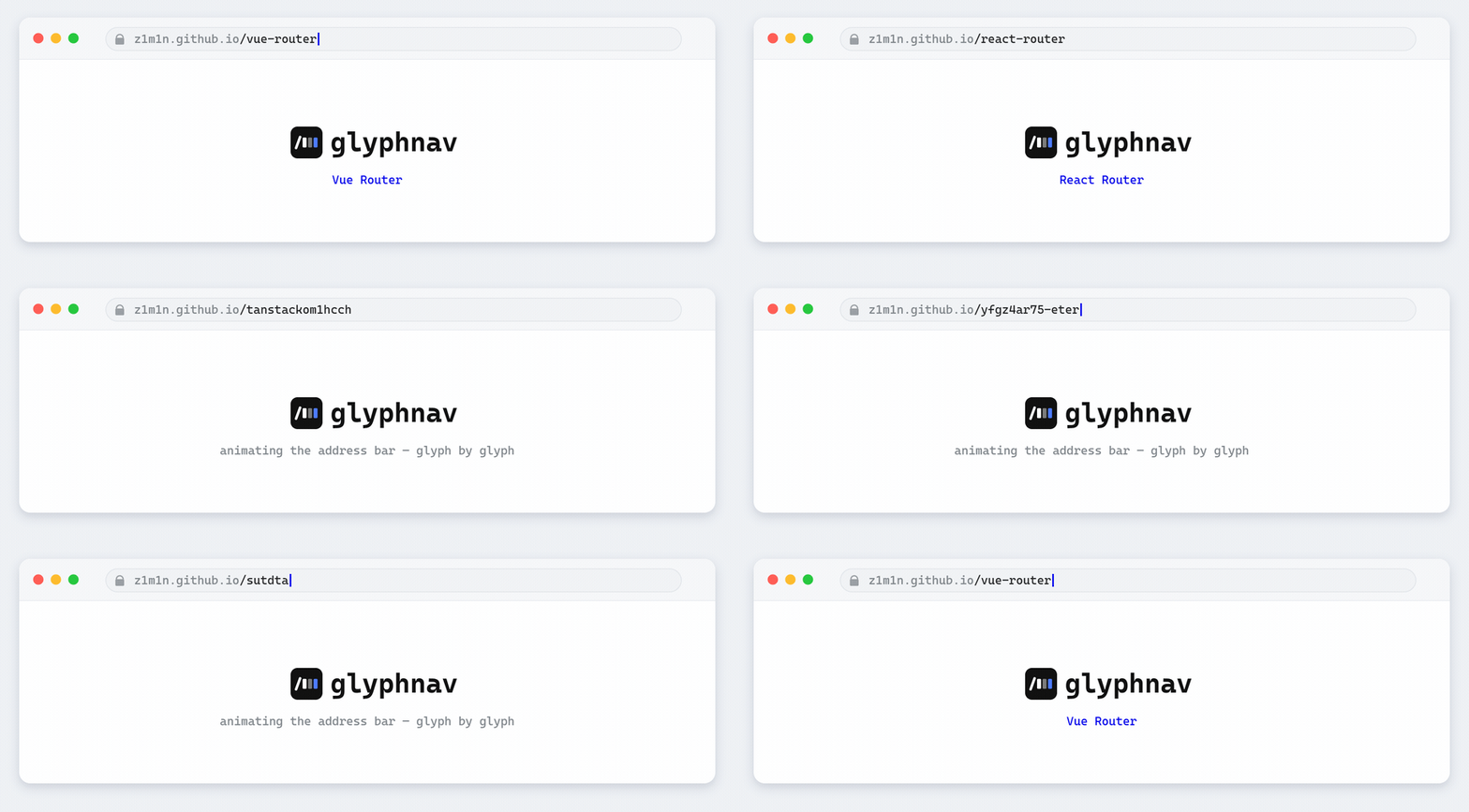
Live demo
Jump straight to an integration: vanilla · Vue Router · React Router · Solid Router · TanStack (React) · TanStack (Solid) · Angular Router · Preact (preact-iso) · Next.js · Nuxt · SvelteKit
glyphnav rewrites history.replaceState frame by frame: it fills the destination
path with random glyphs (the grow phase), then resolves the real characters
left‑to‑right (the resolve phase). When the animation finishes it performs the
actual navigation — a hard reload for plain links, or a hand‑off to your router for SPAs.
- Framework‑agnostic core — a tiny, dependency‑free engine.
- Adapters named after the router they wrap:
glyphnav/vue-router,glyphnav/react-router,glyphnav/solid-router,glyphnav/tanstack-router/react,glyphnav/tanstack-router/solid,glyphnav/angular-router,glyphnav/preact-iso,glyphnav/next(App and Pages Router),glyphnav/nuxtandglyphnav/sveltekit. - Navigate‑first by default (
commit: 'before') — the page changes instantly and the animation plays on top; switch tocommit: 'after'for the classic animate‑then‑commit order. - Two effects:
decode(grow + resolve left‑to‑right) andscramble(full‑length noise at once, characters lock in random order). -
durationbudgets the whole animation — frames auto‑scale to fit. - Animates browser back/forward too — on by default for the vanilla
install(), opt‑in (animatePopState) for the router adapters. - ~1 kB per adapter (gzipped, ~0.5–1 kB) on top of a ~3 kB core.
- Honors
prefers-reduced-motion, supersedes overlapping navigations, fully cancelable. - Frames run on
requestAnimationFrame— vsync-aligned and paused while the tab is backgrounded. - Writes only rooted same‑origin paths and backs off if the URL changes underneath it (back button mid‑animation) — the address bar can't be corrupted.
- ESM + CJS + types, built with Vite, covered by Vitest.
Install
pnpm add glyphnav
# npm install glyphnav  ·  yarn add glyphnav
Router adapters use your existing router as a peer dependency — nothing extra to install.
Quick start (no framework)
import { install, navigate } from 'glyphnav';

// Hijack same-origin <a> clicks so every navigation animates, then reloads.
install();

// Animate only programmatic calls, leave links alone:
install({ intercept: 'none' });
await navigate('/dashboard'); // hard reload: animate, then location.assign('/dashboard')

// Navigate-first is the default for SPA navigations: pushState immediately,
// then decode the bar on top (hard reloads fall back to animate-then-commit
// because the page unloads):
await navigate('/dashboard', { reload: false });

// Opt back into the classic animate-then-commit order, per call or per install:
install({ reload: false, commit: 'after', duration: 250, effect: 'scramble' });
install() ignores the things a good link interceptor should: modified clicks
(⌘/Ctrl/Shift/middle), target="_blank", download, rel="external",
cross‑origin links, and anything marked data-glyphnav="off".
How it works
Given a target like /test (query and hash included — they are just part of the
path), glyphnav splits it into a fixed prefix and the animated text, then
generates frames. There are two effects, shown below resolving the same /test:
decode (default) — two phases:
- grow: append one random glyph per frame until the text reaches the target length, producing a random "base" string.
- resolve: lock in the real characters left‑to‑right, leaving the unresolved tail at its base glyphs.
/  →  /x  →  /xy  →  /xyz  →  /xyzw  →  /tyzw  →  /tezw  →  /tesw  →  /test
      └────────────  grow  ────────────┘└───────────  resolve  ──────────┘
scramble — a random string of the target's full length appears immediately,
then the real characters lock in at random positions while every unresolved
slot keeps flickering:
/qqqq  →  /qeqq  →  /qesq  →  /qest  →  /test
          └─────  lock in random order  ────┘
By default (commit: 'before') the navigation goes out immediately — the
page never waits for the animation — and the bar replays the decode from the old
path to wherever the navigation landed (router redirects included). With
commit: 'after' the order flips back to the classic one: the real navigation
is committed only after the last frame has been drawn.
Each frame is written with history.replaceState (no new history entries, back button
untouched, and via History.prototype so router‑patched history wrappers never see the
frames). The starting path is restored right before the real navigation so router
history stays clean. Safety rails:
- Relative targets are resolved against the current path; only rooted same‑origin paths are animated (cross‑origin targets are committed without animation).
- If the URL changes externally mid‑animation (back/forward button, another script), the run cancels itself and leaves the new URL alone.
Caveat — URL history / autocomplete: replaceState never adds a back/forward
entry, but the browser still treats each frame as a same‑document navigation, so
Chromium's address‑bar autocomplete (and any extension listening for
webNavigation.onHistoryStateUpdated) can log every frame as a visit — a long
scramble can leave dozens of throwaway, half‑resolved URLs in your history/autocomplete
suggestions. There is no web‑platform API to opt a replaceState call out of that; the
only lever is fewer frames — a short duration, a low maxFrames, or scope: 'tail'
(shorter animated text means fewer frames).
Frame generation is pure and deterministic given an rng, which is exactly what the
test‑suite pins down.
Back/forward animation
By default an in‑flight run just backs off when the user hits back/forward — the browser has already moved the URL, so glyphnav leaves it alone. You can instead have those history traversals animate too: glyphnav replays the decode from the previously shown path to the one the browser landed on (nothing is committed — the browser already did that).
- Vanilla
install()turns it on by default when intercepting links. It is a no‑op in reload (MPA) mode and only does visible work for SPA navigations (reload: false). PassanimatePopState: falseto switch it off. - Router adapters keep it off by design (they patch nothing globally) — opt in
with
animatePopState: true:- React Router / TanStack / Next:
<GlyphnavProvider animatePopState>(aProviderowns the listener for the subtree's lifetime). - Vue / Nuxt:
attachGlyphnav(router, { animatePopState: true })/installGlyphnav(app, { animatePopState: true })—detach()removes the listener. - SvelteKit:
attachGlyphnav(goto, { animatePopState: true })—detach()removes the listener. - Angular:
provideGlyphnav({ animatePopState: true }).
- React Router / TanStack / Next:
Under the hood the core controller exposes enableHistoryAnimation() (wire up the
popstate listener; returns a cleanup) and replay(from, to) (decode between two
known paths without committing). Reduced motion, no‑op traversals (from === to) and
non‑rooted paths are skipped, exactly like run().
Options
Every entry point accepts the same options object.
| Option | Type | Default | Description |
|---|---|---|---|
charset |
string |
url‑safe set | Pool of random glyphs. Non‑URL‑safe glyphs are percent‑encoded in the bar. |
duration |
number | null |
null |
Total animation time in ms, spread over all frames (frames auto‑scale, ≥ ~15 ms each). Takes precedence over stepDuration. |
stepDuration |
number |
40 |
Milliseconds per frame, used when no duration is set. |
effect |
'decode' | 'scramble' |
'decode' |
decode grows then resolves left‑to‑right; scramble bursts to full length, then locks characters in random order. |
commit |
'after' | 'before' |
'before' |
before navigates immediately and animates on top of the landed URL; after animates first, then navigates. |
growStep |
number |
1 |
Characters added per grow frame. |
resolveStep |
number |
1 |
Characters locked per resolve frame. |
maxFrames |
number |
120 |
Hard cap; steps auto‑scale so long paths never overrun. |
scope |
'full' | 'tail' |
'full' |
full animates the whole path; tail keeps the common prefix and only animates what differs. |
preserveLeadingSlash |
boolean |
true |
Keep the leading / fixed (for scope: 'full'). |
respectReducedMotion |
boolean |
true |
Skip the animation under prefers-reduced-motion. |
rng |
() => number |
Math.random |
Random source — inject for reproducibility/tests. |
hooks |
object |
{} |
onStart, onFrame, onCommit, onCancel, onComplete. |
Built‑in charsets
import { URL_SAFE, ALPHANUMERIC, LOWER_ALPHA, HEX, SYMBOLS, MATRIX, BINARY } from 'glyphnav/core';URL_SAFE is the default and the only one that stays verbatim in the real address bar.
Router adapters
Each subpath is named after the router it wraps. The Vue and Nuxt plugins, the
SvelteKit adapter, and vanilla install() intercept globally — and all can be told
not to. The React, Solid, TanStack, Angular and Next adapters are opt‑in by design:
only navigations made through their links/hooks animate. The Preact adapter is opt‑in
too, but adds interceptLinks to animate the plain <a> clicks preact-iso already
handles. Browser back/forward animation is opt‑in for every
adapter via animatePopState — except the vanilla install(), where it is on by
default; see Back/forward animation.
Vue Router — glyphnav/vue-router
import { createRouter, createWebHistory } from 'vue-router';
import { glyphnav } from 'glyphnav/vue-router';

const router = createRouter({ history: createWebHistory(), routes });

app.use(router);
app.use(glyphnav, { router, duration: 250, commit: 'before' });
The plugin wraps router.push/router.replace, so every <router-link> click and
programmatic navigation animates first — await router.push(...) still resolves to the
real navigation result. Read the controller anywhere with useGlyphnav(), or attach to
a router manually with attachGlyphnav(router, options).
Prefer to leave the router untouched? Pass intercept: 'none' and use the animated
push/replace explicitly:
app.use(glyphnav, { router, intercept: 'none' });

// in a component:
const { push } = useGlyphnavRouter();
await push('/dashboard'); // animated; plain router.push stays native
React Router — glyphnav/react-router
import { GlyphnavProvider, GlyphnavLink, useGlyphnavNavigate } from 'glyphnav/react-router';

<GlyphnavProvider duration={250} effect="scramble" commit="before">
  <GlyphnavLink to="/about">About</GlyphnavLink>
</GlyphnavProvider>;

// imperative, drop-in for useNavigate():
const navigate = useGlyphnavNavigate();
await navigate('/dashboard');
GlyphnavLink is a drop‑in for <Link> (basename‑aware via useHref), and
useGlyphnavNavigate() mirrors useNavigate(). The provider is optional — without it,
hooks create their own controller.
Solid Router — glyphnav/solid-router
For the official Solid Router (@solidjs/router), with Solid components and hooks
(solid-js + @solidjs/router as peers):
import { GlyphnavProvider, GlyphnavLink, useGlyphnavNavigate } from 'glyphnav/solid-router';

<GlyphnavProvider duration={250} effect="scramble" commit="before">
  <Router root={Layout}>{/* <Route> children */}</Router>
</GlyphnavProvider>;

// inside the router tree — a drop-in for Solid Router's <A href>:
<GlyphnavLink href="/about?tab=2#top">About</GlyphnavLink>;

// imperative, drop-in for useNavigate():
const navigate = useGlyphnavNavigate();
await navigate('/dashboard');
GlyphnavLink is a drop‑in for <A> whose destination is resolved exactly like the
real one (route‑relative via useResolvedPath, base‑aware via useHref), then
navigates imperatively — preventDefault stops Solid Router's own delegated click
handler so the navigation happens once. useGlyphnavNavigate() mirrors useNavigate()
(string target plus replace/scroll/state/resolve; a numeric history delta is
passed straight through). The provider is optional — without it, hooks create their own
controller.
TanStack Router (React) — glyphnav/tanstack-router/react
import {
  GlyphnavProvider,
  GlyphnavLink,
  useGlyphnavNavigate,
} from 'glyphnav/tanstack-router/react';

<GlyphnavProvider duration={250} commit="before">
  <RouterProvider router={router} />
</GlyphnavProvider>;

// inside the router tree:
<GlyphnavLink to="/about">About</GlyphnavLink>;

const navigate = useGlyphnavNavigate();
await navigate({ to: '/posts' });
useGlyphnavNavigate() mirrors TanStack's useNavigate() (same NavigateOptions
object) and resolves the basepath‑aware target via router.buildLocation().
GlyphnavLink renders a real <a href>; for fully type‑safe links wrap
useGlyphnavNavigate() in your own component.
TanStack Router (Solid) — glyphnav/tanstack-router/solid
TanStack Router's buildLocation/navigate come from its framework‑agnostic
core, so the engine is shared — only the bindings differ. The Solid adapter has
the same API as the React one, with Solid components and hooks (and
solid-js + @tanstack/solid-router as peers):
import {
  GlyphnavProvider,
  GlyphnavLink,
  useGlyphnavNavigate,
} from 'glyphnav/tanstack-router/solid';

<GlyphnavProvider duration={250} commit="before">
  <RouterProvider router={router} />
</GlyphnavProvider>;

// inside the router tree:
<GlyphnavLink to="/about">About</GlyphnavLink>;

const navigate = useGlyphnavNavigate();
await navigate({ to: '/posts' });
useGlyphnavNavigate() mirrors Solid's useNavigate(), and GlyphnavLink
renders a real <a href> resolved through router.buildLocation() — identical
in spirit to the React adapter above.
Angular Router — glyphnav/angular-router
Because glyphnav is built by Vite (not Angular's ngtsc), it ships compiler‑free
helpers rather than decorated classes:
import { provideGlyphnav, GLYPHNAV } from 'glyphnav/angular-router';

bootstrapApplication(App, {
  providers: [provideRouter(routes), provideGlyphnav({ duration: 250, commit: 'before' })],
});

// inject anywhere:
const nav = inject(GLYPHNAV);
await nav.navigateByUrl('/about');
await nav.navigate(['/users', 42]);
The navigator is base‑href aware: provideGlyphnav resolves the animated path
through Location.prepareExternalUrl, so apps served under a base href animate
the URL that really lands in the bar.
For an animated link directive ([glyphnavLink]), copy the small directive from
demo/angular-router/glyphnav-link.directive.ts
into your app, where your own Angular build compiles it. Or wrap a Router directly with
createGlyphnavNavigator(router, options).
Preact (preact-iso) — glyphnav/preact-iso
For Preact's official router, preact-iso
(preact + preact-iso as peers). preact-iso already intercepts every same‑origin
<a> itself, so the adapter gives you both a global mode and opt‑in entry points:
import { LocationProvider, Router } from 'preact-iso';
import { GlyphnavProvider, GlyphnavLink, useGlyphnavRoute } from 'glyphnav/preact-iso';

<LocationProvider>
  <GlyphnavProvider duration={250} commit="before" interceptLinks>
    <a href="/about">About</a> {/* plain links animate via interceptLinks */}
    <GlyphnavLink href="/posts?page=2#top">Posts</GlyphnavLink>
    <Router>{/* <Route> children */}</Router>
  </GlyphnavProvider>
</LocationProvider>;

// imperative, drop-in for useLocation().route:
const route = useGlyphnavRoute();
await route('/dashboard');
interceptLinks (on <GlyphnavProvider>, or the standalone useGlyphnavLinks() hook)
animates the plain <a> clicks preact-iso already handles — no component swap.
GlyphnavLink and useGlyphnavRoute() are the opt‑in equivalents; both stop the click
from reaching preact-iso's global handler, so each navigation happens exactly once.
Modified clicks (⌘/Ctrl/middle) fall through to the browser. The provider is optional —
without it, the hooks create their own controller.
Note that preact-iso intercepts every same‑origin <a> itself — including links
that leave your router (a link back to a separate app, another server‑rendered page).
data-glyphnav="off" only tells glyphnav's interceptor to skip; to make such a link a
real full‑page navigation, bound preact-iso with
<LocationProvider scope>
(a path prefix or RegExp) so out‑of‑scope links fall through to the browser.
Next.js — glyphnav/next
One adapter for both Next routers. routerMode selects which one performs the
real navigation — 'app' (default, via next/navigation) or 'pages' (via
next/compat/router) — so the same code animates whether your routes live in
app/ or pages/.
'use client';
import { GlyphnavProvider, GlyphnavLink, useGlyphnavNavigate } from 'glyphnav/next';

<GlyphnavProvider duration={250} commit="after" routerMode="app">
  <GlyphnavLink href="/about?tab=2#top">About</GlyphnavLink>
</GlyphnavProvider>;

// imperative, mirrors useRouter().push:
const navigate = useGlyphnavNavigate();
await navigate('/dashboard');
GlyphnavLink is a drop‑in for next/link (prefetch and all) that animates on
click; useGlyphnavNavigate() mirrors useRouter().push (pass { replace: true }
for replace). Pass basePath if the app is served under one. App Router note:
its navigations are asynchronous, so commit: 'after' (animate, then navigate) is
the reliable mode there; the Pages Router resolves synchronously and works with
either timing.
Nuxt — glyphnav/nuxt
Nuxt runs on Vue Router, so a single client plugin wraps router.push/replace and
every <NuxtLink> click and navigateTo() call animates — no per‑link wiring:
// plugins/glyphnav.client.ts
import { installGlyphnav } from 'glyphnav/nuxt';

export default defineNuxtPlugin((nuxtApp) => {
  installGlyphnav(
    { $router: useRouter(), provide: (name, value) => nuxtApp.provide(name, value) },
    { duration: 250, commit: 'before' },
  );
});

// anywhere: const { controller, navigate } = useNuxtApp().$glyphnav;
historyMode: 'hash' keeps the animated target correct for hash‑mode routers, and
intercept: 'none' leaves the router untouched so only the instance's
navigate()/push()/replace() animate. Attach to a router manually with
attachGlyphnav(router, options).
SvelteKit — glyphnav/sveltekit
SvelteKit — Svelte's official framework and router — exposes no patchable router
object: programmatic navigation goes through goto, and internal <a> clicks are
handled by SvelteKit itself. So attachGlyphnav(goto, …) installs a capture‑phase
click listener that animates every eligible same‑origin link — it preventDefault()s
the click (SvelteKit's own handler then stands down) and goto performs the real
navigation, so every link animates with no per‑link wiring, like the Nuxt plugin.
Call it once on the client (it rewrites the address bar, so it must not run during
prerender):
<!-- src/routes/+layout.svelte -->
<script>
  import { onMount } from 'svelte';
  import { goto } from '$app/navigation';
  import { attachGlyphnav } from 'glyphnav/sveltekit';

  // Every <a> click and goto() now animates first.
  onMount(() => attachGlyphnav(goto, { duration: 250, commit: 'before' }).detach);
</script>
goto is passed in because $app/navigation is a virtual module only resolvable
inside a SvelteKit app — the adapter never imports SvelteKit and stays compiler‑free.
With the default commit: 'before' the navigation goes out first and the bar decodes
on top of the path that actually landed (redirects included): goto resolves a tick
before the address bar settles, so the adapter waits for the URL to land — the same
approach the Next App Router adapter uses.
Pass intercept: 'none' to leave clicks to SvelteKit and animate only the instance's
own navigate() — a drop‑in for goto — or links you opt in with the use:link
action:
<script>
  import { goto } from '$app/navigation';
  import { attachGlyphnav } from 'glyphnav/sveltekit';

  const { navigate, link } = attachGlyphnav(goto, { intercept: 'none' });
  // await navigate('/dashboard', { replace: true });
</script>

<a href="/about" use:link>About</a>
Links opt out with data-glyphnav="off" (new‑tab, download, rel="external" and
cross‑origin links are skipped automatically). Apps served under a base need no
extra config: SvelteKit's hrefs already include it and goto resolves against the
live URL, so the animated path always matches the address bar.
Core API — glyphnav/core
import { createGlyphnav, generateFrames } from 'glyphnav/core';

// Orchestrate it yourself:
const glyph = createGlyphnav({ duration: 300, effect: 'scramble' });
await glyph.run('/somewhere', () => myRouter.go('/somewhere'));
glyph.cancel();

// Or just compute the frames (pure, DOM-free):
generateFrames('/', '/test', { charset: 'xyzw' }).map((f) => f.path);
// → ['/x','/xy','/xyz','/xyzw','/tyzw','/tezw','/tesw','/test']
createGlyphnav(options, deps) returns a controller with run(to, commit, perCall?),
replay(from, to, perCall?) (decode between two known paths without committing),
enableHistoryAnimation(perCall?) (animate back/forward; returns a cleanup),
cancel(), update(options) and an animating flag. deps lets you inject history,
getCurrentPath, a scheduler and a reduced‑motion probe (used throughout the tests).
Demos
Hosted live at https://z1m1n.github.io/glyphnav/ — the same playground, deployed to GitHub Pages.
One Vite playground covers seven integrations — vanilla, Vue Router, React Router, Solid Router, TanStack Router (React and Solid) and Angular Router:
pnpm install
pnpm demo                  # → http://localhost:5173  (picker + all ten, live)
# …or run one server individually:
pnpm demo:vite             # → http://localhost:5173  (just the seven Vite demos)
pnpm demo:next             # → http://localhost:5174/next   (Next.js, own dev server)
pnpm demo:nuxt             # → http://localhost:5176/nuxt   (Nuxt, own dev server)
pnpm demo:sveltekit        # → http://localhost:5177/sveltekit   (SvelteKit, own dev server)
The ports above are defined in demo/.env (GLYPHNAV_PORT_VITE,
GLYPHNAV_PORT_NEXT, GLYPHNAV_PORT_NUXT, GLYPHNAV_PORT_SVELTEKIT) as the
single source of truth — each demo's own dev server and the picker proxy that
forwards to it read the same value via demo/ports.ts, so changing one there
moves both together.
Next.js, Nuxt and SvelteKit have their own build systems, so they're separate
workspace projects under demo/next, demo/nuxt and demo/sveltekit rather than
Vite entries — each runs on its own dev server. pnpm demo (run-p via
npm-run-all2) starts all four together, and the Vite dev server proxies /next,
/nuxt and /sveltekit to them, so the picker
at :5173 reaches every demo from one origin (run just pnpm demo:vite and those three
links show a hint pointing at their own server). Run a single pnpm demo — a
second Nuxt instance sharing demo/nuxt/.nuxt breaks dev; kill any stale :5176
server first. For the deployed artifact,
pnpm demo:build (run-s) builds the Vite playground, statically exports Next
(output: 'export'), Nuxt (nuxi generate) and SvelteKit (adapter-static), and
copies their output into demo/dist/{next,nuxt,sveltekit} so a single demo/dist
deploys all ten. All demos — Vite, Next, Nuxt and SvelteKit — share one
@glyphnav-demo/shared workspace package for the charsets,
address‑bar helpers, syntax highlighter and styles.
The Angular demo runs in JIT mode inside the same dev server: it imports
@angular/compiler in the browser, so no ngtsc build step (and no second app)
is needed. The trade‑offs of JIT‑in‑Vite — no AOT template type‑checking, the
compiler in the bundle, inject() instead of constructor DI — are fine for a
demo; a real app keeps using its own Angular build, which compiles the copied
directive with AOT as usual.
Every demo shares the same bare, monospace look: a clickable glyphnav / <router>
breadcrumb back to the picker, an in‑page mirror of the address bar, a docs tab
with copy‑paste integration snippets, deep links with ?query and #hash
(they animate like any path), and controls for charset, speed (whole‑animation
duration 20–1000 ms, slider inverted so full right is fastest), effect
(decode/scramble), commit order (navigate first/animate first) and scope.
The demos alias glyphnav to src/, so editing the library updates them live.
Development
The repo is a pnpm 11.5 workspace: the library is the root
package, with the Next.js, Nuxt and SvelteKit demos as members under demo/ (the other demos
are plain files in the root package).
pnpm test            # Vitest (jsdom) — core, controller, vanilla + all adapters
pnpm run typecheck   # tsc --noEmit
pnpm run build       # Vite library build → dist/ (ESM + CJS + .d.ts)
pnpm run coverage    # V8 coverage
The package is built with Vite 8 in library mode with eleven entry points
(., ./core, ./vue-router, ./react-router, ./solid-router,
./tanstack-router/react, ./tanstack-router/solid, ./angular-router, ./next,
./nuxt, ./sveltekit); router/framework deps are always externalized. Declarations are
generated against tsconfig.build.json so they mirror the entry layout in dist/.