




GMGN Agent Skills
With GMGN Agent Skills, you can use AI agents to query real-time trending token rankings across multiple chains, token fundamentals, social media signals, live trading activity, new tokens in Trenches, top holders, top traders, smart money positions, KOL holdings, insider wallets, bundled wallet exposure, and other professional on-chain analytics. It also supports market orders, limit orders, advanced take-profit/stop-loss strategy orders, one-command cooking orders (buy + condition orders in a single flow), and wallet management — including real-time holdings, recent P&L, and transaction history — all through natural language.
Why GMGN Skills
Built for AI agents to query and trade multi-chain Meme tokens at high speed in real time. gmgn-skills gives AI agents direct access to GMGN's trending tokens, Trenches new token listings, and professional on-chain data — including Smart Money, KOL, rat trader, and bundler analytics.
With 500+ professional data dimensions, you can turn your AI agent into a 24/7 real-time chain-scanning trading tool — monitoring multi-chain token momentum, placing orders instantly, and managing exits with take-profit / stop-loss, all on autopilot.
1. Real-time on-chain data — faster
Data across SOL / BSC / Base / ETH is live on every query. Supports multi-parameter customization, no snapshot cache — built for AI agent real-time decision-making (including but not limited to):
| Data | Granularity |
|---|---|
| New token discovery (Trenches) | Real-time, filtered by launchpad, dev holdings, KOL entry, rat trader ratio |
| Trending tokens | Real-time, 1m / 5m / 1h / 6h / 24h — minimum 1-minute window |
| Token info | Real-time — trade activity / price / volume / market cap |
| Token security | Real-time — open source, renounced, honeypot detection, etc. |
| Token analytics | Real-time — Dev / KOL / Smart Money / rat trader / bundler wallet holdings |
| Monitoring & tracking | Real-time — KOL / Smart Money / followed wallet trade activity |
| K-line (OHLCV) | Real-time, 1m / 5m / 15m / 1h / 4h / 1d — minimum 1-minute candles |
| Wallet holdings | Real-time — holdings / P&L / trade activity |
2. Trade faster
- Same RPC routing as GMGN's web trading interface, multi-region deployment, millisecond response — order submission under 0.3 seconds end-to-end.
- Automatic best-route selection, the same routing engine as GMGN web.
- Market orders, limit orders, and strategy orders (take-profit / stop-loss) in a single command.
- Sell by position percentage (
--percent 50) without calculating exact amounts.
| Order Type | Description |
|---|---|
| Market Order | Instant execution at current market price |
| Limit Order | Trigger buy or sell at a specified price |
| Take-Profit / Stop-Loss | Fixed-price exit conditions attached to a swap |
| Trailing Take-Profit / Trailing Stop-Loss | Tracks price peak; fires after a specified drawdown % — rides momentum while protecting gains |
| Multi-Wallet Batch Trading | Buy with multiple wallets simultaneously, each with its own take-profit / stop-loss / trailing take-profit / trailing stop-loss orders |
3. More comprehensive token data
No more scraping web pages or getting blocked by Cloudflare. Query all the professional analytics needed for high-frequency Meme token trading, with high concurrency in real time (including but not limited to):
- Smart money count (
smart_degen_count) and KOL holders (renowned_wallets) — live - Rat trader ratio (
rat_trader_amount_rate) — volume share from insider/sneak wallets - Bundler bot exposure (
bundler_trader_amount_rate) — volume from bot-bundled buys - Sniper wallets (
sniper_count) — wallets that bought at the exact moment of launch - Suspected insider hold rate (
suspected_insider_hold_rate) - Fresh wallet ratio (
fresh_wallet_rate) - Rug ratio score (0–1) + honeypot detection + wash-trade flag
- Bonding curve status (
is_on_curve) — whether the token has graduated to open DEX
4. What you can do with GMGN Skills
Real-time chain scanning
- Scan Trenches for new tokens, filtered by launchpad (Pump.fun, letsbonk, fourmeme, clanker…), dev holdings, KOL entry, and rat trader ratio in real time
- Browse multi-chain trending token rankings (minimum 1-minute granularity), sorted by volume, smart money count, market cap, and more
- Track new tokens in real time — see which tokens KOLs, Smart Money, and wallets you follow are buying, and auto-analyze the latest hot tokens
- Fetch real-time K-line / OHLCV data for any token (1m / 5m / 15m / 1h / 4h / 1d)
Token analytics
- Query token fundamentals, social links, Bonding Curve status, and liquidity pool details
- Security check: open source, renounced, honeypot, wash trading, Rug ratio score (0–1)
- Deep holder analysis: Smart Money / KOL / rat trader / bundler / sniper / whale / fresh wallet — holdings breakdown and rankings
Wallet & tracking
- Analyze any wallet: real-time holdings, realized / unrealized P&L, win rate, trade style, full history
- Track the latest buys and sells from Smart Money, KOL, and wallets you follow in real time
Automated trading
- Market orders, limit orders, take-profit / stop-loss strategy orders — end-to-end latency under 0.3 seconds
- One-command sell by position percentage (
--percent 50), no manual calculation needed
AI workflows
- 9 built-in workflow docs: token research, project deep report, wallet analysis, Smart Money profiling, risk warning, early project screening, daily brief, market discovery, and more — ready to use out of the box
Skills
| Skill | Description | Reference |
|---|---|---|
/gmgn-token |
Token info, security, pool, holders, traders | SKILL.md |
/gmgn-market |
K-line market data, trending tokens | SKILL.md |
/gmgn-portfolio |
Wallet holdings, activity, stats | SKILL.md |
/gmgn-track |
Follow-wallet trades, KOL trades, Smart Money trades | SKILL.md |
/gmgn-swap |
Swap submission + limit orders + strategy orders + order query | SKILL.md |
/gmgn-cooking |
One-command cooking orders (buy + take-profit/stop-loss in a single flow) | SKILL.md |
For detailed CLI commands, parameters, and recommended values, see the Wiki documentation.
Quick Start
Note for AI assistants: If you are an AI Agent helping the user install or configure gmgn-cli, jump directly to Quick Start (AI Agent) — it contains all the steps you need to complete, including how to guide the user through API key generation. If the user asks to upgrade, jump to Upgrade (AI Agent).
Ready to install? Jump to Installation →
Already installed? Upgrade Skills and CLI →
Tip: If your AI agent tries to open or scrape the gmgn.ai website instead of using the CLI, add this to your prompt:
Use gmgn-cli commands. Do not call gmgn.ai web endpoints directly.
Quick Start (AI Agent)
The following steps are for AI Agents. Some steps require the user to complete actions in a browser.
Step 1 — Install CLI and Skills
npx skills add GMGNAI/gmgn-skillsStep 2 — Verify CLI installation (demo key)
GMGN_API_KEY=gmgn_solbscbaseethmonadtron gmgn-cli market trending --chain sol --interval 1h --limit 3If JSON output appears, the CLI is installed correctly. Setup is NOT yet complete — this is a public demo key for testing only. You must continue to Steps 3–4 to configure the user's personal API key. Do not stop here.
Step 3 — REQUIRED: Set up personal API key
This step is mandatory. The demo key in Step 2 supports testing only and is not for actual use.
Immediately tell the user the following, then run the key generation command without waiting for them to ask:
"To use GMGN Skills, you need your own API key from https://gmgn.ai/ai. I'm generating an Ed25519 key pair for you now."
Run:
openssl genpkey -algorithm ed25519 -out /tmp/gmgn_private.pem 2>/dev/null && \
  openssl pkey -in /tmp/gmgn_private.pem -pubout 2>/dev/null
Show the public key to the user with the following instructions:
This is your Ed25519 public key. Please complete these two steps:
- Go to https://gmgn.ai/ai, paste the public key above into the API Key creation form, and submit.
- Once created, copy the API Key shown on the page and send it back to me — I'll handle Step 4 configuration for you.
Wait for the user to reply with their API Key before continuing to Step 4.
Step 4 — Configure credentials
After the user receives their API key, write it to the global config:
mkdir -p ~/.config/gmgn
# Write API key (replace with the actual key the user provides)
echo 'GMGN_API_KEY=<user_api_key>' > ~/.config/gmgn/.env
chmod 600 ~/.config/gmgn/.env
If the user also needs swap or order capability, append the private key:
# Append private key (use the PEM content from Step 3)
echo 'GMGN_PRIVATE_KEY="<pem_content>"' >> ~/.config/gmgn/.env
Step 5 — Verify
gmgn-cli market trending --chain sol --interval 1h --limit 3If output appears without error, setup is complete.
Upgrade (AI Agent)
Run these two commands to upgrade both the CLI and Skills to the latest version.
npm install -g gmgn-cli
npx skills add GMGNAI/gmgn-skills
Check the installed version after upgrading:
gmgn-cli --versionFor the full upgrade reference, see Section 10 — Upgrade Skills and CLI.
Demo Cases
Trending Token Rankings
Send this prompt to your AI Agent:
Fetch Solana 1h trending, filter for pump.fun tokens created within 6h, sort by volume descending.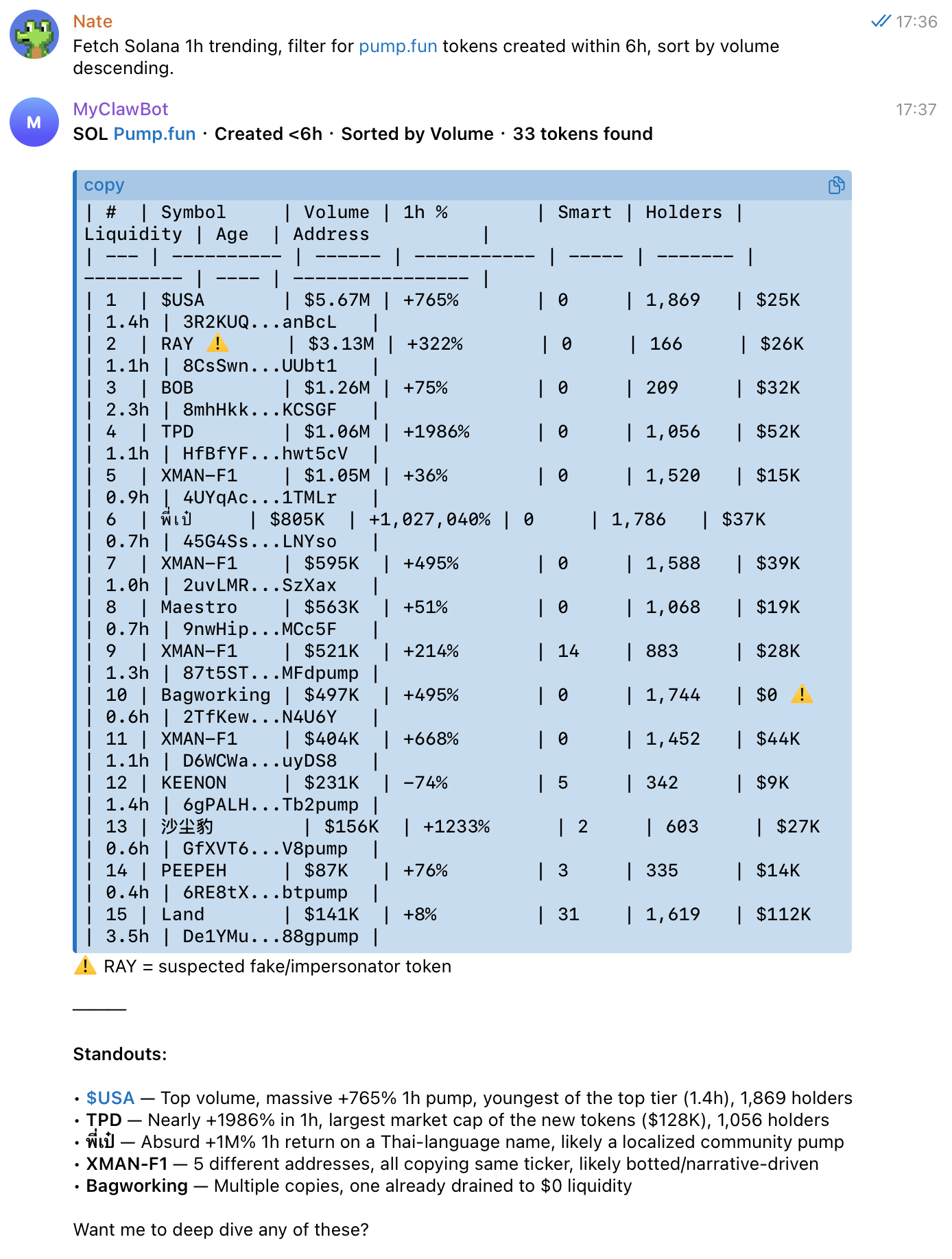
Real-Time Token Trading Analysis
Send this prompt to your AI Agent:
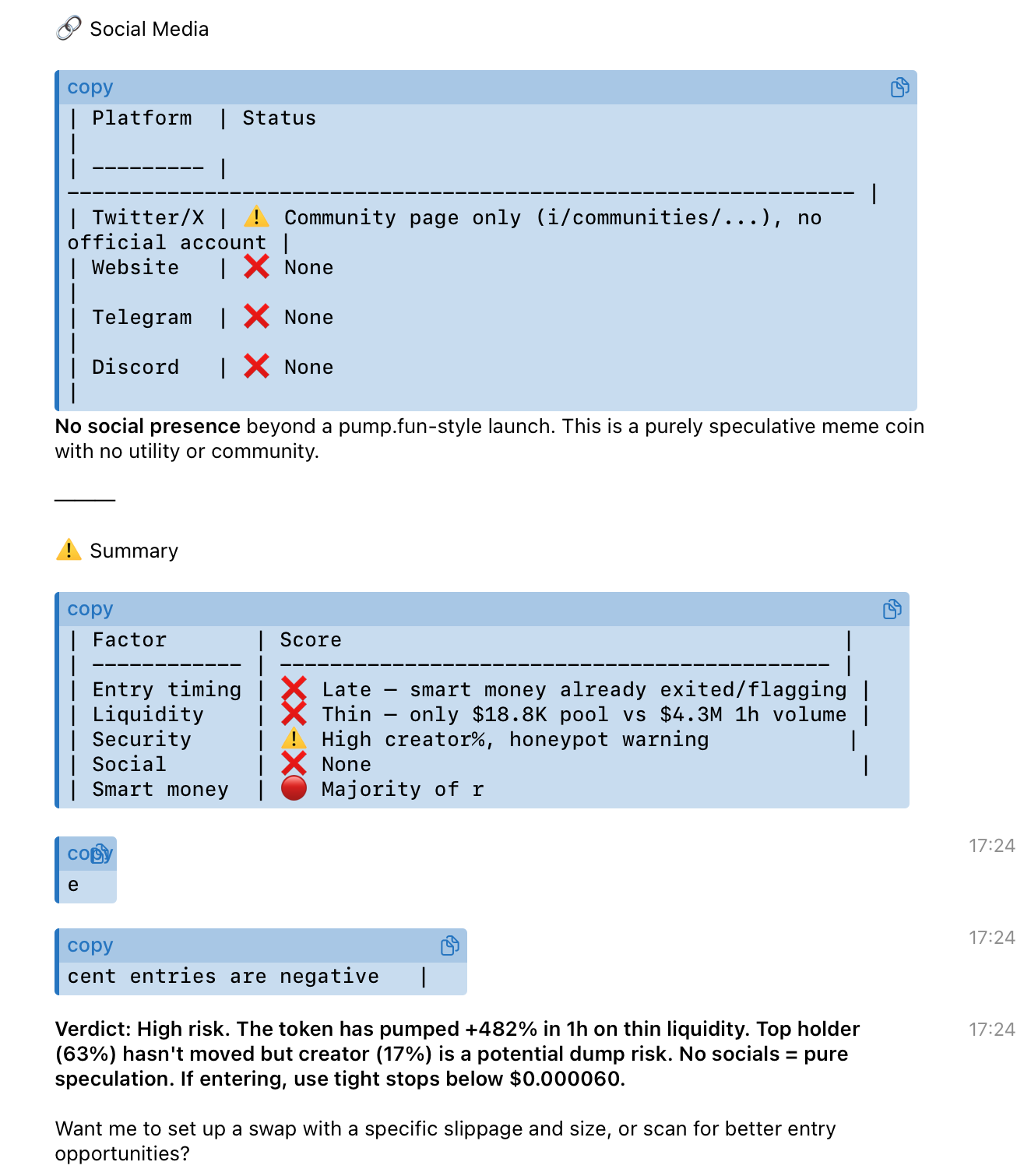
Check the first token's K-line, analyze entry timing, plot price + volume chart, and provide social media links and smart money/KOL trading analysis.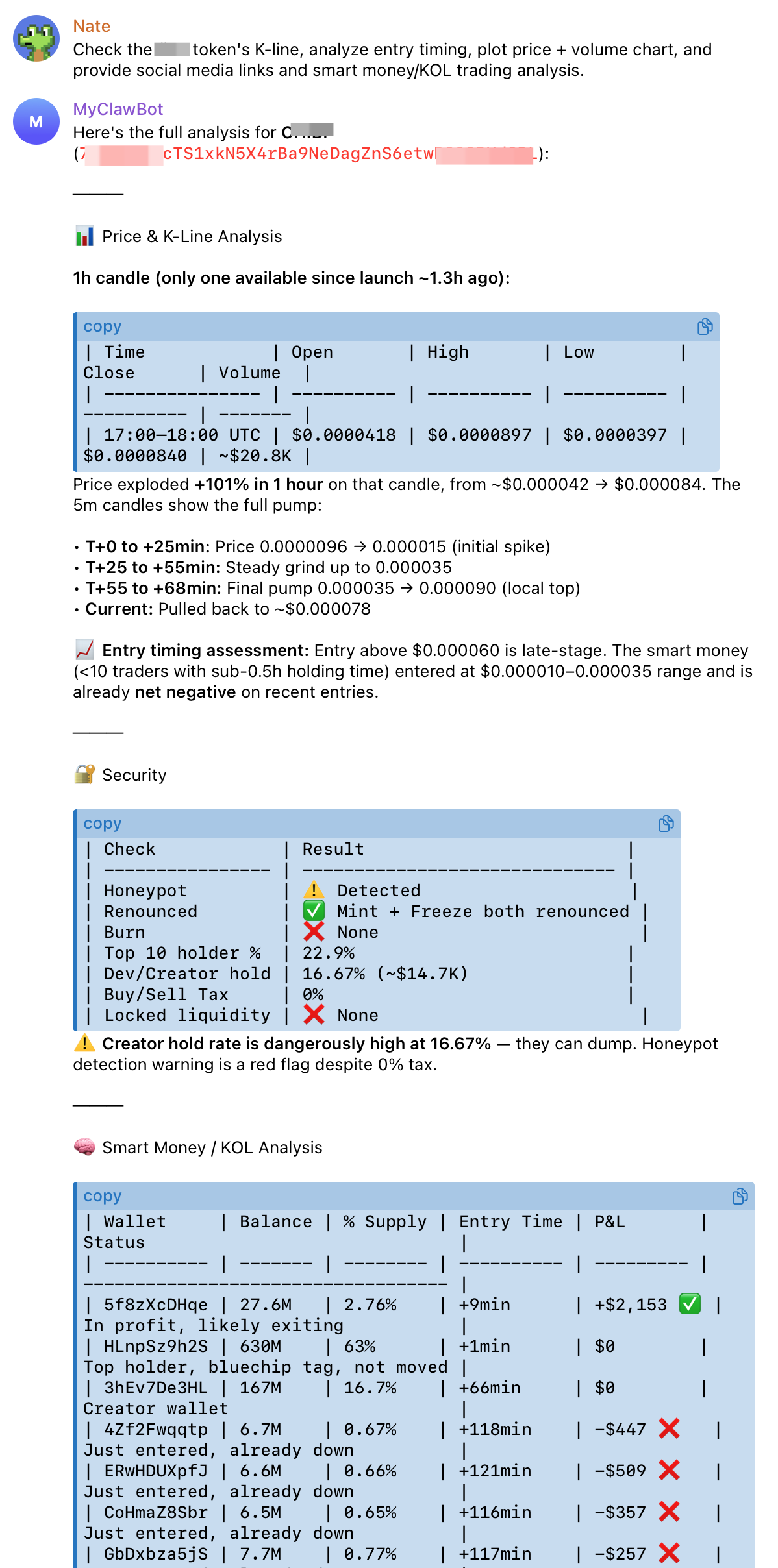
1. Installation
Prerequisites: Before installing, create your API Key at https://gmgn.ai/ai (see Section 3 for the full setup guide).
Choose one of the following methods:
1.1 Via Agent (recommended)
Send this to your AI agent:
npx skills add GMGNAI/gmgn-skills1.2 npm Global Install
npm install -g gmgn-cli1.3 Local Development
npm install
npm run build
node dist/index.js <command> [options]
2. Verify Connection
Test with the public API key — no registration required:
GMGN_API_KEY=gmgn_solbscbaseethmonadtron gmgn-cli market trending --chain sol --interval 1h --limit 3If you see JSON output, the CLI is working. The public key supports all read-only commands (token / market / portfolio) and is for testing only — apply for your own API key to use any feature (see step 3).
Troubleshooting — 401 / 403 errors: If the command fails with
401or403and credentials look correct, your outbound traffic may be going via IPv6 (not supported). Check immediately: (1) runifconfig | grep inet6(macOS) orip addr show | grep inet6(Linux) to list all network interfaces and their IPv6 addresses; (2) runcurl -s https://ipv6.icanhazip.com— if it returns an IPv6 address, your traffic is going via IPv6. Disable IPv6 on your network interface — gmgn-cli commands only work over IPv4.
3. Get Your Own API Key
The public key in step 2 is for testing only. Apply for your own API key at https://gmgn.ai/ai — required for all actual use (read-only and swap). You will need:
3.1 Generate an Ed25519 Key Pair
Option 1 — Ask your AI agent (recommended)
Send this prompt to your agent:
Generate an Ed25519 key pair for me using OpenSSL and show me:
1. The public key (I need to fill it in the GMGN API Key application form)
2. The private key in PEM format (I need to set it as GMGN_PRIVATE_KEY in my .env)
Option 2 — Binance Key Generator
Download and run the Binance Asymmetric Key Generator.
Enter the public key in the application form.
3.2 Get Your Public Egress IP
For the IP whitelist (required when enabling swap capability on your API key):
curl ip.me4. Configure Your API Key
Option 1: Global config (recommended)
Create ~/.config/gmgn/.env once — works from any directory:
mkdir -p ~/.config/gmgn
cat > ~/.config/gmgn/.env << 'EOF'
GMGN_API_KEY=your_api_key_here

# Required for swap / order only:
GMGN_PRIVATE_KEY="-----BEGIN PRIVATE KEY-----\n<base64>\n-----END PRIVATE KEY-----\n"
EOF
Option 2: Project .env
cp .env.example .env
# Edit .env and fill in your values
Config lookup order: ~/.config/gmgn/.env → project .env (project takes precedence).
5. Try in AI Clients
OpenClaw
Send the following prompt directly to test the query capabilities:
Show me the trending tokens on Solana in the last 1 hour.Claude Code
Skills are automatically discovered when the package is installed as a plugin.
Cursor
Skills are automatically discovered via the .cursor-plugin/ configuration.
- Complete the installation and configuration steps above
- Restart Cursor — skills will be available in Agent mode via
/gmgn-*commands
Cline
- Complete the installation and configuration steps above
- In Cline settings → Skills directory: point to the installed package's
skills/folder:echo "$(npm root -g)/gmgn-skills/skills" - Restart Cline —
/gmgn-token,/gmgn-market,/gmgn-portfolio,/gmgn-track,/gmgn-swap,/gmgn-cookingwill be available
Codex CLI
git clone https://github.com/GMGNAI/gmgn-skills ~/.codex/gmgn-cli
mkdir -p ~/.agents/skills
ln -s ~/.codex/gmgn-cli/skills ~/.agents/skills/gmgn-cli
See .codex/INSTALL.md for full instructions.
OpenCode
git clone https://github.com/GMGNAI/gmgn-skills ~/.opencode/gmgn-cli
mkdir -p ~/.agents/skills
ln -s ~/.opencode/gmgn-cli/skills ~/.agents/skills/gmgn-cli
See .opencode/INSTALL.md for full instructions.
6. Usage
Examples
Natural language prompts you can send to any AI assistant with gmgn-cli skills installed:
buy 0.1 SOL of <token_address>
sell 50% of <token_address> on BSC
sell 30% of my <token_address> position
get a quote: how much <token_address> can I get for 1 SOL?
check order status <order_id>
is <token_address> safe to buy on solana?
show top holders of <token_address>
show smart money holdings of <token_address>, sorted by buy volume
show recent KOL trades for <token_address>
show my wallet holdings on SOL
query token details for 0x1234...
show 24h K-line and volume for <token_address>
show trading stats for wallet <wallet_address> on BSC
show recent trades for wallet <wallet_address>
which wallets are linked to my API key, and what are their balances
show the latest smart money trades on SOL
show what KOLs are buying on SOL
show newly launched tokens on Solana
show Solana 1-minute trending tokens
Typical Workflows
Research a token:
token info → token security → token pool → token holdersAnalyze a wallet:
portfolio holdings → portfolio stats → portfolio activityExecute a trade:
token info (confirm token) → portfolio token-balance (check funds) → swap → order get (poll status)Discover trading opportunities via trending:
market trending (top 50) → AI selects top 5 by multi-factor analysis → user reviews → token info / token security → swap7. Workflow Docs
Step-by-step guides for common analysis tasks:
| Workflow | When to use |
|---|---|
| workflow-token-research.md | Pre-buy token due diligence (address → buy/watch/skip) |
| workflow-project-deep-report.md | Comprehensive project analysis with scored dimensions and full written report |
| workflow-wallet-analysis.md | Wallet quality assessment (address → follow/skip) |
| workflow-smart-money-profile.md | Trading style analysis, copy-trade ROI estimate, smart money leaderboard |
| workflow-risk-warning.md | Active risk monitoring for held positions (whale exit, liquidity, dev dump) |
| workflow-early-project-screening.md | Screen newly launched launchpad tokens for smart money entry |
| workflow-daily-brief.md | Daily market overview: trending + smart money moves + early watch + risk scan |
| workflow-market-opportunities.md | Discover trading opportunities from trending data |
| workflow-token-due-diligence.md | 4-step token due diligence checklist |
8. CLI Reference
Full parameter reference: docs/cli-usage.md. All commands support --raw for single-line JSON output (pipe-friendly, e.g. | jq '.price').
Token
gmgn-cli token info --chain sol --address <addr>Market
gmgn-cli market trending \
  --chain sol \
  --interval 1h \
  --order-by volume --limit 20 \
  --filter not_risk --filter not_honeypot

# Trending with numeric range filters (min_*/max_* are forwarded as query params)
gmgn-cli market trending \
  --chain sol --interval 1h \
  --min-liquidity 10000 --max-liquidity 1000000 \
  --max-created 30m --min-smart-degen-count 1 \
  --order-by volume --limit 30

gmgn-cli market trenches \
  --chain sol \
  --type new_creation --type near_completion --type completed \
  --launchpad-platform Pump.fun --launchpad-platform pump_mayhem --launchpad-platform letsbonk \
  --limit 80

# With server-side filters: safe preset + require smart money + sort by smart degen count
gmgn-cli market trenches \
  --chain sol --type new_creation \
  --filter-preset safe --min-smart-degen-count 1 --sort-by smart_degen_count

# Token signals — smart money buys on SOL (single group)
gmgn-cli market signal --chain sol --signal-type 12 --raw

# Token signals — multi-group: smart money OR large buys in parallel
gmgn-cli market signal --chain sol \
  --groups '[{"signal_type":[12]},{"signal_type":[14,16]}]' --raw

# Hot searches — most-searched tokens (default 7-chain set, 24h)
gmgn-cli market hot-searches --raw

# Hot searches — SOL only, 1h window, top 50
gmgn-cli market hot-searches --chain sol --interval 1h --limit 50 --raw

# Hot searches — SOL with range filters (same metric names as trending)
gmgn-cli market hot-searches --chain sol --interval 1h \
  --min-liquidity 10000 --min-smart-degen-count 1 --raw
Portfolio
# Holdings
gmgn-cli portfolio holdings --chain sol --wallet <addr>

# Activity
gmgn-cli portfolio activity --chain sol --wallet <addr>

# Stats (supports multiple wallets)
gmgn-cli portfolio stats --chain sol --wallet <addr1> --wallet <addr2>

# Wallets and balances linked to API key
gmgn-cli portfolio info

# Single token balance
gmgn-cli portfolio token-balance --chain sol --wallet <addr> --token <token_addr>

# Tokens created by a developer wallet
gmgn-cli portfolio created-tokens --chain sol --wallet <addr>
Track
# Followed token map for a wallet
gmgn-cli track follow-tokens --chain sol --wallet <wallet_address>

# Follow-wallet trade records
gmgn-cli track follow-wallet --chain sol
gmgn-cli track follow-wallet --chain sol --limit 20 --min-amount-usd 1000

# KOL trade records
gmgn-cli track kol --limit 100 --raw
gmgn-cli track kol --chain sol --side buy --limit 50 --raw

# Smart Money trade records
gmgn-cli track smartmoney --limit 100 --raw
gmgn-cli track smartmoney --chain sol --side sell --limit 50 --raw
Swap / Quote / Query
# Submit swap with fixed slippage
gmgn-cli swap \
  --chain sol \
  --from <wallet-address> \
  --input-token <input-token-addr> \
  --output-token <output-token-addr> \
  --amount 1000000 \
  --slippage 30

# Submit swap with automatic slippage
gmgn-cli swap \
  --chain sol \
  --from <wallet-address> \
  --input-token <input-token-addr> \
  --output-token <output-token-addr> \
  --amount 1000000 \
  --auto-slippage

# Sell by position percentage (e.g. sell 50%)
gmgn-cli swap \
  --chain sol \
  --from <wallet-address> \
  --input-token <token-addr> \
  --output-token <usdc-addr> \
  --percent 50 \
  --auto-slippage

# Get quote (no transaction submitted)
gmgn-cli order quote \
  --chain sol \
  --from <wallet-address> \
  --input-token <input-token-addr> \
  --output-token <output-token-addr> \
  --amount 1000000 \
  --slippage 30

# Quotes use signed auth and require GMGN_PRIVATE_KEY on every chain
gmgn-cli order quote \
  --chain bsc \
  --from <wallet-address> \
  --input-token <input-token-addr> \
  --output-token <output-token-addr> \
  --amount 1000000000000000000 \
  --slippage 30

# Query order
gmgn-cli order get --chain sol --order-id <order-id>

# Query real-time gas price (all chains)
gmgn-cli gas-price --chain sol
gmgn-cli gas-price --chain eth
gmgn-cli gas-price --chain bsc
gmgn-cli gas-price --chain base

# Multi-wallet concurrent swap
gmgn-cli multi-swap \
  --chain sol \
  --accounts <addr1>,<addr2> \
  --input-token <input-token-addr> \
  --output-token <output-token-addr> \
  --input-amount '{"<addr1>":"1000000","<addr2>":"2000000"}' \
  --slippage 30
order quoteuses signed auth onsol/bsc/base/ethand requiresGMGN_PRIVATE_KEY.
ETH Gas Control (ETH only)
# Pick a gas tier instead of entering gwei manually (low / average / high)
gmgn-cli swap \
  --chain eth \
  --from <wallet-address> \
  --input-token <input-token-addr> \
  --output-token <output-token-addr> \
  --amount <amount> \
  --slippage 30 \
  --gas-level high

# Let GMGN auto-select the optimal gas fee for condition orders
gmgn-cli swap \
  --chain eth \
  --from <wallet-address> \
  --input-token <input-token-addr> \
  --output-token <output-token-addr> \
  --amount <amount> \
  --slippage 30 \
  --condition-orders '[...]' \
  --auto-fee
--gas-leveland--auto-feeare ETH only.--auto-feeonly takes effect when used with--condition-orders. For other chains (SOL / BSC / BASE), usegas-priceto query the current gas, then pass the result via--gas-price.
Swap with Take-Profit / Stop-Loss Orders (requires private key)
hold_amount mode — each condition order fires based on current holdings at trigger time:
# Buy token A with 0.01 SOL; take-profit 50% at +100%, take-profit remaining 50% at +300%, stop-loss 100% at -65%
gmgn-cli swap \
  --chain sol \
  --from <wallet_address> \
  --input-token So11111111111111111111111111111111111111112 \
  --output-token <token_A_address> \
  --amount 10000000 \
  --slippage 30 \
  --anti-mev \
  --condition-orders '[{"order_type":"profit_stop","side":"sell","price_scale":"100","sell_ratio":"50"},{"order_type":"profit_stop","side":"sell","price_scale":"300","sell_ratio":"100"},{"order_type":"loss_stop","side":"sell","price_scale":"65","sell_ratio":"100"}]' \
  --sell-ratio-type hold_amount
price_scaleforprofit_stop: gain % from entry ("100"= +100% / 2×,"300"= +300% / 4×). Forloss_stop: drop % from entry ("65"= drops 65%, triggers at 35% of entry).hold_amount: the second take-profit fires on whatever is held at that point (the remaining 50%). If you added to your position in between, those additional tokens will be included as well.
buy_amount mode — each condition order fires based on the original bought amount:
# Same strategy using fixed percentages of the original bought amount
gmgn-cli swap \
  --chain sol \
  --from <wallet_address> \
  --input-token So11111111111111111111111111111111111111112 \
  --output-token <token_A_address> \
  --amount 10000000 \
  --slippage 30 \
  --anti-mev \
  --condition-orders '[{"order_type":"profit_stop","side":"sell","price_scale":"100","sell_ratio":"50"},{"order_type":"profit_stop","side":"sell","price_scale":"300","sell_ratio":"50"},{"order_type":"loss_stop","side":"sell","price_scale":"65","sell_ratio":"100"}]' \
  --sell-ratio-type buy_amount
buy_amount: each take-profit sells 50% of the original bought amount. Stop-loss sells 100% of the original bought amount.
Limit Orders (requires private key)
# Create a take-profit order
gmgn-cli order strategy create \
  --chain sol \
  --from <wallet_address> \
  --base-token <token_address> \
  --quote-token <sol_address> \
  --sub-order-type take_profit \
  --check-price 0.002 \
  --amount-in-percent 100 \
  --slippage 30

# Create a stop-loss order
gmgn-cli order strategy create \
  --chain sol \
  --from <wallet_address> \
  --base-token <token_address> \
  --quote-token <sol_address> \
  --sub-order-type stop_loss \
  --check-price 0.0005 \
  --amount-in-percent 100 \
  --slippage 30

# List open strategy orders (requires private key)
gmgn-cli order strategy list --chain sol

# Cancel a strategy order
gmgn-cli order strategy cancel --chain sol --from <wallet_address> --order-id <order_id>
Cooking (requires private key)
# Buy token and automatically attach take-profit + stop-loss condition orders
gmgn-cli cooking \
  --chain sol \
  --from <wallet_address> \
  --input-token So11111111111111111111111111111111111111112 \
  --output-token <token_address> \
  --amount 1000000000 \
  --slippage 30 \
  --condition-orders '[{"order_type":"profit_stop","side":"sell","price_scale":"100","sell_ratio":"100"},{"order_type":"loss_stop","side":"sell","price_scale":"50","sell_ratio":"100"}]'
9. Supported Chains
| Commands | Chains | Chain Currencies |
|---|---|---|
| token / market / portfolio / track | sol / bsc / base / eth |
— |
| swap / order | sol / bsc / base / eth |
sol: SOL, USDC · bsc: BNB, USDC · base: ETH, USDC · eth: ETH |
| gas-price | sol / bsc / base / eth |
— |
10. Upgrade Skills and CLI
# Upgrade CLI
npm install -g gmgn-cli

# Upgrade Skills
npx skills add GMGNAI/gmgn-skills

# Check current version
gmgn-cli --version
Via AI Agent: Tell your agent — "Upgrade gmgn-cli and the skills to the latest version." See also Upgrade (AI Agent).
11. Security & Disclaimer (Read Before Use)
This tool can be invoked by an AI Agent to submit real on-chain transactions automatically. It carries inherent risks including model hallucination, uncontrolled execution, and prompt injection. Once authorized, the AI Agent will submit transactions on behalf of your linked wallet address — on-chain transactions are irreversible once confirmed and may result in financial loss. Use with caution.
About GMGN_PRIVATE_KEY
GMGN_PRIVATE_KEY is a request-signing key used to authenticate API calls to the GMGN OpenAPI service. It is not a blockchain wallet private key and does not directly control on-chain assets. If compromised, an attacker could forge authenticated API requests on your behalf — rotate it immediately via the GMGN dashboard if you suspect exposure.
Best practices
- Restrict config file permissions:
chmod 600 ~/.config/gmgn/.env - Never commit your
.envfile to version control — add it to.gitignore - Do not share
GMGN_API_KEYorGMGN_PRIVATE_KEYin logs, screenshots, or chat messages - Before every swap, carefully review the trade summary presented by the AI (chain, wallet, token addresses, amount) and confirm only when it matches your intent
- Test with small amounts first before executing larger trades
- Always use the latest version of gmgn-cli (
npm install -g gmgn-cli). To check your current version:gmgn-cli --version
Disclaimer
Use of this tool and any financial decisions made based on its output are entirely at your own risk. GMGN is not liable for any trading losses, errors, or unauthorized access resulting from model hallucination, prompt injection, improper credential management, or user confirmation errors. By using this tool, you acknowledge that you have fully understood the above risks and voluntarily accept all responsibility.
The npm package is published with provenance attestation, linking each release to a specific git commit and CI pipeline run. Verify with:
npm audit signatures gmgn-cli