
gtpython
gtpython
Write GameTank games in a pygame-flavored Python that compiles to native 6502. Part of the pycretro console-Python family (with gbapython for GBA and mdpython for Sega Genesis).
Native resolution: 128 × 128 (draw and sprites use the full screen). Colors
are PICO-8-style indices 0–15 that bake to the GameTank CAPTURE palette at build
time. Numbers are 16.16 fixed point. Familiar, not compatible — see
DIFFERENCES.md.
Your first game
import pygame

pygame.init()
screen = pygame.display.set_mode((128, 128))   # MUST be 128x128 (native)
clock = pygame.time.Clock()

running = True
while running:
    cls(1)                          # dark blue background

    print("hello python", 34, 16, 14)   # title, pink, near the top

    # a smiley face, drawn entirely with shapes (centered on 128x128)
    circfill(64, 72, 30, 10)        # head: a big yellow circle
    rectfill(52, 58, 58, 68, 0)     # left eye
    rectfill(70, 58, 76, 68, 0)     # right eye
    circfill(64, 82, 9, 0)          # mouth

    clock.tick(60)
gtpython build examples/hello/main.py -o hello.gtrThat exact code produces this ROM:
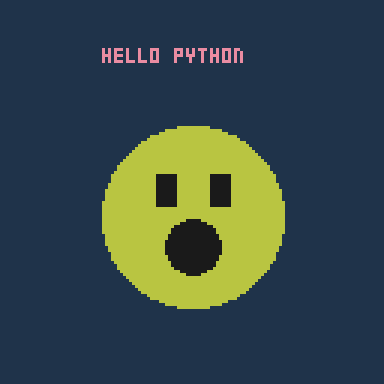 The hello example: shapes + text, drawn by the code above (examples/hello).
npm install brings the whole cc65 WASM toolchain and the GameTank core.
The compiler front-end is the pycretro package.
Sprites
 pygame.image.load + blit -> a hardware sprite (examples/sprite)
What you can do
- Draw:
cls,screen.fill((r,g,b)),rectfill/rect/circfill/circ/line/ pset,print(text, x, y, color)(f-strings work). - Sprites:
pygame.image.load("hero.png")+screen.blit(img, (x, y))— the PNG bakes to a native.gtgsheet. - Input:
pygame.key.get_pressed()+pygame.K_*(d-pad, K_z, K_x, K_c). - Rects, classes, sprite.Group, mixer, font — same API as the family
(
docs/CHEATSHEET.md).
Examples
examples/: hello, sprite. Build with gtpython build examples/<name>/main.py.
See docs/CHEATSHEET.md, docs/ASSETS.md (image/music formats), and
DIFFERENCES.md.
Runtime + hardware register semantics adapted from clydeshaffer/gametank_sdk
(MIT) — see PROVENANCE.md.
Screenshots are the raw framebuffer at 3× integer scale (pixel-perfect native). Note: GameTank pixels display at the hardware's native aspect on real hardware; these images preserve exact pixels rather than resampling to a TV aspect.