
Google Chrome Style Color Picker (hcg-color-picker)
A lightweight, dependency-free color picker widget inspired by Google Chrome's built-in color picker. Supports multiple instances, alpha control, touch input, and the EyeDropper API.
Full docs and live demos: website
Preview
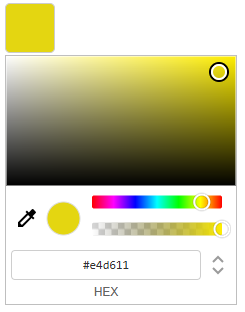
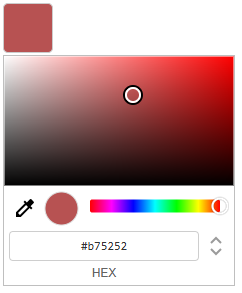
Features
- No dependencies - pure vanilla JavaScript, no libraries required
- Multiple instances - attach a picker to any number of buttons, each remembers its own color
- Single shared UI - one picker element is reused across all instances, keeping memory usage minimal
- Three color modes - switch between HEX, RGBA, and HSLA input formats
- Alpha / opacity control - full transparency support, can be enabled or disabled per instance
- EyeDropper API - pick any color from the screen (supported browsers only)
- Touch support - works on mobile and tablet devices
- Color preview swatch - live preview inside the picker
- Keyboard accessible - color text inputs are fully keyboard navigable
data-colorattribute - current color is always available on the trigger element viaelement.dataset.color- Event system - subscribe and unsubscribe to color change events
- Programmatic API - set color, open/close, enable/disable, and destroy instances at runtime
- Destroy by element -
hcgColor.get(),hcgColor.destroy(), andhcgColor.destroyAll()without keeping an instance reference open/closeevents - listen for when the picker is shown or hidden- Debounce option - built-in change event throttling for expensive handlers
Installation
Download
<link rel="stylesheet" href="hcg-color.css">
<script src="hcg-color.js"></script>
Minified builds are available in dist/hcg-color.min.js and dist/hcg-color.min.css.
CDN
jsDelivr:
<link rel="stylesheet" href="https://cdn.jsdelivr.net/npm/hcg-color-picker@2.0.5/hcg-color.css">
<script src="https://cdn.jsdelivr.net/npm/hcg-color-picker@2.0.5/hcg-color.js"></script>
unpkg:
<link rel="stylesheet" href="https://unpkg.com/hcg-color-picker@2.0.5/hcg-color.css">
<script src="https://unpkg.com/hcg-color-picker@2.0.5/hcg-color.js"></script>
After the script loads, hcgColor is available as a global variable.
npm
npm install hcg-color-pickerimport hcgColor from 'hcg-color-picker';
import 'hcg-color-picker/hcg-color.css';Basic Usage
<button id="my-color-btn">Pick Color</button>

<script>
    const picker = new hcgColor(
        document.getElementById('my-color-btn'),
        { color: '#ff0000' }
    );

    picker.on('change', function (colors, source) {
        console.log(colors.hex);   // "#ff0000"
        console.log(source);       // "drag" | "input" | "api" | "eyedropper"
    });
</script>
Constructor
new hcgColor(element, options)| Parameter | Type | Required | Description |
|---|---|---|---|
element |
HTMLElement |
Yes | The trigger button element |
options |
object |
No | Configuration (see below) |
Options
| Option | Type | Default | Description |
|---|---|---|---|
color |
string |
data-color attr or '#ff0000' |
Initial color - HEX, RGB, HSL formats |
onChange |
function |
- | Shorthand change callback (same as .on('change')) |
onOpen |
function |
- | Shorthand open callback (same as .on('open')) |
onClose |
function |
- | Shorthand close callback (same as .on('close')) |
alpha |
boolean |
true |
Set to false to disable alpha control |
debounce |
number |
0 |
ms to debounce the change event during drag (0 = off) |
disabled |
boolean |
false |
Start in disabled state - also reads element.disabled |
const picker = new hcgColor(btn, {
    color:    '#ff0000',
    onChange: colors => console.log(colors.hex),
    alpha:    true,
    debounce: 150,
    disabled: false
});
Initial Color Formats
The color option accepts any of the following formats:
new hcgColor(el, { color: '#ff0000' });               // 6-digit HEX
new hcgColor(el, { color: '#ff0000ff' });              // 8-digit HEX with alpha
new hcgColor(el, { color: '#f00' });                   // 3-digit HEX shorthand
new hcgColor(el, { color: '#f00a' });                  // 4-digit HEX shorthand with alpha
new hcgColor(el, { color: 'rgb(255, 0, 0)' });         // RGB
new hcgColor(el, { color: 'rgba(255, 0, 0, 0.5)' });   // RGBA
new hcgColor(el, { color: 'hsl(0, 100%, 50%)' });      // HSL
new hcgColor(el, { color: 'hsla(0, 100%, 50%, 1)' });  // HSLA
Instance Methods
.on(event, callback)
Subscribe to an event.
picker.on('change', function (colors, source) {
    console.log(colors.hex);   // "#ff0000"
    console.log(colors.rgb);   // "rgb(255, 0, 0)"
    console.log(colors.rgba);  // "rgba(255, 0, 0, 1)"
    console.log(colors.hsl);   // "hsl(0, 100%, 50%)"
    console.log(colors.hsla);  // "hsla(0, 100%, 50%, 1)"
    console.log(source);       // "drag" | "input" | "api" | "eyedropper"
});
.off(event, callback)
Unsubscribe a specific listener.
function onChange(colors) { console.log(colors.hex); }

picker.on('change', onChange);
picker.off('change', onChange);
.setColor(color)
Programmatically set the color. Fires the change event.
picker.setColor('#00ff00');
picker.setColor('rgb(0, 255, 0)');
.getColor()
Returns the current color as an object with all formats:
picker.getColor();
// {
//     hex:  "#ff0000",
//     hexa: "#ff0000ff",
//     rgb:  "rgb(255, 0, 0)",
//     rgba: "rgba(255, 0, 0, 1)",
//     hsl:  "hsl(0, 100%, 50%)",
//     hsla: "hsla(0, 100%, 50%, 1)"
// }

picker.getColor().hex   // "#ff0000"
picker.getColor().rgba  // "rgba(255, 0, 0, 1)"
picker.getColor().hsla  // "hsla(0, 100%, 50%, 1)"
.setAlphaEnabled(boolean)
Enable or disable the alpha slider at runtime.
picker.setAlphaEnabled(false); // hide alpha controls
picker.setAlphaEnabled(true);  // show alpha controls
.open() / .close()
Programmatically open or close the picker.
picker.open();
picker.close();

if (picker.isOpen) {
    picker.close();
}
.disable() / .enable()
Disable or re-enable the picker.
picker.disable();
picker.enable();
.destroy()
Fully remove the picker instance - cleans up event listeners, clears state, and removes the color from the element.
picker.destroy();Static Methods
Look up or destroy a picker by trigger element without keeping the instance returned from new hcgColor(). Each trigger stores its instance on element._hcgColor.
hcgColor.get(element | selector)
Returns the picker instance for a trigger element, or null.
const picker = hcgColor.get('#my-btn');
if (picker) {
    picker.setColor('#00ff00');
}
hcgColor.destroy(element | selector)
Destroy a picker by element or CSS selector. Returns true if an instance was found and destroyed, otherwise false.
new hcgColor(document.getElementById('my-btn'), { color: '#ff0000' });

// later, no saved reference needed
hcgColor.destroy('#my-btn'); // true
hcgColor.destroyAll()
Destroy every active picker instance.
hcgColor.destroyAll();Events
| Event | Callback args | Description |
|---|---|---|
change |
colors, source |
Fired every time the color changes |
open |
hex |
Fired when the picker opens |
close |
hex |
Fired when the picker closes |
picker.on('open',  hex => console.log('opened with:', hex));
picker.on('close', hex => console.log('closed with:', hex));
colors object
{
    hex:  "#ff0000",
    hexa: "#ff0000ff",
    rgb:  "rgb(255, 0, 0)",
    rgba: "rgba(255, 0, 0, 1)",
    hsl:  "hsl(0, 100%, 50%)",
    hsla: "hsla(0, 100%, 50%, 1)"
}
source string
| Value | Triggered by |
|---|---|
"drag" |
Dragging the color box, hue, or alpha slider |
"input" |
Typing into HEX, RGBA, or HSLA inputs |
"api" |
Calling .setColor() programmatically |
"eyedropper" |
Picking a color with the EyeDropper API |
Multiple Instances
Each instance is independent - they share one picker UI but each stores its own color state.
const picker1 = new hcgColor(document.getElementById('btn1'), { color: '#ff0000' });
const picker2 = new hcgColor(document.getElementById('btn2'), { color: '#0000ff' });
const picker3 = new hcgColor(document.getElementById('btn3'), { color: '#00ff00', alpha: false });

picker1.on('change', colors => console.log('Picker 1:', colors.hex));
picker2.on('change', colors => console.log('Picker 2:', colors.hex));
Reading Color Without an Instance Reference
The current color is always stored on the trigger element via data-color:
document.querySelectorAll('.color-btn').forEach(btn => {
    console.log(btn.dataset.color); // "#ff0000"
});
To destroy without saving the instance:
hcgColor.destroy('.color-btn');Usage in React
A dedicated React component is available as a separate package.
npm install hcg-color-picker-reactimport ColorPicker from 'hcg-color-picker-react';
import 'hcg-color-picker-react/ColorPicker.css';
function App() {
return (
<ColorPicker
color="#ff0000"
onChange={(colors, source) => console.log(colors.hex, source)}
/>
);
}Full documentation: hcg-color-picker-react on npm
Browser Support
| Feature | Support |
|---|---|
| Color picker UI | All modern browsers |
| Touch events | iOS Safari, Android Chrome |
| EyeDropper API | Chrome 95+, Edge 95+ (not Firefox/Safari) |
Changelog
See CHANGELOG.md.
Links
- Website: https://www.html-code-generator.com/javascript/chrome-style-color-picker
- GitHub: https://github.com/html-code-generator/hcg-color-picker
- npm: https://www.npmjs.com/package/hcg-color-picker
License
MIT