
hexo-bb-channel
English | Chinese
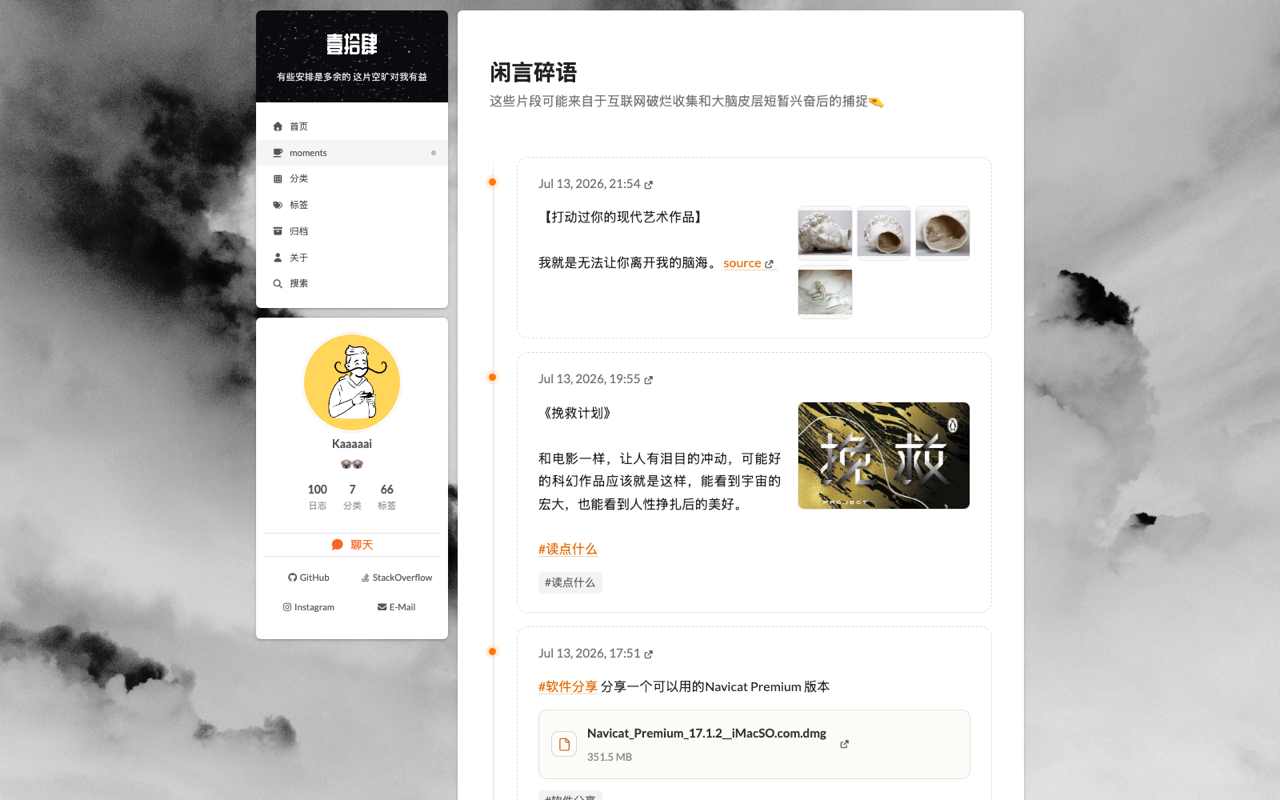
Render a public Telegram channel as a dynamic microblog timeline in Hexo.




hexo-bb-channel is a small Hexo plugin that creates a /bb/ page shell and loads posts from a separate API at runtime. Your blog stays static, while Telegram updates can appear without rebuilding the whole site.
Preview
Live demo: https://www.kaaaaai.cn/bb/
Why This Design
- Theme-agnostic: works through Hexo's generator system, so it can be used with NexT, Wizarding, or most other themes.
- Dynamic content on static blogs: Telegram posts are fetched in the browser from the API backend.
- No Telegram token in the blog: the Hexo side only needs a public API URL.
- Media-friendly timeline: supports text, real Telegram hashtag entities, images, files, pagination, and image preview interactions.
- Theme comments remain available: the generated page is a standard Hexo page with
comments: true; whether comments render depends on your theme and comment system.
Quick Start
1. Deploy the API backend
Create a public Telegram channel first. Its public link should look like https://t.me/my_notes, and the API TG_CHANNEL value should be only my_notes, without @.
Deploy the companion API first:
Backend repo: Kaaaaai/kaaaaai.tools.channel-api See the API README for detailed Telegram channel creation steps.
For production, set ALLOWED_ORIGINS to your blog's exact origin, for example https://www.example.com, so the API accepts requests from the generated page.
2. Install the Hexo plugin
Install the latest stable release from npm:
npm install hexo-bb-channelTo try unreleased changes from the default GitHub branch instead:
npm install github:Kaaaaai/kaaaaai.tools.hexo-bb-channelInstalling the Hexo plugin does not deploy the companion API. Complete step 1 and keep the bb_channel block in your site's root _config.yml.
3. Configure Hexo
Add this to the root _config.yml of your Hexo site:
bb_channel:
  enable: true
  mode: client
  route: bb/
  title: moments
  description: Notes captured from a Telegram channel
  api_base: https://your-channel-api.vercel.app
  page_size: 20
Then rebuild:
hexo clean
hexo generate
hexo server
Open:
http://localhost:4000/bb/Configuration
| Option | Default | Description |
|---|---|---|
enable |
true |
Enable or disable the generated page. |
mode |
client |
Client-rendered dynamic mode. |
route |
bb/ |
Output route, for example moments/. |
title |
moments |
Page title inside the content area. |
description |
empty | Subtitle under the title. |
api_base |
empty | Required in client mode. Base URL of kaaaaai.tools.channel-api; when omitted, the page shows Missing bb_channel.api_base. |
page_size |
20 |
Posts requested per page. |
How It Works
Hexo build
  └─ hexo-bb-channel generates /bb/index.html

Browser
  └─ fetches api_base/api/posts?page=1&page_size=20

kaaaaai.tools.channel-api
  ├─ fetches public Telegram channel pages
  ├─ parses posts, tags, media, files
  └─ caches normalized payload in Upstash Redis
The Hexo build does not fetch Telegram. Only the page shell is static. Runtime content comes from the API.
Theme Integration
This plugin uses Hexo's generator API, so it does not require theme template changes. It has been used with:
- NexT theme
- Wizarding theme
- Any theme that renders the standard Hexo
pagelayout
If your theme or source folder already has a /bb/ page, remove it or change bb_channel.route to avoid duplicate output.
Runtime Features
- Client-side pagination
- Telegram source link per post
- Hashtags from Telegram entities instead of loose regex matching
- Image thumbnails and click-to-expand preview
- Multi-image horizontal carousel
- File attachment cards
- Image lazy hydration compatible with Hexo image lazyload plugins
API Contract
The plugin expects:
GET /api/posts?page=1&page_size=20{
"channel": {
"title": "Channel title",
"description": "Channel description"
},
"posts": [
{
"id": "101",
"datetime": "2026-01-01T12:00:00.000Z",
"html": "<p>Hello</p>",
"tags": ["Tools"],
"media": [{ "type": "image", "src": "https://..." }],
"attachments": [{ "title": "file.dmg", "meta": "351.5 MB", "url": "https://..." }],
"source": { "telegramUrl": "https://t.me/channel/101" }
}
],
"pagination": {
"page": 1,
"pageSize": 20,
"total": 3,
"totalItems": 60,
"hasNext": true,
"hasPrev": false
}
}FAQ
Do I need to rebuild my blog when Telegram updates?
No. The Hexo page is static, but posts are loaded dynamically from the API.
Does this work with private Telegram channels?
No. This project is designed for public Telegram channels that can be accessed through t.me/s/<channel>.
Why do I need a separate API?
Static sites cannot safely store refresh secrets or Redis credentials. The API isolates fetching, caching, CORS, and refresh logic from your blog.
Can I use it with non-Hexo blogs?
The UI is currently packaged as a Hexo plugin. The backend API is framework-agnostic, and the same JSON can be consumed by other static site generators.
Development
npm install
npm test
Related
- API backend: Kaaaaai/kaaaaai.tools.channel-api
License
MIT