
keepitmovin


Agents hit limits. Your work doesn't.
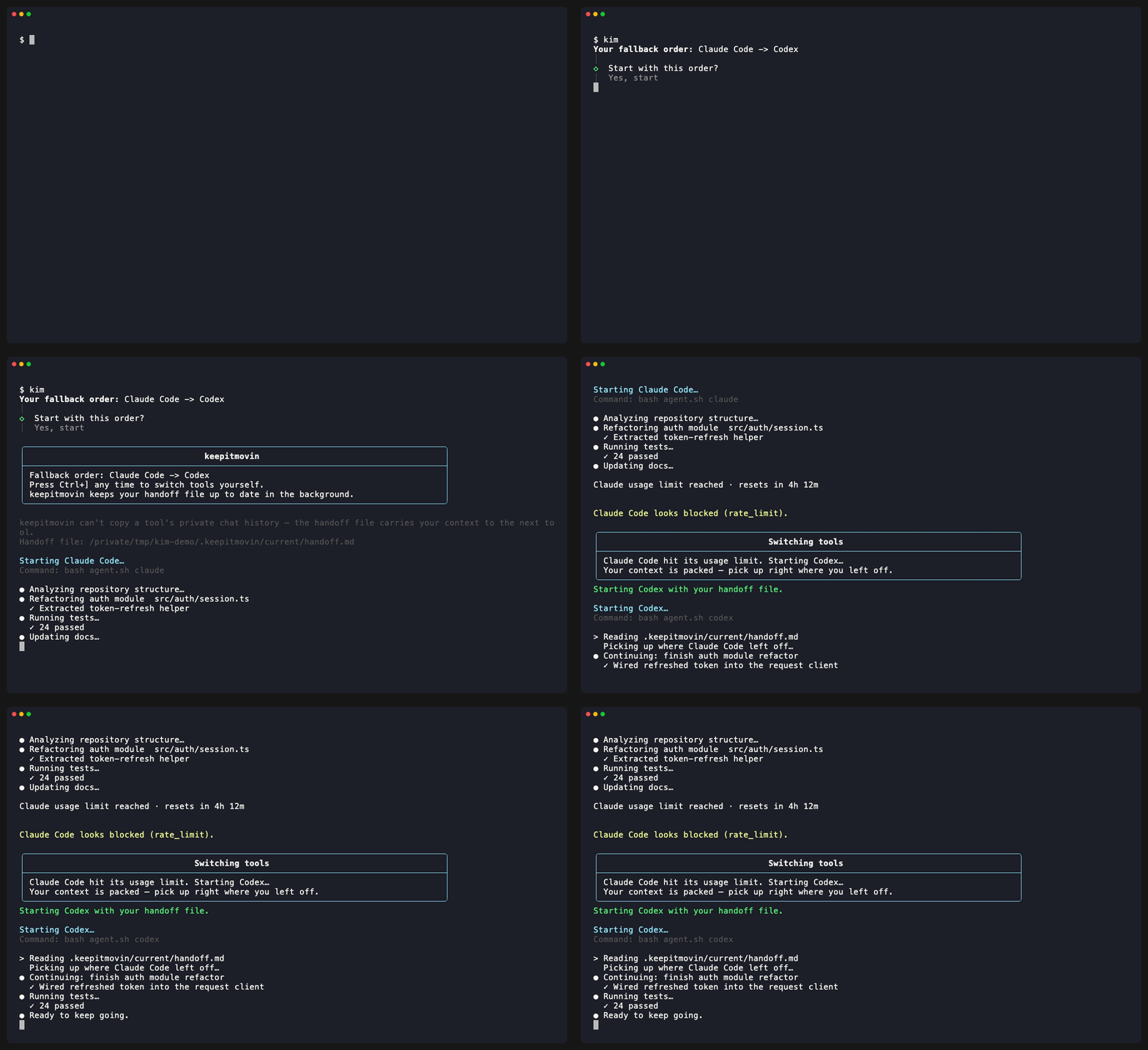
keepitmovin runs your AI coding tools in one terminal, in a fallback order you choose. When one hits its usage limit, keepitmovin hands the next tool a handoff file with your full context — so you never stop mid-task. It works with Claude Code, Codex, Kimi CLI, Google Antigravity, opencode, Grok Build, Cursor Agent, GitHub Copilot CLI, and Ollama.
If you've ever been deep in a task in Claude Code and hit your 5-hour limit, or realized partway through that Codex would handle the next part better, you know the problem: switching tools means starting over. The new tool has no idea what you were doing.
keepitmovin fixes that. It runs your coding tool in one terminal, watches for limits and failures, and when it's time to switch, it writes a shared "handoff" file — your goal, what's changed, what's blocked, what's next — and hands it to the next tool so you pick up exactly where you left off.
kimThat's the whole interface. keepitmovin walks you through setup the first time, then starts your first tool. If it hits a limit, keepitmovin shows a short "switching tools" message and moves to the next one for you.
Claude Code -> Codex -> Kimi CLI -> Google Antigravity -> opencode -> Grok Build -> Cursor Agent -> GitHub Copilot CLI -> OllamaWho this is for
Anyone who codes with an AI terminal tool and has more than one available — whether that's because you hit usage limits, want to compare tools, or just like having a fallback instead of being stuck when one tool goes down. No programming experience is required to use keepitmovin itself; you only need one of the supported coding tools already set up.
Install
npm install -g keepitmovin
kim
Or run it without installing anything:
npx keepitmovinOn first run, keepitmovin starts a guided setup wizard: it detects which tools you have installed and lets you pick which ones to use and in what order.
The Important Limitation
keepitmovin cannot copy a tool's private live chat/session state into another tool unless that tool exposes a supported API for it — no coding agent currently does this reliably. So instead of pretending to transfer your conversation, keepitmovin preserves practical continuity with a live handoff file:
.keepitmovin/current/handoff.md— the shared file every tool reads and updates- current working directory
- git status, diff statistics, and changed filenames
- changed files
- project instructions like
AGENTS.md - terminal transcript excerpts
- the reason the switch happened
- a generated handoff prompt for the next tool
The active tool is instructed to keep this file updated as it works — keepitmovin doesn't make any extra AI calls to do this, so it costs you nothing beyond what the tool would already use.
Note: Handoff files and session logs under
.keepitmovin/capture task text, terminal output, and repository metadata, which can contain secrets. Treat them as sensitive. keepitmovin writes a.keepitmovin/.gitignoreso these artifacts stay out of your repo, and best-effort redacts common credential formats before persisting them — but don't share them blindly.
How It Works
- keepitmovin loads
keepitmovin.config.json(or built-in defaults if none exists yet). - First run: keepitmovin asks which tools you want, in what order. Later runs: keepitmovin shows your saved fallback order and asks whether to start it, change it, or start over.
- keepitmovin launches the first installed tool in a real pseudo-terminal — it looks and feels exactly like running that tool directly.
- keepitmovin creates
.keepitmovin/current/handoff.mdand tells the active tool to keep it updated. - Your terminal input/output is mirrored straight through, so the tool stays fully interactive.
- If the output looks like a usage limit, quota issue, sign-in failure, or another recognizable failure — or a usage check shows the tool is near its limit (see below) — keepitmovin pauses it.
- keepitmovin adds a checkpoint to the handoff file, shows a short "switching tools" message explaining what happened, and starts the next tool with the handoff already loaded.
- keepitmovin writes a session summary and archives the handoff for the record.
You can also switch manually at any time:
Ctrl+]Press this while a tool is running to ask keepitmovin to switch tools right now — useful if you just want a different tool's take on something, not only when a limit hits.
Usage Checks
Watching the output only reacts after a tool prints a limit message. When a tool records its own remaining usage on disk, keepitmovin can read it and switch before you hit the wall — a usage check.
Today only Codex exposes this: it writes rolling session files under
~/.codex/sessions/YYYY/MM/DD/ that include its current 5-hour and weekly usage percentages.
keepitmovin reads the newest one before launching Codex (skipping it if it's already spent) and
re-checks periodically while it runs. Claude Code has no equivalent local usage file today, so it
relies on watching the output.
Usage checks are read-only and fail safe: if a session file is missing, unreadable, or in an unexpected shape, the check simply reports nothing and output-watching still covers that session.
Configure it under harness.usageProbe in keepitmovin.config.json (the config key keeps its
original name):
| Field | Default | Meaning |
|---|---|---|
enabled |
true |
Master switch for all usage checks. |
thresholdPercent |
95 |
Switch when a tool's highest usage window reaches this percent. |
pollIntervalMs |
30000 |
How often to re-check while a tool runs. |
A single tool can override the threshold with its own usageProbe.thresholdPercent (e.g. set
Codex to 80 to switch earlier). Run kim doctor to see each tool's current 5-hour / weekly
usage.
Task Routing And Model Selection
Task routing is opt-in during setup. When enabled, kim asks for a task if one wasn't given
on the command line, classifies it locally, and picks a model and reasoning effort within your
saved fallback order. It never changes that order or makes network calls for routing.
kim "Investigate the intermittent auth failure"
kim --tier deep "Implement the approved plan"
kim --model gpt-5.6-sol --effort high "Review the payment migration"
kim --no-route "Use the tool's own defaults for this task"| Tier | Claude Code | Codex | Typical work |
|---|---|---|---|
light |
Haiku / low | GPT-5.6 Luna / low | Mechanical edits and exact small changes |
standard |
Sonnet / medium | GPT-5.6 Terra / medium | Planned features, known repros, ordinary maintenance |
deep |
Opus / high | GPT-5.6 Sol / high | Architecture, investigation, security, migrations |
max |
Fable / max | GPT-5.6 Sol / max | Long-horizon or whole-repository work |
GPT-5.6 Codex models are selected only when they appear in the local Codex model cache. If a
preferred model is not advertised there, keepitmovin falls back to a broadly available GPT-5.x
model. Automatic routing never selects ultra; pass --effort ultra explicitly when the selected
Codex model advertises support. kim session reports the chosen route, the explicit task
outcome, and whether the handoff narrative was updated.
--model and --effort target the first tool in your fallback order. If keepitmovin later hands off,
the next tool gets its normal tier mapping rather than a possibly incompatible model name from the
first tool.
Prompts passed through a tool's command-line prompt argument may be briefly visible to other local processes through the operating system's process list. Don't put credentials in task text.
The Handoff File
.keepitmovin/current/handoff.md is the shared continuity layer between tools. Each tool owns the
narrative sections (Current Goal, Working State, Commands And Checks, Blockers, Next Step) and is
asked to keep them current as it works. keepitmovin maintains the rest:
- Mechanical sections stay fresh automatically. While a tool runs, keepitmovin rewrites the Changed Files and Repository Snapshot sections on a timer, so those are accurate even if the tool never updates them.
- It stays lean. Raw
git diffoutput is never stored (rungit diffyourself for the details); tool switches are one-line entries in a Switch History that's trimmed to the last 10; and only the most recent transcript excerpt is kept. - Stale-handoff nudge. If the narrative sections go stale while the tool is clearly still working, keepitmovin types a short, visible reminder into the tool asking it to update the handoff. It only fires when the tool is idle, and never more than once per staleness window.
Configure it under harness.handoffRefresh in keepitmovin.config.json:
| Field | Default | Meaning |
|---|---|---|
enabled |
true |
Master switch for the whole refresh/nudge system. |
intervalMs |
60000 |
How often keepitmovin refreshes the mechanical sections and checks for staleness. |
nudge.enabled |
true |
Whether to type the stale-handoff reminder into the tool. Set false to disable nudges. |
nudge.staleAfterMs |
300000 |
How long the narrative can go unchanged before it's considered stale. |
nudge.idleForMs |
10000 |
The tool must be idle at least this long before a nudge is sent. |
nudge.minTranscriptGrowthChars |
2000 |
How much output the tool must produce before a nudge is warranted. |
Supported Tools
keepitmovin fully supports nine tools today. Each has a verified way to start it, pass it your task, and recognize its exact limit messages — so the handoff fires reliably.
| Tool | How keepitmovin starts it |
|---|---|
Claude Code (claude) |
Passes your task as a command-line argument. |
Codex (codex) |
Passes your task as a command-line argument. |
Kimi CLI (kimi) |
Starts the kimi app, then hands it the handoff file (its -p mode exits after one turn). |
Google Antigravity (agy) |
Uses agy --prompt-interactive with your task. |
opencode (opencode) |
Starts with --prompt. opencode retries limits forever instead of exiting, so keepitmovin hands off on its retry message. |
Grok Build (grok) |
Passes your task as a command-line argument (grok "…"). |
Cursor Agent (agent) |
Passes your task as a command-line argument (agent "…"). Config name is cursor. |
GitHub Copilot CLI (copilot) |
Starts the copilot app, then hands it the handoff file. Needs a Copilot subscription. |
Ollama (ollama) |
Local last resort — runs ollama run llama3.2 (change the model to one you've pulled). A chat model for advice and planning, not a file-editing tool, so it sits last. |
Run kim doctor --all to see every tool in the catalog, including ones that aren't verified
yet.
A few tools (Kimi CLI, GitHub Copilot CLI, Ollama) can't take your task as a command-line argument, so keepitmovin starts them and then pastes a single line pointing at the handoff file. You don't have to do anything — this is automatic.
Each tool's limit messages were gathered from its source code, GitHub issues, and docs, then locked in with tests. They're verified against reported messages, not against live limit events (which can't be forced on demand), so keepitmovin keeps a general-purpose limit detector as a backup.
Commands
| Command | What it does |
|---|---|
kim |
Start (or resume) your session. |
kim init |
Create the config file and .keepitmovin/ folders without running the wizard. |
kim setup |
Re-run the guided setup. |
kim providers |
Change which tools you use and their fallback order (add --all to browse every tool). |
kim doctor |
Check your config, tools, and git status (add --all to include tools that aren't verified yet). |
kim handoff |
Show the current handoff file's path and a preview. |
kim session |
Show a summary of your most recent session. |
kim clear |
Delete local handoff and session files (add --yes to skip the confirmation). |
kim --help |
See every command and option. |
Tool Updates
By default, keepitmovin checks your selected tools each time it starts and asks before running
their verified native updater when one is available (e.g. claude update, codex update,
kimi upgrade, opencode upgrade, grok update, agent update).
It never guesses an installer for a tool without a verified update command —
those tools just show up as "add later" with setup guidance instead.
Advanced users can change this in keepitmovin.config.json:
"updates": {
  "checkOnStart": true,
  "mode": "prompt",
  "includeDisabledProviders": false
}
Use "mode": "always" to run updates without asking, or "mode": "off" to skip the check
entirely.
More Tools
More tools (Cline, Aider, Goose, Amp, Factory Droid, and the OpenRouter gateway) are in the
catalog but hidden while their limit detection and launch path get the same verification the nine
supported tools have. They stay out of setup and this list until then. If your config already
references one, keepitmovin keeps launching it — and kim doctor --all still lists them.
Where Things Are Saved
Everything keepitmovin writes lives under .keepitmovin/ in your project's working directory:
.keepitmovin/current/handoff.md   the live handoff file for the current session
.keepitmovin/handoffs/            archived handoffs from past sessions
.keepitmovin/sessions/            session summaries (start/end time, tools tried, changed files)
Run kim clear any time you want to wipe these.
Safety Defaults
- keepitmovin never pushes changes.
- keepitmovin never commits by default.
- keepitmovin is upfront that exact private session transfer isn't possible — the handoff file is the shared continuity layer instead.
- Tool commands are configured explicitly; nothing is guessed or auto-installed without asking.
- Handoff prompts are generated entirely locally from your repo context and terminal transcript — no extra network calls.
Building From Source / Contributing
keepitmovin is a small TypeScript CLI (Node 20+). To work on it directly:
git clone https://github.com/garrettsiegel/keepitmovin.git
cd keepitmovin
pnpm install
pnpm build
pnpm test
pnpm dev # run the CLI directly with tsx, no build step needed
pnpm dev -- doctor # pass args through to a specific commandBefore committing, make sure pnpm build, pnpm test, and pnpm lint all pass.
Releasing
pnpm release <patch|minor|major|<semver>> runs build/test/lint, bumps the version, commits and
tags it, pushes main + tags to origin, and publishes to npm — in one step. It refuses to run
from a branch other than main, with a dirty working tree, or out of sync with origin/main, and
prompts for confirmation before it pushes or publishes (pass --yes to skip the prompt). Preview
what would happen, including the packed npm contents, without any git or npm mutation:
pnpm release patch --dry-runSee CLAUDE.md for the architecture guide (module layout, conventions, known gotchas) and GAMEPLAN.md for the project's original brief, design vision, and the full V1 execution history.