




What is Manifest
Manifest is the API resilience layer for your apps and agents. It works with every API they call: external services, your internal APIs and MCP tools.
- See every API your app depends on, and how reliable each one is.
- Repair failed API requests on the fly, so your app keeps working.
- Know what to fix in your code, with a prompt for your coding agent.
How it works
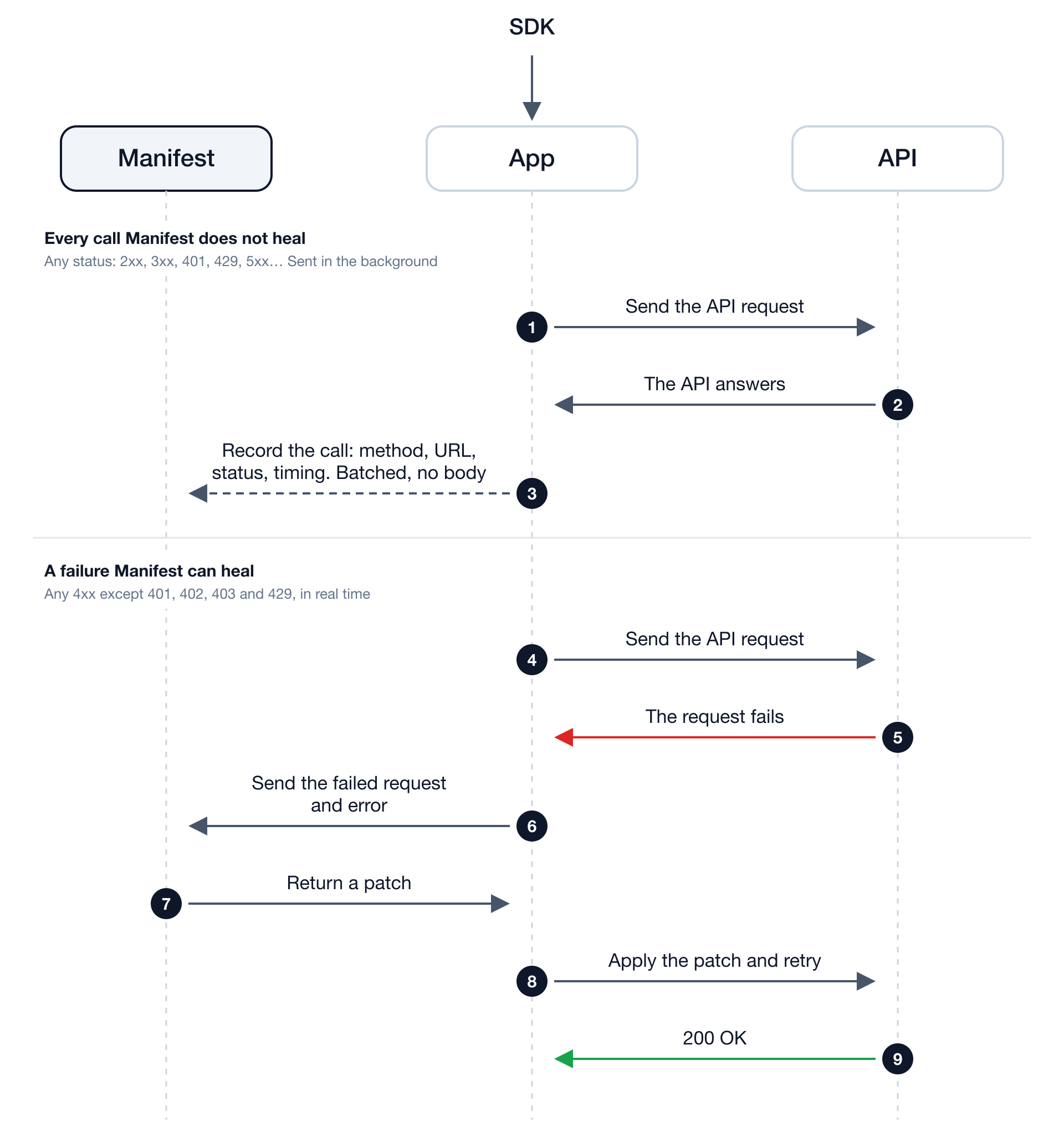
Every call your app makes is reported to Manifest as metadata only (method, URL without its query string, status and timing), in the background. A failure Manifest can heal is sent in full, so it can be repaired. What is sent.
Prerequisites
- Node.js 22 or higher
Get started
Start with your agent
"Install Manifest in this app: https://dashboard.manifest.build/prompt-node.md"The prompt adds the one-line install to your entry file and stops to let you paste your key.
Start with code
Create a project in your Manifest dashboard and copy its project key.
Install the SDK:
npm install manifestCall
manifest()from the first import of the file that starts your app, before any client is constructed:import { manifest } from 'manifest'; manifest(); // Once, at startup. // Keep making your API calls as usual.TypeScript, ESM and CommonJS. Zero dependencies.
Set your key in the environment of your app, or in the project's
.env:export MNFST_KEY='your-project-key'Restart your app, then check the install from your project directory:
npx manifest doctorIt reads the key from the shell, then from the project's
.env.localor.env. It resolves the installed SDK version, masks and validates the key, checks that Manifest loads before your app, and prints the runtime coverage.
Some clients keep the fetch they saw when they were built, and a client built at import time runs before your call. Where that happens, or where the start command is not yours to change, preload the SDK instead:
node -r manifest/register app.jsn8n
Manifest runs in a self-hosted n8n with Docker Compose, through this SDK. n8n Cloud cannot load it. Run the steps in this order:
Install the SDK from the folder of your
docker-compose.yml:docker compose exec n8n npm install --prefix /home/node/.n8n/manifest manifestAdd these two lines to the
environmentof your n8n service, and of every worker service in queue mode:MNFST_KEY: your-project-key NODE_OPTIONS: --require /home/node/.n8n/manifest/node_modules/manifest/dist/register.cjsRestart n8n:
docker compose up -d
n8n does not start when NODE_OPTIONS names a file that is not installed yet, so keep this order.
Try it
Send a request that fails with a 4xx error, such as a value the API rejects:
import { manifest } from 'manifest';

manifest({
  onHeal(event) {
    console.log('[manifest]', event.healStatus, event.replayStatusCode);
  },
});

const res = await fetch('https://api.example.com/orders', {
  method: 'POST',
  headers: { 'content-type': 'application/json' },
  body: JSON.stringify({ limit: 500 }),  // rejected by the API
});
console.log(res.status);
The failed request appears in your Manifest dashboard, grouped with others like it in an issue. Once Manifest has a patch for that error, the next request that fails the same way is repaired and retried: onHeal reports patched or unverified with the retry's status code, and your app receives the answer to the retry.
Choosing which calls reach Manifest
Keep calls out of Manifest entirely: they are neither repaired nor tracked, and nothing about them leaves your app. Each entry is a domain or a domain with a path:
MNFST_ALLOWLIST=stripe.com                       # only Stripe
MNFST_ALLOWLIST=stripe.com/v1/payment_intents    # only this Stripe endpoint
MNFST_DENYLIST=stripe.com/v1/charges,internal.example.com # never these- A domain covers its subdomains, with or without a path:
stripe.comandstripe.com/v1/chargesboth matchapi.stripe.com. - A path matches whole segments:
/v1/chargescovers/v1/charges/ch_123, not/v1/charges_export. Paths are case-sensitive. - A scheme, port, query or fragment in an entry is ignored.
*in a path is not supported yet: the entry is skipped with a warning, and an allowlist made only of skipped entries lets nothing through. - The denylist wins over the allowlist. With no allowlist, every call is eligible.
Or in code: manifest({ denylist: ['stripe.com/v1/charges'] }). An option overrides its environment variable. When Manifest starts from a preload (node -r manifest/register), set the environment variables: a later manifest() call cannot change the configuration.
More
Documentation · Configuration, limits & development · API contract · Python SDK · PHP SDK · Website