
MemoryViz: Creating memory model diagrams
MemoryViz is a visualization tool that generates memory model diagrams for Python code, aimed at students and educators. MemoryViz is written in Javascript and is built on top of the Rough.js library.
For more information, check out our demo and project documentation.
Installation
Install MemoryViz using npm (requires Node.js to be installed):
$ npm install memory-vizUsage
MemoryViz can be run from the command line or using its Javascript API.
Command-line interface
Given a JSON file demo.json that encodes a state of Python memory and some styling options:
[
    {
        "type": ".frame",
        "name": "__main__",
        "value": { "lst1": 82, "lst2": 84, "p": 99, "d": 10, "t": 11 }
    },
    {
        "type": "str",
        "id": 19,
        "value": "David is cool!",
        "style": ["highlight"]
    },
    {
        "type": "int",
        "id": 13,
        "value": 7
    }
]
you can run the following command in the terminal:
$ npx memory-viz --output demo_output.svg demo.jsonThis producs an SVG file, demo_output.svg, that visualizes the state of memory:
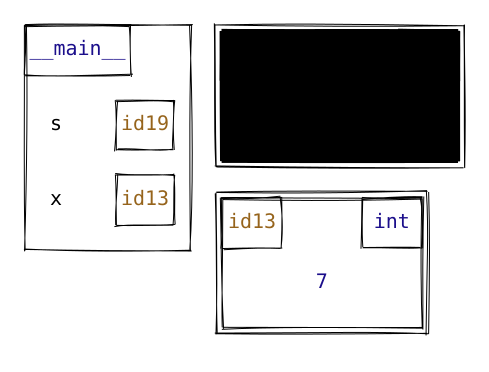
Javascript API (Node.js)
Call the draw function on an array that encodes a state of Python memory and some styling options.
Here's a complete example, which produces the same SVG output as above.
import { draw } from "memory-viz";

const objects = [
    {
        type: ".frame",
        name: "__main__",
        value: { lst1: 82, lst2: 84, p: 99, d: 10, t: 11 },
    },
    {
        type: "str",
        id: 19,
        value: "David is cool!",
        style: ["highlight"],
    },
    {
        type: "int",
        id: 13,
        value: 7,
    },
];

const model = draw(objects, true, { width: 1300 });

model.save("demo_output.svg");
Javascript API (browser)
MemoryViz can also be run in the browser by loading the library from a CDN (e.g., jsDelivr) and accessing the global memoryViz object.
Here is a standalone example.
Contributing
See our GitHub repository.