
mj-wrapper
Enables you to wrap multiple mj-section tags together. It's especially useful to achieve nested layouts with shared border or background images across sections.
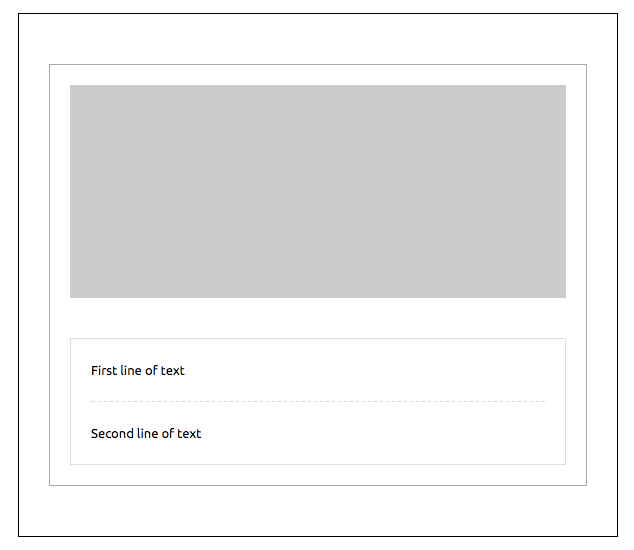
<mjml>
  <mj-body>
    <mj-wrapper border="1px solid #000000" padding="50px 30px">
      <mj-section border-top="1px solid #aaaaaa" border-left="1px solid #aaaaaa" border-right="1px solid #aaaaaa" padding="20px">
        <mj-column>
          <mj-image padding="0" src="https://placeholdit.imgix.net/~text?&w=350&h=150" />
        </mj-column>
      </mj-section>
      <mj-section border-left="1px solid #aaaaaa" border-right="1px solid #aaaaaa" padding="20px" border-bottom="1px solid #aaaaaa">
        <mj-column border="1px solid #dddddd">
          <mj-text padding="20px"> First line of text </mj-text>
          <mj-divider border-width="1px" border-style="dashed" border-color="lightgrey" padding="0 20px" />
          <mj-text padding="20px"> Second line of text </mj-text>
        </mj-column>
      </mj-section>
    </mj-wrapper>
  </mj-body>
</mjml>
The full-width attribute will be used to manage the background width.
Setting it will change the width of the section from the default 600px to 100%.
Important
When applying full-width to mj-wrapper, any mj-section tags which are also set to full-width will default to standard width.
Caution
If you're using the background-url attribute for mj-wrapper then do not add one into a child mj-section as this is not supported for Outlook desktop
Also, if you’re using the background-color attribute for mj-wrapper and the background-url attribute on its mj-section or mj-hero children, the background-color will appear over the background-image on Outlook desktop.
Attributes
| attribute | accepts | description | default value |
|---|---|---|---|
| background-color | CSS color formats | section color | |
| background-position | string | CSS values, i.e. left center right + top center bottom (see outlook limitations below) |
top center |
| background-position-x | string | CSS values, i.e. left center right (see outlook limitations below) |
|
| background-position-y | string | CSS values, i.e. top center bottom (see outlook limitations below) |
|
| background-repeat | repeat no-repeat |
set the background image to repeat | |
| background-size | string | CSS values e.g. auto cover contain px % size |
auto |
| background-url | string | background image, in URL format | |
| border | string | CSS border format | |
| border-bottom | string | CSS border format | |
| border-left | string | CSS border format | |
| border-radius | string | border radius | |
| border-right | string | CSS border format | |
| border-top | string | CSS border format | |
| css-class | string | class name, added to the root HTML element created | |
| full-width | full-width false |
make the section full-width | |
| gap | px |
applies a vertical gap between child mj-section instances |
|
| padding | px % |
section padding, supports up to 4 parameters | 20px 0 |
| padding-bottom | px % |
section bottom padding | |
| padding-left | px % |
section left padding | |
| padding-right | px % |
section right padding | |
| padding-top | px % |
section top padding | |
| text-align | left center right |
CSS text-align | center |