

Mock Knight
A web UI for WireMock — and for MockServer, Mockoon and Prism.
Find a stub among thousands, see why a request didn't match it, and edit it safely
on a mock server your whole team shares.




npx mock-knight --url http://localhost:8080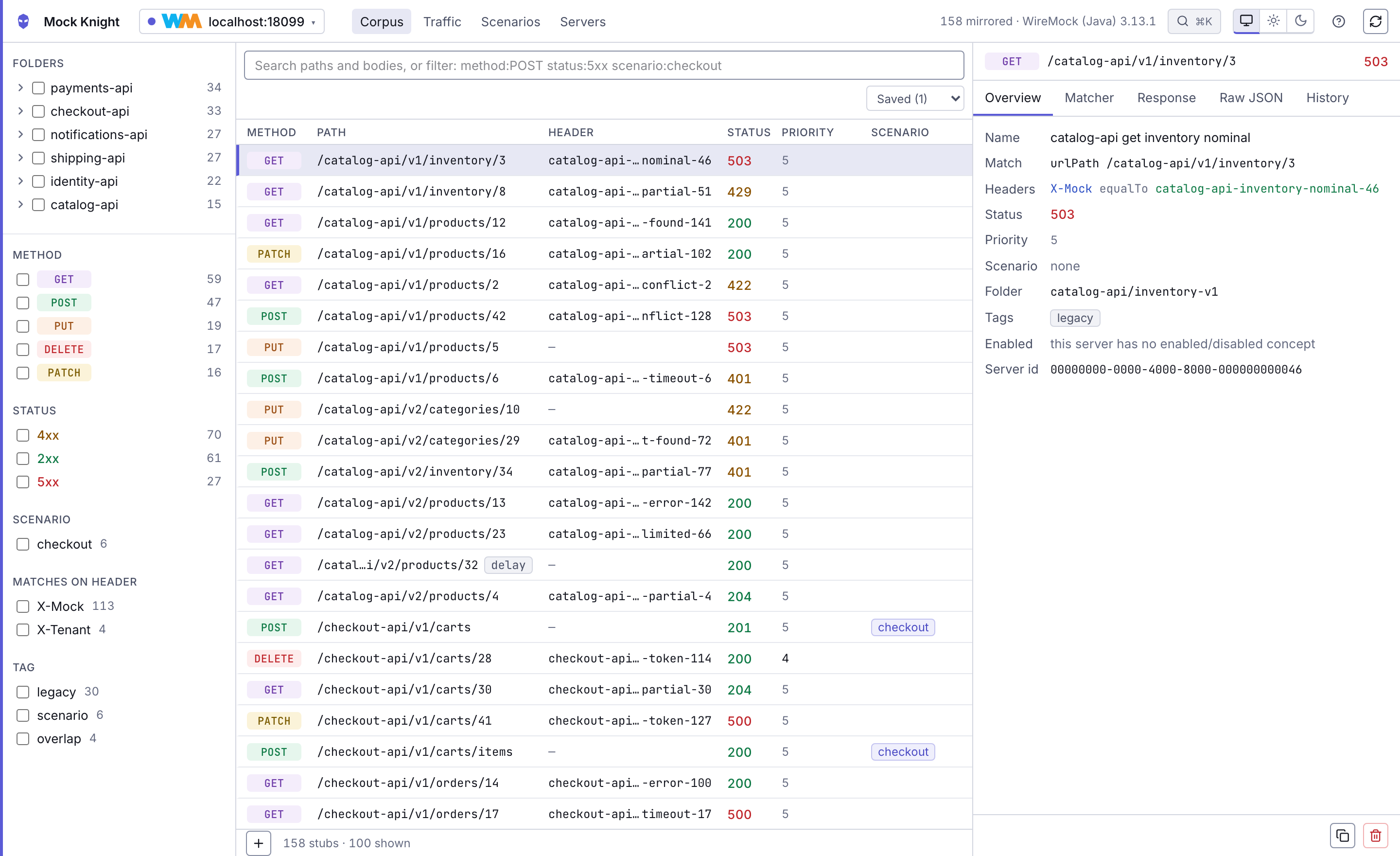
WireMock, MockServer and friends have an admin API and no UI. That is fine for three stubs. On a
shared mock server with three thousand — edited by a whole team, driving the tests that gate your
release — it means answering every question one curl at a time.
Mock Knight is that missing UI. It runs on your machine, connects to a mock server you already have, and gives you a browser view of it: full-text and structured search over the whole corpus, a live request log, a field-by-field explanation of why a request fell through to a 404, and edits that can't silently clobber a colleague's.
It is not a mock server. It never serves mock traffic and never becomes a dependency. Point it at your WireMock, use it, stop it — your mocks carry on exactly as before.
Quick start
Requires Node 22 or newer (better-sqlite3 v13 needs it). No Docker, no account, no config
file.
# a WireMock (or MockServer, or Mockoon, or Prism) you already run
npx mock-knight --url http://localhost:8080
It starts a local server, opens http://127.0.0.1:7777, connects to the mock server you named,
and mirrors its corpus. To keep it around:
npm install -g mock-knight
mock-knight --url http://localhost:8080
What the screens look like
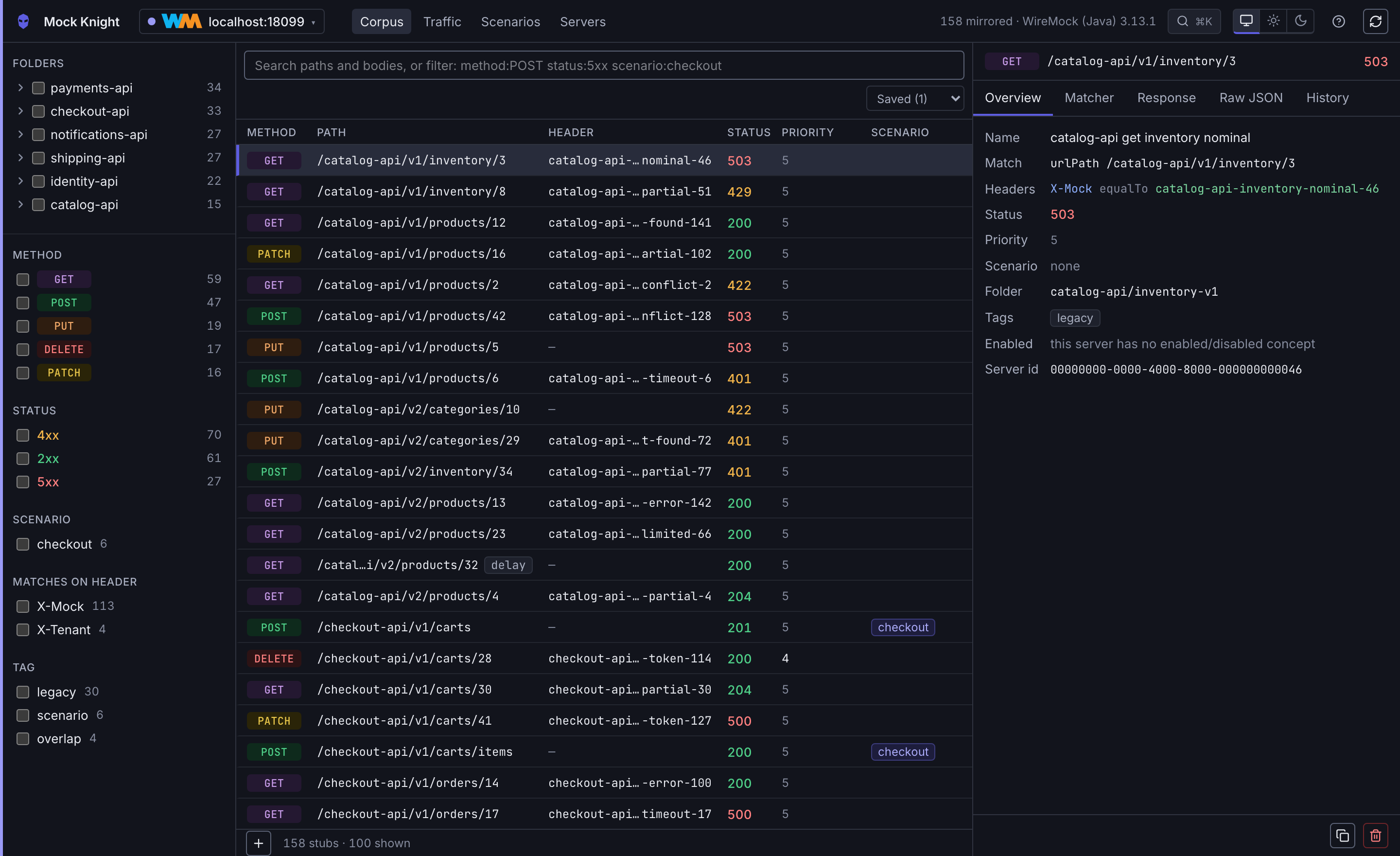
Search a corpus of thousands
Full text over paths and bodies, plus a structured query language — method:POST status:5xx header:X-Tenant scenario:checkout — with faceted filters whose counts follow the query, a folder
tree, and a virtualised list that stays fluid at 10,000 rows. The view lives in the URL, so
"the stub that's broken" is a link you can paste into Slack.
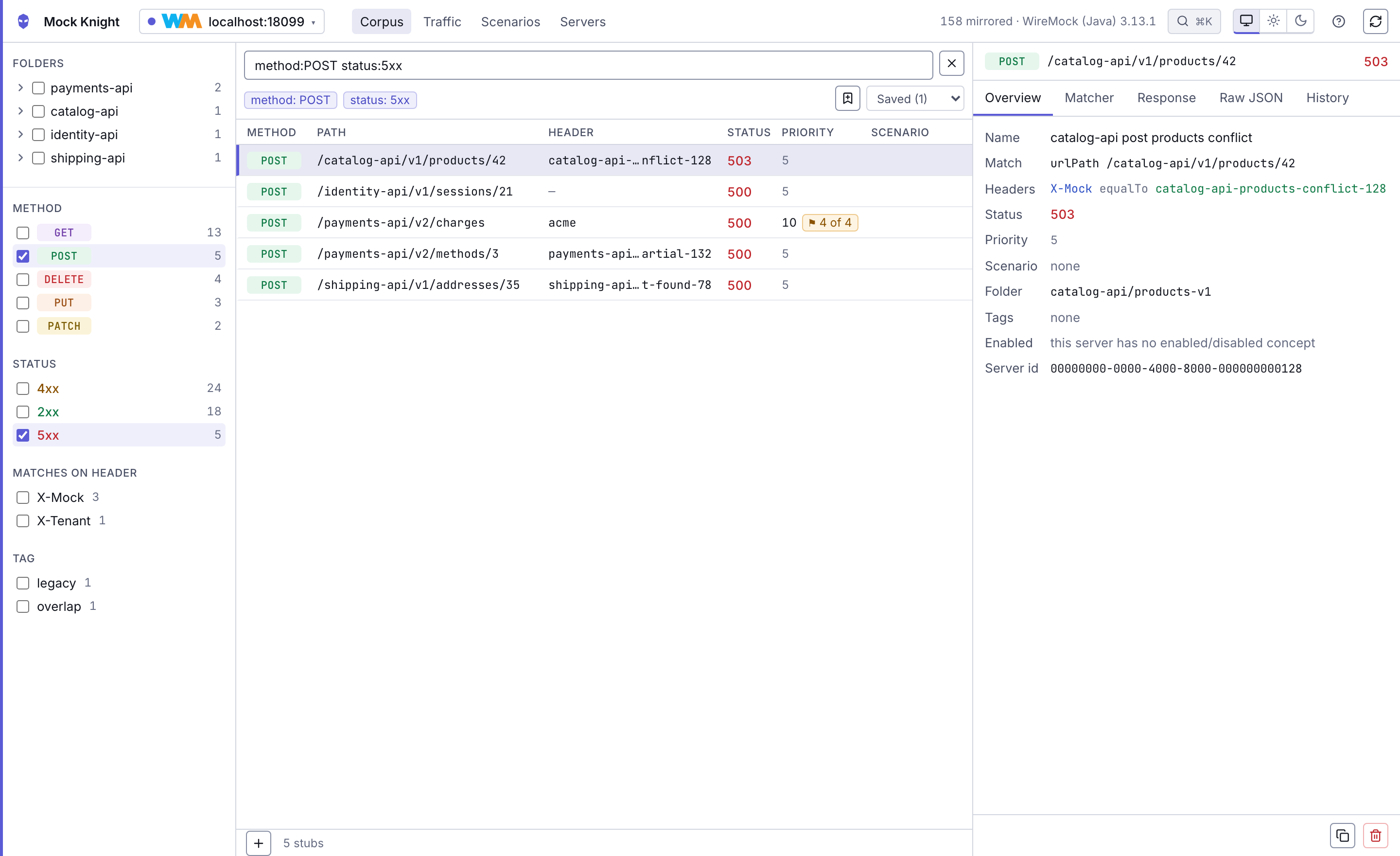
See why a request didn't match
The question no admin API answers. For any unmatched request, the closest stubs ranked, each with
a field-by-field comparison of what matched and what didn't — and one click to create a stub that
would have matched, or to copy the request as curl.
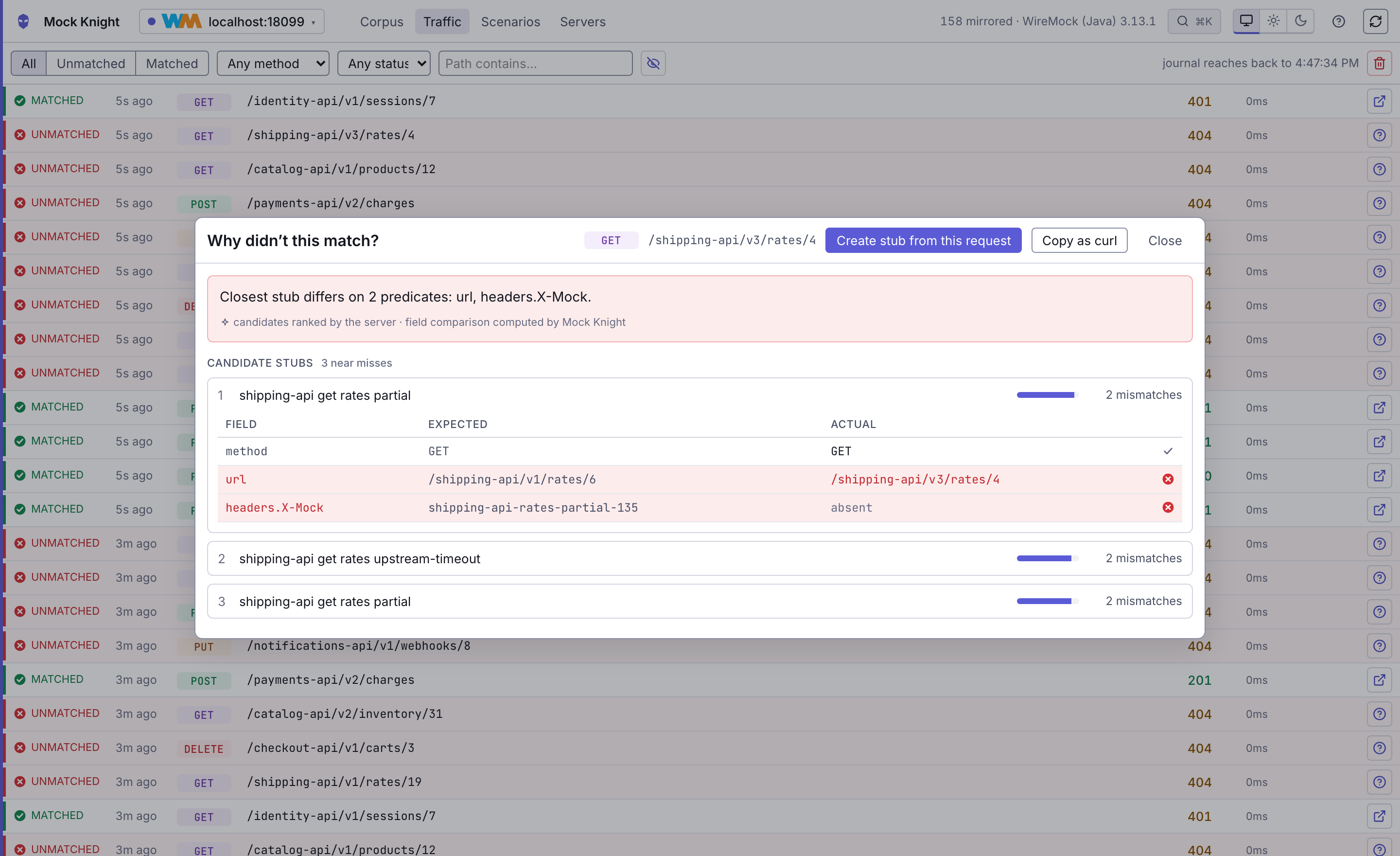
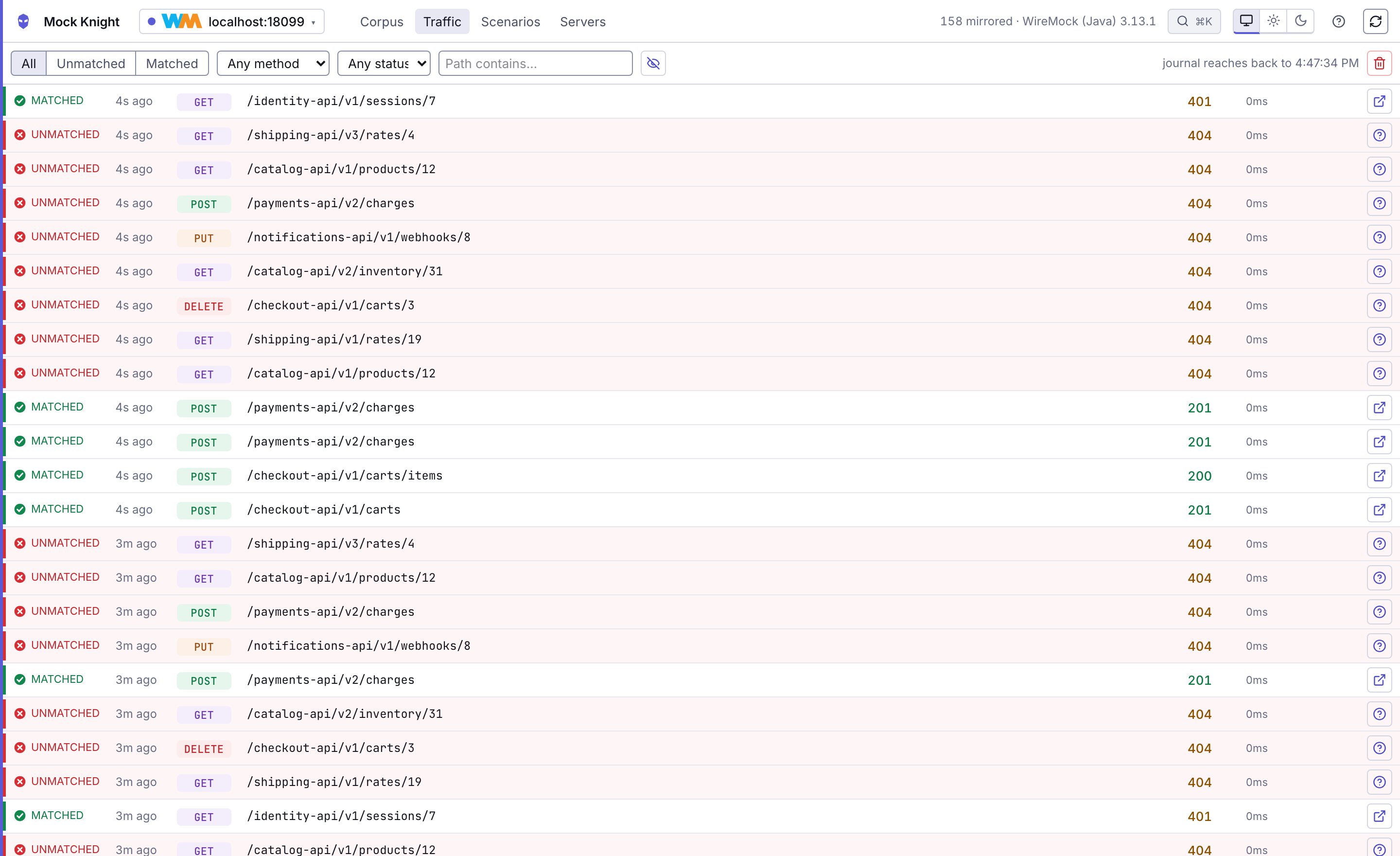
Watch traffic as it arrives
The request journal, live, with match state, filters by method, status and path, and the explainer one keystroke away. Arrivals hold while your pointer is over the list, so a click lands on the row you aimed at.
Drive stateful scenarios
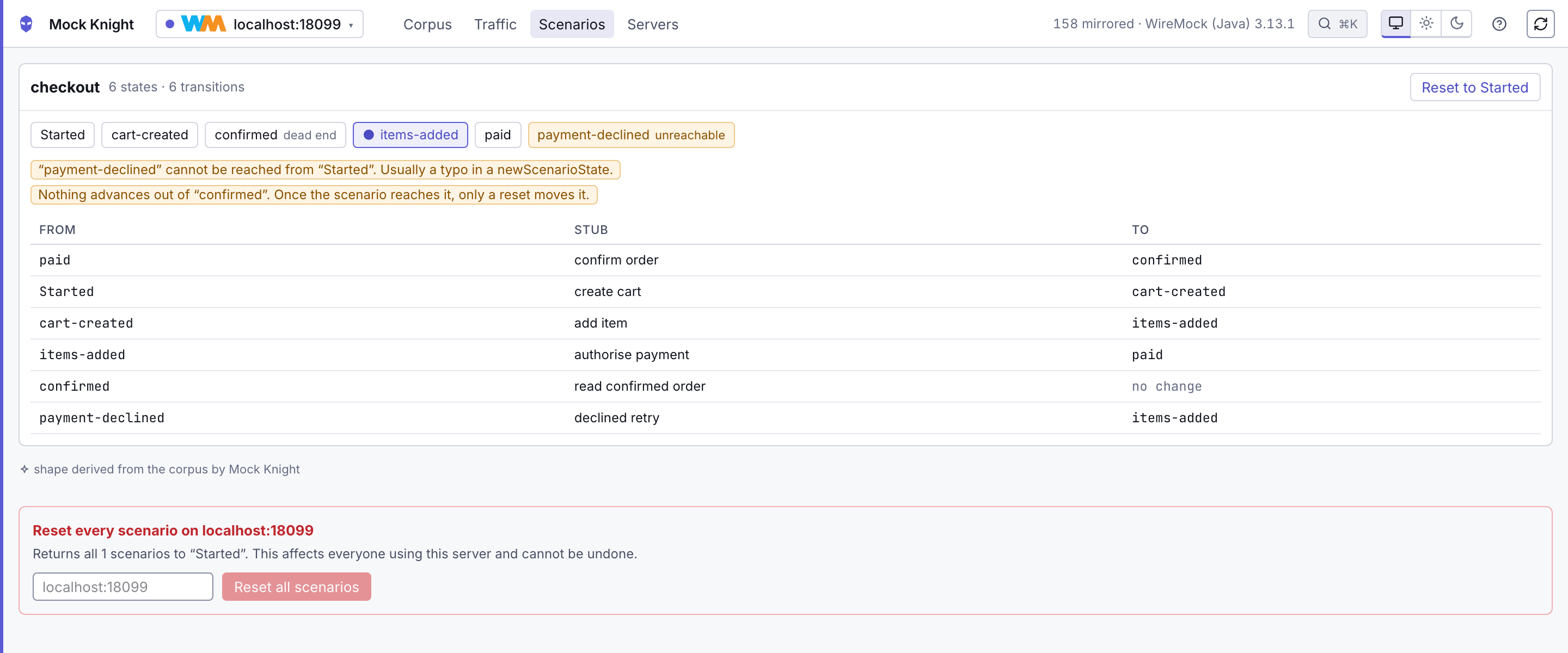
Stateful stubs as a state graph, with the current state highlighted, unreachable states and dead ends flagged, and a reset that says who else it affects.
Light and dark
It follows the OS by default, or pin either. It is a debugging tool; it gets used at both ends of the day.
Why
A mock server with three stubs needs no tool. A mock server with three thousand is a different thing, and the questions that actually matter are the ones an admin API answers worst:
- Which stub answered this request? And if none did, how close did each one get?
- Which of these four stubs on
/v1/ratesactually wins? They differ only by a header. - Did my edit just silently drop a field the UI didn't know about?
- Is this stub dead, or has it just not been called since the journal was last cleared?
What it does
| Find | Full-text and structured search (method:POST status:5xx header:X-Tenant), faceted filters with live counts, a folder tree, and a virtualised list that stays fluid at 10,000 rows |
| Explain | For any unmatched request, the closest stubs ranked, with a field-by-field comparison of what matched and what didn't — and one click to create a stub that would have matched |
| Priority | Which stub on a path actually answers, and which are shadowed. Invisible in a flat list, decisive on a corpus where stubs differ only by header |
| Edit safely | Every write re-reads and hash-compares first, so two people editing the same stub get a three-way merge instead of a lost update |
| Watch | A live request journal with match state, filters, and the match explainer one keystroke away |
| Scenarios | Stateful stubs as a state graph, with unreachable states and dead ends flagged |
| Keyboard first | ⌘K reaches every action, screen, server and stub; / focuses search; ? publishes the whole map |
| Light and dark | Follows the OS by default, or pin either |
Two principles shape all of it:
- Your mock server is the source of truth. Mock Knight keeps a local SQLite mirror purely as a cache. Delete it and nothing is lost.
- Nothing inferred is presented as fact. Anything Mock Knight worked out itself — overlap detection, ranked near-misses — is labelled as its own inference. Anything derived from the request journal carries the window it came from, because that journal is finite and resettable. A tool that presents a guess with the confidence of a fact gets abandoned the first time the guess is wrong.
Supported mock servers
| Backend | Status |
|---|---|
| WireMock 3.x | Supported. Read, write, journal, scenarios, near-miss |
| WireMock 2.x | Read paths work; some admin routes are probed and gracefully absent |
| MockServer | Supported. Read and write. No traffic log and no scenarios — it records no attribution for a served request and has no named states, so both screens are absent rather than empty |
| Mockoon | Read, edit and traffic. Its corpus is an environment JSON file — the admin API cannot read routes — so point a profile at the file. Editing rewrites that file surgically, leaving everything it did not touch byte-identical; run Mockoon with --watch and it serves the change about a second later. Adding and deleting stubs are not offered: both also rewrite rootChildren, where a mistake silently unserves a route |
| Prism | Read-only. Its corpus is the OpenAPI document it serves — Prism has no control API — so point a profile at the file. An operation becomes one stub per declared response, ranked the way Prism picks: lowest 2xx first |
| Hoverfly, JSON Server | Not yet. JSON Server in particular is a poor fit: it has no matchers, no journal and no stubs — its db.json holds data, and its routes are generated rather than declared |
Pick one with --adapter, or per server on the Servers screen:
npx mock-knight --url http://localhost:1080 --adapter mockserverA Mockoon profile also needs the path to its environment JSON file — the Servers screen asks for
it once Mockoon is chosen as the backend, because its admin API cannot read routes. Start Mockoon
with --watch and the file is authoritative: edit it and the server follows.
mockoon-cli start --data ./env.json --port 3000 --watch --admin-api-token <token>The traffic log needs that token; set it as an environment variable and name the variable in the profile's auth field, which is where every secret is referenced rather than stored.
Mock Knight probes each server on connect and derives a capability set. A capability that is off means the control is absent, never a button that fails when you press it. The Servers screen shows the full report and explains what each one being off costs you.
Options
| Flag | Default | |
|---|---|---|
--url <url> |
— | Mock server to connect to on startup. A context path is kept — the adapter's own admin path is appended to it, e.g. https://host/ctx/__admin for WireMock |
--adapter <name> |
probed | wiremock, mockserver, mockoon or prism |
--port <n> |
7777 |
|
--host <addr> |
127.0.0.1 |
Anything else prints a warning — there is no authentication |
--state <path> |
~/.mock-knight/state.db |
Where the SQLite mirror lives |
--name <name> |
the URL's host | Profile name |
--no-refresh |
Skip the initial corpus mirror | |
--mode <local|deployed> |
local |
deployed disables actions that assume a single trusted user |
--config <path> |
./mock-knight.json if present |
See below |
--no-config |
Ignore any config file | |
--allow-stored-credentials |
Permit a non-loopback bind while profiles hold stored credentials. Refused by default — see Security |
Servers you connect to are remembered in the state database and stay in the list until you
remove them (Servers → Remove). --url always decides which one the browser opens, whatever
else is in there, and naming one that is already known simply opens it rather than adding a
second copy.
One address, one server: two profiles reaching the same admin URL are refused, since both would
mirror the same corpus and the switcher would offer a choice that changes nothing. The
comparison is on the composed address, so a trailing slash or a spelled-out /__admin does not
sneak a duplicate past.
Configuration — mock-knight.json
Optional. Picked up from the working directory, or named with --config. A flag always wins
over the file — a flag is what you typed just now.
{
  "$schema": "https://raw.githubusercontent.com/LamineMbn/mock-knight/main/schema/mock-knight.schema.json",
  "port": 7777,
  "state": "./mirror.db",            // relative to this file, not your shell's directory
  "allowedHosts": ["wiremock.internal:8080"],
  "profiles": [
    {
      "name": "staging",
      "adapter": "wiremock",
      "baseUrl": "${env:STAGING_MOCK_URL}",
      "authKind": "basic",
      "authUsername": "ci",
      "authSecret": "${env:STAGING_MOCK_PASSWORD}",
      "readOnly": true
    }
  ]
}allowedHostsrestricts where this instance may connect. Absent means no restriction; an empty array means nothing is reachable. Worth setting whenever you use--host.profilesare reconciled by name on every start, so edit and restart. They are the way to share a set of servers with a team through version control.${env:VAR}is interpolated into string values, and refuses to start if the variable is unset rather than substituting an empty string. Use it for anything secret, so the file you commit holds a variable name rather than a password.- The
$schemaline gives you completion and validation in any editor that reads JSON Schema. - YAML is not implemented yet; a
.yamlfile is reported, not ignored.
Servers behind basic auth
WireMock can put its admin API behind HTTP basic auth. Set a username and password on the Servers screen — the field appears only for backends that accept one, which among those supported is WireMock alone.
By default the password is never written to disk. It is held in the Mock Knight process for
as long as it is running and re-entered after a restart, which keeps it out of backups, a synced
home directory, a support bundle and anything you screen-share. Tick Remember on this machine
and it is written to the state database in plain text — the file is 0600 so other accounts
cannot read it, but it is not encrypted, and encrypting it with a key kept beside it would stop
someone reading over your shoulder and nothing more.
Either way it is never sent to the browser, never written to the audit trail, and never put in a log line or a URL.
Security
Mock Knight is unauthenticated and binds to loopback by default. It is a developer tool for a machine you control.
It fetches arbitrary URLs by design, so an exposed instance is a relay into whatever network it can see. Binding to a non-loopback address prints a warning; put a reverse proxy in front of it if you must.
The bigger exposure is not the credential file. Anyone who can reach Mock Knight's port can use every server you have configured without ever reading a credential. Because of that, binding to a non-loopback address while any profile holds a stored credential is refused, not warned about — clear the stored ones and re-enter them without remember, or pass
--allow-stored-credentialsif you have put your own authentication in front.A profile in a config file holds the name of an environment variable, never a value, so the file you commit contains nothing sensitive.
The values of the header names listed in a profile's
redactHeadersare replaced before a request journal entry is stored. The names themselves are kept, so the Traffic screen still showsX-Api-Key: «redacted». Matching is case-insensitive.Redaction covers every copy the entry contains, not only the header it was named in: the mock server's own payload as well as the record Mock Knight builds from it, the
cookiesobject that sits beside the headers, theurl, the body and the base64 twin the backends store next to it, and the columns derived from all of those. Whatever was replaced is then scrubbed from every string in the entry, because a near-miss diff quotes a header value in prose.That sweep is deliberately blunt — a value you declared is replaced wherever it occurs, with no minimum length — so a near-miss report can read
«redacted»mid-sentence. It sweeps only what you named, though: declaringCookiereplaces every cookie in the entry, but the individual cookie values are not hunted for elsewhere, because a jar carries throwaway pairs liken=1and sweeping1would corrupt far more than it protected. The one thing that leaves behind: a backend printing a single cookie's value, alone, into free text.It costs you something on the Traffic screen. The match explainer and create stub from request rebuild the request from the redacted entry, so a redacted header always reports as a mismatch in the explainer, and a stub generated from that request carries a literal
«redacted»matcher you will want to edit. That is the deliberate trade: better a degraded explainer than your credential written into the corpus.
FAQ
Does WireMock have a UI?
Not in the open-source distribution. WireMock ships an admin REST API — GET /__admin/mappings
and friends — and leaves the interface to you. WireMock Cloud is a separate commercial hosted
product with its own UI. Mock Knight is an open-source UI you run yourself, pointed at the
WireMock you already have.
How is this different from WireMock Cloud?
WireMock Cloud is a hosted service you move your mocks to. Mock Knight is a local tool you point at a mock server you already run — your own laptop, your CI, your team's shared instance — and it never becomes part of your stack. It is also not WireMock-only: the same UI drives MockServer, Mockoon and Prism.
Can I edit WireMock stubs in a browser with it?
Yes, on backends whose admin API supports writes (WireMock and MockServer). You can edit the matcher and response through forms or as raw JSON, create a stub from scratch, duplicate one, or build one from a request that didn't match. Every write re-reads the stub and compares hashes first, so if a colleague changed it since you opened it you get a three-way merge rather than a silent overwrite.
Will it rewrite or reformat my mapping files?
No. Mock Knight talks to the admin API, and it never rebuilds a stub from its own model — it patches the vendor JSON it read, so a field it doesn't understand survives the round trip untouched. For the file-backed backends (Mockoon, Prism) it reads the file, and for Mockoon's edits it rewrites surgically, leaving everything it didn't touch byte-identical.
Is it safe to point at a mock server my team shares?
That is the case it is built for. Writes are hash-checked against the current server state,
destructive actions name who else they affect and require typing the profile name, a profile can
be marked read-only, and --mode deployed disables the actions that assume a single trusted
user. Read paths never mutate anything.
Does it work with MockServer, Mockoon or Prism?
Yes — see Supported mock servers for exactly what each one can and can't do. Where a backend cannot answer a question (MockServer records no attribution for a served request, so there is no traffic log), the screen is absent rather than empty or wrong.
Does it need Docker, an account, or a config file?
None of the three. npx mock-knight --url <your mock server> is the whole setup. Node 22 or
newer is the only requirement.
Does it replace my mock server?
No, and it never serves mock traffic. Stop Mock Knight and your mocks behave exactly as they did before you started it.
Contributing
See CONTRIBUTING.md. It covers the layout, the four test tiers, and the architecture invariants — those are load-bearing, and a change that breaks one won't be merged even if the tests pass.
License
Apache-2.0 Lamine Bendib