
nativescript-preferences
App settings for NativeScript, declared once. Describe them in one TypeScript file; get the iOS Settings screen, the Android preference screen, and a typed API, all from the same definition and all reading the same native store.
import settings from './app.preferences';

settings.get('theme');           // 'system' | 'light' | 'dark', never undefined
settings.set('volume', 80);      // persisted in NSUserDefaults / SharedPreferences
settings.onChange('theme', applyTheme);
await settings.openSettings(); // the OS draws the screen- No platform code. One API on both OSes. No
if (isIOS), no plist, no XML written by hand. - Typed for real. Keys, value types and option literals are inferred from the definition. A default that is not one of its options, or a misspelled property, is a compile error. Every key has a default, so reads are never
undefined. - Live everywhere. Change a value in the OS settings, in your code, or through a two-way binding, and everything else updates.
- Native UI for free. iOS gets a page in the Settings app, Android gets an AndroidX
PreferenceScreen. Or bind your own screen to the same instance.
One definition, both platforms
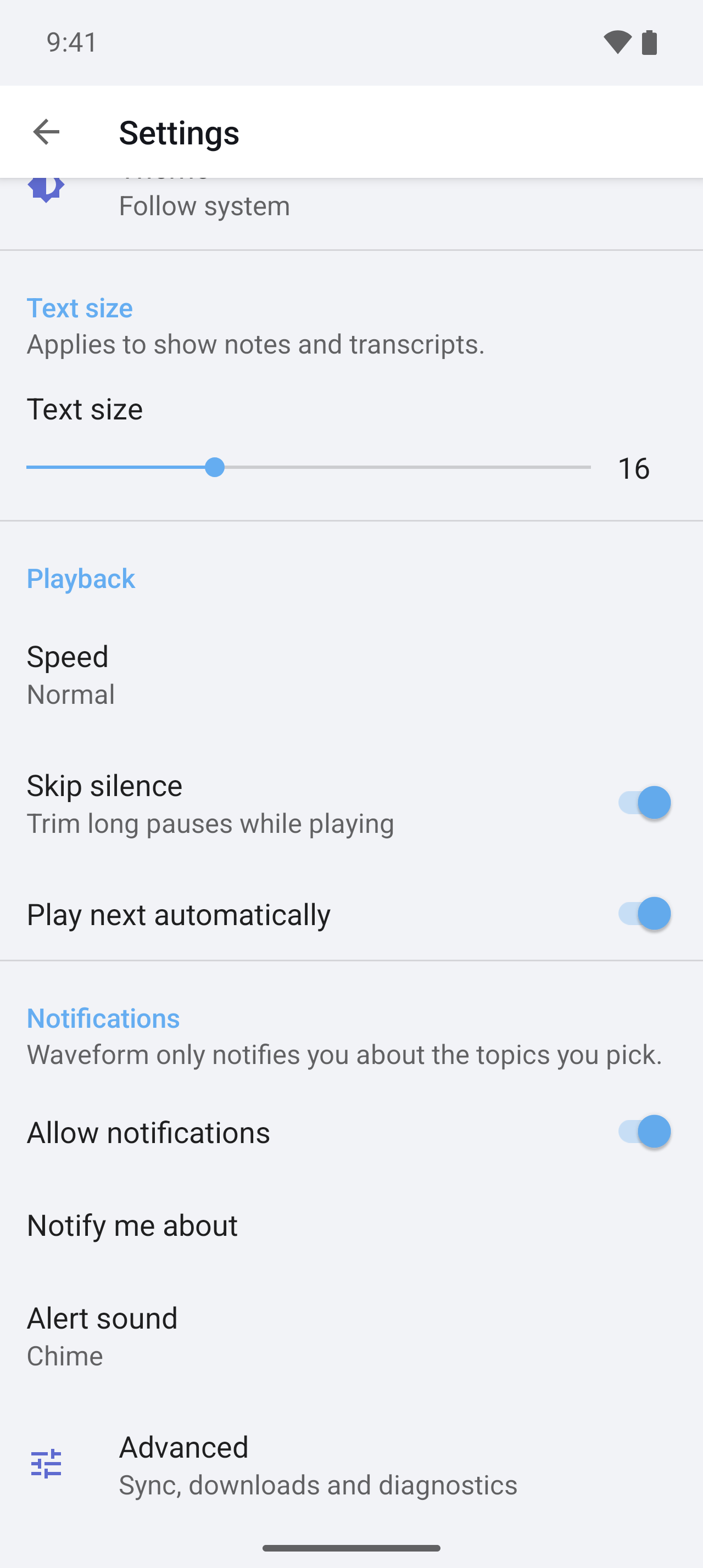
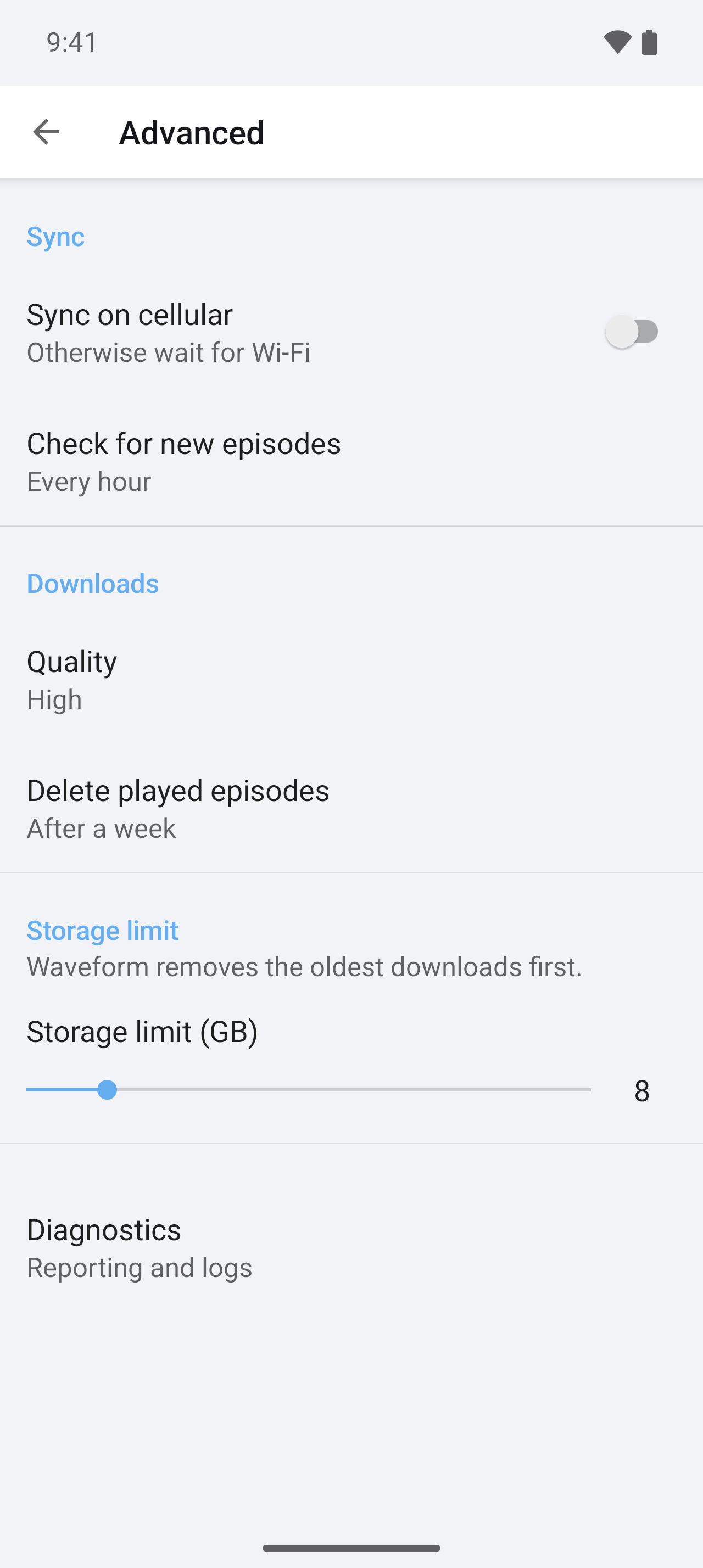
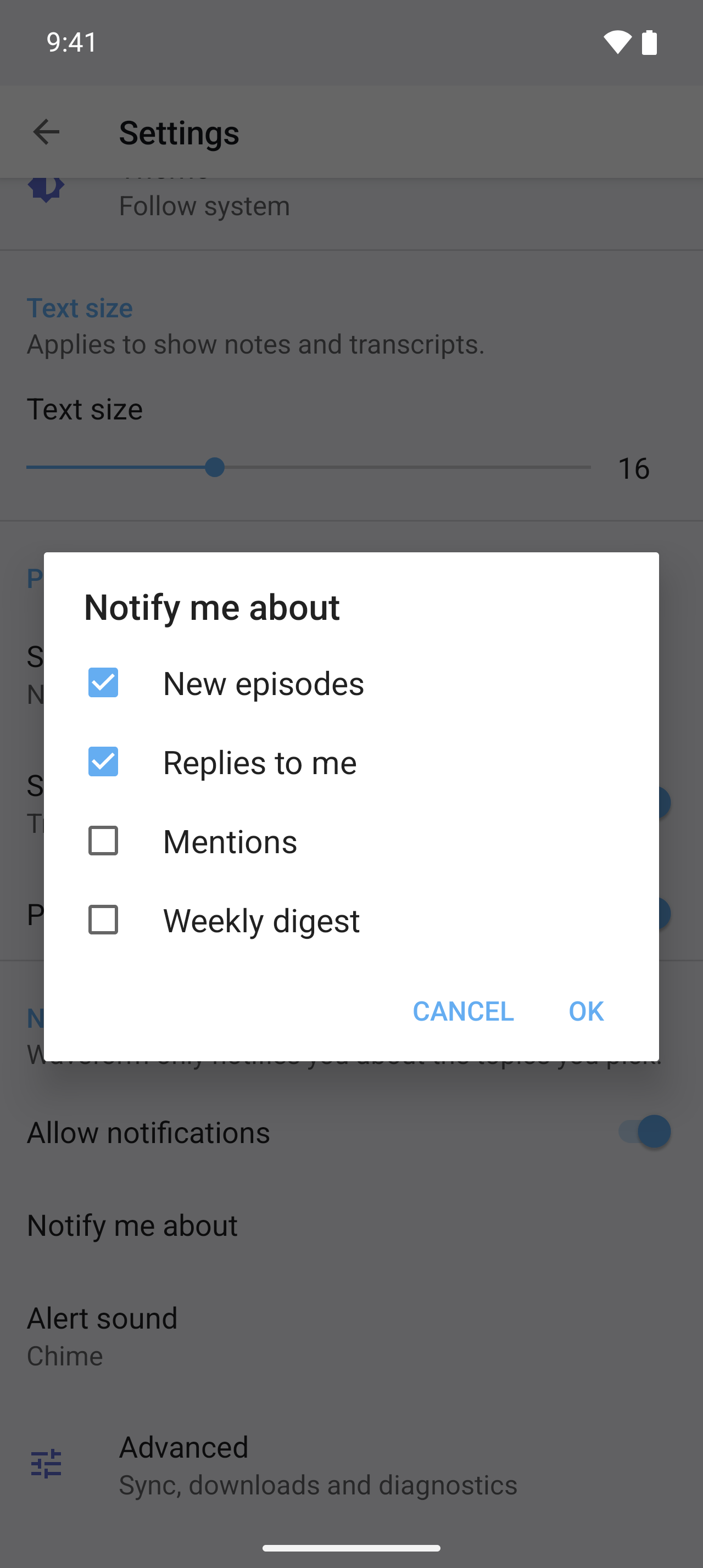
The demo app's app.preferences.ts produces every screen below. Nothing here is hand-written per platform.
| iOS — the Settings app | Android — an AndroidX PreferenceScreen |
|
|---|---|---|
| Root |  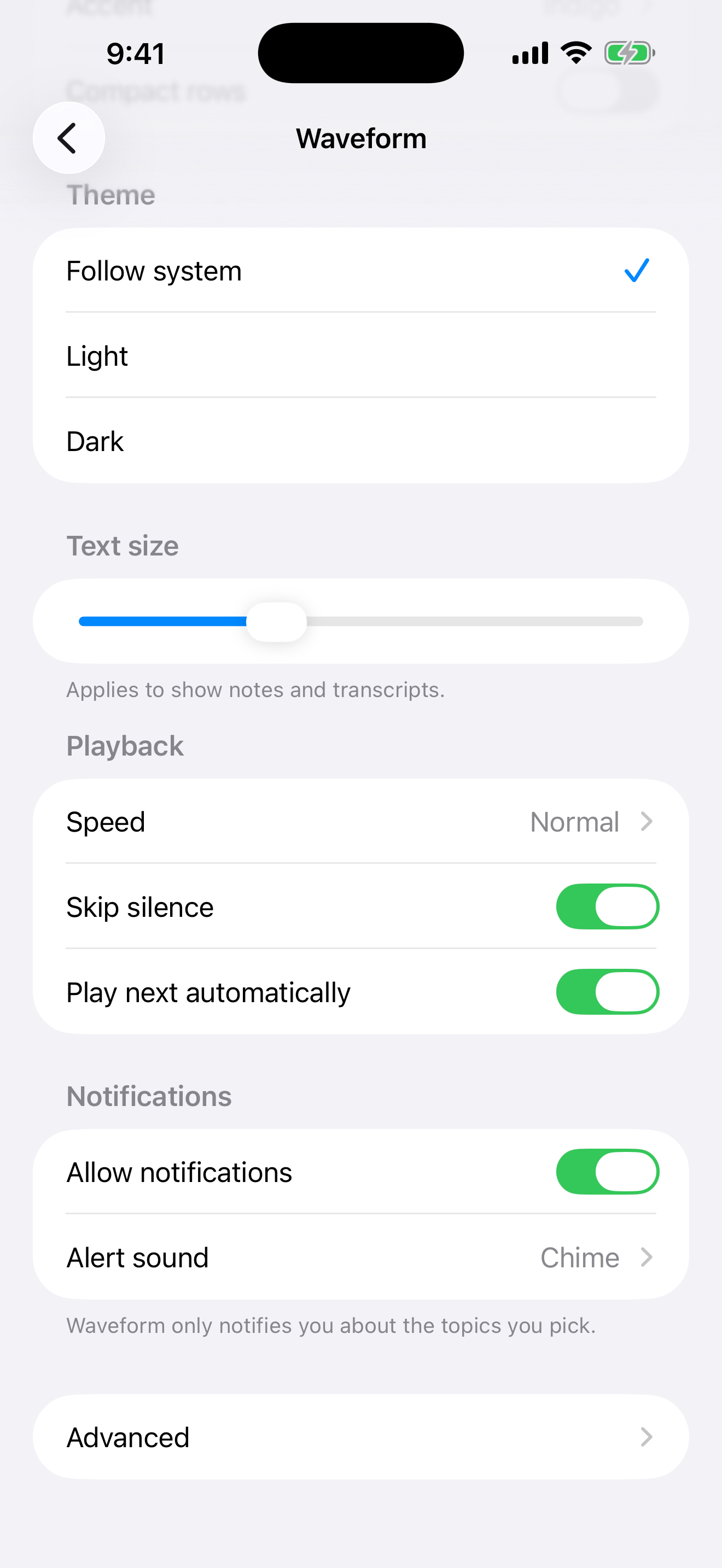 |
  |
| Nested screen | 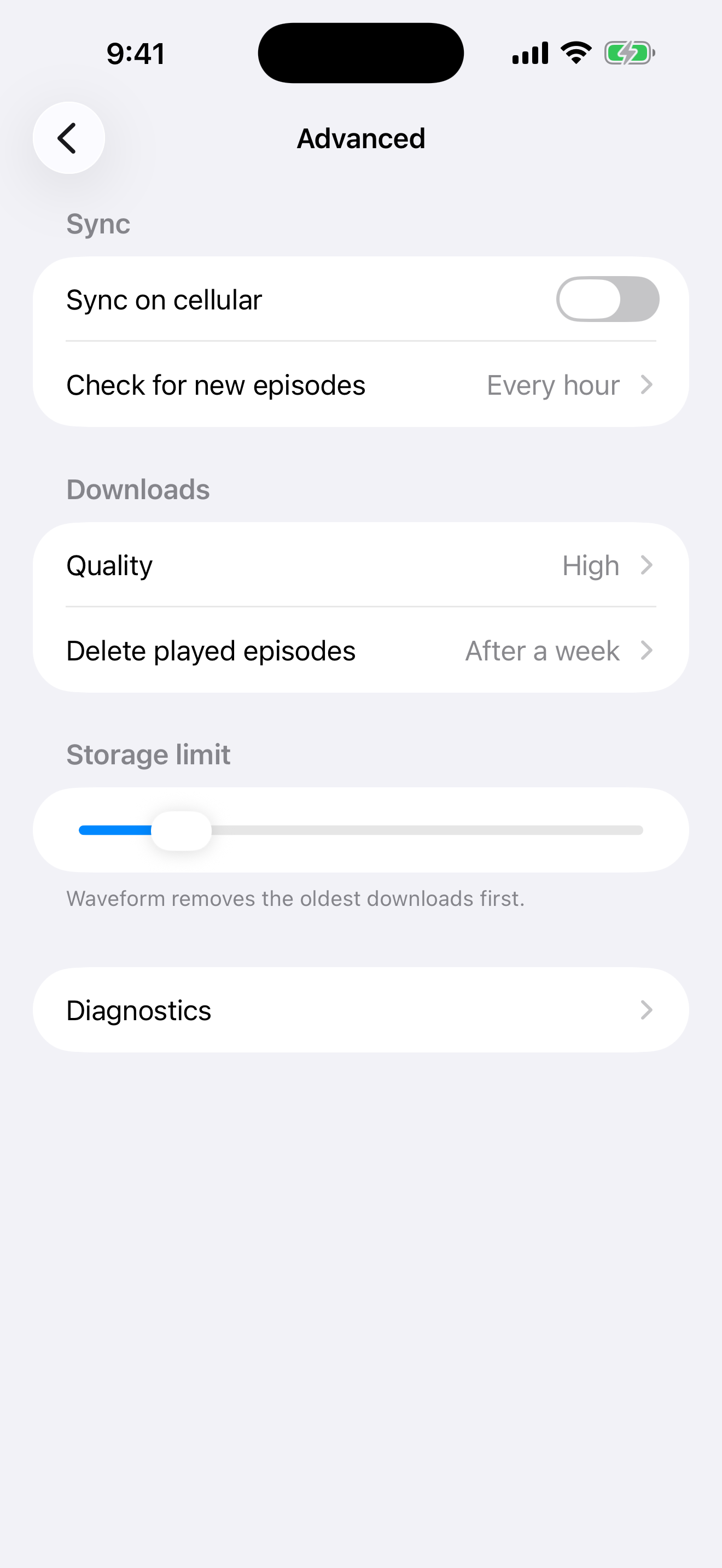 |
 |
| Two levels deep | 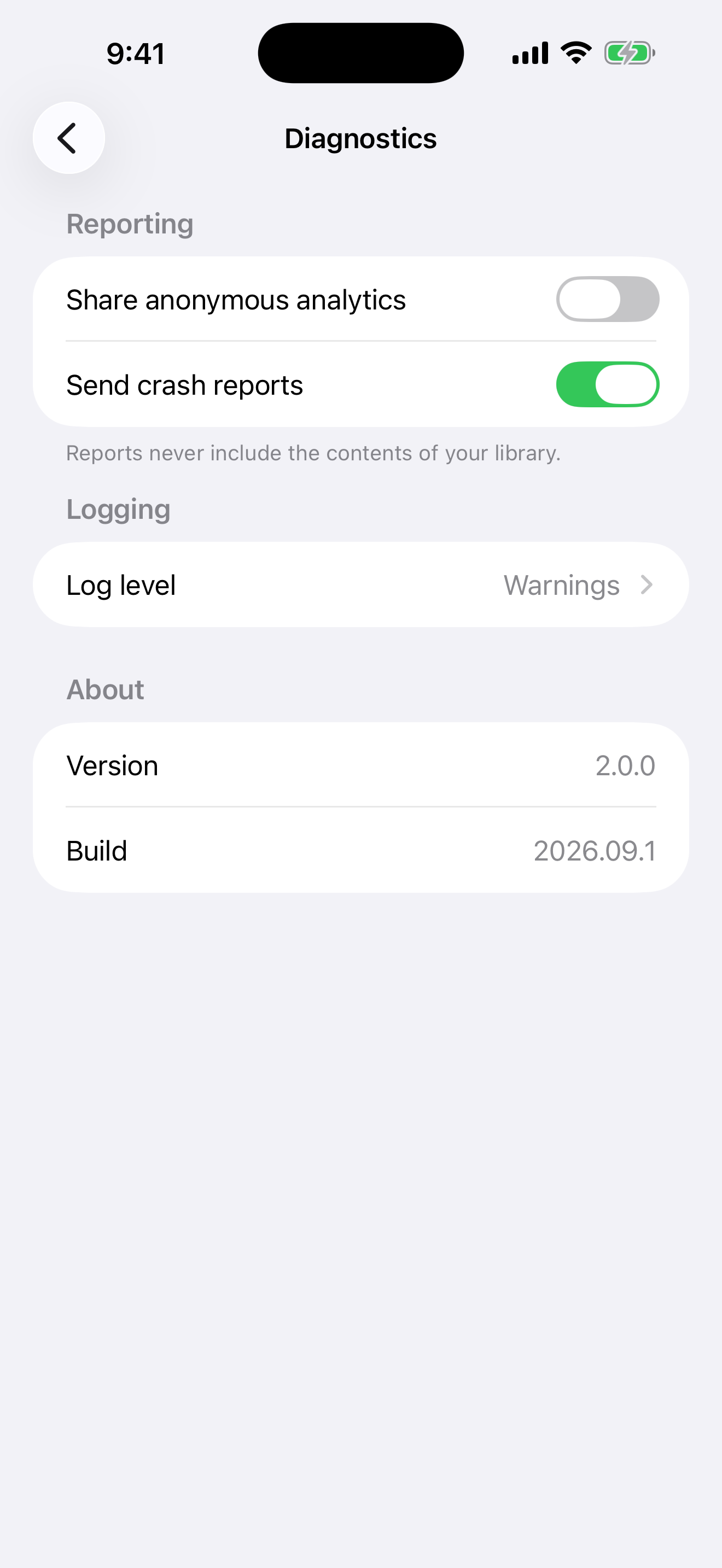 |
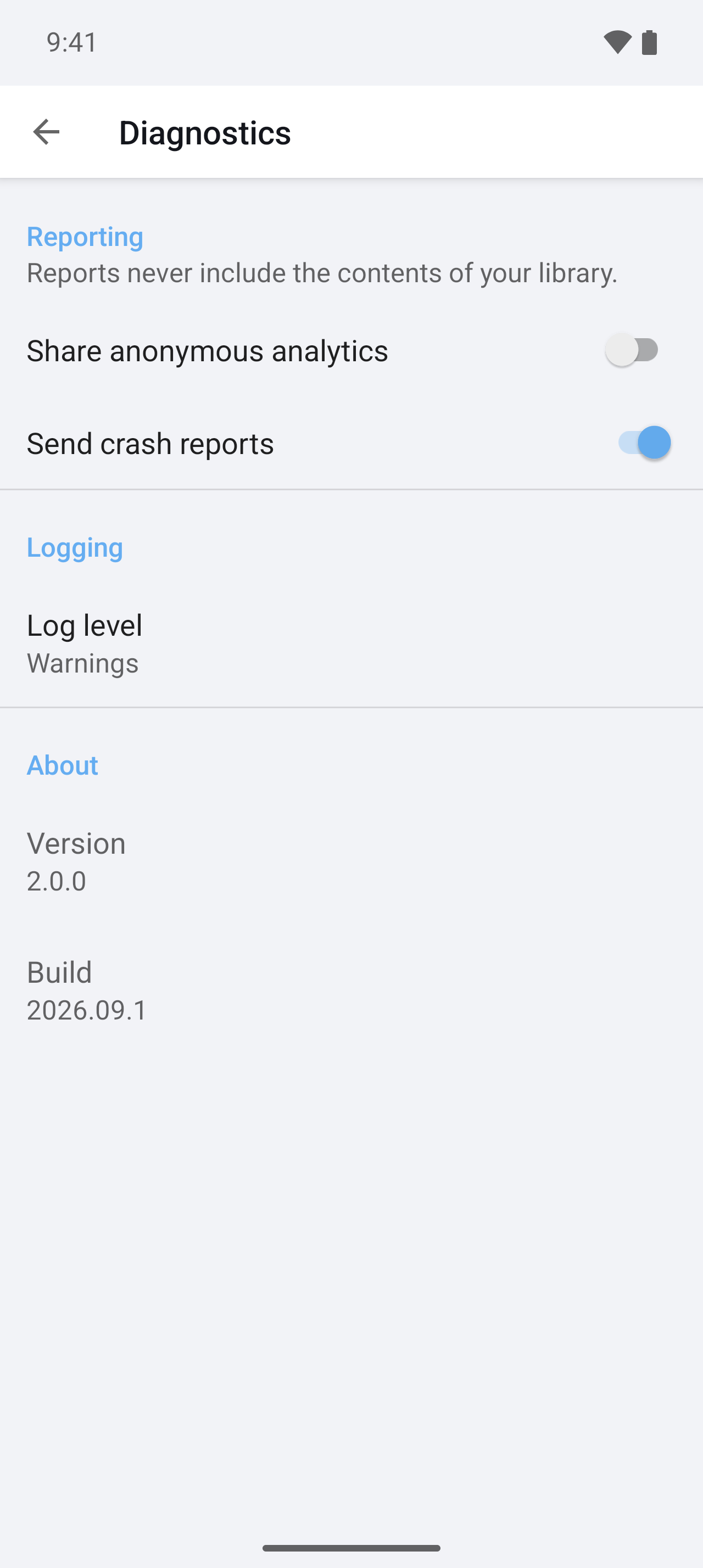 |
Same definition, native idioms on each side: the list for Theme is an ios.widget radio group on the left and a DropDownPreference with an icon on the right, and the multilist that iOS has no control for is hidden there and a MultiSelectListPreference on Android.
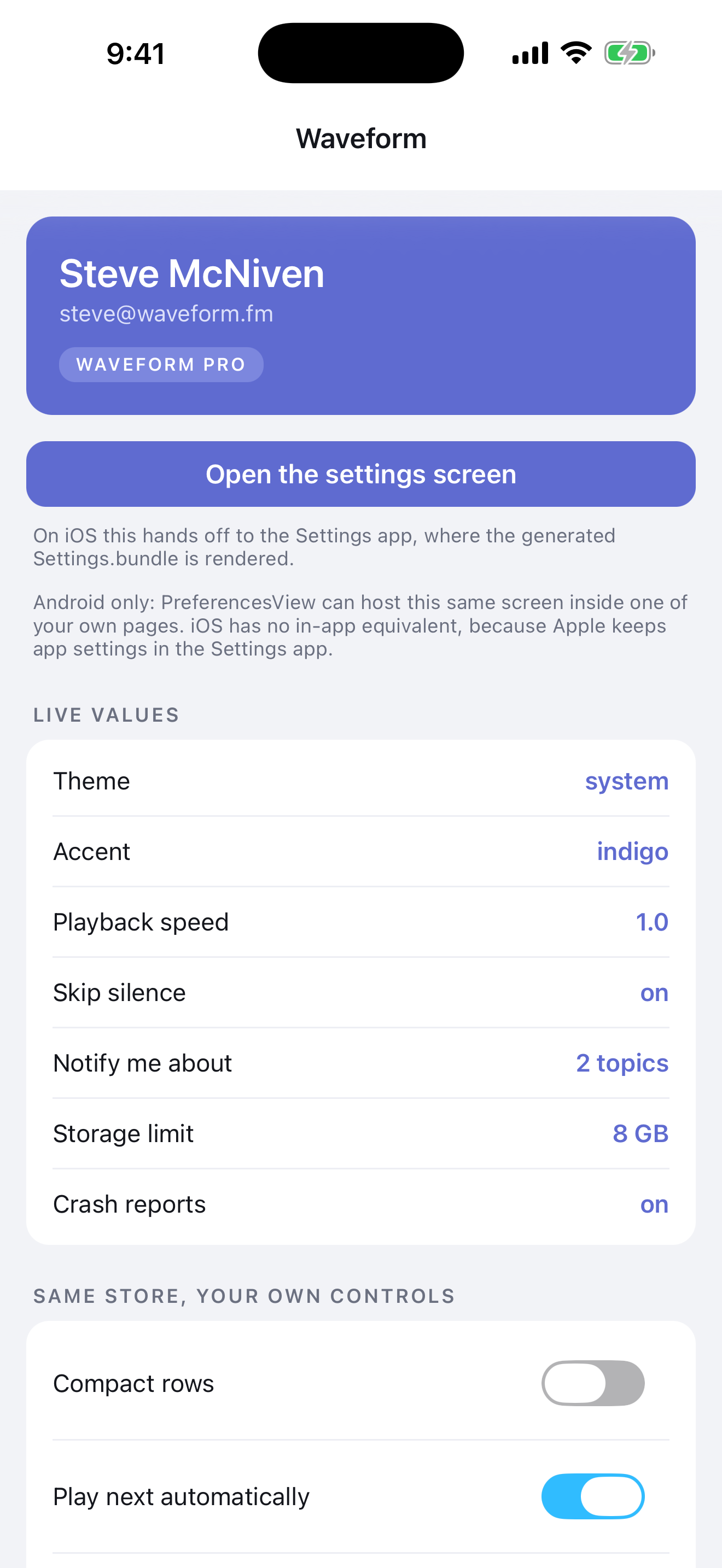
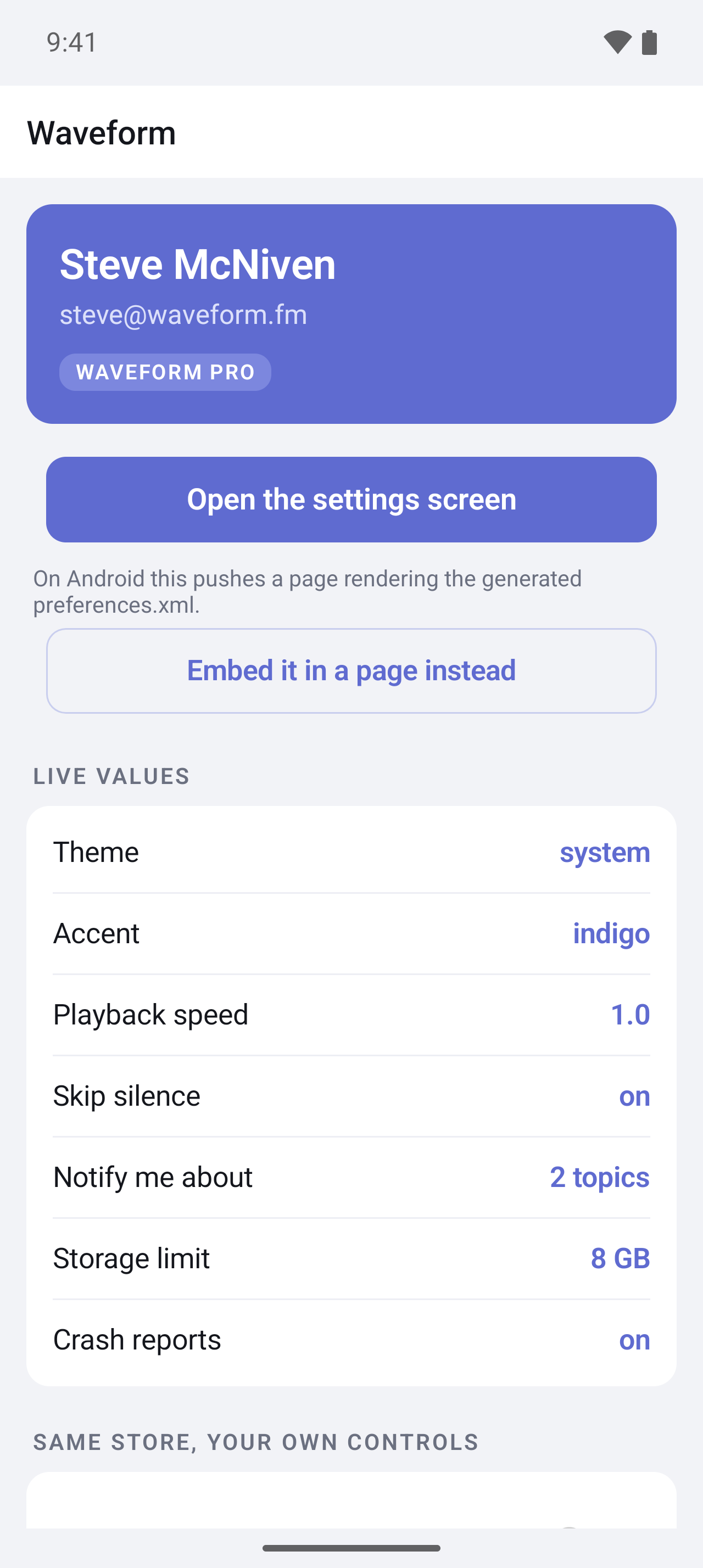
And the same values in the app itself, through the typed API and two-way bindings:
Quick start
ns plugin add nativescript-preferences
npx ns-preferences init
init creates app/app.preferences.ts, adds a build hook to nativescript.config.ts, and generates once. Describe your settings:
// app/app.preferences.ts
import { definePreferences } from 'nativescript-preferences';

export default definePreferences({
  items: [
    {
      type: 'group',
      title: 'General',
      items: [
        { key: 'enabled', type: 'toggle', title: 'Enabled', default: true },
        {
          key: 'theme',
          type: 'list',
          title: 'Theme',
          default: 'system',
          options: [
            { value: 'system', title: 'Follow system' },
            { value: 'light', title: 'Light' },
            { value: 'dark', title: 'Dark' },
          ],
        },
        { key: 'volume', type: 'slider', title: 'Volume', default: 50, min: 0, max: 100 },
      ],
    },
  ],
});
Use them anywhere:
import settings from './app.preferences';

settings.get('volume');                          // number
settings.get('theme');                           // 'system' | 'light' | 'dark'
settings.set('enabled', false);                  // a string here is a compile error
settings.set('theme', null);                     // back to the default
const stop = settings.onChange('theme', (theme) => applyTheme(theme));
The file is both the schema and the runtime instance: definePreferences infers the keys and value types from the literal (no as const needed) and returns the typed Preferences for them. The build hook evaluates the same file under Node to write the native screens, so keep it self-contained: import only nativescript-preferences and relative .ts helpers there, nothing from the app or @nativescript/*.
Or bind a page to it. The instance is an Observable, so bindings work in both directions:
page.bindingContext = settings;<Switch checked="{{ enabled }}" />
<Slider value="{{ volume }}" minValue="0" maxValue="100" />Every ns run, ns build and ns prepare regenerates the platform files, so the OS screen, the types and the defaults can't drift. Requires @nativescript/core 9 and TypeScript 6, the version NativeScript 9 ships with (5.3 and 7.0 are verified too). To read the definition at build time the hook uses the project's typescript when it has the compiler API, else the NativeScript CLI's own copy, so a TypeScript 7 project still builds. No native code, no manifest or Info.plist changes.
What gets generated
| Output | Path |
|---|---|
| iOS Settings.bundle, one plist per screen | App_Resources/iOS/Settings.bundle/ |
| AndroidX preference screen and its string arrays | App_Resources/Android/src/main/res/xml/preferences.xml, values/preferences_arrays.xml |
The definition file is the typed module, so nothing else is generated for it. (A preferences.json project also gets output.typescript; see Still on preferences.json.)
Only changed files are written. Generated files carry a "Do not edit" header; files without it are never overwritten. npx ns-preferences generate runs it by hand, npx ns-preferences check fails CI when output is stale.
Item types
Every item except group has a unique key. title and summary are optional (iOS shows summary only on groups, as footer text).
type |
Stores | iOS | Android | Fields |
|---|---|---|---|---|
group |
nothing | PSGroupSpecifier |
PreferenceCategory |
items |
screen |
nothing | PSChildPaneSpecifier |
nested PreferenceScreen |
items |
text |
string |
PSTextFieldSpecifier |
EditTextPreference |
default, secure, keyboard, autocapitalize, autocorrect (iOS) |
toggle |
boolean |
PSToggleSwitchSpecifier |
SwitchPreferenceCompat |
default |
list |
one option | PSMultiValueSpecifier |
ListPreference |
options, default |
multilist |
string[] |
needs ios.widget |
MultiSelectListPreference |
options, default |
slider |
integer | PSSliderSpecifier (no title) |
SeekBarPreference |
default, min, max, step |
label |
nothing | PSTitleValueSpecifier |
Preference |
value |
options are strings or { "value", "title" }. Defaults are validated, and every error names the item.
Per-platform overrides
Add ios or android to any item. false hides it on that platform. widget swaps the control; any other entry is written verbatim as a plist key or XML attribute, and null removes one.
{
  "key": "theme",
  "type": "list",
  "title": "Theme",
  "default": "system",
  "options": ["system", "light", "dark"],
  "ios": { "widget": "PSRadioGroupSpecifier" },
  "android": {
    "widget": "DropDownPreference",
    "android:icon": "@drawable/ic_theme",
    "app:iconSpaceReserved": null
  }
}
Any control that stores the same shape of data is a safe swap (Apple reference, AndroidX reference):
| Stores | iOS widget |
Android widget |
|---|---|---|
boolean |
PSToggleSwitchSpecifier |
SwitchPreferenceCompat, CheckBoxPreference |
string |
PSTextFieldSpecifier |
EditTextPreference |
| one option | PSMultiValueSpecifier, PSRadioGroupSpecifier |
ListPreference, DropDownPreference |
string[] |
PSMultiValueSpecifier (picks one) |
MultiSelectListPreference |
| integer | PSSliderSpecifier |
SeekBarPreference |
| read-only | PSTitleValueSpecifier |
Preference |
Fully qualified Android classes work too. The generator accepts any non-empty widget name without checking it, so stick to the table above or a control that stores the same shape of data.
Two iOS layout quirks are handled for you: a PSRadioGroupSpecifier is always emitted last in its group (iOS renders it as its own section and would reorder the rows otherwise; generate prints a note if it moved), and a screen that shares a group with other rows gets its own card instead of inheriting their footer.
Keeping control
- Hand-edit a file. Remove its "Generated by nativescript-preferences" header and the generator leaves it alone.
generate --forcetakes it back. - Stop generating one output.
output: { android: false }and write that file yourself. - Skip the hook.
NS_PREFERENCES_SKIP=1 ns run iosfor one build, or remove thehooksentry fromnativescript.config.tsfor good.
Existing hand-written Root.plist or preferences.xml files are kept on the first run for the same reason.
Still on preferences.json
preferences.json keeps working exactly as in 2.x: the same items, "output": { "typescript": "app/settings.generated.ts" }, and a generated module exporting the interface, the defaults and settings. npx ns-preferences init --json creates one, preferences.schema.json gives editor completion, and the hook picks up whichever of app.preferences.ts or preferences.json exists (both at once is an error, so two sources can never disagree). Moving over is mechanical: paste the items into definePreferences({ items }), drop $schema and output.typescript, delete the generated module, and import the definition instead.
Without the generator
Everything above is sugar over one class:
import { Preferences } from 'nativescript-preferences';

interface Settings { enabled: boolean; theme: 'system' | 'light' | 'dark'; volume: number }

export const settings = new Preferences<Settings>({
  defaults: { enabled: true, theme: 'system', volume: 50 },
  integers: ['volume'], // rounded on write, like every generated slider
});
A typed schema needs a default per key; that is what makes get() never undefined. Preferences.shared is the untyped instance, where get() may return undefined and getString / getNumber / getBoolean / getStringArray coerce. For an OS screen, write Root.plist and preferences.xml yourself with the same keys.
Platform details
Android settings page. Android has no OS-hosted settings, so openSettings() navigates the topmost Frame to a page rendering preferences.xml with PreferenceFragmentCompat. Nested screens open as pages, back works. Options (all ignored on iOS): title, resource, rootKey, modal, frame, animated. CSS classes ns-preferences-page and ns-preferences.
Embed it. <prefs:PreferencesView resource="preferences" /> hosts the Android screen in any page, tab or modal (xmlns:prefs="nativescript-preferences"). It renders nothing on iOS; PreferencesView.isSupported tells you. Handle navigateToScreen and set args.handled = true to present nested screens yourself. The plugin registers the namespace with the XML builder the moment it is imported, so it works under both webpack and Vite; just make sure something imports it before the page loads (the generated settings module does).
Defaults, strongest first. The stored value; the native defaults; the in-code defaults. On iOS the shared store registers the Settings.bundle DefaultValues on launch, after the in-code defaults, so a bundle value wins where both define a key; a suiteName store has no bundle. Android has no registration layer: registerDefaults() fills in the preferences.xml android:defaultValues for keys that have no stored value yet. AndroidX records that it has run with one app-wide flag, so a second call for another resource or a suiteName store does nothing unless the second argument, readAgain, is true. With the generator all three come from the same JSON.
Coming from ApplicationSettings. Preferences covers every ApplicationSettings call (getBoolean / getString / getNumber, has, keys, remove, clear) and adds typed keys, string[], defaults, change events and the OS screen. On iOS both read the same NSUserDefaults; on Android ApplicationSettings keeps its own prefs.db file, so use Preferences.applicationSettings to read values written there, or move them once into settings.
Separate stores. new Preferences({ suiteName: 'group.com.example.app' }) opens an iOS App Group suite or an Android SharedPreferences file. Pass the same suiteName to PreferencesView to edit it.
Value types. string, boolean, number and string[] map to NSString/String, Bool/boolean, Integer or Double/int, long or float (Android keeps a key's existing Java type), and NSArray/Set<String>. A key named like a class member (set, keys) is readable via get() but not bindable; a warning is traced.
iOS system keys. iOS registers and writes its own entries next to yours (NSHyphenatesAsLastResort, AppleLanguages, MultiWindowEnabled...). Only keys you declared come out of the registration domain, and system-looking keys are filtered from the persistent domain (systemKeyPattern), so keys(), getAll() and the global change event only ever see app preferences.
Whole numbers. A slider is an integer on both platforms, but an iOS Slider bound to it reports fractions. The generated module passes every slider key as integers, so writes are rounded; do the same when you construct Preferences yourself.
iOS caches Settings.bundle per install. After editing the definition, a plain ns run ios can leave the old Settings screen in place. Delete the app from the simulator or device (or xcrun simctl uninstall booted <bundle id>) and run again.
API
definePreferences(definition)
Returns Preferences<InferPreferences<typeof definition>>, with the definition reachable as settings.definition. The definition is { title?, output?, items }; items are the types above with ios / android overrides. Inferred per item: text is string, toggle is boolean, slider is number, multilist is string[], and list is the union of its option values. label, group and screen store nothing and have no key in the schema. Checked at compile time: a list default must be one of its options (and is required), a multilist default must be a subset, a group cannot contain a group, and an unknown property such as titel is an error. Requires TypeScript 6 (5.3 and 7.0 verified); the same inference is available as InferPreferences<D> and the item types as PreferenceItem, ListPreferenceItem and so on.
Preferences<Schema>
| Member | Description |
|---|---|
static shared |
Untyped instance of the store behind the OS settings UI. |
static applicationSettings |
Untyped instance of the store core's ApplicationSettings uses. |
new Preferences({ defaults?, suiteName?, integers? }) |
Defaults: one per key for a typed schema, any subset untyped. integers lists keys that round on write (every slider, when generated). |
get(key, fallback?) |
Stored value, else fallback, else the default. |
getString / getNumber / getBoolean / getStringArray(key, fallback?) |
Coerced reads. |
set(key, value) |
Writes; null or undefined removes the key. |
remove(key), clear() |
Remove one key or all. Defaults stay in effect. |
has(key), keys(), getAll() |
Inspect the store. has ignores defaults. |
onChange(callback), onChange(key, callback) |
Subscribe; returns an unsubscribe function. Also on('change'). |
refresh() |
Re-read the native store and raise events for differences. |
registerDefaults() |
iOS: register Settings.bundle defaults. Android: persist preferences.xml defaults. |
openSettings(options?) |
Open the OS settings UI. Resolves true once presented. |
ios / android |
The underlying NSUserDefaults / SharedPreferences. |
dispose() |
Stop observing native changes (short-lived instances only). |
PreferencesView
resource, suiteName, rootKey properties; navigateToScreen event with { key, title, handled }; static isSupported.
ns-preferences CLI
| Command | Description |
|---|---|
init |
Create app/app.preferences.ts (or preferences.json with --json), register the build hook, generate once. |
generate |
Write all outputs. --force overwrites files without the generated header. |
check |
Exit 1 when any generated file is stale. |
Options: --config, --project, --app-dir, --app-resources, --platform ios|android, --json. The definition is found in the app folder (appPath from nativescript.config.ts, else src, else app) or the project root. The hook lives at hooks/before-prepare.cjs.
For AI assistants
llms.txt is a compact, self-contained reference for the whole package: the JSON format, the API, the rules, and the mistakes to avoid. It ships in the npm package (node_modules/nativescript-preferences/llms.txt), so an agent working in your app can read it directly, and SKILL.md wraps the same content as an Agent Skill for Claude Code and compatible tools.
Development
npm run build          # compile src/
npm test               # generator tests
npm run demo.install && npm run demo.ios   # or demo.android
The debug APK ships every ABI (about 100 MB of runtime); if an emulator refuses to install it, add packagingOptions { jniLibs { ... } } or splits to demo/App_Resources/Android/app.gradle for one ABI.
Releases are cut from tags: bump src/package.json, add the ## x.y.z changelog section, then git tag v2.0.0 && git push origin master v2.0.0. The Release workflow publishes the GitHub release with those notes and the npm tarball attached. npm publish from src/ is manual.
License
Apache 2.0