ngx-mat-filter v1.0.0
ngx-mat-filter



What is it?
A material component providing a dynamic input for filtering and ordering. It will help you to create a criteria collection easily and is expressed through chip components.

Dynamic input based on Field Type
- Text
- Number
- Select
- Multi-select
- Autocomplete
- Date
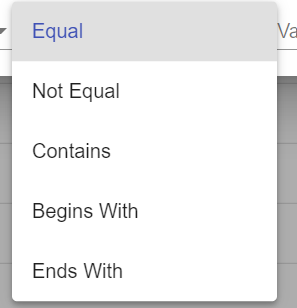
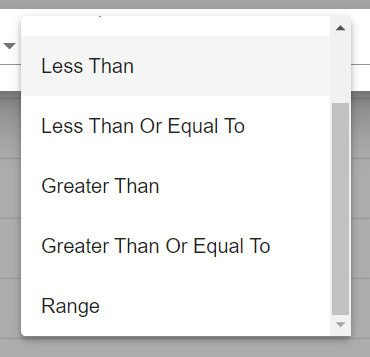
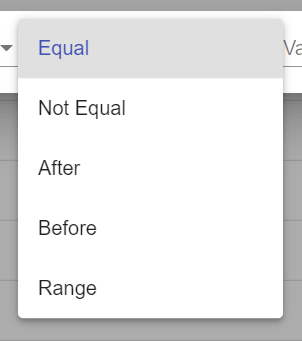
Dynamic operators based on Field Type
Try it
Installation
Peer Dependencies:
| Package Name | Version |
|---|---|
| @angular/common | ^9.1.12 |
| @angular/core | ^9.1.12 |
| @angular/flex-layout | ^9.0.0-beta.31 |
| @angular/cdk | ^9.2.4 |
| @angular/material | ^9.2.4 |
| moment | ^2.29.1 |
Install
npm install ngx-mat-filterChoose the version corresponding to your Angular version:
| Angular | Angular Material | ngx-mat-filter |
|---|---|---|
| 9 | 9 | 1.x+ |
Add needed package to NgModule imports:
import { NgxMatFilterModule } from 'ngx-mat-filter';

@NgModule({
  ...
  imports: [NgxMatFilterModule,...]
  ...
})
Usage
Add component to your page:
<ngx-mat-filter [worker]="worker" [fields]="fields"></ngx-mat-filter>Setup Worker:
constructor() {
  this.worker = new NgxMatFilterWorker<Product>();
}
Setup fields:
this.fields = [
  createTextField({
    key: 'name',
    name: 'Product Name'
  })
];
For Select, Multi-Select and Autocomplete you need to define options:
this.fields = [
  createSelectField({
    key: 'material',
    name: 'Material',
    options: [
      { id: 1, name: 'Wood' },
      { id: 2, name: 'Metal' }
    ]
  })
];
As you see, we have an array options with id and name. If you make an order with this field, it will not work well.
So you have to add sortKey to specify which property will be sorted.
this.fields = [
  createSelectField({
    key: 'material',
    name: 'Material',
    options: [
      { id: 1, name: 'Wood' },
      { id: 2, name: 'Metal' }
    ],
    sortKey: 'materialName'
  })
];
Initialize data:
this.worker.setData(this.items);
this.worker.update();
Data change:
this.worker.dataChange.subscribe((data: Product[]) => {
  //filtered data
});
Destroy worker:
ngOnDestroy() {
  this.worker.destroy();
}
Field
key: string
Field ID
name: string
Field Name
options: {id: any, name: string}[]
A collection is to use for Select, Multi-Select and Autocomplete
skipFilter: boolean
Hide and skip this field when filtering
skipSort: boolean
Hide and skip this field when sorting
NgxMatFilterWorker
Methods
setData(data: T[])
Set original data set
update()
Make filter & order on data set
addFilter(data: FilterCriteria)
Add a filter
removeFilter(data: FilterCriteria)
Remove a filter
addSort(data: SortCriteria)
Add a sort
removeSort(data: SortCriteria)
Remove a sort
setBatch(filters: FilterDTO[], sorts: SortDTO[])
Use createFilter and createSort to generate FilterDTO and SortDTO Set a criteria collection
clear()
Remove all filter & sort criteria
setFields(data: Field[])
When use setBatch, you need to provide fields for the worker
Events
getDataChange(): Observable<T[]>
Return filtered data set
getCriteriaChange(): Observable<{filters: FilterCriteria[], sorts: SortCriteria[]}>
Return criteria list