node-red-contrib-sun-position v1.1.0-alpha-3
node-red-contrib-sun-position for NodeRED





This is a ultimate (Swiss-Army-Knife) Node-Red Timer based flow control with dusk, dawn (and variations) and much more. Additional you can get sun and moon position or to control a flow by sun or moon position. It is ideal for usage of control smart home, but also for all other time based flow control. There is also a roller blind control node and a clock timer node. The blind control node can determine the position of the roller shutter by time or position of the sun. The timer can send different payloads depending on the time.
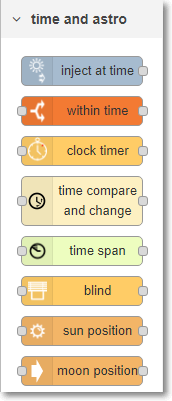
Table of contents
- node-red-contrib-sun-position for NodeRED
- Table of contents
- Preconditions
- Installation
- General
- Implemented Nodes
- CHANGELOG
- TODO
- Support, Bugs and Feedback
- LICENSE
- Other
Preconditions
These nodes need at least NodeJS Version 8.0 and Node-Red with Version 1.0! Any early Version of Node-Red will not work!
Installation
npm install node-red-contrib-sun-position
General
Saving resources
The nodes are designed to do not calculate time events with every arriving message or with an interval every x time. This is to be able to handle a huge amount of messages also on even on computers with low resources.
second based accuracy
The nodes are designed to be accurate to seconds. This means it was designed to turn on/off at exact given second. Other timers often work using intervals where they check your schedule only once a minute or even less. This means when you want something to come on at 08:00am, it may actually not come on until 30 seconds later. This nodes does not have this problem, it will come on at exactly 08:00:00am.
base functions for all (or the most of the nodes)
see here
Implemented Nodes
- within-time a switch node, which forwards a message only within a certain period of time.The beginning and the end can also be sunset, sunrise, moonset, moonrise or any other sun times.
- time-inject a inject node, which can send a message on a specified time, which can also be a sun or moon time.
- sun-position a node which calculates sun position. Can be used as a switch node for specific azimuth of the sun.
- moon-position a node which calculates moon position and phases. Can be used as a switch node for specific azimuth of the sun.
sun-position
The node calculates the current sun position on any input message. This node is compatible to node-red-contrib-blindcontroller.

[{"id":"fc962ea1.197a3","type":"inject","z":"de4e9c38.0d942","name":"","topic":"","payload":"","payloadType":"date","repeat":"","crontab":"","once":false,"onceDelay":0.1,"x":120,"y":300,"wires":[["56265aeb.99f034"]]},{"id":"a0d0e562.7ad1d8","type":"debug","z":"de4e9c38.0d942","name":"","active":true,"tosidebar":true,"console":false,"tostatus":false,"complete":"payload","x":570,"y":300,"wires":[]},{"id":"56265aeb.99f034","type":"sun-position","z":"de4e9c38.0d942","name":"","positionConfig":"2831ba70.55a636","rules":[{"valueLow":"10","valueLowType":"num","valueHigh":"100","valueHighType":"num"}],"onlyOnChange":"true","topic":"","outputs":2,"x":330,"y":300,"wires":[["a0d0e562.7ad1d8","9cc2d51.4ac0828","28e91.9d63d16f6"],["e921e01a.a0fa3"]]},{"id":"9cc2d51.4ac0828","type":"change","z":"de4e9c38.0d942","name":"azimuth","rules":[{"t":"set","p":"payload","pt":"msg","to":"payload.azimuth","tot":"msg"}],"action":"","property":"","from":"","to":"","reg":false,"x":560,"y":340,"wires":[["e866e950.a7f798"]]},{"id":"28e91.9d63d16f6","type":"change","z":"de4e9c38.0d942","name":"altitude","rules":[{"t":"set","p":"payload","pt":"msg","to":"payload.altitude","tot":"msg"}],"action":"","property":"","from":"","to":"","reg":false,"x":560,"y":380,"wires":[["5b085e1b.4ec8a"]]},{"id":"e921e01a.a0fa3","type":"debug","z":"de4e9c38.0d942","name":"","active":true,"tosidebar":true,"console":false,"tostatus":false,"complete":"true","x":550,"y":420,"wires":[]},{"id":"e866e950.a7f798","type":"debug","z":"de4e9c38.0d942","name":"","active":true,"tosidebar":true,"console":false,"tostatus":false,"complete":"payload","x":750,"y":340,"wires":[]},{"id":"5b085e1b.4ec8a","type":"debug","z":"de4e9c38.0d942","name":"","active":true,"tosidebar":true,"console":false,"tostatus":false,"complete":"payload","x":750,"y":380,"wires":[]},{"id":"2831ba70.55a636","type":"position-config","z":"","name":"Kap-Halbinsel","longitude":"-34.357051","latitude":"18.473782","angleType":"deg"}]sun-position - Node settings
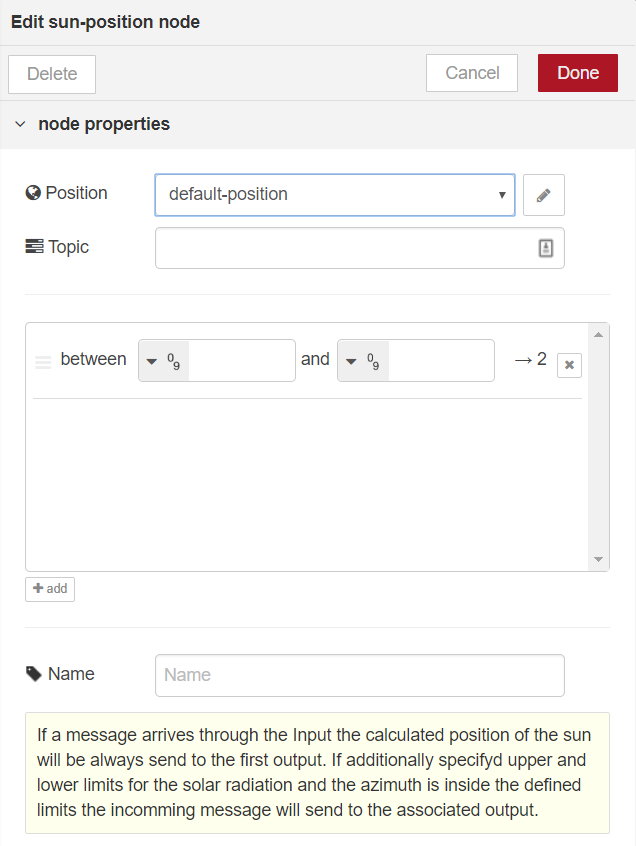
- Position connects to the central configuration node, which contains the current position, but also handles internal shared functions
- Topic defines the topic of the first output
- position container here you can define multiple lower and upper limits for azimuth. If the calculated value of the azimuth is inside the defined limit the input message will send to the associated output.
- Name name of the Node
sun-position - Node Input
The Input is for triggering the calculation. If limits are defined the input message will send to the output associated to the limit.
It is possible that the incoming message have properties msg.latitude and msg.longitude (or msg.lat and msg.lon) defined to override settings in configuration node. The configuration Node still needs to be configured properly.
sun-position - Node Output
first output
msg.payload.azimuththe azimuth of the sun position relative to the given coordinates.msg.payload.altitudethe altitude/elevation of the sun position relative to the given coordinates.msg.payload.timesthe sun times as object.msg.payload.times.astronomicalDawnnight ends (morning astronomical twilight starts)msg.payload.times.amateurDawnamateur astronomical dawn (sun at 12° before sunrise)msg.payload.times.nauticalDawnnautical dawn (morning nautical twilight starts)msg.payload.times.blueHourDawnStartblue Hour start (time for special photography photos starts)msg.payload.times.civilDawndawn (morning nautical twilight ends, morning civil twilight starts)msg.payload.times.blueHourDawnEndblue Hour end (time for special photography photos starts)msg.payload.times.sunrisesunrise (top edge of the sun appears on the horizon)msg.payload.times.sunriseEndsunrise ends (bottom edge of the sun touches the horizon)msg.payload.times.goldenHourDawnEndmorning golden hour (soft light, best time for photography) endsmsg.payload.times.solarNoonsolar noon (sun is in the highest position)msg.payload.times.goldenHourDuskStartevening golden hour startsmsg.payload.times.sunsetStartsunset starts (bottom edge of the sun touches the horizon)msg.payload.times.sunsetsunset (sun disappears below the horizon, evening civil twilight starts)msg.payload.times.blueHourDuskStartnautical dusk start (evening astronomical twilight starts)msg.payload.times.civilDuskdusk (evening nautical twilight starts)msg.payload.times.blueHourDuskEndnautical dusk end (evening astronomical twilight starts)msg.payload.times.amateurDuskamateur astronomical dusk (sun at 12° after sunrise)msg.payload.times.astronomicalDusknight starts (dark enough for astronomical observations)msg.payload.times.nadirnadir (darkest moment of the night, sun is in the lowest position)
msg.payload.posarray with a boolean of every defined limit of the azimuth, which is true if the azimuth is inside the limit.msg.payload.posChangedboolean which is true if any of the defined limit of the azimuth has changed to the last calculation.msg.payload.startTimeif a start time is defined the start timestamp (inclusive of offset).msg.payload.endTimeif a end time is defined the end timestamp (inclusive of offset).msg.payload.sunInSkyif a start and an end time is defined a boolean value indicating whether it is currently considered daylight hours.msg.payload.altitudePercentgives the altitude in percent between horizon (0%) and solar noon (100%) (will not calculated if sun position for a time is calculated which is not today or tomorrow).
second output to ... output if limits for azimuth are defined the incoming message will send to this output. It adds a
msg.posChangedproperty of type boolean which is true if in the previous calculation no message was send to this output.
moon-position
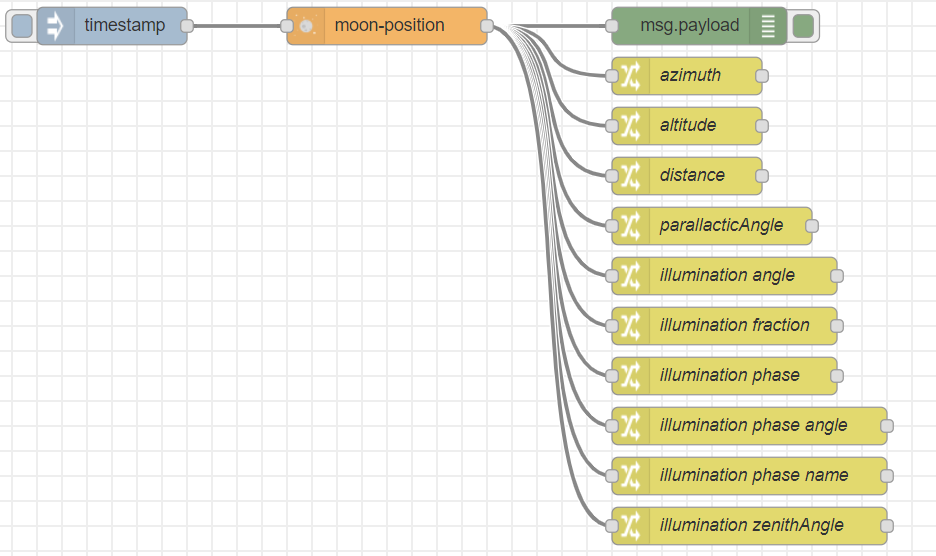
The node calculates the current sun position on any input message.
[{"id":"d99ac08d.fdb94","type":"moon-position","z":"de4e9c38.0d942","name":"","positionConfig":"2831ba70.55a636","rules":[],"outputs":1,"topic":"","x":340,"y":520,"wires":[["e5e8e9a1.6080e8","e9ec273d.d90168","45563d84.0c4bf4","cce94ccc.b2dd2","65c76f28.3dd49","ac44c210.86465","f2deae49.60015","a9e0a2d1.0633a","948f6e2.8a4a39","cc85e458.447ba8","bff5a621.3fb498"]]},{"id":"124bfd72.dcb2f3","type":"inject","z":"de4e9c38.0d942","name":"","topic":"","payload":"","payloadType":"date","repeat":"","crontab":"","once":false,"onceDelay":0.1,"x":120,"y":520,"wires":[["d99ac08d.fdb94"]]},{"id":"e5e8e9a1.6080e8","type":"debug","z":"de4e9c38.0d942","name":"","active":true,"tosidebar":true,"console":false,"tostatus":false,"complete":"payload","x":590,"y":520,"wires":[]},{"id":"e9ec273d.d90168","type":"change","z":"de4e9c38.0d942","name":"azimuth","rules":[{"t":"set","p":"payload","pt":"msg","to":"payload.azimuth","tot":"msg"}],"action":"","property":"","from":"","to":"","reg":false,"x":580,"y":560,"wires":[[]]},{"id":"45563d84.0c4bf4","type":"change","z":"de4e9c38.0d942","name":"altitude","rules":[{"t":"set","p":"payload","pt":"msg","to":"payload.altitude","tot":"msg"}],"action":"","property":"","from":"","to":"","reg":false,"x":580,"y":600,"wires":[[]]},{"id":"cce94ccc.b2dd2","type":"change","z":"de4e9c38.0d942","name":"distance","rules":[{"t":"set","p":"payload","pt":"msg","to":"payload.distance","tot":"msg"}],"action":"","property":"","from":"","to":"","reg":false,"x":580,"y":640,"wires":[[]]},{"id":"65c76f28.3dd49","type":"change","z":"de4e9c38.0d942","name":"parallacticAngle","rules":[{"t":"set","p":"payload","pt":"msg","to":"payload.parallacticAngle","tot":"msg"}],"action":"","property":"","from":"","to":"","reg":false,"x":600,"y":680,"wires":[[]]},{"id":"ac44c210.86465","type":"change","z":"de4e9c38.0d942","name":"illumination angle","rules":[{"t":"set","p":"payload","pt":"msg","to":"payload.illumination.angle","tot":"msg"}],"action":"","property":"","from":"","to":"","reg":false,"x":610,"y":720,"wires":[[]]},{"id":"f2deae49.60015","type":"change","z":"de4e9c38.0d942","name":"illumination fraction","rules":[{"t":"set","p":"payload","pt":"msg","to":"payload.illumination.fraction","tot":"msg"}],"action":"","property":"","from":"","to":"","reg":false,"x":610,"y":760,"wires":[[]]},{"id":"a9e0a2d1.0633a","type":"change","z":"de4e9c38.0d942","name":"illumination phase","rules":[{"t":"set","p":"payload","pt":"msg","to":"payload.illumination.phase.value","tot":"msg"}],"action":"","property":"","from":"","to":"","reg":false,"x":610,"y":800,"wires":[[]]},{"id":"948f6e2.8a4a39","type":"change","z":"de4e9c38.0d942","name":"illumination phase angle","rules":[{"t":"set","p":"payload","pt":"msg","to":"payload.illumination.phase.angle","tot":"msg"}],"action":"","property":"","from":"","to":"","reg":false,"x":630,"y":840,"wires":[[]]},{"id":"bff5a621.3fb498","type":"change","z":"de4e9c38.0d942","name":"illumination zenithAngle","rules":[{"t":"set","p":"payload","pt":"msg","to":"payload.illumination.zenithAngle","tot":"msg"}],"action":"","property":"","from":"","to":"","reg":false,"x":630,"y":920,"wires":[[]]},{"id":"cc85e458.447ba8","type":"change","z":"de4e9c38.0d942","name":"illumination phase name","rules":[{"t":"set","p":"payload","pt":"msg","to":"payload.illumination.phase.name","tot":"msg"}],"action":"","property":"","from":"","to":"","reg":false,"x":630,"y":880,"wires":[[]]},{"id":"2831ba70.55a636","type":"position-config","z":"","name":"Kap-Halbinsel","longitude":"-34.357051","latitude":"18.473782","angleType":"deg"}]moon-position - Node settings
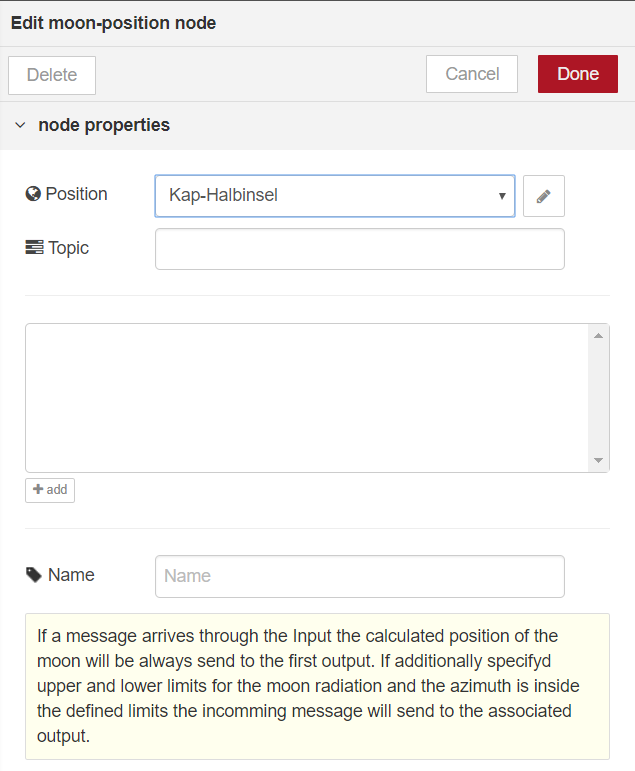
- Position connects to the central configuration node, which contains the current position, but also handles internal shared functions
- Topic defines the topic of the first output
- position container here you can define multiple lower and upper limits for azimuth. If the calculated value of the azimuth is inside the defined limit the input message will send to the associated output.
- Name name of the Node
moon-position - Node Input
The Input is for triggering the calculation.
It is possible that the incoming message have properties msg.latitude and msg.longitude (or msg.lat and msg.lon) defined to override settings in configuration node. The configuration Node still needs to be configured properly.
moon-position - Node Output
- first output
msg.payload.azimuththe azimuth of the moon position relative to the given coordinates.msg.payload.altitudethe altitude/elevation of the moon position relative to the given coordinates.msg.payload.distancethe distance of the moon.msg.payload.parallacticAnglethe parallacticAngle of the moon.msg.payload.illuminationthe illumination of the moon as object.msg.payload.illumination.anglethe illumination angle of the moon.msg.payload.illumination.fractionthe illumination fraction angle of the moon.msg.payload.illumination.zenithAnglethe illumination zenith angle of the moon.msg.payload.illumination.phasethe illumination phase of the moon as object.msg.payload.illumination.phase.valuethe current phase of the moon in percent, where 0%/100% is New Moon, from 0% to 50% is growing, 50% is Full Moon and >50% is decreasing.msg.payload.illumination.phase.anglethe current phase angle of the moon.msg.payload.illumination.phase.emojithe emoji of the current phase of the moon.msg.payload.illumination.phase.codethe code of the emoji for the current phase of the moon.msg.payload.illumination.phase.namethe name of the current phase of the moon.
msg.payload.timesthe moon times as object.msg.payload.times.risethe moon rise time.msg.payload.times.setthe moon set time.msg.payload.times.alwaysUpboolean which is true if the moon never rises/sets and is always above the horizon during the day.msg.payload.times.alwaysDownboolean which is true if the moon is always below the horizon.
msg.payload.posarray with a boolean of every defined limit of the azimuth, which is true if the azimuth is inside the limit.msg.payload.posChangedboolean which is true if any of the defined limit of the azimuth has changed to the last calculation.
{
  "lastUpdate": "2018-11-11T11:11:11.111Z",
  "latitude": "18.473782",
  "longitude": "-34.357051",
  "angleType": "deg",
  "azimuth": 108.71205459404247,
  "altitude": -9.578482237780767,
  "distance": 400811.8001636167,
  "parallacticAngle": -73.92702172116152,
  "illumination": {
    "angle": -94.27663428960696,
    "fraction": 0.14981886026806135,
    "phase": {
      "emoji": "🌒",
      "code": ":waxing_crescent_moon:",
      "name": "Waxing Crescent",
      "weight": 6.3825,
      "value": 0.12651089732280724,
      "angle": 45.54392303621061
    },
    "zenithAngle": -20.349612568445437
  },
  "times": {
    "rise": "2018-11-11T11:44:22.877Z",
    "set": "2018-11-11T23:10:07.389Z",
    "alwaysUp": false,
    "alwaysDown": false
  },
  "pos": [],
  "posChanged": false
}- second output to ... output if limits for azimuth are defined the incoming message will send to this output. It adds a
msg.payload.posChangedproperty of type boolean which is true if the limit has changed since the last azimuth calculation.
time-inject
Injects a message into a flow either manually or at timestamps which can also depending on the sunset, sunrise, or moon set and rise. The message payload can be a variety of types, including strings, JavaScript objects, the current time or the current sun or moon position.
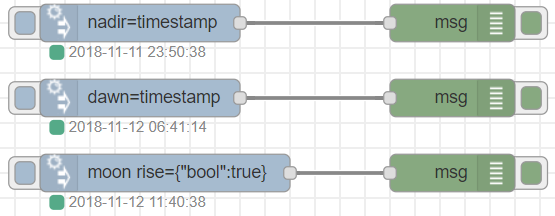
[{"id":"d3c04d4e.ce3e3","type":"debug","z":"de4e9c38.0d942","name":"","active":true,"tosidebar":true,"console":false,"tostatus":false,"complete":"true","x":570,"y":2100,"wires":[]},{"id":"586e4ae2.5b4f14","type":"debug","z":"de4e9c38.0d942","name":"","active":true,"tosidebar":true,"console":false,"tostatus":false,"complete":"true","x":570,"y":2160,"wires":[]},{"id":"1b71d0e5.35b02f","type":"debug","z":"de4e9c38.0d942","name":"","active":true,"tosidebar":true,"console":false,"tostatus":false,"complete":"true","x":570,"y":2220,"wires":[]},{"id":"3e4d36c0.620e7a","type":"time-inject","z":"de4e9c38.0d942","name":"","positionConfig":"bdf7c4a.9ca6c38","time":"nadir","timeType":"pdsTime","timeDays":"*","offset":0,"offsetMultiplier":60,"payload":"","payloadType":"date","topic":"","x":320,"y":2100,"wires":[["d3c04d4e.ce3e3"]]},{"id":"c11713e.db07ef","type":"time-inject","z":"de4e9c38.0d942","name":"","positionConfig":"bdf7c4a.9ca6c38","time":"dawn","timeType":"pdsTime","timeDays":"*","offset":0,"offsetMultiplier":60,"payload":"","payloadType":"date","topic":"","x":320,"y":2160,"wires":[["586e4ae2.5b4f14"]]},{"id":"b227cadc.dcf8c8","type":"time-inject","z":"de4e9c38.0d942","name":"","positionConfig":"bdf7c4a.9ca6c38","time":"rise","timeType":"pdmTime","timeDays":"1,4,0","offset":0,"offsetMultiplier":60,"payload":"{\"bool\":true}","payloadType":"json","topic":"","x":340,"y":2220,"wires":[["1b71d0e5.35b02f"]]},{"id":"bdf7c4a.9ca6c38","type":"position-config","z":"","name":"","longitude":"13.71587","latitude":"51.01732","angleType":"deg"}]time-inject - Node settings
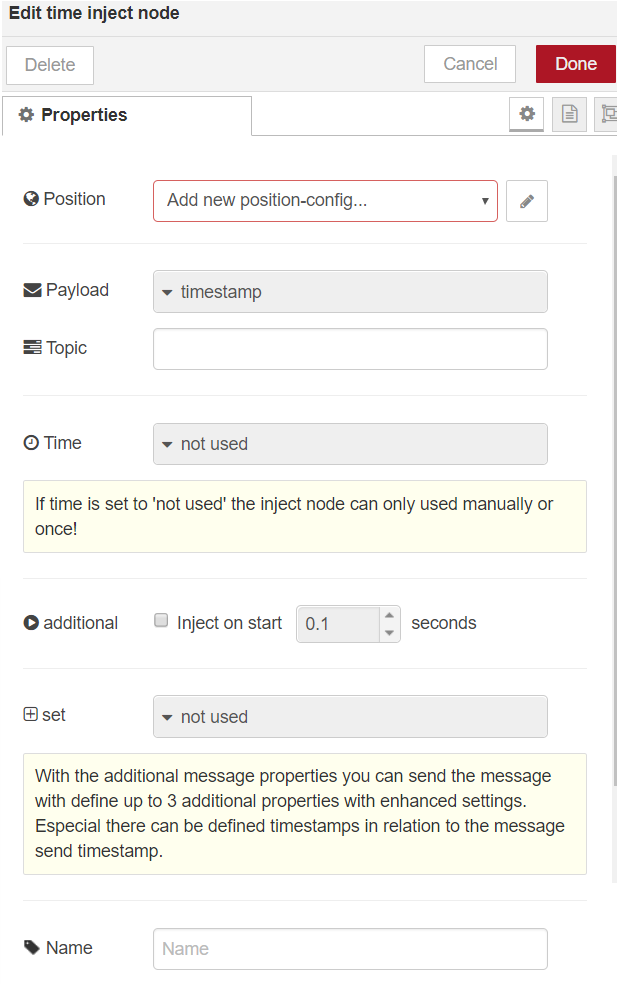
- Position connects to the central configuration node, which contains the current position, but also handles internal shared functions
- Payload defines the payload of the message object send to the output
- Compared to the standard inject node, this node has more options for the payload see Possible Node Output Formats for these options.
- Topic defines the topic of the send message
- Time An optional property that can be configured when the inject node should emit a message on that timestamp.
- if a time is choose additional settings available

- Offset An optional property which is only available if an time is chosen. The offset can be a positive or negative and defines a time offset to the chosen time.
- valid days There can be defined on which days a msg should be emitted.
- special days There can be defined if the msg should only be emitted on even or odd days.
- valid month There can be defined on which month a msg should be emitted.
- valid date range There can be defined if the message should be only emitted between two dates. The defined year will be ignored. There are two options:
- starting day.month is less than end day.month - then the start and end date will be every time the current year
- end day.month is less than start day.month then the message will be send this year from 1.1. to end month and year and from starting date to end month and day next year
- if a time is choose additional settings available
- Property optional here can be defined a condition under which a alternate time should be used.
Alternate time optional defines an alternate start time which will be used if the condition applies. This can be used for different times for example of holidays/weekend.
Additional Inject on Start If this checkbox is set the inject node can emit the message on Node-Red Start or on any deploy of this node. There can be defined a delay after the emit should be done. This can be useful for initializing any flow.
Set additional With this selection you can
- set global, flow context or set additional property of the message object (if the property is payload the payload will be overridden.)
- for any timestamp properties like timestamp, sun time, moon time there are a lot of possibilities to influence this. You can add an offset or select the days wherefore the timestamp should be calculated. The output format could be Unix, ECMA timestamp, object or the time difference between timestamp and emit the message. This is useful to to send a payload of true on sunset with an additional message property as on time with the seconds until sunrise. see Possible Node Output Formats for possible information
time-inject - Node Input
It has only a button as input, where the massage could injected into a flow manually.
time-inject - Node Output
The output is a message with the defined payload and topic in the settings.
time-inject - Node Status
- red on error
- green
- the color of the status is green, if the next trigger time is soon (< 36h).
- type of the status
- dot The next trigger time is normal time. (But that doesn't mean that an inject really takes place.)
- ring The next trigger time is alternate time. (But that doesn't mean that an inject really takes place.)
- blue
- the next trigger (alternate or normal time) is far in the future (>36h).
- type of the status
- dot The next trigger time is normal time. (But that doesn't mean that an inject really takes place.)
- ring The next trigger time is alternate time. (But that doesn't mean that an inject really takes place.)
within-time

[{"id":"bd9bd279.302eb","type":"inject","z":"de4e9c38.0d942","name":"","topic":"","payload":"","payloadType":"date","repeat":"","crontab":"","once":false,"onceDelay":0.1,"x":120,"y":1180,"wires":[["b5c283be.eb945"]]},{"id":"273eb4cb.2715fc","type":"debug","z":"de4e9c38.0d942","name":"out1","active":true,"tosidebar":true,"console":false,"tostatus":false,"complete":"true","x":590,"y":1180,"wires":[]},{"id":"78f068d6.2fe9f8","type":"debug","z":"de4e9c38.0d942","name":"out2","active":true,"tosidebar":true,"console":false,"tostatus":false,"complete":"true","x":590,"y":1220,"wires":[]},{"id":"b5c283be.eb945","type":"within-time-switch","z":"de4e9c38.0d942","name":"","positionConfig":"bdf7c4a.9ca6c38","startTime":"7:00","startTimeType":"entered","startOffset":0,"startOffsetMultiplier":"60","endTime":"9:00","endTimeType":"entered","endOffset":0,"endOffsetMultiplier":"60","property":"","propertyType":"none","startTimeAlt":"","startTimeAltType":"none","startOffsetAlt":0,"startOffsetAltMultiplier":"60","endTimeAlt":"","endTimeAltType":"none","endOffsetAlt":0,"endOffsetAltMultiplier":"60","x":330,"y":1180,"wires":[["273eb4cb.2715fc"],["78f068d6.2fe9f8"]]},{"id":"bdf7c4a.9ca6c38","type":"position-config","z":"","name":"","longitude":"13.71587","latitude":"51.01732","angleType":"deg"}]within-time - Node settings
A simple node that routes messages depending on the time. If the current time falls within the range specified in the node configuration, the message is routed to output 1. Otherwise the message is routed to output 2.
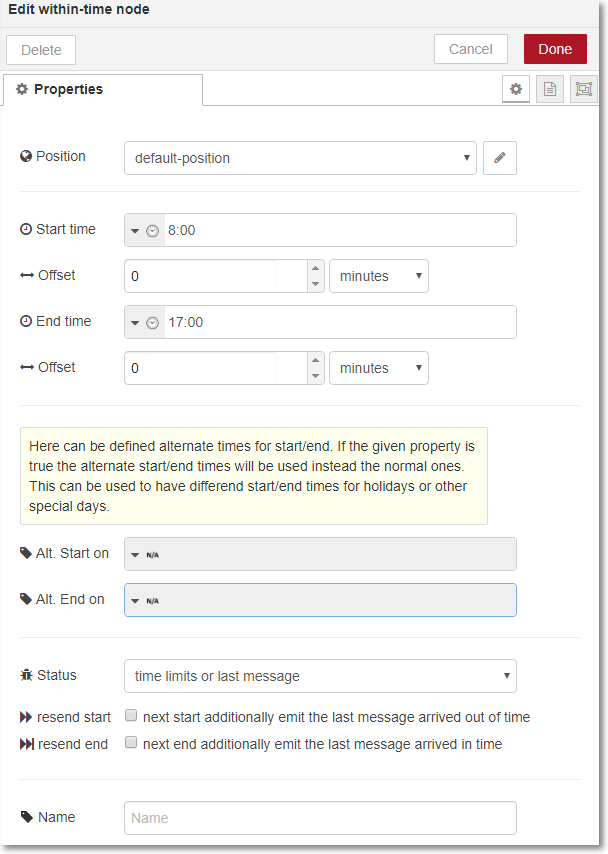
- Position connects to the central configuration node, which contains the current position, but also handles internal shared functions
- Start time defines the start time of the time range with with different configuration possibilities
- Start Offset allows to define a positive or negative offset in seconds, minutes or hours to the given Start Time. This will be useful for sun based times.
End time defines the end time of the time range with with different configuration possibilities
- End Offset allows to define a positive or negative offset in seconds, minutes or hours to the given End Time. This will be useful for sun based times.
Alternate start time optional defines an alternate start time of the time range which will be used if the conditions matches. This can be used for different times for example of holidays.
- Start time alternate start time
- Start Offset offset for the alternate start time
Alternate end time optional defines an alternate end time of the time range which will be used if the conditions matches. This can be used for different times for example of holidays.
- End time alternate end time
- End Offset offset for the alternate end time
resend start If this checkbox is checked and a message arrived outside of time, this message will be additional send again some milliseconds after next start time point. This option is only for fixed time definitions available.
- resend end If this checkbox is checked and a message arrived within time, this message will be additional send again some milliseconds after next end time point. This option is only for fixed time definitions available.
time-comp
A enhanced node for time format change and time comparison.
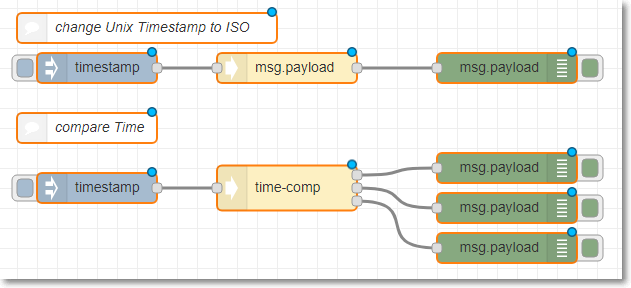
[{"id":"1a6b5f99.4c928","type":"time-comp","z":"4e9a710a.bf0b9","outputs":1,"name":"","positionConfig":"d9e9ca6a.952218","input":"payload","inputType":"msg","inputFormat":"0","inputOffset":0,"inputOffsetMultiplier":60,"rules":[],"checkall":"true","result1":"payload","result1Type":"msg","result1Value":"","result1ValueType":"input","result1Format":"5","result1Offset":0,"result1OffsetMultiplier":60,"x":350,"y":120,"wires":[["fd45b2d2.eba89"]]},{"id":"fd45b2d2.eba89","type":"debug","z":"4e9a710a.bf0b9","name":"","active":true,"tosidebar":true,"console":false,"tostatus":false,"complete":"false","x":570,"y":120,"wires":[]},{"id":"f390b758.7dd9b8","type":"inject","z":"4e9a710a.bf0b9","name":"","topic":"","payload":"","payloadType":"date","repeat":"","crontab":"","once":false,"onceDelay":0.1,"x":160,"y":120,"wires":[["1a6b5f99.4c928"]]},{"id":"b87a5c79.d4ce3","type":"comment","z":"4e9a710a.bf0b9","name":"change Unix Timestamp to ISO","info":"","x":210,"y":80,"wires":[]},{"id":"20afdf5d.4cd8d","type":"comment","z":"4e9a710a.bf0b9","name":"compare Time","info":"","x":150,"y":180,"wires":[]},{"id":"3d8ee66c.7c86ea","type":"inject","z":"4e9a710a.bf0b9","name":"","topic":"","payload":"","payloadType":"date","repeat":"","crontab":"","once":false,"onceDelay":0.1,"x":160,"y":240,"wires":[["f19f0fd9.8ad1d"]]},{"id":"f19f0fd9.8ad1d","type":"time-comp","z":"4e9a710a.bf0b9","outputs":3,"name":"","positionConfig":"d9e9ca6a.952218","input":"payload","inputType":"msg","inputFormat":"0","inputOffset":0,"inputOffsetMultiplier":60,"rules":[{"operator":"5","operatorType":"11,12,13,14,15,16,17,18","operatorText":"","operandType":"str","operandValue":"12:00","format":"ddd MMM dd yyyy HH:mm:ss","formatSelection":"0","offsetType":"none","offsetValue":"","propertyType":"none","propertyValue":""},{"operator":"3","operatorType":"11,12,13,14,15,16,17,18","operatorText":"","operandType":"str","operandValue":"15:00","format":"ddd MMM dd yyyy HH:mm:ss","formatSelection":"0","offsetType":"none","offsetValue":"","propertyType":"none","propertyValue":""}],"checkall":"true","result1":"payload","result1Type":"msg","result1Value":"","result1ValueType":"input","result1Format":"5","result1Offset":0,"result1OffsetMultiplier":60,"x":350,"y":240,"wires":[["723d7d7c.e7a874"],["44ac03f7.fd68fc"],["4d8512cd.73c90c"]]},{"id":"723d7d7c.e7a874","type":"debug","z":"4e9a710a.bf0b9","name":"","active":true,"tosidebar":true,"console":false,"tostatus":false,"complete":"payload","x":570,"y":220,"wires":[]},{"id":"44ac03f7.fd68fc","type":"debug","z":"4e9a710a.bf0b9","name":"","active":true,"tosidebar":true,"console":false,"tostatus":false,"complete":"payload","x":570,"y":260,"wires":[]},{"id":"4d8512cd.73c90c","type":"debug","z":"4e9a710a.bf0b9","name":"","active":true,"tosidebar":true,"console":false,"tostatus":false,"complete":"false","x":570,"y":300,"wires":[]},{"id":"d9e9ca6a.952218","type":"position-config","z":0,"name":"Entenhausen","longitude":"13.72324","latitude":"51.12381","angleType":"deg"}]time-comp - Node settings
A simple node that routes messages depending on the time. If the current time falls within the range specified in the node configuration, the message is routed to output 1. Otherwise the message is routed to output 2.
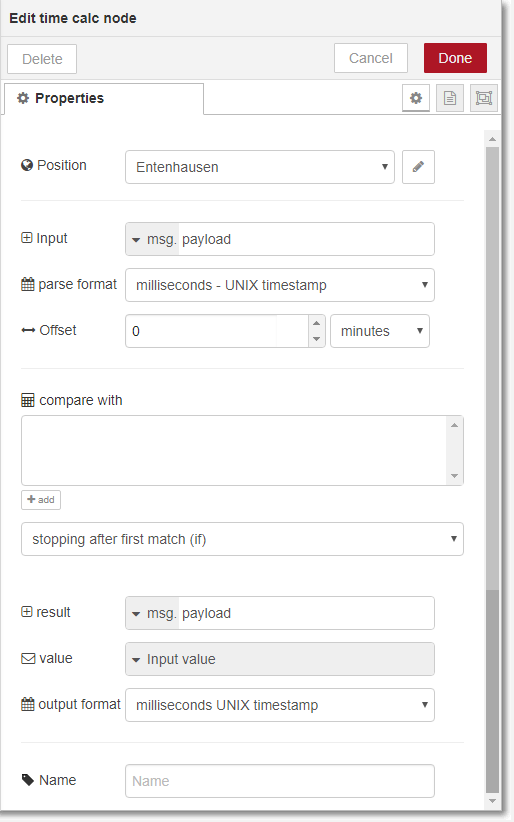
- Position connects to the central configuration node, which contains the current position, but also handles internal shared functions
- Input defines the input parameter for the time stamp
- parse format defines the format for the input parameter, more information see input parse formats.
- Offset allows to define a positive or negative offset to the given Input Time.
- compare with here can be defined various definitions of times to which the input time should be compared.
- operator Drop down to define operator
- compare type allows to define what parts of the time string should be compared. Default is a comparison of the complete timestamp. But it is possible to only compare a pat like the only the year.
- time defines where the time to which should be compared comes from
- parse format defines the format for the time to compare, more information see input parse formats.
- Offset allows to define a positive or negative offset to the given time.
- limitation here it is possible to additionally define a parameter. if defined this comparison will only be made if the conditions matches.
- result allows to write the Input time to a parameter in a different format. Without defining any compare with, the node allows by only defining input and result parameter a simply time format conversation.
time-span
A enhanced node for time span calculation and time span comparison.
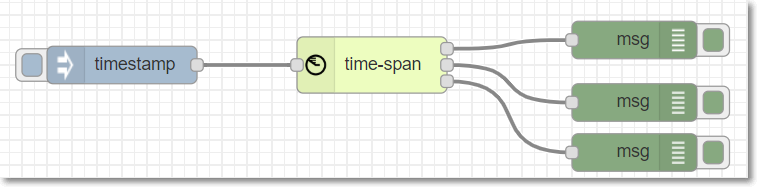
tbdtime-span - Node settings
A simple node that routes messages depending on the time. If the current time falls within the range specified in the node configuration, the message is routed to output 1. Otherwise the message is routed to output 2.
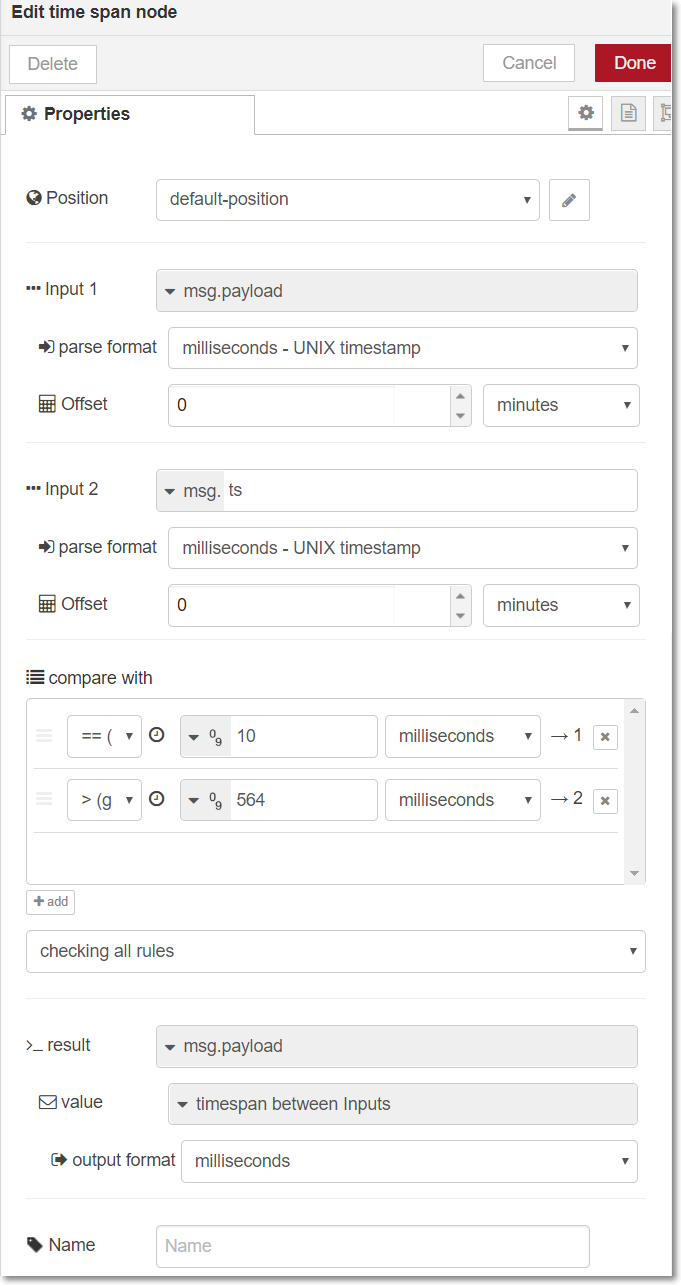
- Position connects to the central configuration node, which contains the current position, but also handles internal shared functions
- Input 1 defines the first input parameter for the time span calculation
- parse format defines the format for the first input parameter, more information see input parse formats.
- Offset allows to define a positive or negative offset to the given Input 1 Time.
- Input 2 defines the second input parameter for the time span calculation
- parse format defines the format for the second input parameter, more information see input parse formats.
- Offset allows to define a positive or negative offset to the given Input 2 Time.
- compare with here can be defined various time spams to which the time span between timestamp of input 1 and input 2 should be compared.
- operator Drop down to define operator for comparison
- time defines a number to which should be the timespan be compared
- time type the unit of the given time
- result ** as result of an incoming message, data could be written to that destination. This could be a message property, a flow or a global context.
- result value defines the value which should be written to the result destination. Could be the timestamp, one of the Input times or any other time/data. For timestamp or times the output format or maybe an offset could be defined.
Without defining any comparison, the node allows by only defining inputs and result a simply timespan calculation.
blind-control

Used to control a blind with many possibilities. This can be time-dependent and it can calculate the blind position based on the current position of the sun to limit the sun light To limit the sunlight on the floor of a window.
clock-timer

Used to control a flow time based with many possibilities. This can be used to switch something which is time-dependent (e.g. Christmas lights).
CHANGELOG
TODO
- add possibility to select input/output timezone
- Add new node time-control as a stripped down node of the blind control with only rules for control other devices like dimmer and thermostats
Support, Bugs and Feedback
For bugs, questions and feature requests please use the GitHub Issues, the Homematic forum or the RedMatic Slack.
:moneybag: Donations 
Even for those that don't have the technical knowhow to help developing on there are ways to support development. So if you want to donate some money please feel free to send money via PayPal.
LICENSE
Licensed under the Apache License, Version 2.0 (the "License"); you may not use this nodes except in compliance with the License. You may obtain a copy of the License at
http://www.apache.org/licenses/LICENSE-2.0
Unless required by applicable law or agreed to in writing, software distributed under the License is distributed on an "AS IS" BASIS, WITHOUT WARRANTIES OR CONDITIONS OF ANY KIND, either express or implied. See the License for the specific language governing permissions and limitations under the License.
Other

4 years ago
4 years ago
4 years ago
4 years ago
4 years ago
4 years ago
4 years ago
4 years ago
4 years ago
4 years ago
4 years ago
4 years ago
4 years ago
4 years ago
4 years ago
4 years ago
4 years ago
4 years ago
4 years ago
4 years ago
4 years ago
4 years ago
4 years ago
4 years ago
4 years ago
4 years ago
4 years ago
4 years ago
4 years ago
4 years ago
4 years ago
4 years ago
4 years ago
4 years ago
5 years ago
5 years ago
5 years ago
5 years ago
5 years ago
5 years ago
5 years ago
5 years ago
5 years ago
5 years ago
5 years ago
6 years ago
6 years ago
6 years ago
6 years ago
6 years ago
6 years ago
6 years ago
6 years ago
6 years ago
6 years ago
6 years ago
6 years ago
6 years ago
6 years ago
6 years ago
6 years ago
6 years ago
6 years ago
6 years ago
6 years ago
6 years ago
6 years ago
6 years ago
6 years ago
6 years ago
6 years ago
6 years ago
6 years ago
6 years ago
6 years ago
6 years ago
6 years ago
6 years ago
6 years ago
6 years ago
6 years ago
6 years ago
6 years ago
6 years ago
6 years ago
6 years ago
6 years ago
6 years ago
6 years ago
6 years ago
6 years ago
6 years ago
6 years ago
6 years ago
7 years ago
7 years ago
7 years ago
7 years ago
7 years ago
7 years ago
7 years ago
7 years ago
7 years ago
7 years ago
7 years ago
7 years ago
7 years ago
7 years ago
7 years ago
7 years ago
7 years ago
7 years ago
7 years ago
7 years ago
7 years ago
7 years ago
7 years ago
7 years ago
7 years ago
7 years ago
7 years ago
7 years ago
7 years ago
7 years ago
7 years ago
7 years ago
7 years ago
7 years ago
7 years ago
7 years ago
7 years ago
7 years ago
7 years ago
7 years ago
7 years ago
7 years ago
7 years ago
7 years ago
7 years ago
7 years ago
7 years ago
7 years ago
7 years ago
7 years ago
7 years ago
7 years ago
7 years ago
7 years ago
7 years ago
7 years ago
7 years ago
7 years ago
7 years ago
7 years ago
7 years ago
7 years ago
7 years ago
7 years ago
7 years ago
7 years ago
7 years ago
7 years ago
7 years ago
7 years ago
7 years ago
7 years ago
7 years ago