
OpenLayers Context Menu
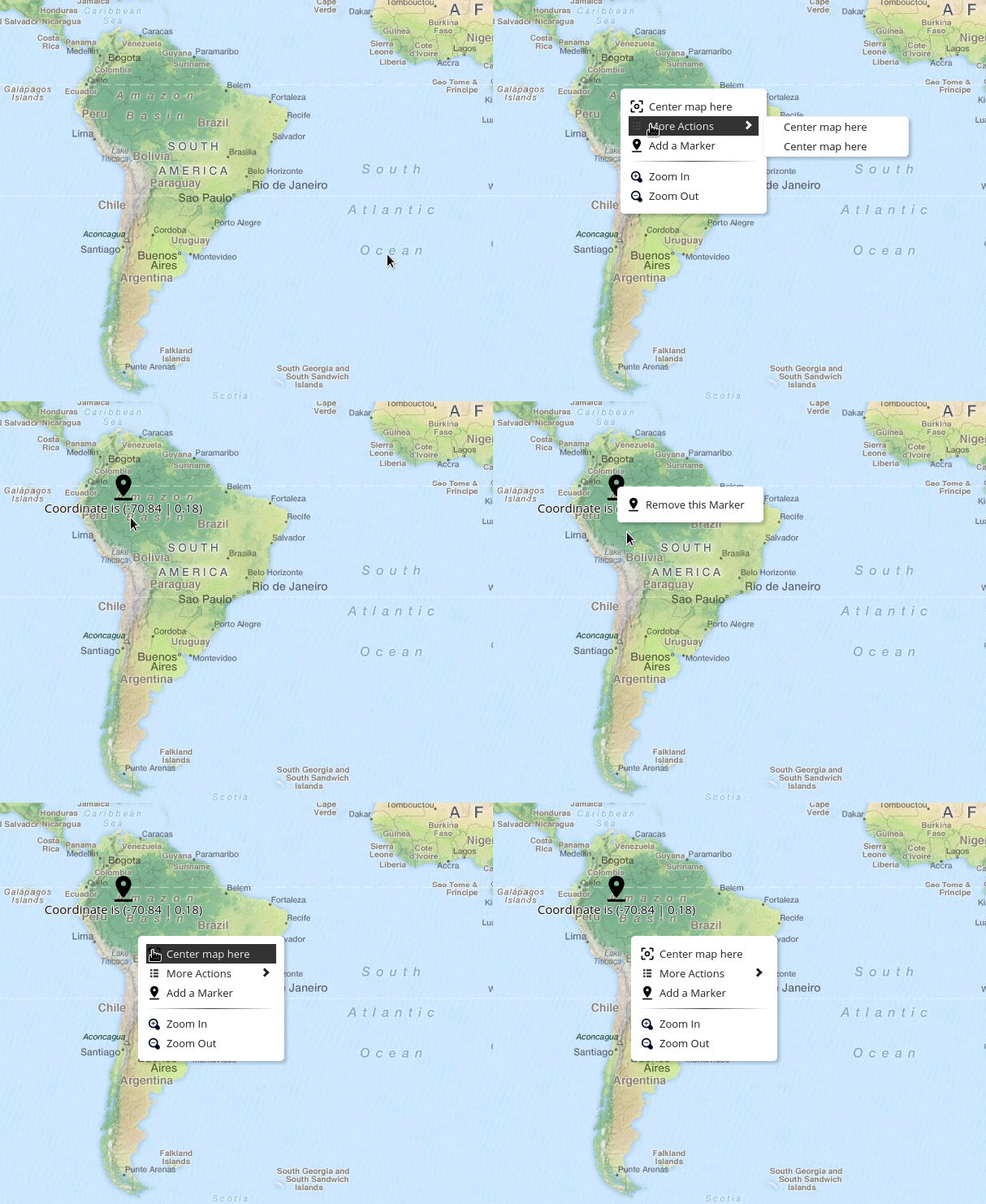
A customizable, feature-rich context menu extension for OpenLayers maps




Quick Links: Demo • Installation • Quick Start • API • TypeScript • Examples
Features
- Easy Integration - Works seamlessly with OpenLayers 7.x - 10.x
- Fully Customizable - Control width, icons, styles, and appearance
- Nested Submenus - Unlimited nesting levels for complex menu structures
- Zero CSS Dependencies - Styles are bundled inline (since v6.0)
- Event-Driven - React to
beforeopen,open, andcloseevents - Multiple Trigger Types - Context menu, click, or double-click
- Viewport-Aware - Automatically repositions to stay visible at screen edges
- TypeScript Support - Full type definitions included out of the box
- Lightweight - Minimal footprint with only one dependency (
tiny-emitter) - Well Tested - 191 tests covering all functionality
Demo
Try it live:
- CodeSandbox - Interactive demo with full source
- JSFiddle - Quick playground
- Local Examples - Webpack, Vite, and CDN examples
Installation
npm (Recommended):
npm install ol ol-contextmenuCDN:
<script src="https://cdn.jsdelivr.net/npm/ol-contextmenu"></script>Requires: OpenLayers 7.0.0 or higher
See Getting Started Guide for detailed installation instructions and setup.
Quick Start
import ContextMenu from 'ol-contextmenu';

const contextmenu = new ContextMenu({
    width: 170,
    defaultItems: true, // Includes Zoom In/Zoom Out
    items: [
        {
            text: 'Center map here',
            callback: (obj, map) => {
                map.getView().setCenter(obj.coordinate);
            },
        },
        {
            text: 'Add a Marker',
            icon: 'img/marker.png',
            callback: addMarker,
        },
        '-', // Separator
    ],
});

map.addControl(contextmenu);
See Getting Started Guide for complete setup instructions and Examples for advanced patterns.
Documentation
- Getting Started - Installation and basic setup
- API Reference - Complete API documentation
- TypeScript Guide - TypeScript usage and type definitions
- Examples & Recipes - Common patterns and code examples
- Troubleshooting - Common issues and solutions
TypeScript
Full TypeScript support with comprehensive type definitions included:
import ContextMenu, { type Item } from 'ol-contextmenu';

const items: Item[] = [
    {
        text: 'Center map here',
        callback: (obj, map) => {
            map.getView().setCenter(obj.coordinate);
        },
    },
];

const contextmenu = new ContextMenu({ width: 170, items });
See the TypeScript Guide for complete type definitions and usage patterns.
API
Constructor
new ContextMenu(options)Options:
width(number, default:150) - Menu width in pixelsdefaultItems(boolean, default:true) - Include default Zoom In/Out itemsitems(Item[], default:[]) - Array of menu itemseventType(string, default:'contextmenu') - Event type to trigger menu
Methods
clear()- Remove all itemsclose()- Close menu programmaticallyextend(items)- Add multiple itemspush(item)- Add single itempop()/shift()- Remove itemsgetDefaultItems()- Get default items arrayisOpen()- Check if menu is openenable()/disable()- Control menu state
Events
beforeopen- Fired before menu opensopen- Fired when menu opensclose- Fired when menu closes
See API Reference for complete documentation with examples.
Examples
- Examples & Recipes - Common patterns and code examples
- Local Examples - Complete working projects:
- CDN Example - No build tools required
- Webpack Example - Integration with Webpack
- Vite Example - Modern setup with Vite + TypeScript
Troubleshooting
Common issues:
- Menu doesn't appear: Ensure
map.addControl(contextmenu)is called - Menu cut off: Update to v5.5.0+ for automatic viewport positioning
- TypeScript errors: Use
import ContextMenu, { type Item } from 'ol-contextmenu'
See the Troubleshooting Guide for detailed solutions and common issues.
Browser Support
Modern browsers supporting ES6+:
- Chrome/Edge (latest)
- Firefox (latest)
- Safari (latest)
Contributing
Contributions are welcome! We appreciate:
- Bug reports
- Feature requests
- Documentation improvements
- Code contributions
Please read our Contributing Guidelines before submitting a PR.
Development Setup
# Clone the repository
git clone https://github.com/jonataswalker/ol-contextmenu.git
cd ol-contextmenu

# Install dependencies
npm install

# Run tests
npm test

# Start development server
npm run dev

# Build for production
npm run build
License
MIT Jonatas Walker
Acknowledgments
Built with for the OpenLayers community.
Special thanks to all contributors who have helped improve this project.
Made with by the community