
GPT-5.6 Switcher for Pi


A keyboard-first Pi extension for switching GPT-5.6 capability models and thinking levels without leaving the current Provider.
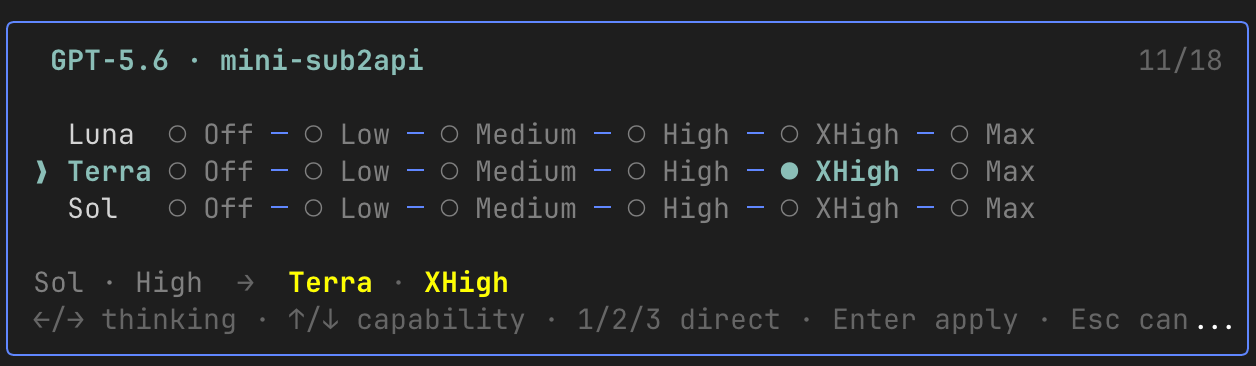
The screenshot shows one Provider configuration. The extension derives the visible rows and thinking levels from your live Pi model registry.
Why
A Provider may expose GPT-5.6 as several capability models—Luna, Terra, and Sol—with different supported thinking levels. Pi can switch models and thinking independently, but repeatedly opening separate selectors makes this combination slower to inspect and change.
GPT-5.6 Switcher turns the valid combinations into one inline, three-row selector:
- discovery is restricted to the active Provider;
- unavailable capability models are omitted;
- unsupported thinking levels are omitted from each row;
- navigation previews only; Enter applies the model and thinking level together;
- the footer compares the current and target Profiles, highlighting changed target fields in yellow; an active non-GPT-5.6 model is shown as
Otherrather than being misidentified as a capability tier.
Requirements
@earendil-works/pi-coding-agent0.80.10 or later- A Provider that registers at least one of:
gpt-5.6-lunagpt-5.6-terragpt-5.6-sol
The extension does not register models or Providers. It only uses models already present in Pi's model registry.
Installation
Install from npm:
pi install npm:pi-gpt56-switcherOr install directly from GitHub:
pi install git:github.com/yoyooyooo/gpt56-switcherRestart Pi or run /reload in an existing TUI session.
For local development:
git clone https://github.com/yoyooyooo/gpt56-switcher.git
cd gpt56-switcher
bun install
pi -e .
Usage
Open the selector:
/g56Apply a Profile directly without opening the selector:
/g56 terra high
/g56 sol max
If the requested model or thinking level is unavailable in the active Provider, the command makes no change and reports the unavailable Profile.
Controls
| Key | Action |
|---|---|
| Left / Right | Move between supported thinking levels in the current row |
| Up / Down | Move between available capability rows while preserving or safely clamping thinking |
| Home / End | Jump to the first or last thinking level in the current row |
1 / 2 / 3 |
Jump to Luna / Terra / Sol when available |
| Enter | Apply the target model, then its thinking level |
| Escape | Cancel without changing anything |
Discovery rules
Capability order is fixed as Luna → Terra → Sol. Thinking order follows Pi:
off → minimal → low → medium → high → xhigh → maxFor every matching model, the extension follows Pi's model metadata semantics:
reasoning: falseexposes onlyoff;- a
thinkingLevelMapvalue ofnullmarks that level unsupported; xhighandmaxare shown only when explicitly mapped;- ordinary levels use Pi defaults when their map entry is absent.
No fallback to another Provider occurs.
Interaction design
Pi custom components expose keyboard input but no public mouse coordinates, hit testing, or drag events. The extension therefore uses a three-row keyboard interface instead of taking ownership of terminal mouse tracking or starting a second renderer.
The selector is transactional from the user's perspective:
- movement updates only the preview;
- Escape exits with no state change;
- Enter calls Pi's model switch first;
- after a successful model switch, it applies the selected thinking level;
- Pi's effective thinking level is reported, including any unexpected clamp.
Privacy and security
The extension reads only in-process model metadata exposed by Pi. It does not read Provider credential files, send telemetry, or make model requests. Authentication, routing, and credential storage remain owned by Pi and the active Provider.
See SECURITY.md for reporting guidance.
Development
bun install
bun test
bun run typecheck
Contributions are welcome. See CONTRIBUTING.md.