
pi-presence
Ambient session-status for the pi coding agent. pi-presence gives every pi session a live status — needs-you, running, idle, or dormant — so one glance at your menu bar or a terminal tells you which session to switch to next, instead of alt-tabbing through look-alike terminal tabs.


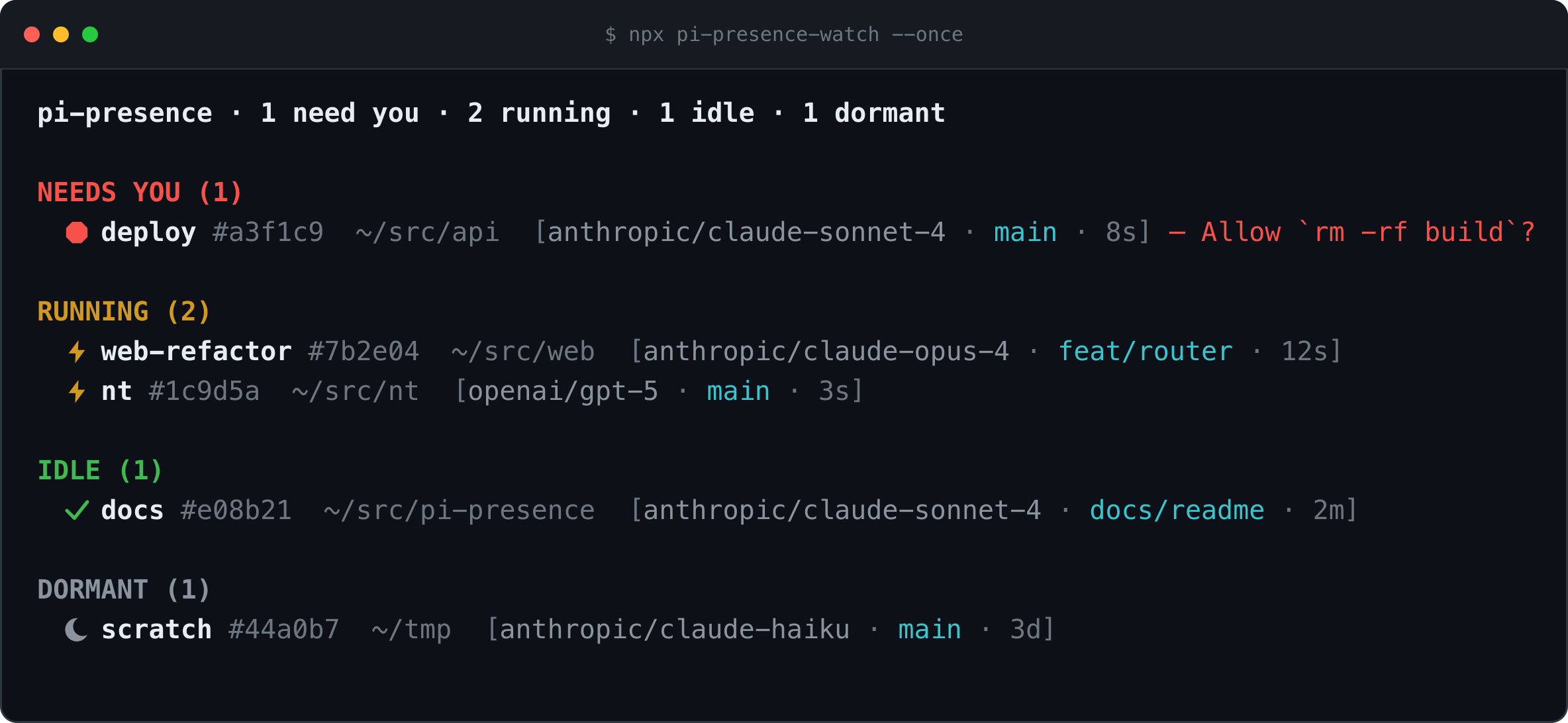
Illustration of npx pi-presence-watch --once — same header line, groups,
and per-session format the CLI really prints (see Quickstart for
live output).
Why
Run several pi sessions across terminal tabs and you lose the thread: which one
is blocked waiting on you, which is still working, which finished ten minutes
ago. pi-presence makes that state ambient. Each session continuously
publishes its status to ~/.pi/agent/live/<session-id>.json, and any reader —
the bundled terminal CLI, a menu-bar plugin, or your own script — turns that
directory into a glanceable, grouped list.
The core is two moving parts: a pi extension that writes the state files and self-labels your tab, and a zero-dependency reader that renders them.
Quickstart
Requirements. pi ≥ 0.78.1 (the extension needs ctx.mode; live-tested on pi
0.79.2). Node ≥ 22 for the reader CLI. macOS is the primary
target; the state files and readers are cross-platform.
1. Install the extension into pi.
pi install npm:pi-presenceThat's it — no build step. The extension ships TypeScript that pi loads with
jiti. On your next session start you get a self-labeling tab and a state file
per session under <agentDir>/live/.
2. Start a pi session as you normally would, in one terminal:
pi3. Watch every session from a second terminal:
npx pi-presence-watch --onceYou don't need a fleet of sessions to see it work — one running session is
enough, and --once prints a snapshot and exits (drop it for a live view).
With a single working session you'll see:
pi-presence · 0 need you · 1 running · 0 idle · 0 dormant

RUNNING (1)
  ⚡ api #abc123  /Users/you/src/api  [anthropic/claude-sonnet-4 · main · just now]
With nothing running, it's honest about it:
pi-presence · 0 need you · 0 running · 0 idle · 0 dormant

  no pi sessions
Leave npx pi-presence-watch running (no --once) for a live TUI that redraws
as sessions change, or wire it into your menu bar with the
Vee plugin. Other commands:
npx pi-presence-watch              # live TUI, redraws on change
npx pi-presence-watch --json       # stream the view model as JSON
npx pi-presence-watch focus <q>    # focus a session's terminal (or copy its resume command)
npx pi-presence-watch gc           # prune state files of long-dead sessions
Packages
| Package | What it is | Published |
|---|---|---|
pi-presence |
The pi extension: writes state files, labels tabs, consumes/produces herdr:blocked, optional notifications. |
npm |
pi-presence-watch |
Standalone terminal reader — a live grouped list of all sessions, plus focus / gc. |
npm |
@pi-presence/shared |
Zero-pi-dependency reader library: schema, liveness, watch/reconcile, view model, JSON Patch, terminal focus. | workspace-only (bundled into the reader) |
@pi-presence/vee-plugin |
Vee / xbar / SwiftBar menu-bar plugin — a single copyable script that renders pi-presence-watch --once --json. |
copy the script |
How it works
State-file schema
One file per session id at <agentDir>/live/<session-id>.json, written
atomically (temp file + rename). The directory is resolved from pi's agent dir
(honoring PI_CODING_AGENT_DIR); readers can also be pointed at it with
PI_PRESENCE_LIVE_DIR.
{
  "schema": 1,                       // SCHEMA_VERSION; readers ignore files with a higher value
  "sessionId": "abc123",
  "sessionFile": "/Users/x/.pi/agent/sessions/abc123.jsonl",
  "sessionName": "api",
  "state": "working",                // "working" | "blocked" | "idle" (dormant is reader-derived)
  "blockedLabel": "Allow `rm -rf build`?", // present only when state === "blocked"
  "cwd": "/Users/x/src/api",
  "branch": "main",
  "model": "anthropic/claude-sonnet-4",
  "pid": 45123,
  "startTime": 1721300000000,        // epoch ms; PID-reuse guard
  "bootId": null,
  "nonce": "uuid-v4",
  "updatedAt": 1721300012345,
  "terminal": {
    "program": "iTerm.app",
    "itermSessionId": "w0t1p0:UUID",
    "termSessionId": null,
    "ghosttyResource": null,
    "windowId": "12345",
    "tmux": null,
    "tmuxPane": null,
    "titleMarker": "⚡ api · working"
  }
}
States
The writer only ever emits three states; readers derive a fourth:
| State | Icon | Group | Meaning |
|---|---|---|---|
blocked |
needs-you | Waiting on you (a confirmation or prompt). | |
working |
running | The agent is actively working. | |
idle |
✓ | idle | Finished a turn; alive and waiting for input. |
dormant |
dormant | Process is gone — reader-derived, never written. |
The working → idle transition is debounced: on pi's agent_end the extension
waits idleDebounceMs (250ms), then confirms with ctx.isIdle() before
settling — a retry or queued continuation re-checks after retryGraceMs rather
than flickering to idle and back.
Forward compatibility. Readers ignore files whose schema exceeds the
version they understand, and treat any unknown state value as idle, so a
newer writer never wedges an older reader.
Liveness
dormant is decided by the reader, not the writer. A reader probes
process.kill(pid, 0) (ESRCH → gone, EPERM → alive but another user's) and
compares the process start time (read via ps) against the file's startTime
to catch PID reuse. Files for dead processes older than a TTL (default 24h) are
pruned by pi-presence-watch gc. The extension also unlinks its own state file
on every session teardown (quit, reload, new, resume, fork) — a
following session rewrites a fresh one — so an alive-pid session never lingers as
a phantom after a /new or /fork.
Settings
Add a pi-presence block to <agentDir>/settings.json (global). A trusted
project's .pi/settings.json block overrides the global one per key; settings
from an untrusted project are ignored (pi ≥ 0.79.1, via
ctx.isProjectTrusted()). A mistyped key (e.g. enabled: "false" as a string)
falls back to its default and prints a one-line warning to stderr rather than
being silently ignored.
{
  "pi-presence": {
    "enabled": true,                          // master switch
    "title": true,                            // self-label the terminal tab (TUI only)
    "titleFormat": "{icon} {name} · {state}", // placeholders: {icon} {name} {state} {cwd} {branch}
    "notify": false,                          // desktop notifications (macOS)
    "idleDebounceMs": 250,                    // working→idle debounce after agent_end
    "retryGraceMs": 2500,                     // re-check delay when a settle fires mid-retry
    "notifyThresholdMs": 10000                // min working time before a "finished" notification
  }
}
Click-to-focus
pi-presence-watch focus <query> brings a session's terminal tab to the front
using the captured terminal snapshot, best correlation first. <query>
matches an exact session id, then a short id suffix, then an exact name, then
a name/cwd substring.
- iTerm2 — by
$ITERM_SESSION_IDvia the Python API (async_activate(select_tab=True, order_window_front=True)). - Ghostty (1.3.0+) — by working directory + the OSC
titleMarker(the AppleScript terminal class exposes neither PID nor TTY yet — issue #11592). - Terminal.app — by the
titleMarker(no per-session id). - tmux —
select-window/select-paneon$TMUX_PANE.
When focus isn't possible, the reader falls back to the resume command
(pi --session <file>) and copies it to your clipboard.
Interop: the herdr:blocked contract
pi-presence surfaces its highest-value state — "needs-you" — cooperatively,
over pi's shared event bus, rather than by patching ctx.ui.* (unsupported) or
intercepting tool_call (which only catches tool calls, not arbitrary dialogs).
Any extension that puts pi into a wait emits:
pi.events.emit("herdr:blocked", { active: true, label: "Allow `rm -rf build`?" });
// …when the wait clears…
pi.events.emit("herdr:blocked", { active: false });
pi-presence consumes these with ref-counting (blocked while depth > 0). This
is herdr's convention, verified against
its real pi integration (herdr-agent-state.ts, integration version 6): the same
"herdr:blocked" channel, the same { active, label? } payload, the same
ref-counting, and the same idleDebounceMs / retryGraceMs defaults (250 /
2500 ms). So pi-presence and herdr interoperate out of the box, and any other
cooperating extension (pi-worktree, your own) can raise "needs-you" the same way.
pi-presence is also self-sufficient: it ships an optional producer, the
permission-gate extension, which brackets a confirmation for risky shell
commands with the same events. Enable it explicitly:
{ "source": "npm:pi-presence", "extensions": ["./extensions/index.ts", "+permission-gate/index.ts"] }pi is @earendil-works/pi by Mario Zechner; herdr is a third-party tool by ogulcancelik.
Terminal selection for Resume
Resuming a dead/dormant session opens a new terminal window — there's no existing tab to focus. macOS has no queryable system-wide "default terminal" setting (unlike a default browser or mail client), so readers pick one themselves, in order:
- Explicit config — the
PI_PRESENCE_TERMINALenvironment variable (in the Vee plugin, its equivalent<xbar.var>, set via the plugin's Vee settings), naming an app:iTerm,Ghostty,Terminal, or a bundle id. - The session's own recorded terminal — its
terminal.tmuxPane(resume into that tmux session withtmux new-window) or, failing that,terminal.program— so resume opens where the session actually lived. - Terminal.app, with the resume command copied to the clipboard as a last resort if even that fails (e.g. a denied Automation permission).
Each app gets its own launch mechanism: Terminal.app and iTerm2 via
osascript (do script / create window with default profile + write text), Ghostty via open -na Ghostty.app --args -e (it has no
window-scripting CLI on macOS), and tmux via tmux new-window. See
packages/shared/src/launch.ts.
Development
npm install
npm run check        # lint + typecheck + schema-sync + test (what CI runs)
npm test             # vitest across all workspaces
npm run lint         # biome
npm run typecheck    # tsc --noEmit per workspace
npm run assets:demo  # regenerate the hero image (assets/demo.png)
Requires Node ≥ 22 (CI runs the suite on 22 and 24). The canonical state schema
lives in packages/shared/src/schema.ts; the extension keeps a
byte-identical copy in packages/pi-presence/src/schema.ts (so its tarball
has no workspace dependency), enforced by npm run check:schema-sync.
The hero image is generated, not a screenshot: scripts/gen-demo-png.mjs builds
an SVG that mirrors the real pi-presence-watch --once format and rasterizes it
to assets/demo.png (via rsvg-convert, resvg, or magick if one is on
PATH). It has no image or font dependency.
Publishing
Two packages publish to npm: pi-presence (the extension) and
pi-presence-watch (the reader CLI, bundled so it has no runtime deps). The
@pi-presence/shared library is bundled into the reader, not published.
CI publishing uses npm Trusted Publishing (OIDC) — no NPM_TOKEN secret is
stored anywhere. The publish-npm workflow requests a short-lived token via OIDC
(id-token: write) and attaches provenance. This needs the repo to be public
(it is) and a one-time setup on npm.
First publish (bootstrap). A trusted publisher can only be configured for a package that already exists, so publish each package once from your machine:
npm ci && npm run build
npm login
npm publish --workspace pi-presence --access public         # add --dry-run to validate
npm publish --workspace pi-presence-watch --access public   # prepack builds the bundle
Then enable token-free CI publishing — on npmjs.com, for each of
pi-presence and pi-presence-watch: Settings → Trusted Publisher → add GitHub
navbytes/pi-presence with workflow publish-npm.yml.
Subsequent releases:
- Bump
versioninpackages/pi-presence/package.jsonand add a matching## <version>section topackages/pi-presence/CHANGELOG.md. - Tag it:
git tag vX.Y.Z && git push --tags. Thereleaseworkflow verifies the tag matches the package version, runsnpm run check+npm run build, and creates the GitHub Release (notes from the CHANGELOG section). - Run the
publish-npmworkflow (leavedry-runon first to pack & validate, then run it withdry-runoff) — it publishes both packages via OIDC with provenance, no secret required.
Prefer a stored token instead? Set an
NPM_TOKENrepo (or GitHub org) secret, addenv: NODE_AUTH_TOKEN: ${{ secrets.NPM_TOKEN }}to the publish step, and drop--provenance/id-token. Trusted publishing is recommended now that the repo is public.
Caveats
- Terminal titles are best-effort. The extension prefers pi's sanctioned
ctx.ui.setTitle; where that's unavailable it falls back to writing an OSC escape to stdout, guarded totuimode on a TTY (raw OSC during an RPC/JSON render corrupts the stream — pi #2388). The title may not survive every full repaint. - Non-interactive
pi -psessions clean up on exit. A print-mode run unlinks its state file when the process exits (aquitteardown), so short scripted sessions won't pile up as staleidleentries — by design. You may never see a fast-prun in the reader at all. - The Vee plugin needs absolute paths. Vee's GUI
PATHoften omits the npm global bin; the plugin resolvespi-presence-watch/piitself, but see the plugin README if it can't find them. - macOS permission prompts can't be scripted. Automation (for focus) and Notification permissions prompt on first use; readers fail open (a duplicate beats a missed alert) and fall back to copy-to-clipboard when focus is denied.