
react-mobile-datepicker



a lightweight react date picker for mobile, Not more than 4k
react-mobile-datepicker provides a component that can set year, month, day, hour, minute and second by sliding up or down.
Features
- is only 4k.
- It does not depend on moment.js
Theme
default
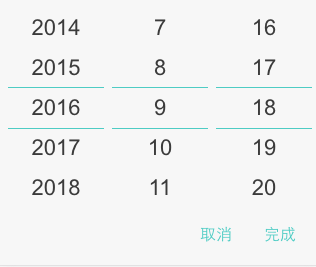
dark
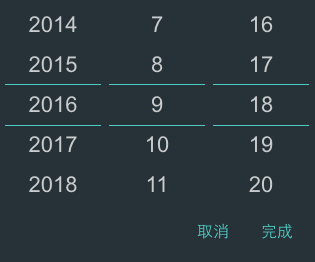
ios
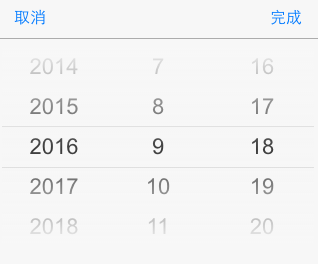
android
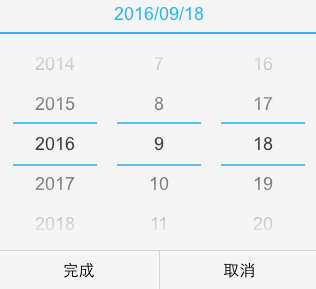
android-dark
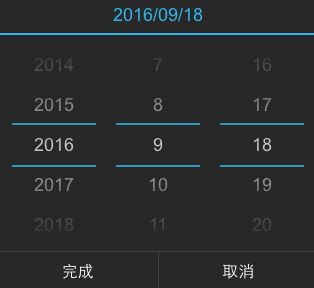
Custom date unit
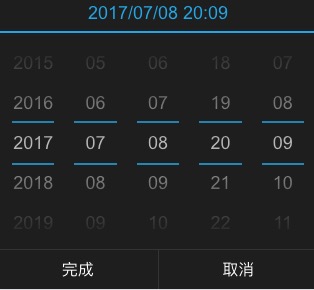
set dateConfig to configure year, month, day, hour, minute.
{
    'year': {
        format: 'YYYY',
        caption: 'Year',
        step: 1,
    },
    'month': {
        format: 'MM',
        caption: 'Mon',
        step: 1,
    },
    'date': {
        format: 'DD',
        caption: 'Day',
        step: 1,
    },
    'hour': {
        format: 'hh',
        caption: 'Hour',
        step: 1,
    },
    'minute': {
        format: 'mm',
        caption: 'Min',
        step: 1,
    },
    'second': {
        format: 'hh',
        caption: 'Sec',
        step: 1,
    },
}
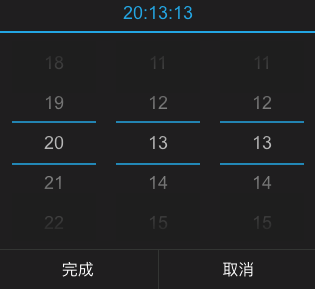
set dateConfig to configure hour, minute and second.
{
    'hour': {
        format: 'hh',
        caption: 'Hour',
        step: 1,
    },
    'minute': {
        format: 'mm',
        caption: 'Min',
        step: 1,
    },
    'second': {
        format: 'hh',
        caption: 'Sec',
        step: 1,
    },
}
customize the content mapping shown in the month.
const monthMap = {
	'1': 'Jan',
	'2': 'Feb',
	'3': 'Mar',
	'4': 'Apr',
	'5': 'May',
	'6': 'Jun',
	'7': 'Jul',
	'8': 'Aug',
	'9': 'Sep',
	'10': 'Oct',
	'11': 'Nov',
	'12': 'Dec',
};

const dateConfig = {
	'year': {
		format: 'YYYY',
		caption: 'Year',
		step: 1,
	},
	'month': {
		format: value => monthMap[value.getMonth() + 1],
		caption: 'Mon',
		step: 1,
	},
	'date': {
		format: 'DD',
		caption: 'Day',
		step: 1,
	},
};

<DatePicker
	dateConfig={dateConfig}
/>
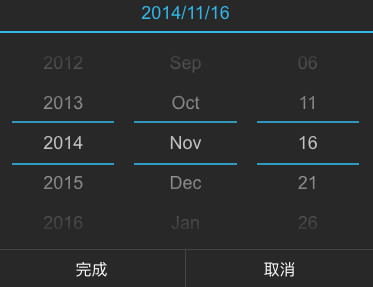
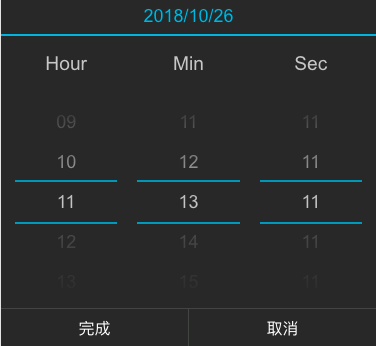
set showCaption to display date captions, matches the dateConfig property's caption.
const dateConfig = {
    'hour': {
        format: 'hh',
        caption: 'Hour',
        step: 1,
    },
    'minute': {
        format: 'mm',
        caption: 'Min',
        step: 1,
    },
    'second': {
        format: 'hh',
        caption: 'Sec',
        step: 1,
    },
}

<DatePicker
	showCaption={true}
	dateConfig={dateConfig}
/>
Getting Started
Install
Using npm:
$ npm install react-mobile-datepicker --saveImport what you need
The following guide assumes you have some sort of ES2015 build set up using babel and/or webpack/browserify/gulp/grunt/etc.
// Using an ES6 transpiler like Babel
import  React from 'react';
import ReactDOM from 'react-dom';
import DatePicker from 'react-mobile-datepicker';
Usage Example
class App extends React.Component {
	state = {
		time: new Date(),
		isOpen: false,
	}

	handleClick = () => {
		this.setState({ isOpen: true });
	}

	handleCancel = () => {
		this.setState({ isOpen: false });
	}

	handleSelect = (time) => {
		this.setState({ time, isOpen: false });
	}

	render() {
		return (
			<div className="App">
				<a
					className="select-btn"
					onClick={this.handleClick}>
					select time
				</a>

				<DatePicker
					value={this.state.time}
					isOpen={this.state.isOpen}
					onSelect={this.handleSelect}
					onCancel={this.handleCancel} />
			</div>
		);
	}
}


ReactDOM.render(<App />, document.getElementById('react-box'));
PropTypes
| Property | Type | Default | Description |
|---|---|---|---|
| isPopup | Boolean | true | whether as popup add a overlay |
| isOpen | Boolean | false | whether to open datepicker |
| theme | String | default | theme of datepicker, include 'default', 'dark', 'ios', 'android', 'android-dark' |
dateConfig instead) |
Array | ['YYYY', 'M', 'D'] | according to year, month, day, hour, minute, second format specified display text. E.g ['YYYY年', 'MM月', 'DD日'] |
dateConfig instead |
Array | [1, 1, 1] | set step for each time unit |
| dateConfig | Object | See DateConfig format for details |
configure date unit information |
headerFormat instead) |
String | 'YYYY/MM/DD' | customize the format of the display title |
| headerFormat | String | 'YYYY/MM/DD' | customize the format of the display title |
| value | Date | new Date() | date value |
| min | Date | new Date(1970, 0, 1) | minimum date |
| max | Date | new Date(2050, 0, 1) | maximum date |
| showHeader | Boolean | true | whether to show the header |
| showFooter | Boolean | true | whether to show the fotter |
| customHeader | ReactElement | undefined | customize the header, if you set this property, it will replace showFormat |
| confirmText | String | 完成 | customize the selection time button text |
| cancelText | String | 取消 | customize the cancel button text |
| onSelect | Function | () => {} | the callback function after click button of done, Date object as a parameter |
| onCancel | Function | () => {} | the callback function after click button of cancel |
| onChange | Function | () => {} | the callback function after date be changed |
DateConfig
all default date configuration information, as follows
- format: date unit display format
- caption: date unit caption
- step: date unit change interval
{
    'year': {
        format: 'YYYY',
        caption: 'Year',
        step: 1,
    },
    'month': {
        format: 'M',
        caption: 'Mon',
        step: 1,
    },
    'date': {
        format: 'D',
        caption: 'Day',
        step: 1,
    },
    'hour': {
        format: 'hh',
        caption: 'Hour',
        step: 1,
    },
    'minute': {
        format: 'mm',
        caption: 'Min',
        step: 1,
    },
    'second': {
        format: 'hh',
        caption: 'Sec',
        step: 1,
    },
}
Changelog
How to Contribute
Anyone and everyone is welcome to contribute to this project. The best way to start is by checking our open issues, submit a new issues or feature request, participate in discussions, upvote or downvote the issues you like or dislike.