
react-native-body-parts-anatomy




An interactive human body diagram for React Native where every muscle is individually addressable — 23 muscle groups split into 317 separately tappable SVG fragments, across male/female and front/back. Zero native code.
Try it live: open snack.expo.dev and replace
App.tsxwithsnack/App.tsxfrom this repo — every import resolves automatically, including this package itself. No install needed.
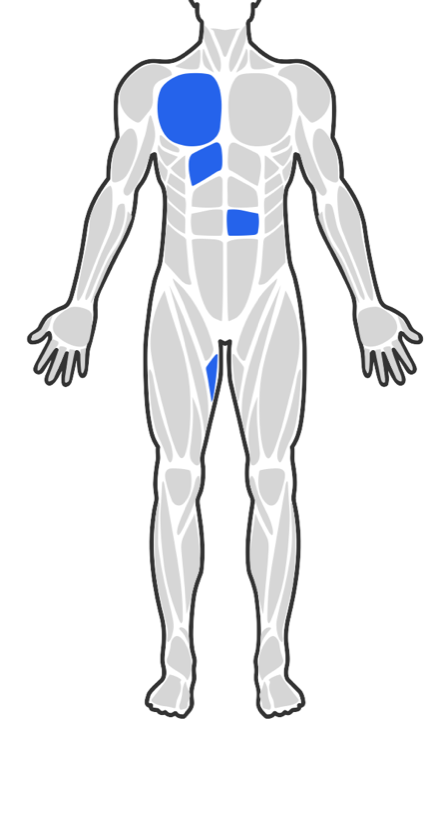
Interactive picker — tap individual fragments |
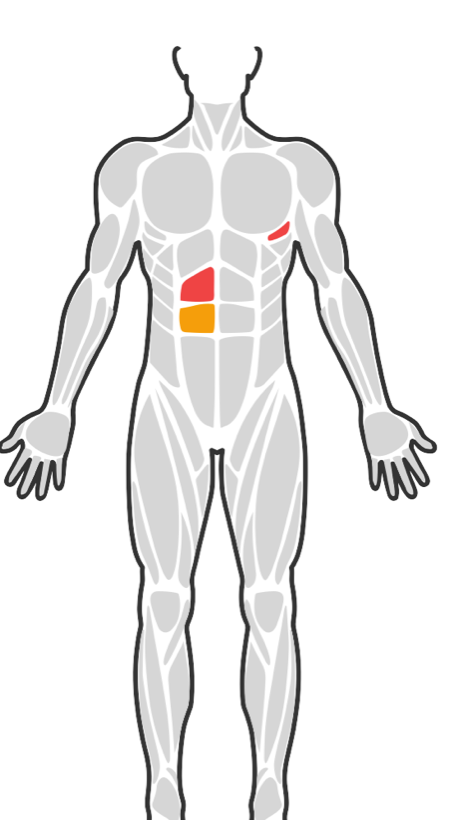
Read-only diagram — colour by your own data |
In the picker above, two separate abdominal fragments are selected — not the whole abdomen. That per-fragment granularity is the point of this library.
Why this library
Most React Native body maps expose one tappable path per muscle group. That is the right model for "which muscle did you train?" and the wrong one as soon as you need to know where within a muscle something happened — which is exactly what pain tracking, physiotherapy, injury logs, and symptom diaries are made of.
| Capability | What you get |
|---|---|
| Tappable targets | 317 fragments across 23 muscle groups — abs alone is 8 separate targets per gender on the front view |
| Two selection models | Fragment mode (default) addresses every piece individually; selectByGroup swaps in whole-muscle slugs so one tap selects the entire muscle |
| Sub-muscle location | Every fragment carries a derived side (left/right) and axis (upper/middle/lower/inner/center/outer), so you can label "lower-left abs" without a lookup table of your own |
| Views | Male/female × front/back — 4 combinations |
| Zoom & pan | Pinch, drag-while-zoomed, and step +/− buttons, built in |
| Selection accuracy | Selection commits on a tap, so a drag or scroll starting over a muscle never records it — see Interaction model |
| Theming | Every colour is a prop. No bundled theme system, no i18n framework assumed |
| Dependencies | Zero native code — pure JS/TSX over react-native-svg, react-native-gesture-handler, and react-native-reanimated |
| Accessibility | Honors the OS Reduce Motion setting automatically |
When not to use it: if you only need "which muscle group", a simpler body map is a lighter dependency. Reach for this one when the sub-region actually matters.
Installation
npm install react-native-body-parts-anatomy
npx expo install react-native-svg react-native-gesture-handler react-native-reanimated
Required setup
Wrap your app root in GestureHandlerRootView. Both pinch/pan and tap selection run
through a GestureDetector, which throws at runtime without it:
import { GestureHandlerRootView } from 'react-native-gesture-handler';

export default function App() {
  return (
    <GestureHandlerRootView style={{ flex: 1 }}>
      {/* ...your app... */}
    </GestureHandlerRootView>
  );
}
You can skip this only if every diagram you render is read-only — that is, you never pass
onFragmentPress. In that case no gesture detector is mounted at all. Note this depends on
onFragmentPress, not on zoomable: a zoomable={false} diagram that is still tappable
needs GestureHandlerRootView.
On the bare React Native CLI (not Expo), also follow each peer's own native setup —
notably react-native-reanimated's Babel plugin. Those are the peers' setup steps, not this
package's.
Reanimated v4 users: Reanimated 4 moved worklets into a separate
react-native-workletspackage and requires the New Architecture. This package never importsreact-native-workletsdirectly, so it isn't declared as a peer here — but you must satisfy Reanimated's own peer requirement, and keep a singlereact-native-workletsversion in your tree. A mismatch between the installed JS version and the Babel plugin version fails at startup with[Worklets] Mismatch between JavaScript code version and Worklets Babel plugin version.
Interaction model
Selection is committed by a tap gesture, not by the raw touch-down on an SVG path. This matters because a body diagram is usually both a picker and something you drag:
- Tap (finger travels <10pt, released within 1.5s) →
onFragmentPress(slug). - Drag starting on a fragment → pans the zoomed diagram, or scrolls the parent list, and selects nothing.
- Tap on empty space between fragments → selects nothing.
- At 1× the pan gesture never activates, so the diagram does not block a surrounding
ScrollView. It claims drags only once zoomed in.
Committing on touch-down instead (the obvious approach, and what most SVG body maps do) means
every attempt to pan or scroll silently records a body part the user never chose. Committing on
React Native's onPress is not an option either — Fabric cancels it on the slightest finger
movement, so real taps stop registering.
Quick start
Interactive picker
import { useState } from 'react';
import { BodySilhouette } from 'react-native-body-parts-anatomy';

function PainAreaPicker() {
  const [selectedSlugs, setSelectedSlugs] = useState<string[]>([]);

  const toggleFragment = (slug: string) => {
    setSelectedSlugs((current) =>
      current.includes(slug) ? current.filter((item) => item !== slug) : [...current, slug]
    );
  };

  return (
    <BodySilhouette
      gender="male"
      view="front"
      selectedSlugs={selectedSlugs}
      onFragmentPress={toggleFragment}
    />
  );
}
Read-only diagram
import { BodySilhouette } from 'react-native-body-parts-anatomy';

function SymptomDiagram({ colorBySlug }: { colorBySlug: Map<string, string> }) {
  return (
    <BodySilhouette
      gender="female"
      view="back"
      zoomable={false}
      selectedSlugs={Array.from(colorBySlug.keys())}
      colorForSlug={(slug) => colorBySlug.get(slug)}
    />
  );
}
Whole-muscle picker
Set selectByGroup when per-piece granularity is more than you need. Selection identifiers
become muscle-group slugs ('abs', 'chest') instead of fragment slugs, and every piece of a
muscle commits the same identifier — so toggling works no matter which piece was tapped:
function MusclePicker() {
  const [groups, setGroups] = useState<string[]>([]);

  return (
    <BodySilhouette
      gender="male"
      view="front"
      selectByGroup
      selectedSlugs={groups}
      onFragmentPress={(groupSlug) => {
        setGroups((current) =>
          current.includes(groupSlug)
            ? current.filter((item) => item !== groupSlug)
            : [...current, groupSlug]
        );
      }}
    />
  );
}
Props
| Prop | Type | Default | Description |
|---|---|---|---|
gender |
'male' | 'female' |
— (required) | |
view |
'front' | 'back' |
— (required) | |
selectedSlugs |
string[] |
— (required) | Identifiers currently highlighted — fragment slugs by default, muscle-group slugs under selectByGroup. |
selectByGroup |
boolean |
false |
Select whole muscles: onFragmentPress reports the tapped fragment's parent group. |
colorForSlug |
(slug: string) => string | undefined |
— | Per-slug color override for selected fragments; falls back to selectedFragmentColor when it returns undefined. |
onFragmentPress |
(slug: string) => void |
— | Omit for a read-only diagram. |
zoomable |
boolean |
true |
Enables pinch/pan/step-zoom and the floating +/− buttons. |
outlineColor |
string |
'#333333' |
Skin-outline stroke color. |
unselectedFragmentColor |
string |
'#D6D6D6' |
Fill for fragments not in selectedSlugs. |
selectedFragmentColor |
string |
'#2563EB' |
Fallback fill when colorForSlug is omitted or returns undefined. |
zoomButtonBackgroundColor |
string |
'#FFFFFF' |
|
zoomButtonBorderColor |
string |
'#D6D6D6' |
|
zoomButtonIconColor |
string |
'#333333' |
|
zoomInAccessibilityLabel |
string |
'Zoom in' |
|
zoomOutAccessibilityLabel |
string |
'Zoom out' |
|
minScale |
number |
1 |
|
maxScale |
number |
3 |
|
zoomStep |
number |
0.5 |
Scale delta per tap of a zoom button. |
zoomAnimationDurationMs |
number |
200 |
Exported data & types
import {
  BODY_REGIONS,
  FRAGMENTS_BY_PARENT,
  FRAGMENT_BY_SLUG,
  fragmentSlugsForGroup,
} from 'react-native-body-parts-anatomy';
import type { BodyFragment, BodyRegionSet } from 'react-native-body-parts-anatomy';

// The full fragment tree, if you need to iterate it yourself.
BODY_REGIONS.male.front.fragments; // BodyFragment[]

// Reverse lookup: parent muscle name -> every fragment slug under it
// (e.g. legacy-data migration, or building a "select whole muscle" affordance).
FRAGMENTS_BY_PARENT['abs']; // ["abs-male-front-1", "abs-female-front-1", ...]

// O(1) lookup by fragment slug — useful for building your own label text.
const fragment = FRAGMENT_BY_SLUG['abs-male-front-3'];
// { slug, parentSlug: 'abs', side: 'left', axis: 'upper', pathData }
const label = [fragment.parentSlug, fragment.side, fragment.axis].filter(Boolean).join(' · ');

// Group helpers backing `selectByGroup`, exported for custom logic too:
fragmentSlugsForGroup('abs', 'male', 'front'); // ["abs-male-front-1", ..., "abs-male-front-8"]
selectionKeyForFragment('abs-male-front-3', true); // 'abs'
isFragmentSelected(fragment, ['abs'], true); // true
Regenerating the data (maintainers only)
src/data/bodyRegions.generated.ts is generated, not hand-written, by
scripts/generate-body-regions.mjs, which reads react-native-body-highlighter's raw SVG path
data. This script is repo-only — it is not part of the published package (see the files
allowlist in package.json) and pulls in svgpath as a devDependency only it uses.
npm run generate-dataThis temporarily installs react-native-body-highlighter@3.2.0 (--no-save), runs the codegen,
then leaves your package.json untouched. See THIRD_PARTY_NOTICES.md for why this package
depends on that library's data at build time but never at runtime.
License & attribution
MIT — see LICENSE.
The fragment path data is derived from react-native-body-highlighter (MIT, ELABBASSI Hicham) —
see THIRD_PARTY_NOTICES.md for the full attribution.
Contributing
Made with create-react-native-library