reposit v1.0.32
reposit 
- Create remote repositories from the command line
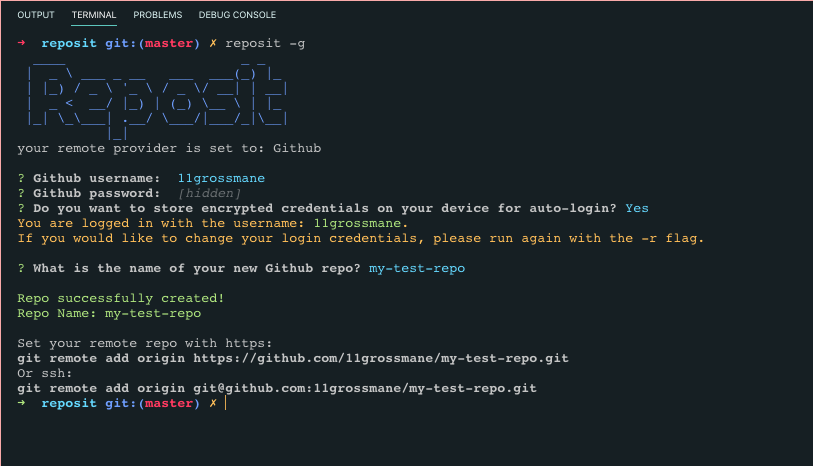
The prompt will ask you if you would like to store encrypted login credentials on your machine for auto-login. Nothing is stored without your consent.
Install
npm i -g repositUsage
**Note: reposit currently only supports Github and Bitbucket, and therefore must be run with -g flag, or -b flag
- -b create bitbucket repo
- -g create github repo
- -r reset login credentials
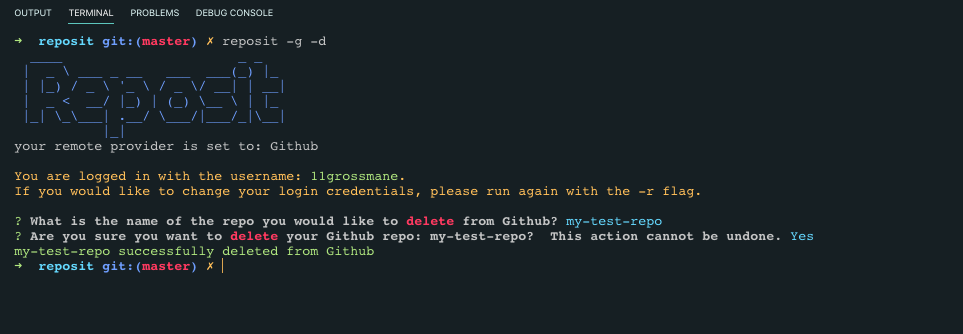
- -d delete repo (use with -g or -b to specify provider)
Create Github Repo
reposit -gCreate Bitbucket Repo
reposit -bDeleting Github Repo
reposit -g -dDeleting Bitbucket Repo
reposit -b -dResetting Login Information
When you run reposit for the first time with -g or -b, it will take you through a flow where you add your login information, which is, if you choose, encrypted and stored on your machine so you don't have to log in everytime. But if you want to reset your info, just run reposit with the -r flag
Example
reposit -g -rLicense
5 years ago
5 years ago
5 years ago
5 years ago
5 years ago
5 years ago
5 years ago
5 years ago
5 years ago
5 years ago
5 years ago
5 years ago
5 years ago
5 years ago
5 years ago
5 years ago
5 years ago
5 years ago
5 years ago
5 years ago
5 years ago
5 years ago
5 years ago
5 years ago
5 years ago
5 years ago
5 years ago
5 years ago
5 years ago
5 years ago
5 years ago
5 years ago