
site-doctor


Audit rendered websites for broken links, images, accessibility violations, security header gaps, design issues, SEO metadata problems, console errors, hydration errors, and mixed content. Works with any URL — localhost, staging, or production.
MCP server included — use site-doctor directly from Claude, Cursor, Windsurf, or any MCP-compatible AI tool.
Install
npm install -g site-doctorOr run without installing:
npx site-doctor audit --url http://localhost:3000CLI Usage
Interactive mode
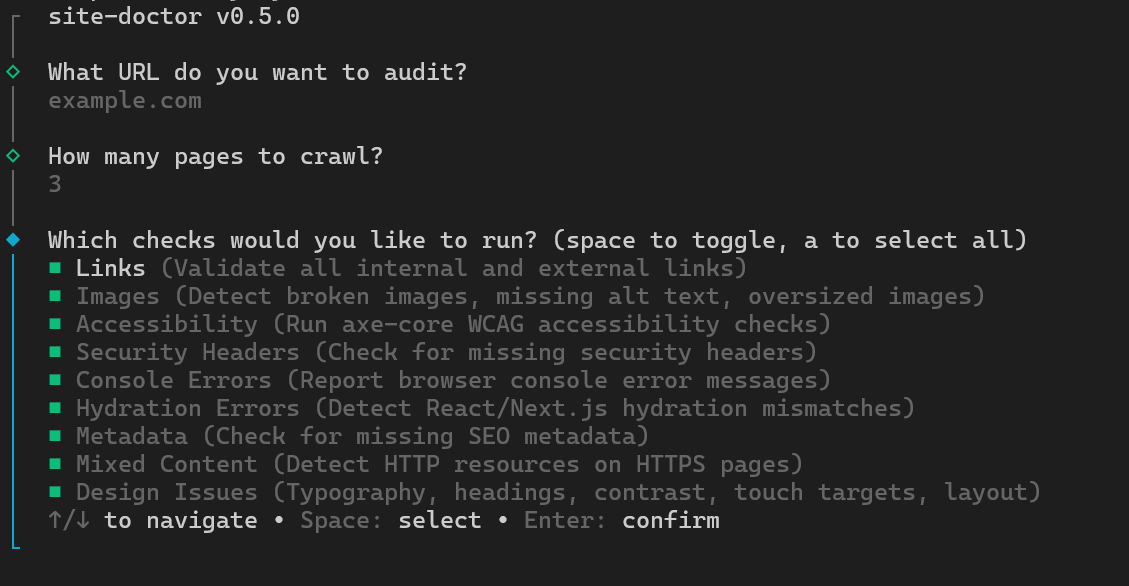
Run without --url to launch an interactive prompt:
site-doctor auditYou'll be guided through selecting a URL, checks, severity filters, and output format.
One-shot mode
site-doctor audit --url http://localhost:3000Options
| Option | Description | Default |
|---|---|---|
--url <url> |
Base URL to audit. Omit to launch interactive mode. | — |
--max-pages <number> |
Maximum pages to crawl. | 25 |
--report <terminal|json|html> |
Output format. | terminal |
--output <path> |
Write JSON or HTML report to a file. | — |
--open |
Open HTML report in the browser. | true for HTML |
--no-open |
Do not open HTML report in the browser. | — |
--open-files |
Open source files with critical/high issues in your editor. | false |
--project-dir <path> |
Path to project source for source-file links. | — |
--editor <vscode|cursor|webstorm> |
Editor for source-file links. | vscode |
--only <checks> |
Run only these checks (comma-separated). Mutually exclusive with --skip. |
— |
--skip <checks> |
Skip these checks (comma-separated). Mutually exclusive with --only. |
— |
--severity <levels> |
Filter issues by severity (comma-separated: critical,high,medium,low,info). |
— |
--category <cats> |
Filter issues by category (comma-separated: links,images,accessibility,security,console,hydration,metadata,mixed-content,design,performance). |
— |
Check name aliases
--only and --skip accept both kebab-case and common aliases:
| Check | Aliases |
|---|---|
links |
links |
images |
images |
accessibility |
accessibility, a11y |
securityHeaders |
security-headers, securityheaders |
consoleErrors |
console-errors, consoleerrors |
hydrationErrors |
hydration-errors, hydrationerrors |
metadata |
metadata, seo |
mixedContent |
mixed-content, mixedcontent |
designIssues |
design-issues, designissues, design |
performance |
performance, perf |
Examples
Interactive audit (prompts for URL, checks, severity, format):
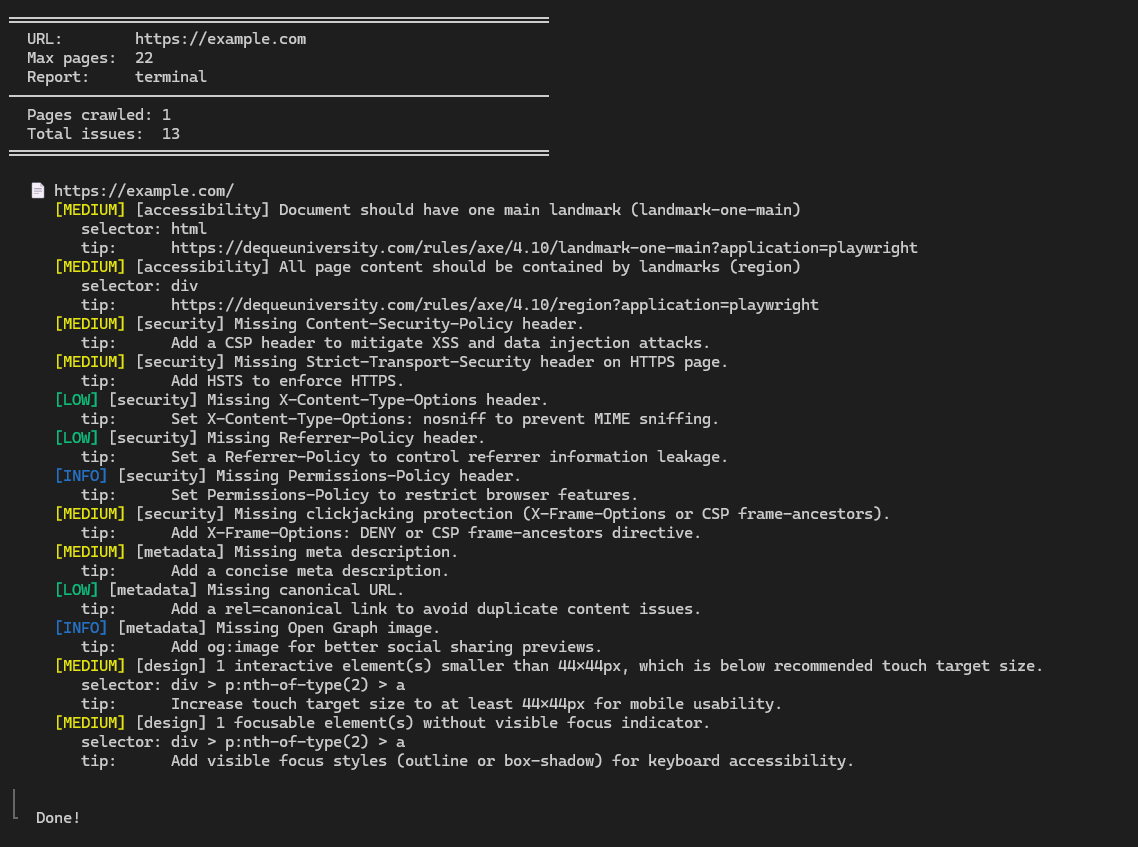
site-doctor auditTerminal report:
site-doctor audit --url http://localhost:3000 --max-pages 10Run only design and accessibility checks:
site-doctor audit --url http://localhost:3000 --only design,a11ySkip console and hydration checks, show only critical/high issues:
site-doctor audit --url http://localhost:3000 --skip console-errors,hydration-errors --severity critical,highFilter by category and output as JSON:
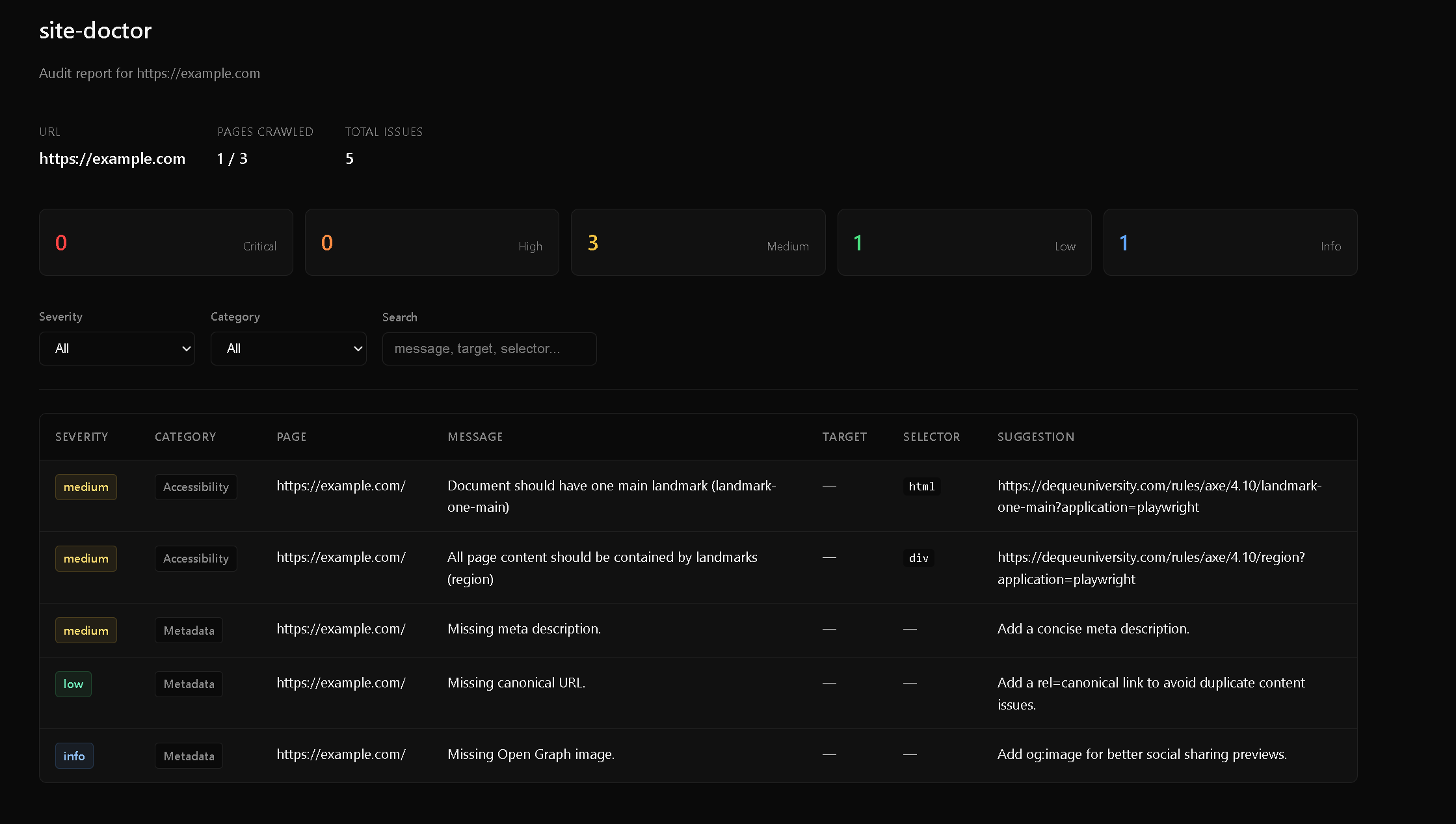
site-doctor audit --url http://localhost:3000 --category design,security --report json --output report.jsonHTML report (auto-opens browser):
site-doctor audit --url http://localhost:3000 --report html --project-dir ./apps/webOpen source files in VSCode for critical/high issues:
site-doctor audit --url http://localhost:3000 --report html --project-dir ./apps/web --open-filesList available checks
site-doctor list-checksMCP Server
site-doctor ships a built-in Model Context Protocol server so AI agents can run audits without the CLI.
Tools
| Tool | Description |
|---|---|
audit |
Run a full audit. Parameters: url (required), maxPages (default 25), checks (toggle individual checks). Returns a markdown summary grouped by severity. |
list-checks |
List all available audit checks with descriptions. Use this before running a full audit. |
Claude Desktop
Add to ~/Library/Application Support/Claude/claude_desktop_config.json (macOS) or %APPDATA%\Claude\claude_desktop_config.json (Windows):
{
  "mcpServers": {
    "site-doctor": {
      "command": "npx",
      "args": ["-y", "site-doctor-mcp"]
    }
  }
}
Cursor
Add to your Cursor MCP settings (.cursor/mcp.json in your project or global settings):
{
  "mcpServers": {
    "site-doctor": {
      "command": "npx",
      "args": ["-y", "site-doctor-mcp"]
    }
  }
}
Windsurf
Add to ~/.codeium/windsurf/mcp_config.json:
{
  "mcpServers": {
    "site-doctor": {
      "command": "npx",
      "args": ["-y", "site-doctor-mcp"]
    }
  }
}
opencode
Add to opencode.json:
{
  "mcp": {
    "site-doctor": {
      "type": "local",
      "command": ["npx", "-y", "site-doctor-mcp"],
      "enabled": true
    }
  }
}
Global install
If installed globally, you can use the binary directly instead of npx:
{
  "mcpServers": {
    "site-doctor": {
      "command": "site-doctor-mcp"
    }
  }
}
Checks
| Check | Flag name | What it finds |
|---|---|---|
| Crawl | — | Discovers same-origin pages, respects maxPages, skips downloads |
| Links | links |
Broken internal/external links, redirect loops, blocked URLs |
| Images | images |
Broken images, missing alt, missing dimensions, oversized files, lazy-loaded hero images |
| Accessibility | accessibility (a11y) |
axe-core WCAG violations — contrast, labels, landmarks, ARIA, heading order |
| Security headers | security-headers |
Missing CSP, HSTS, X-Content-Type-Options, Referrer-Policy, Permissions-Policy, frame protection |
| Console errors | console-errors |
Grouped browser console errors with page context |
| Hydration errors | hydration-errors |
React / Next.js hydration mismatches |
| Metadata | metadata (seo) |
Missing title, description, canonical, Open Graph image, H1 issues |
| Mixed content | mixed-content |
HTTP resources loaded on HTTPS pages |
| Design issues | design-issues (design) |
Heading hierarchy, typography scale & readability, color contrast, touch targets, responsive layout, text walls |
| Performance | performance (perf) |
LCP, CLS, INP, render-blocking resources, JS/CSS bundle size, DOM size, compression, third-party hosts |
Source-file links
When you pass --project-dir, the HTML report links each page to its source file. Supports Next.js app/ and pages/ routers, including monorepos. Click the file link to open it in VS Code, Cursor, or WebStorm.
Programmatic API
You can also use site-doctor as a library:
import { runAudit, buildConfig } from "site-doctor";

const config = buildConfig({ url: "http://localhost:3000", maxPages: 10 });
const result = await runAudit(config);

console.log(`Found ${result.issues.length} issues`);
for (const issue of result.issues) {
  console.log(`[${issue.severity}] ${issue.category}: ${issue.message}`);
}
License
MIT