




Agent skills multiply: Claude Code reads ~/.claude/skills, Codex reads ~/.agents/skills, your own agents read somewhere else. Copies drift. skill-loom keeps one vault — a plain, git-versioned folder you own — and projects it into every runtime with symlinks. Edit once, every agent sees the same skill.
Runs headless from the CLI, or open the built-in dashboard with skill-loom ui.
Quickstart
mkdir my-skills && cd my-skills
npx skill-loom init          # detects Claude Code / Codex, writes loom.json
npx skill-loom add my-skill --category writing
npx skill-loom link          # dry-run: shows what would change
npx skill-loom link --apply  # creates the symlinks
Commands
| Command | What it does |
|---|---|
init |
Create the vault: loom.json + archive/. Detects known runtimes. |
add <name> [--category <dir>] |
Scaffold a skill folder with a SKILL.md. |
link [--apply] |
Plan (dry-run) or apply symlinks for every skill × consumer. Never overwrites anything that is not a symlink. |
status |
Matrix of skill × consumer: linked / missing / broken / foreign. |
doctor |
Validate names, frontmatter, duplicates, broken and orphan links. Exit 1 if problems. |
archive <name> [--reason <text>] [--apply] |
Move a skill to archive/, record why in loom.json, remove its links. |
migrate <old> <new> [--apply] |
Rename a skill everywhere: folder, frontmatter, links. |
ui [--port N] [--host ADDR] [--no-open] |
Local dashboard in your browser: status grid, git changes, lifecycle actions, new-skill form. Binds 127.0.0.1 by default. |
sync [--apply] |
Sync the vault with its git remote: auto-commit, pull --rebase, push. Dry-run by default. |
link, archive and migrate are dry-run by default — nothing changes without --apply.
Exit codes: 0 ok · 1 problems found · 2 usage/config error (CI- and git-hook-friendly).
The vault
my-skills/
├── loom.json            # consumers, ignore list, archive log
├── writing/
│   └── my-skill/
│       └── SKILL.md     # frontmatter `name:` must equal the folder name
└── archive/ # archived skills, excluded from linkingloom.json:
{
  "schema": 1,
  "consumers": {
    "claude": "~/.claude/skills",
    "codex": "~/.codex/skills"
  },
  "ignore": [".git", "node_modules", "__pycache__", ".venv"],
  "archived": [],
  "names": { "forpros": "ForPros" }
}
Any consumer is just a name and a path — add your own runtimes freely. init
pre-fills the runtimes it detects on your machine (Claude Code, Codex, Cursor,
opencode, Gemini CLI, Amp, Windsurf, Goose, Mistral Vibe, and the shared
~/.agents/skills pool); the dashboard's Settings page offers the rest as
one-click additions. names overrides word casing in titles and labels
(editable from Settings too).
SKILL.md frontmatter
The dashboard is driven by a few optional frontmatter fields — use your own vocabulary, every value gets a stable color automatically:
| Field | Required | What it does |
|---|---|---|
name |
yes | Must equal the folder name (doctor checks it). |
description |
no | Shown on cards and in the table; it is also what your agents read to decide when to use the skill. |
domain |
no | Who the skill belongs to (a brand, a project, cross). Groups the library and feeds the sidebar filter. |
layer |
no | What kind of work it does (e.g. tool, review, authoring). The orthogonal axis: chips, grouping, filter. |
status |
no | Lifecycle: active (default) or suspended (parked but visible). Archiving is a separate skill-loom action. |
icon |
no | A line-icon name for the skill tile (NotePlan-style). |
icon-color |
no | A Tailwind-ish token (e.g. teal-500) overriding the tile hue. |
Skills without domain/layer land in an "Other" group — everything keeps
working, the taxonomy only adds structure.
Dashboard
Prefer buttons over flags? skill-loom ui starts a local dashboard — a single
self-contained page, no external dependencies, nothing leaves your machine.
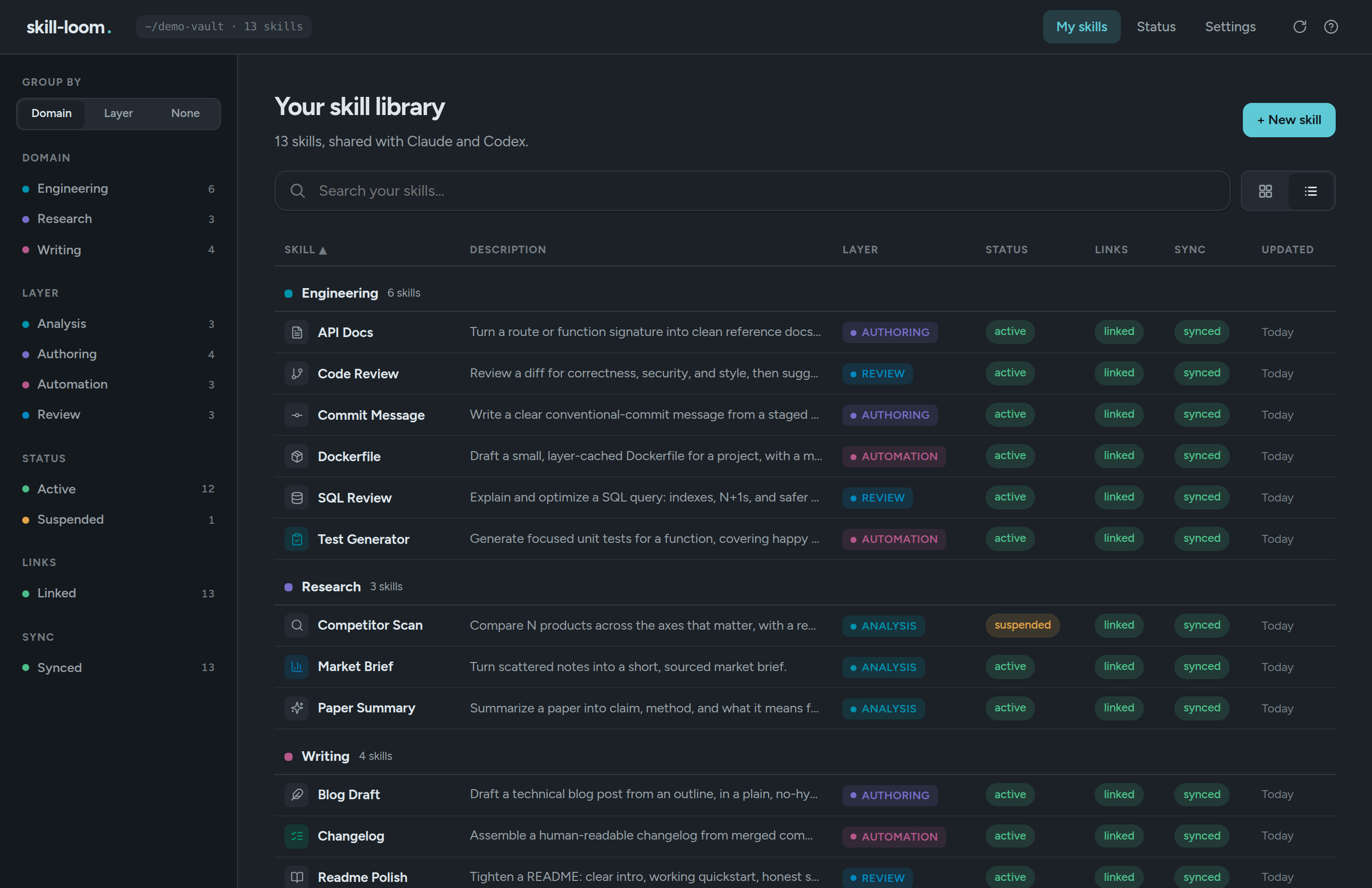
- My skills — your library as a sortable table (or a card grid, g
toggles), grouped by
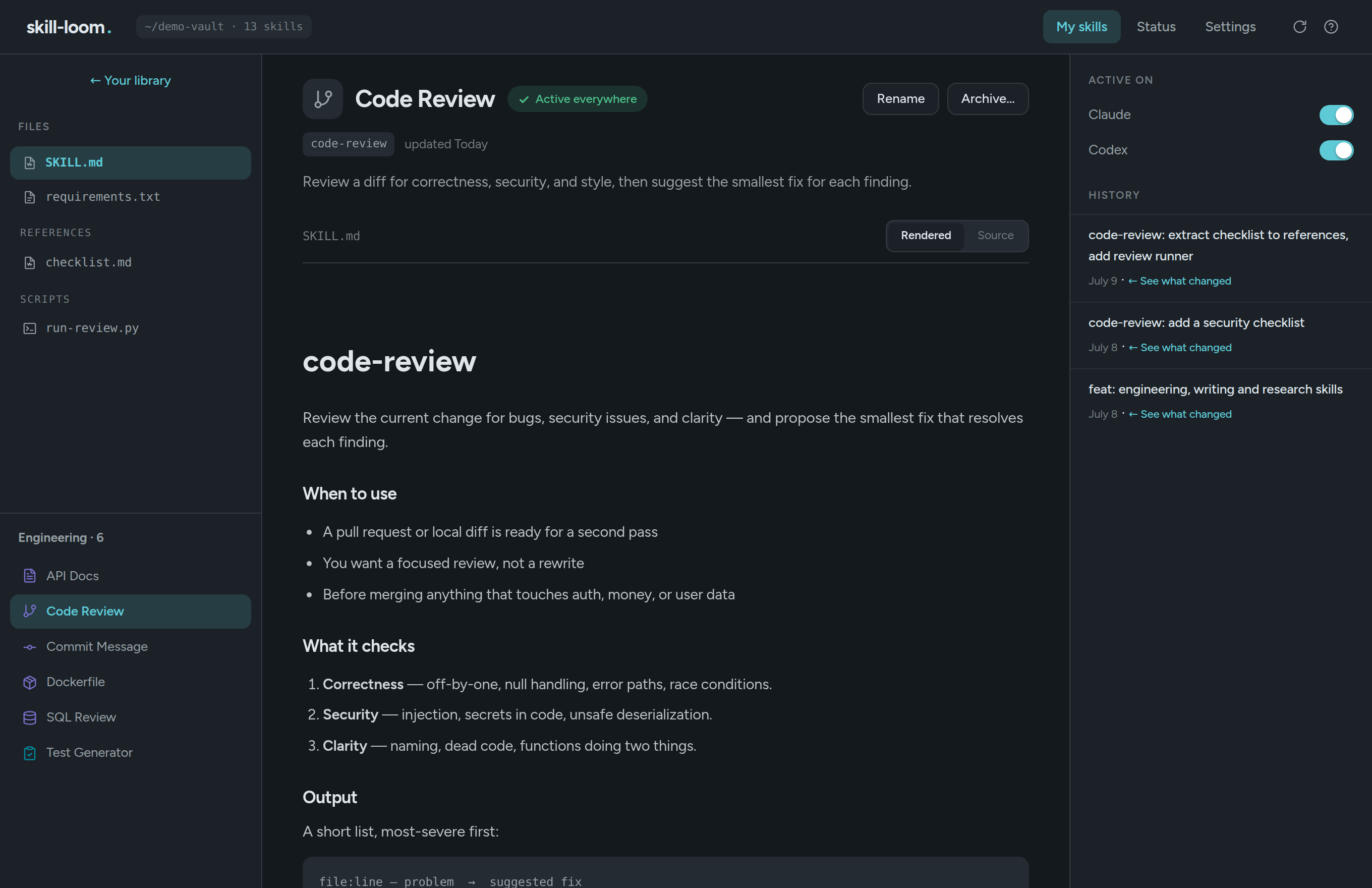
domainorlayerwith per-value colors and chips. The sidebar filters by domain, layer, lifecycle status, link state and git sync state, composing with full-text search. Each row answers the operational questions at a glance: lifecycle (active/suspended), links (linked/partial/not linked/conflict) and sync (synced/to commit/to push/to pull). On open, a live check against your git remote offers push/pull when the vault is out of sync. - Skill page — a three-pane view: files on the left, the guide rendered as a clean document (with syntax highlighting in the source view) in the centre, and runtime toggles + git history on the right. "See what changed" opens the commit diff in place.
- Health — problems explained in plain sentences, one-click "Fix links", and sync status across your machines.
- Recent changes — what your agents edited since the last save, ready to review and push.
Press ? anywhere for the keyboard-shortcut map. Every write action shows the dry-run plan before confirming — same semantics as the CLI, same guarantee: nothing that is not a symlink is ever touched.
Use it on more than one machine
The vault is a git repository, so syncing is just a private remote:
# machine A (where the vault lives)
cd my-skills && git init && git remote add origin git@github.com:you/skills-vault.git
skill-loom sync --apply

# machine B
git clone git@github.com:you/skills-vault.git my-skills
cd my-skills && skill-loom link --apply

# any machine, any time
skill-loom sync            # dry-run: shows what would happen
skill-loom sync --apply    # commit local edits, pull --rebase, push
Links stay local to each machine (they point at that machine's copy); only the vault content travels. On a rebase conflict, sync stops and tells you how to resolve — it never forces anything.
Requirements
Node ≥ 20, macOS or Linux. Windows is not supported (symlink semantics differ — PRs welcome).
Why symlinks
The vault is the single source of truth: history in git, one place to edit, review and back up. Runtimes get a live view, not a copy — there is nothing to sync and nothing to drift. This tool is extracted from the skill registry I run in production for a fleet of 7 agents.
License
MIT