
Statecraft


Find the UI states your product forgot.
Statecraft is a local-first product-state coverage tool. It renders your routes across meaningful states, viewports, and themes; runs assertions; captures screenshots and sanitized diagnostics; and produces one self-contained offline report.
npm install --save-dev statecraft-ui playwright@1.62.1
npx playwright install chromium
npx statecraft init
npx statecraft scan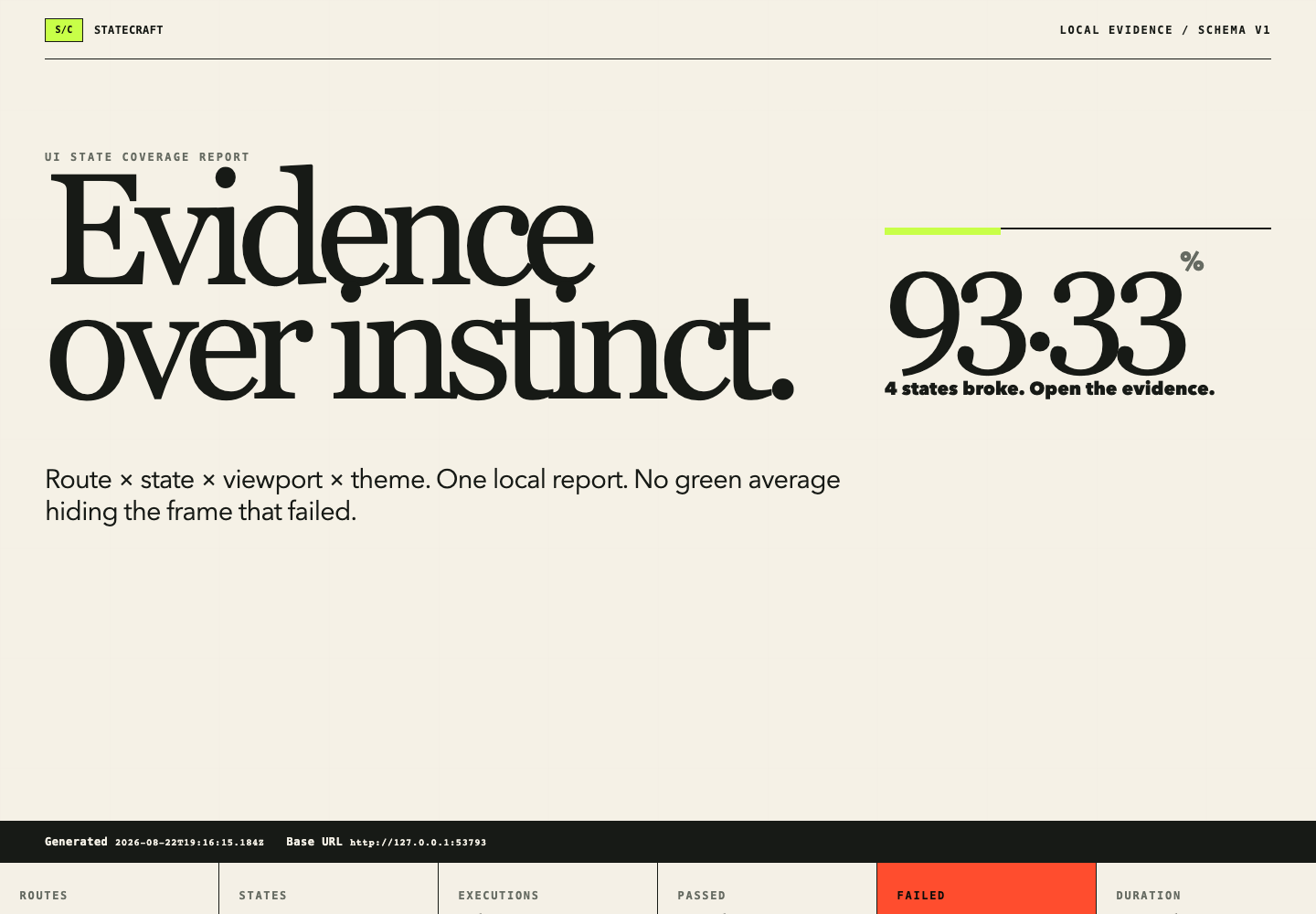
The screenshot above is the real 60-cell Northline example report. Four deliberately broken coordinates remain visible so the release gate proves Statecraft catches narrow-viewport overflow and theme-specific contrast failures.
Product states, not just pixel changes
Conventional visual regression asks whether an existing screenshot changed. Statecraft asks whether every important product state still works in the conditions you support.
| Statecraft | Screenshot regression | |
|---|---|---|
| Primary question | Did each configured product state survive? | Did pixels change from a baseline? |
| Coverage model | Route × state × viewport × theme | Screenshot cases you remembered to write |
| Evidence | Screenshot, assertions, console/page/request diagnostics | Image diff |
| Output | Private local JSON, PNGs, and offline HTML | Usually service- or runner-specific |
Use it for loading, empty, error, unauthorized, long-content, responsive, and theme states—the places where otherwise healthy applications tend to break.
Quick start
Statecraft supports Node.js 22.20 or newer within the Node 22 LTS line, or Node.js 24.x.
Install the CLI and its pinned browser runtime:
npm install --save-dev statecraft-ui playwright@1.62.1
npx playwright install chromium
Generate an overwrite-safe starter config and scenario:
npx statecraft initThis creates
statecraft.config.mtsandstatecraft/scenarios/home/success.mts. The explicit ESM extensions work in both npm's default CommonJS projects and projects that set"type": "module".Start your application, then scan and open the report:
npx statecraft scan
npx statecraft open
scan exits 0 when all cells pass, 1 when completed cells expose product-state failures, and 2 for setup or configuration errors. A failing scan still writes its report whenever execution completed.
Configure a small, explicit matrix
import { defineConfig } from "statecraft-ui";

export default defineConfig({
  baseURL: "http://127.0.0.1:3000",
  routes: [
    {
      id: "orders",
      path: "/orders",
      states: ["success", "loading", "empty", "error"].map((id) => ({
        id,
        setup: "./statecraft/scenarios/orders.mjs",
      })),
    },
  ],
  themes: ["light", "dark"],
  viewports: {
    mobile: { width: 390, height: 844 },
    desktop: { width: 1440, height: 1000 },
  },
});
Scenarios are trusted local modules. They can intercept deterministic API responses, wait for product-specific readiness, and make assertions with the same Playwright page used for capture:
export default {
  async beforeNavigate({ page, state }) {
    if (state.id === "empty") {
      await page.route("**/api/orders", (route) =>
        route.fulfill({ json: { orders: [] }, status: 200 }),
      );
    }
  },
  async afterNavigate({ page }) {
    await page.locator("[data-orders-state]").waitFor();
  },
  async assert({ page }) {
    await page.getByRole("heading", { name: "Orders" }).waitFor();
  },
};
See the CLI and configuration specification, runner API, and complete Northline matrix.
Inspect evidence offline
Every completed scan writes a versioned report beneath .statecraft/:
.statecraft/
├── artifacts/        # deterministic PNG evidence
└── report/
    ├── index.html    # self-contained interactive report
    └── statecraft.json
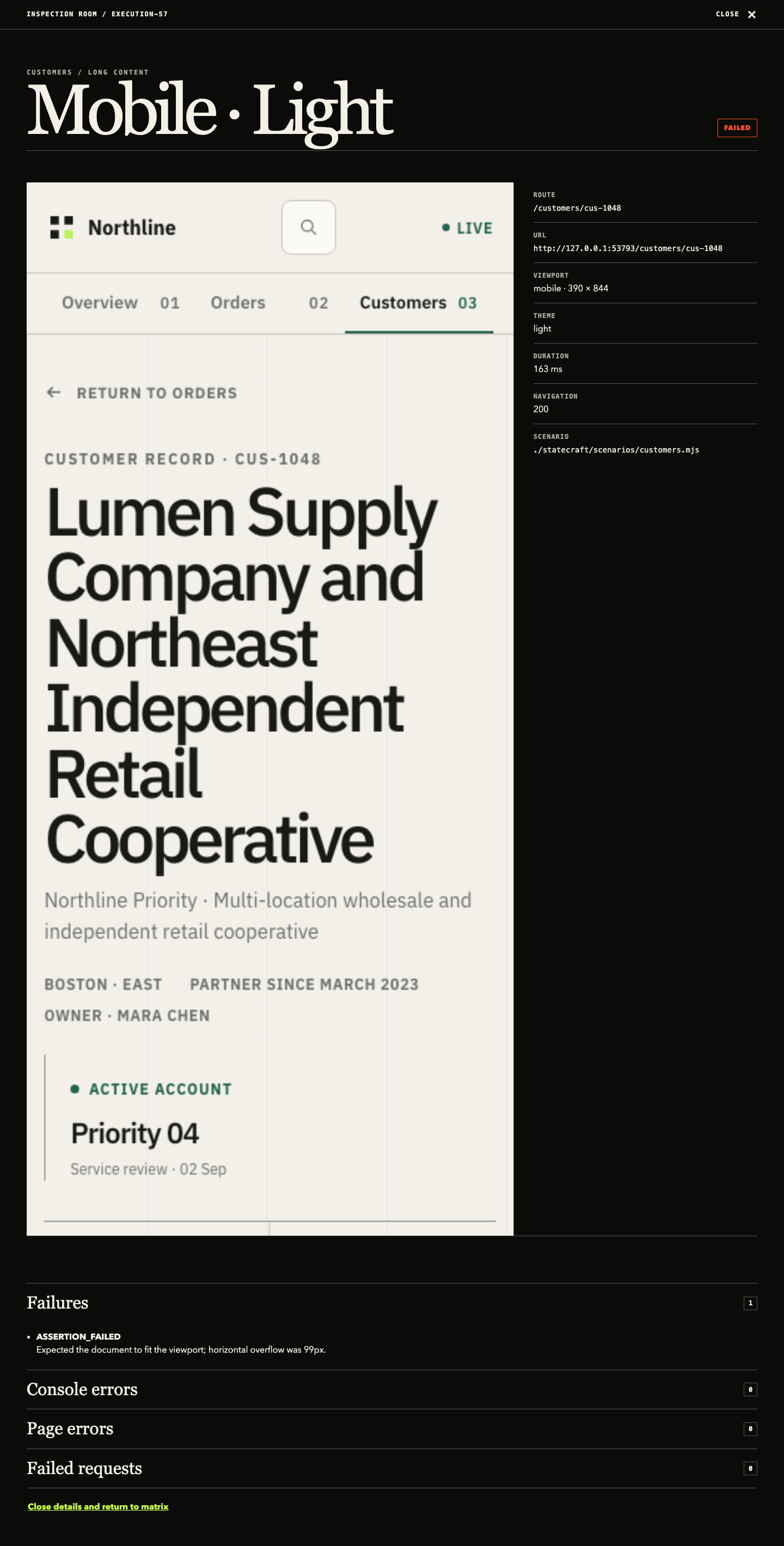
Filter by route, state, viewport, theme, or status. Open a cell to inspect the exact screenshot, route metadata, assertion failures, console errors, page errors, and failed requests. The report needs no server, account, network request, or external asset.
GitHub Actions
Statecraft is a normal CLI job; no custom Marketplace action or hosted service is required. The copy-ready GitHub Actions guide covers application readiness, Chromium installation, exit codes, privacy, and uploading the complete .statecraft bundle with if: always() so failures retain their evidence.
Reports can contain screenshots, URLs, and application data. Treat artifacts from a public repository as public, use only fictional or approved test data, and choose the shortest useful retention period.
Packages
| Package | Purpose |
|---|---|
statecraft-ui |
Public API and the statecraft executable |
statecraft-ui-core |
Browser-independent config, matrix, coverage, and report contracts |
statecraft-ui-runner-playwright |
Isolated Playwright execution and local persistence |
statecraft-ui-report |
Deterministic offline report transformation and rendering |
All four packages publish from the protected GitHub Release workflow through npm trusted publishing with provenance. No long-lived npm token remains configured.
Local-first architecture
configure → expand matrix → run isolated browser cells → persist evidence → inspect report- No telemetry, hosted backend, database, account, cloud dependency, or required LLM.
- One Chromium process is reused while every matrix cell gets a fresh browser context and page.
- Screenshot paths, result schemas, coverage math, and report rendering are deterministic.
- Console, page, and request diagnostics are sanitized before persistence.
.statecraft/is ignored because reports may contain sensitive application data.
Read the architecture, security and privacy model, and report UX specification for the detailed contracts.
Develop and contribute
The workspace uses pnpm, strict TypeScript, Vitest, Playwright, and a polished Next.js fixture:
corepack pnpm install --frozen-lockfile
corepack pnpm --filter statecraft-ui-runner-playwright exec playwright install chromium
corepack pnpm lint
corepack pnpm typecheck
corepack pnpm test
corepack pnpm build
The Northline scan intentionally exits 1 with exactly 56 passes and four failures. To regenerate the checked-in launch images after producing that report, run corepack pnpm launch:assets.
Start with CONTRIBUTING.md. The documentation map, implementation specification, release guide, and launch strategy explain the product boundary and workflow.
Roadmap
The current release is the local-first v0.1 product: explicit matrices, deterministic Playwright scenarios, offline evidence, CI usage, and a complete example. Potential follow-ups include Storybook and MSW helpers, richer assertions, accessibility metadata, PR summaries, and additional framework adapters. Hosted collaboration remains out of scope unless real demand appears.