
StorageSaver
See what's eating your Mac's disk, understand it in plain English, and reclaim space safely.
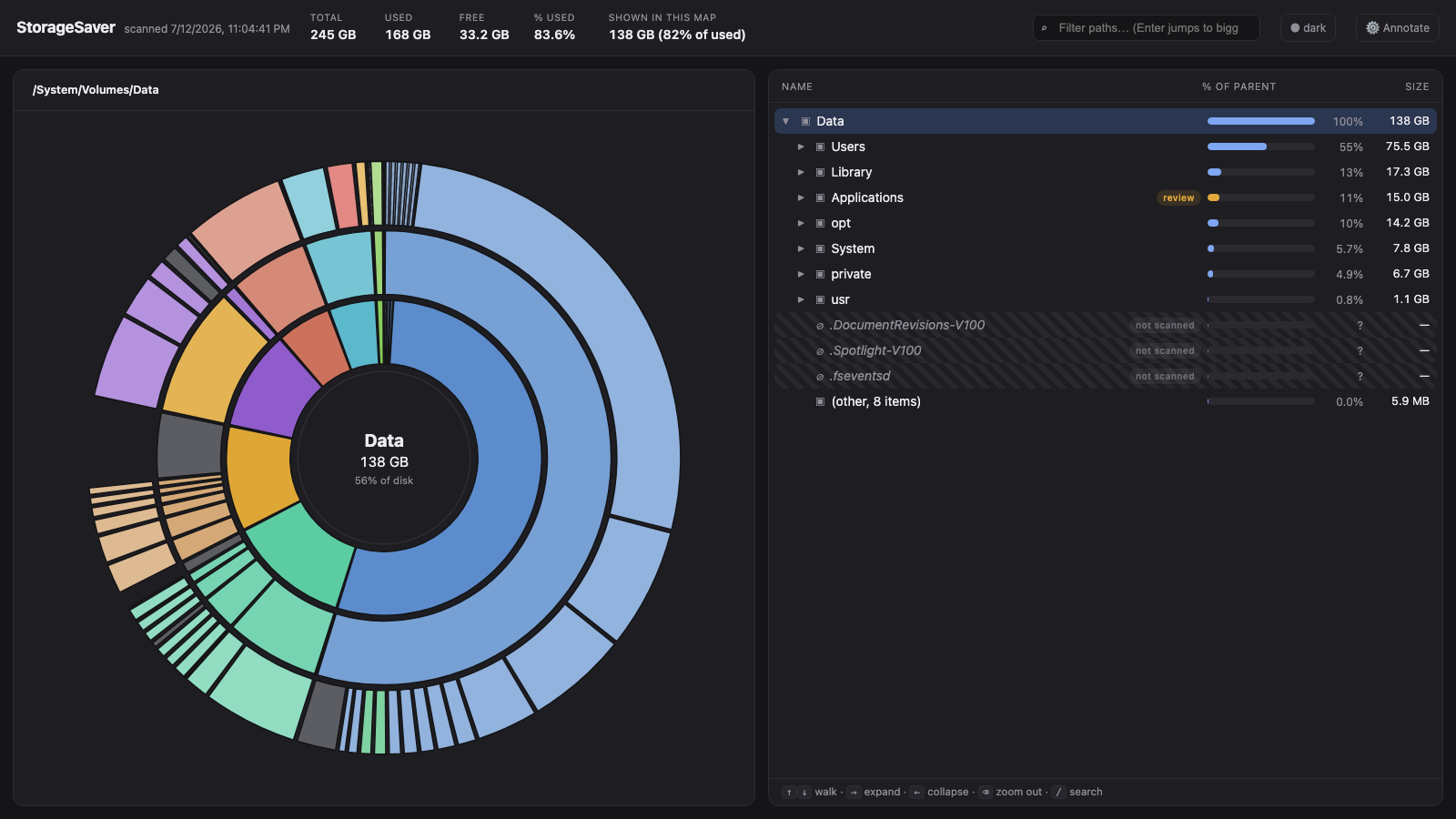
One command. No install. Read-only by design.
Quickstart
npx storagesaverThat's it. StorageSaver walks your disk (about 45 to 90 seconds for a full scan), writes a self-contained storagesaver.html to the current directory, and opens it in your browser. Nothing is uploaded, nothing is deleted, nothing else is written.
Features
- Fast full-disk scan. Walks the whole data volume in roughly 45 seconds to a minute and a half, using allocated blocks (not logical sizes) so sparse files like Docker's VM disk don't lie to you.
- Sunburst + tree explorer. A zoomable radial map plus a drill-down tree, all in one offline HTML file you can archive or share.
- Plain-English "what is this?" tooltips. Hundreds of built-in and community-seeded notes explain what folders actually are. Fill in the rest with AI: use the Annotate panel inside the report, or run
storagesaver annotatefrom the CLI. - Bring your own AI endpoint. Any OpenAI-compatible chat API works: Ollama, LM Studio, OpenAI, Anthropic's compatibility endpoint. Default is a local Ollama, so nothing leaves your machine.
- Safety badges with copy-paste commands. Every recognized path gets a badge: safe (regenerable, with the exact command to reclaim it), review (app-managed, decide first), never (deleting causes real, sometimes cloud-propagating, loss).
- Read-only by design. StorageSaver never deletes, moves, or executes anything. You copy the commands you agree with; you stay in control.
- Agent/watcher integration. A bundled skill turns it into a scheduled storage watcher with severity tiers and debounced alerts (see below).
CLI reference
storagesaver [scan]            scan → storagesaver.html → open in browser
storagesaver annotate [file]   fill tooltips in an existing report via your LLM

  --root <path>     scan root (default: /System/Volumes/Data on macOS)
  --min-mb <n>      hide nodes smaller than this (default 20)
  --quick           scan your home folder only (the user-actionable bulk)
  --out <file>      output path
  --json            emit the raw data tree as JSON instead of HTML
  --no-open         don't open the report in a browser

  --endpoint <url>  annotate: OpenAI-compatible endpoint (default: local Ollama)
  --model <name>    annotate: model name (required)
  --key <key>       annotate: API key if the endpoint needs one
  --dry             annotate: list what would be asked, don't call the model
Configuration
Everything lives under ~/.config/storagesaver/:
| File | Purpose |
|---|---|
config.json |
{ "endpoint": "…", "model": "…", "key": "…" } defaults for annotate (env vars STORAGESAVER_ENDPOINT / STORAGESAVER_MODEL / STORAGESAVER_KEY and CLI flags override it, flags win) |
notes-cache.json |
your own AI-generated tooltip notes; merged over the shipped seed notes |
rules.json |
your safety-rule overlay (below) |
watcher-state.json, watcher.log, reports/ |
watcher state, log, and JSON report history |
Custom safety rules (rules.json)
Add your own knowledge without forking:
{
  "safe":   [{ "match": "~/renders/cache", "note": "re-renders from project files", "cmd": "rm -rf ~/renders/cache" }],
  "review": [{ "match": "Steam", "note": "uninstall games via Steam, not rm" }],
  "never":  [{ "match": "~/Documents/vault/*", "note": "the only copy of my archive" }]
}
A match containing / is an exact path (~ expands; trailing /* covers everything underneath). A bare name matches any file or folder with that basename. Your rules win over the builtins, and never beats review beats safe on overlap.
Scheduled watching (agents / cron)
The skill/ directory contains a ready-made watcher and an agent skill definition (built for OpenClaw-style agents, usable from plain cron too):
NOTIFY_CMD='mail -s "Mac storage" you@example.com' node skill/watcher.js- Severity tiers: below 70% used it stays silent; 70/85/95% step up the tone.
- Debounce: the same severity within 6 days doesn't re-alert.
NOTIFY_CMDgets the alert text on stdin and the fresh HTML report path as$1, so any channel that can attach a file works.- Verified staleness: apps are only called "unused" after checking they aren't running (
pgrepby executable path), aren't login items, and have no recent Spotlight/prefs/container signals. Seeskill/SKILL.mdfor the full playbook.
Check out these other great projects
If StorageSaver isn't quite your thing, this space has excellent tools worth a look: DaisyDisk (the polished paid classic), GrandPerspective (free treemaps since forever), mole (terminal-first Mac maintenance), Radix, and SpaceRadar. StorageSaver's own angle is the plain-English explanations, the curated safety knowledge, and the agent integration — and it never deletes anything.
FAQ
Does it work on Linux/Windows? It runs anywhere Node 18+ runs, but the safety rules and notes are written for macOS paths. On other platforms you'll get sizes and structure with a warning, not much wisdom. Contributions welcome.
License
MIT 2026 Scott Nelson. See LICENSE.