
dokploy-claudecode
An open-source, Railway-style PaaS built on top of Dokploy and driven by Claude Code.
Two pieces live here:
- Launch tooling (
Makefile+scripts/) — one-command, idempotent install of the Dokploy stack (Swarm services + Traefik) on a Linux host, including the workarounds hostile environments need (no systemd, no IPVS, registry rate limits). - Switchyard (
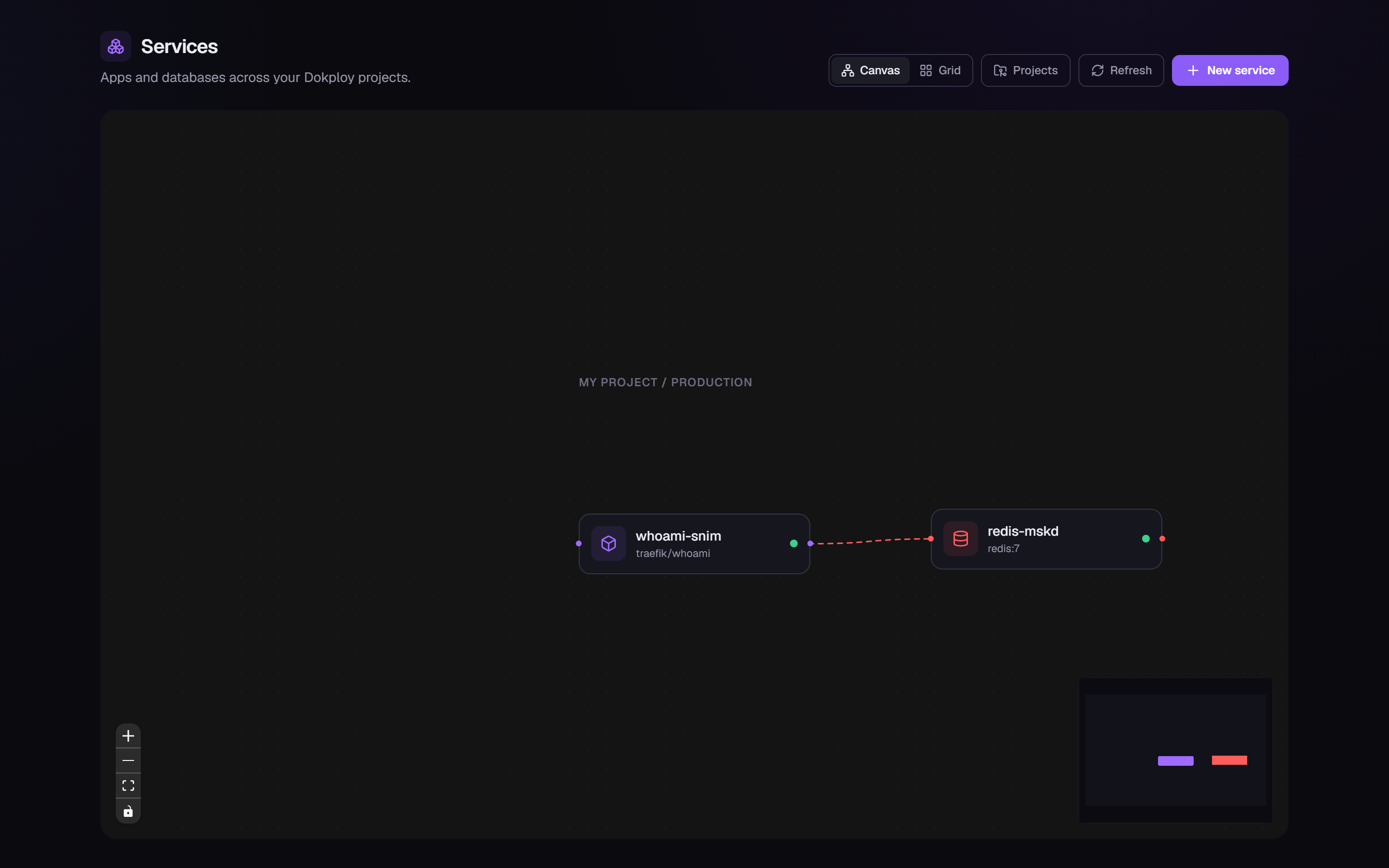
dashboard/) — a Railway-style dashboard over the Dokploy API: one canvas for every service, one-click databases, app deploys from a Docker image or Git repo, compose stacks, live logs and metrics.
Quick start
One command. On a fresh Linux server (installs Docker and Node.js if they're missing):
curl -fsSL https://raw.githubusercontent.com/sbdeals/dokploy-claudecode/main/install.sh | bashOr anywhere with Node 20+ and Docker — including Windows 11 with Docker Desktop and macOS:
npx switchyard-cli upEither way the CLI stands up Dokploy, walks you through creating the admin
account in the terminal (no browser round-trip, no env files to edit),
runs the Switchyard dashboard as a managed container on
http://127.0.0.1:3001, and offers to set up Claude Code. Re-running up is
safe — it converges, and upgrades when a newer version is out. Settings are
changed after setup with switchyard config set <key> <value>. Full
reference: docs/cli.md.
The npm package is
switchyard-cli(the bare npm nameswitchyardis an unrelated squatted package — don'tnpx switchyard).
Manual / contributor path: make up on Linux plus the dev-mode dashboard
(npm run dev) work exactly as before — see
docs/getting-started.md. Other targets:
make down (PURGE=1 wipes data), make claude (launch Claude Code here),
make doctor (check prerequisites).
Switchyard at a glance
- Unified canvas — databases, applications, and compose stacks as draggable nodes (React Flow), with connection arrows inferred from env vars, a minimap, and a per-browser persisted layout. Grid and per-project views included.
- Databases — Postgres, MySQL, MariaDB, MongoDB, Redis: one-click deploy, connection strings, env editor, resource/version/port settings.
- Applications — deploy from a Docker image or a public Git repo (Nixpacks build); domains with auto-SSL, variables, deployment history.
- Compose — docker-compose stacks with an in-app YAML editor.
- Live logs & metrics — streamed straight from the Docker Engine API over SSE; no polling, no Dokploy WebSocket reverse-engineering.
- Projects & environments — create, rename, delete from the dashboard.
Security note: Switchyard has no login of its own — anyone who can reach its port has full admin over Dokploy. Keep it on localhost or gate it before exposing it. (Dashboard auth is on the roadmap.)
Documentation
| Doc | What's inside |
|---|---|
| CLI reference | switchyard up/config/status/... — the one-command install, every flag, config keys, migration notes |
| Getting started | The fast path on all platforms, plus the manual installs (Linux make up, Windows Docker Desktop) and the verification checklist |
| Dashboard guide | Feature tour with screenshots |
| Architecture | The BFF design, data model, SSE logs/metrics, canvas internals |
| Launch tooling | Every make target and script, and why they exist |
| Troubleshooting | Symptom → cause → fix, for both platforms |
Repo layout
install.sh             # curl-able bootstrap: Docker + Node if missing, then `npx switchyard-cli up`
cli/                   # the switchyard CLI (npm: switchyard-cli) — up/status/down/config/doctor/...
Makefile               # up / status / down / claude / doctor
scripts/               # bash launch tooling (Linux hosts; also bundled inside the npm package)
  lib.sh               #   shared helpers: dockerd, mirror, advertise addr, waits
  dokploy-up.sh        #   install + launch Dokploy (idempotent)
  dokploy-status.sh    #   stack status + dashboard URL
  dokploy-down.sh      #   stop the stack (--purge to wipe data)
  claude-up.sh         #   launch Claude Code in this repo
  doctor.sh            #   prerequisite / environment check
dashboard/             # Switchyard (Next.js 16 + TypeScript + Tailwind v4) + its Dockerfile
docs/                  # documentation (see table above) + screenshots
Environment notes
The launch scripts encode two workarounds that stock installers miss on
sandboxed hosts: a Docker Hub pull-through mirror (rate-limited shared egress
IPs) and --endpoint-mode dnsrr on every Swarm service (kernels without IPVS
can't route service VIPs). Details and symptoms live in
docs/launch-tooling.md and
docs/troubleshooting.md.
Roadmap
- Install and launch Dokploy on this host
- One-command launch for Dokploy and Claude Code
- Railway-style dashboard on top of the Dokploy API (Switchyard): databases, applications, compose, projects, canvas, live logs/metrics
- One-command install for the whole stack (
curl … | bash/npx switchyard-cli up): terminal-guided admin setup, dashboard as a managed container, post-setupswitchyard config - Backups (S3 destinations) and deploy-log history
- Dashboard auth (gate Switchyard before it binds beyond localhost)