
vegtam

The wanderer — a pocket CLI for whatever repo you're standing in.
Odin walks Midgard in disguise under the name Vegtam. This tool is that mode: it works on
exactly one repository — the one your shell is in right now — reading everything live from the
local .git and its GitHub remote. No config, no stored state, no assumptions about who owns the
repo. Run it inside any repo, anywhere on the machine, and get a fast lay of the land.
Works in any repo. Owns nothing.
Vegtam is built for the repos that aren't yours — client work, an open-source contribution, something you just cloned. That inverts the usual risk posture, so three rules hold throughout:
- Read-first, act-light. The value is in the views, and views are safe everywhere. The handful of actions are scoped to "help me work in this repo," never "clean up someone else's."
- Convention-neutral. Vegtam reports what is. It doesn't audit your repo against anyone's house style.
- Permission-aware. Contributor without admin? Read-only? Non-GitHub remote? Every remote call degrades to a quiet, informative line — never a crash or a stack trace.
Nothing Vegtam does touches remote state or your uncommitted work unless you explicitly ask — and even then, the destructive-adjacent bits are dry-run by default.
Install
Vegtam is a single, self-contained Bash script. Pick whichever fits:
Homebrew (macOS / Linux):
brew install brett-buskirk/tap/vegtamnpm (also gives you npx vegtam with no install):
npm install -g vegtamcurl — no package manager required, drop it straight on your PATH:
mkdir -p ~/.local/bin
curl -fsSL https://raw.githubusercontent.com/brett-buskirk/vegtam/main/vegtam -o ~/.local/bin/vegtam
chmod +x ~/.local/bin/vegtam
(Make sure ~/.local/bin is on your PATH.)
Requires bash and git — so macOS, Linux, and WSL/Git Bash on Windows. The GitHub CLI (gh)
unlocks the GitHub-backed sections and jq enables --json output; without them, the local git
views still work.
Usage
vegtam [status]      one-screen briefing on the current repo (the default)
vegtam branches      local + remote branches: tracking, merged, stale
vegtam prs           open pull requests with their CI status
vegtam log           timeline of commits, merged PRs, and releases
vegtam health        security & freshness: alerts, deps, unpinned actions
vegtam sync          fast-forward the current branch to its upstream
vegtam tidy          delete merged local branches (dry-run by default)
vegtam branch <name> create + switch to a branch
vegtam pr            open a PR from the current branch
vegtam help          the menu
vegtam <cmd> help    detail & options for any command
vegtam --version     print the version
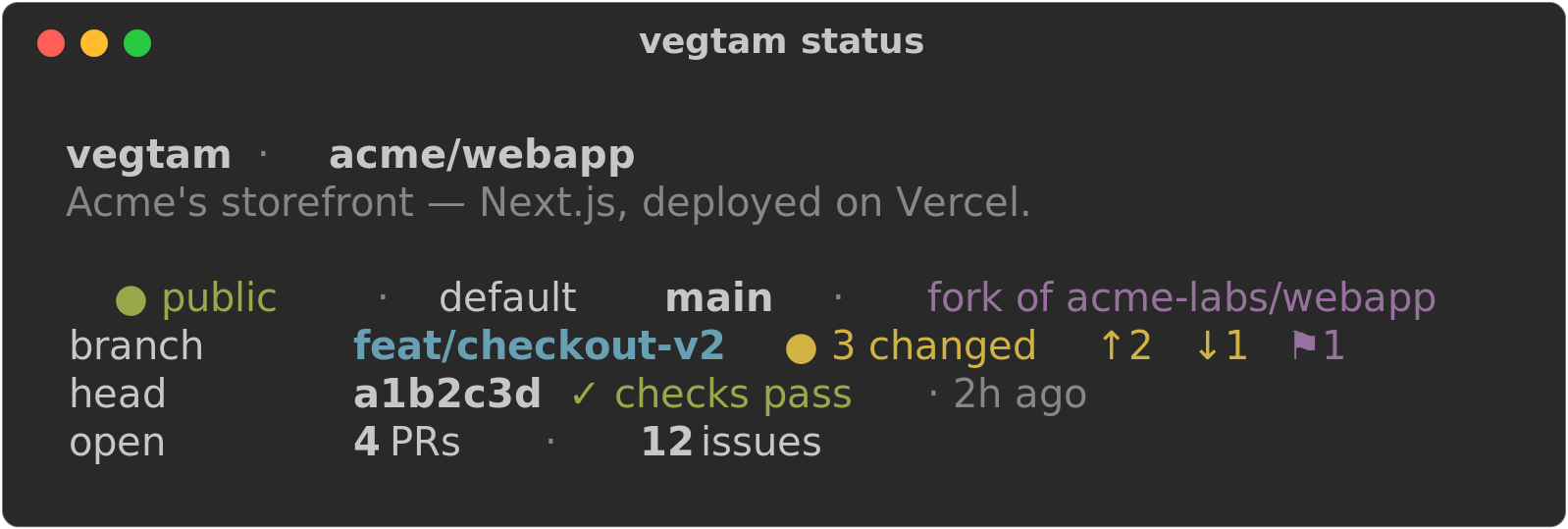
status — the flagship
One glance tells you where you stand:
- repo name, description, visibility, and default branch
- your relationship to it — a fork of whom, and how far ahead/behind its upstream you are
- current branch, dirty state, and stashes
- the latest commit, its CI status, and how long ago
- open PR and issue counts
Fast and local by default; add --fetch to refresh ahead/behind from the remote first. Respects
NO_COLOR and prints plain text when piped.
branches
Your local branches, newest commit first — each with its upstream tracking state (↑ahead/
↓behind, [gone], or local-only), whether it's merged into the default branch, and its age —
followed by the branches on origin you don't have locally. Purely descriptive; it never deletes
anything (that's what tidy is for). --fetch refreshes tracking and remote branches first.
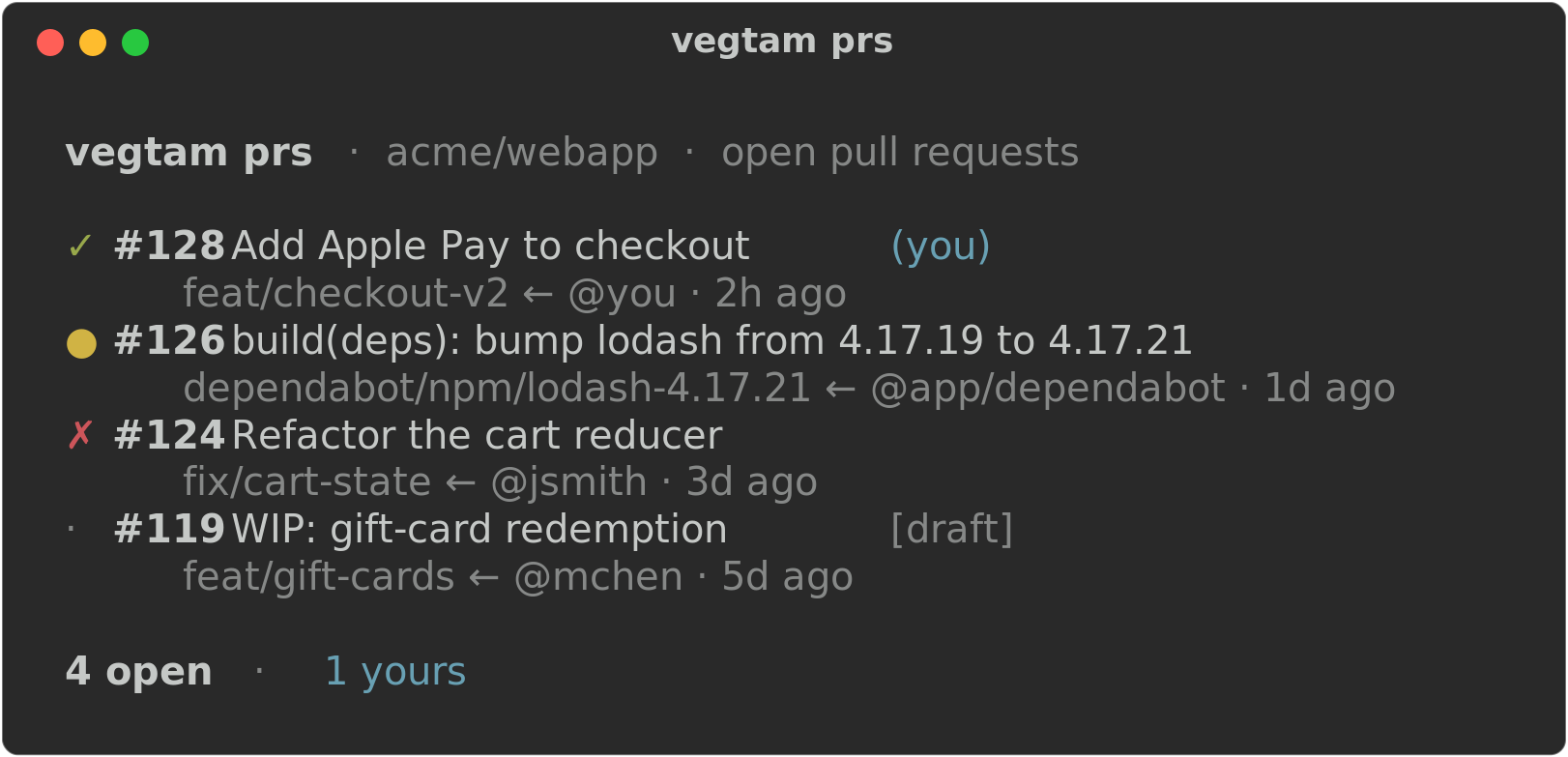
prs
Open pull requests, each with a CI glyph (✓ pass · ✗ fail · ● running · · none), its
source branch, author, and age. The ones you authored are tagged (you).
log
A newest-first timeline of what changed: commits on the current branch (●), merged PRs (⑃),
and releases (⚑). --since <window> sets how far back to look — 6h, 3d, 2w (default),
1mo. Commits always work; the GitHub events need gh.
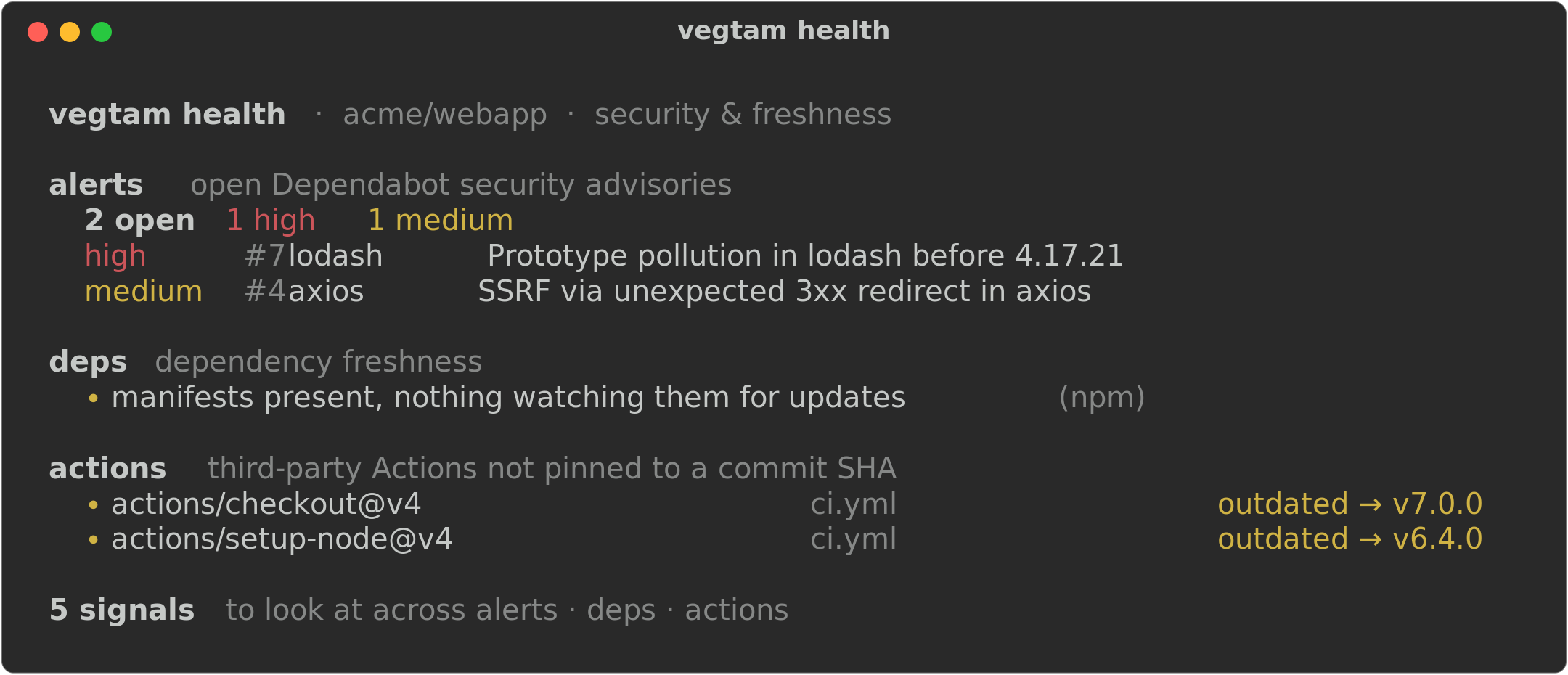
health
Security & freshness — three neutral, widely-recommended signals, each best-effort and access-aware:
- alerts — open Dependabot advisories by severity (needs security read; a contributor usually can't see these, so it degrades to a note)
- deps — dependency manifests with nothing watching them, and open Dependabot update PRs
- actions — third-party Actions not pinned to a commit SHA (the supply-chain hardening recommendation), flagged outdated when a newer major exists
It reports what is — it doesn't judge the repo against anyone's house style, and it changes nothing.
--json
Every inspect view above takes --json (needs jq), emitting a structured object or array for
piping into other tools. Fields you can't read come through as null, so a consumer can tell
"no access" from "none found":
vegtam status --json | jq '.behind'                 # am I behind upstream?
vegtam prs --json    | jq '[.[] | select(.mine)]'   # just my open PRs
vegtam health --json | jq '.alerts.open // 0'       # open Dependabot alerts (null → 0)
Actions — safe, local, self-scoped
The only commands that change anything. Each helps you work in this repo; none touch remote branches, close others' PRs, or rewrite history.
sync
Fetch, then fast-forward the current branch to its upstream — nothing more. If your branch has diverged (you have local commits the remote doesn't), it says so and stops; reconciling means a rebase or merge, which it won't do for you. A clean fast-forward proceeds even with an unrelated dirty file — git itself refuses to overwrite uncommitted changes, so your work is never clobbered.
tidy
Delete local branches already merged into the default branch. Dry-run by default — it lists what
it would delete and changes nothing until you add --apply (which confirms once for the batch;
--yes skips the prompt). Never the default branch, never the one you're on, never anything on the
remote, and only via git branch -d (which itself refuses a branch that isn't fully merged).

branch <name>
Create a branch and switch to it — or just switch, if it already exists. Purely local; nothing is pushed.
pr
Open a pull request from the current branch — a thin wrapper over gh pr create. It refuses on a
detached HEAD, the default branch, or a branch with no commits beyond the base (nothing to open),
then hands off to gh, which pushes the branch if needed (via a fork when you can't push to origin)
and prompts for the rest. Extra flags pass straight through (vegtam pr --fill --draft).
Status
v1.0.0 — stable and feature-complete for v1: five inspect views (each with --json), four safe
local actions, two-level help, shellcheck-gated CI, one self-contained script.
Anything remote-mutating or destructive beyond the safe local set is deliberately out of scope — that's not what a wanderer is for. See ROADMAP.md for what's intentionally deferred.
License
MIT — see LICENSE.