
English | 中文
vue-condition-watcher 




Introduction
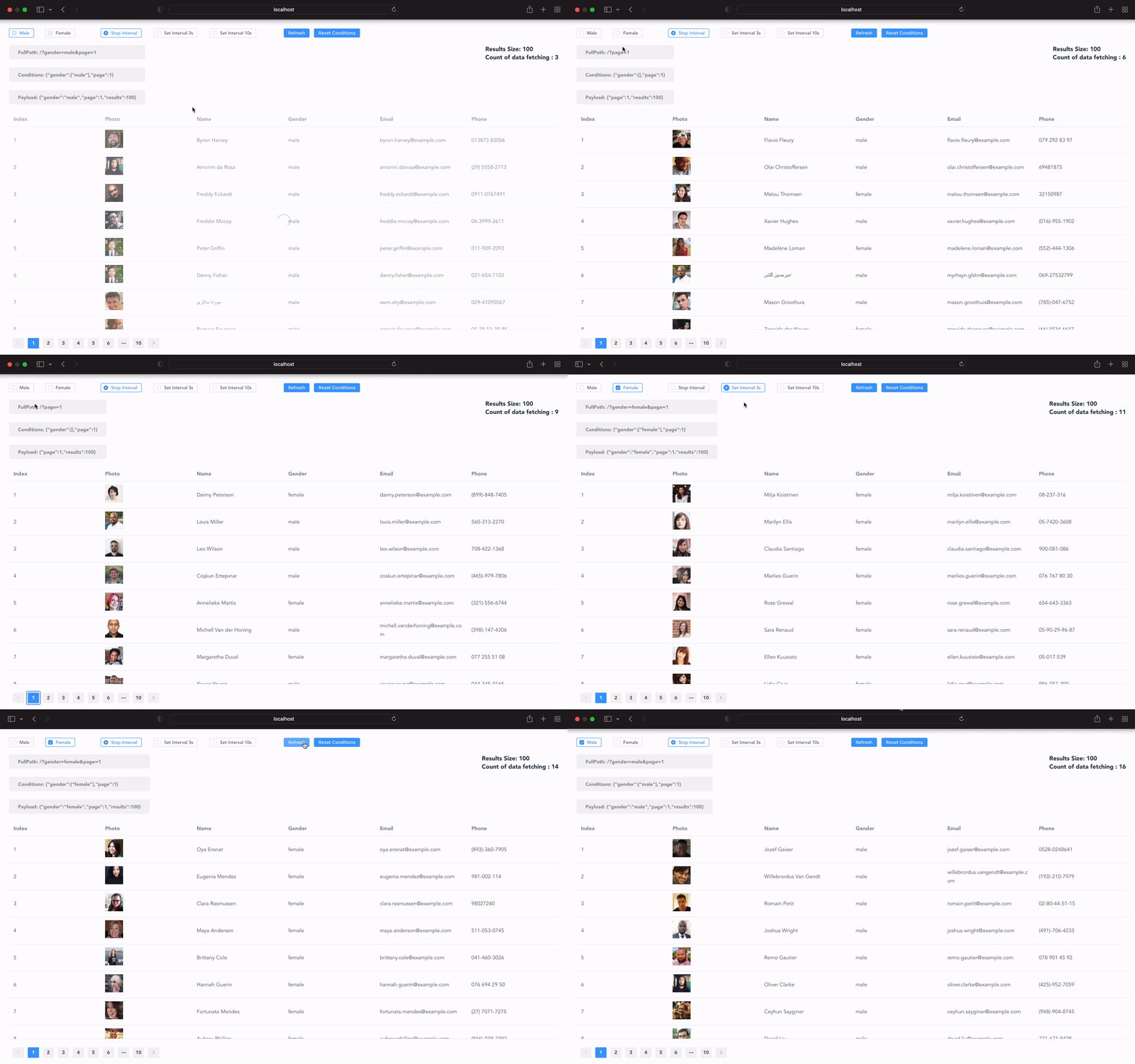
vue-condition-watcher is a data fetching library using the Vue Composition API. It allows you to easily control and sync data fetching to the URL query string using conditions.
requires Node.js 12.0.0 or higher.
Features
Automatically fetches data when conditions change. Filters out null, undefined, [], and '' before sending requests. Initializes conditions based on URL query strings and syncs them accordingly. Synchronizes URL query strings with condition changes, maintaining normal navigation. Ensures requests are first in, first out, and avoids repeats. Handles dependent requests before updating data. Customizable paging logic. Refetches data when the page is refocused or network resumes. Supports polling with adjustable periods. Caches data for faster rendering. Allows manual data modifications to improve user experience. TypeScript support. Compatible with Vue 2 & 3 via vue-demi.
Navigation
- Installation
- Quick Start
- Configs
- Return Values
- Execute Fetch
- Prevent Request
- Manually Trigger
- Intercepting Request
- Mutations data
- Conditions Change Event
- Fetch Event
- Polling
- Cache
- History Mode
- Lifecycle
- Pagination
- Changelog
Demo
cd examples/vue3
yarn
yarn servecd examples/vue2
yarn
yarn serveInstallation
yarn add vue-condition-watcheror
npm install vue-condition-watcheror via CDN
<script src="https://unpkg.com/vue-condition-watcher/dist/index.js"></script>Quick Start
Example using axios and vue-router:
<script setup>
import axios from 'axios'
import { useRouter } from 'vue-router'
import { useConditionWatcher } from 'vue-condition-watcher'

const fetcher = params => axios.get('/user/', {params})
const router = useRouter()

const { conditions, data, loading, execute, error } = useConditionWatcher({
  fetcher,
  conditions: { name: '' },
  history: { sync: router }
})
</script>

<template>
  <div class="filter">
    <input v-model="conditions.name">
    <button @click="execute">Refetch</button>
  </div>
  <div class="container">
    {{ !loading ? data : 'Loading...' }}
  </div>
  <div v-if="error">{{ error }}</div>
</template>
Configs
fetcher(required): Function for data fetching.conditions(required): Default conditions.defaultParams: Parameters preset with each request.initialData: Initial data returned.immediate: If false, data will not be fetched initially.manual: If true, fetch requests are manual.history: Syncs conditions with URL query strings using vue-router.pollingInterval: Enables polling with adjustable intervals.pollingWhenHidden: Continues polling when the page loses focus.pollingWhenOffline: Continues polling when offline.revalidateOnFocus: Refetches data when the page regains focus.cacheProvider: Customizable cache provider.beforeFetch: Modify conditions before fetching.afterFetch: Adjust data before updating.onFetchError: Handle fetch errors.
Return Values
conditions: Reactive object for conditions.data: Readonly data returned by fetcher.error: Readonly fetch error.isFetching: Readonly fetch status.loading: true when data and error are null.execute: Function to trigger a fetch request.mutate: Function to modify data.resetConditions: Resets conditions to initial values.onConditionsChange: Event triggered on condition changes.onFetchSuccess: Event triggered on successful fetch.onFetchError: Event triggered on fetch error.onFetchFinally: Event triggered when fetch ends.
Execute Fetch
Fetch data when conditions change:
const { conditions } = useConditionWatcher({
  fetcher,
  conditions: { page: 0 },
  defaultParams: { opt_expand: 'date' }
})

conditions.page = 1
conditions.page = 2
Manually trigger a fetch:
const { conditions, execute: refetch } = useConditionWatcher({
  fetcher,
  conditions: { page: 0 },
  defaultParams: { opt_expand: 'date' }
})

refetch()
Force reset conditions:
const { conditions, resetConditions } = useConditionWatcher({
const { conditions, resetConditions } = useConditionWatcher({
  fetcher,
  immediate: false,
  conditions: { page: 0, name: '', date: [] },
})

resetConditions({ name: 'runkids', date: ['2022-01-01', '2022-01-02'] })
Prevent Request
Prevent requests until execute is called:
const { execute } = useConditionWatcher({
  fetcher,
  conditions,
  immediate: false,
})

execute()
Manually Trigger Request
Disable automatic fetch and use execute() to trigger:
const { execute } = useConditionWatcher({
  fetcher,
  conditions,
  manual: true,
})

execute()
Intercepting Request
Modify conditions before fetch:
useConditionWatcher({
  fetcher,
  conditions: { date: ['2022/01/01', '2022/01/02'] },
  initialData: [],
  async beforeFetch(conds, cancel) {
    await checkToken()
    const { date, ...baseConditions } = conds
    const [after, before] = date
    baseConditions.created_at_after = after
    baseConditions.created_at_before = before
    return baseConditions
  }
})
Modify data after fetch:
const { data } = useConditionWatcher({
  fetcher,
  conditions,
  async afterFetch(response) {
    if(response.data === null) {
      return []
    }
    const finalResponse = await otherAPIById(response.data.id)
    return finalResponse
  }
})
Handle fetch errors:
const { data, error } = useConditionWatcher({
  fetcher,
  conditions,
  async onFetchError({data, error}) {
    if(error.code === 401) {
      await doSomething()
    }
    return { data: [], error: 'Error Message' }
  }
})
Mutations data
Update data using mutate function:
mutate(newData)Update part of data:
const finalData = mutate(draft => {
  draft[0].name = 'runkids'
  return draft
})
Example for updating part of data
const { conditions, data, mutate } = useConditionWatcher({
  fetcher: api.userInfo,
  conditions,
  initialData: []
})

async function updateUserName (userId, newName, rowIndex = 0) {
  const response = await api.updateUer(userId, newName)
  mutate(draft => {
    draft[rowIndex] = response.data
    return draft
  })
}
Conditions Change Event
Handle condition changes:
const { conditions, onConditionsChange } = useConditionWatcher({
  fetcher,
  conditions: { page: 0 },
})

conditions.page = 1

onConditionsChange((conditions, preConditions) => {
  console.log(conditions)
  console.log(preConditions)
})
Fetch Event
Handle fetch events:
const { onFetchResponse, onFetchError, onFetchFinally } = useConditionWatcher(config)

onFetchResponse(response => console.log(response))
onFetchError(error => console.error(error))
onFetchFinally(() => {
  //todo
})
Polling
Enable polling:
useConditionWatcher({
  fetcher,
  conditions,
  pollingInterval: 1000
})
Use ref for reactivity:
const pollingInterval = ref(0)
useConditionWatcher({
  fetcher,
  conditions,
  pollingInterval: pollingInterval
})
onMounted(() => pollingInterval.value = 1000)
Continue polling when hidden or offline:
useConditionWatcher({
  fetcher,
  conditions,
  pollingInterval: 1000,
  pollingWhenHidden: true, // pollingWhenHidden default is false
  pollingWhenOffline: true, // pollingWhenOffline default is false
  revalidateOnFocus: true // revalidateOnFocus default is false
})
Cache
Cache data globally:
// App.vue
const cache = new Map()
export default {
  name: 'App',
  provide: { cacheProvider: () => cache }
}

useConditionWatcher({
  fetcher,
  conditions,
  cacheProvider: inject('cacheProvider')
})
Cache data in localStorage:
function localStorageProvider() {
  const map = new Map(JSON.parse(localStorage.getItem('your-cache-key') || '[]'))
  window.addEventListener('beforeunload', () => {
    const appCache = JSON.stringify(Array.from(map.entries()))
    localStorage.setItem('your-cache-key', appCache)
  })
  return map
}

useConditionWatcher({
  fetcher,
  conditions,
  cacheProvider: localStorageProvider
})
History Mode
Enable history mode using vue-router:
const router = useRouter()
useConditionWatcher({
  fetcher,
  conditions,
  history: { sync: router }
})
Exclude keys from URL query string:
const router = useRouter()
useConditionWatcher({
  fetcher,
  conditions: { users: ['runkids', 'hello'], limit: 20, offset: 0 },
  history: { sync: router, ignore: ['limit'] }
})
// the query string will be ?offset=0&users=runkids,hello
Convert conditions to query strings:
conditions: {
  users: ['runkids', 'hello']
  company: ''
  limit: 20,
  offset: 0
}
// the query string will be ?offset=0&limit=20&users=runkids,hello
Sync query strings to conditions on page refresh:
URL query string: ?offset=0&limit=10&users=runkids,hello&compay=vueconditions will become
{
  users: ['runkids', 'hello'],
  company: 'vue',
  limit: 10,
  offset: 0
}
Use navigation to replace or push current location:
useConditionWatcher({
  fetcher,
  conditions: {
    limit: 20,
    offset: 0
  },
  history: {
    sync: router,
    navigation: 'replace'
  }
})
Lifecycle
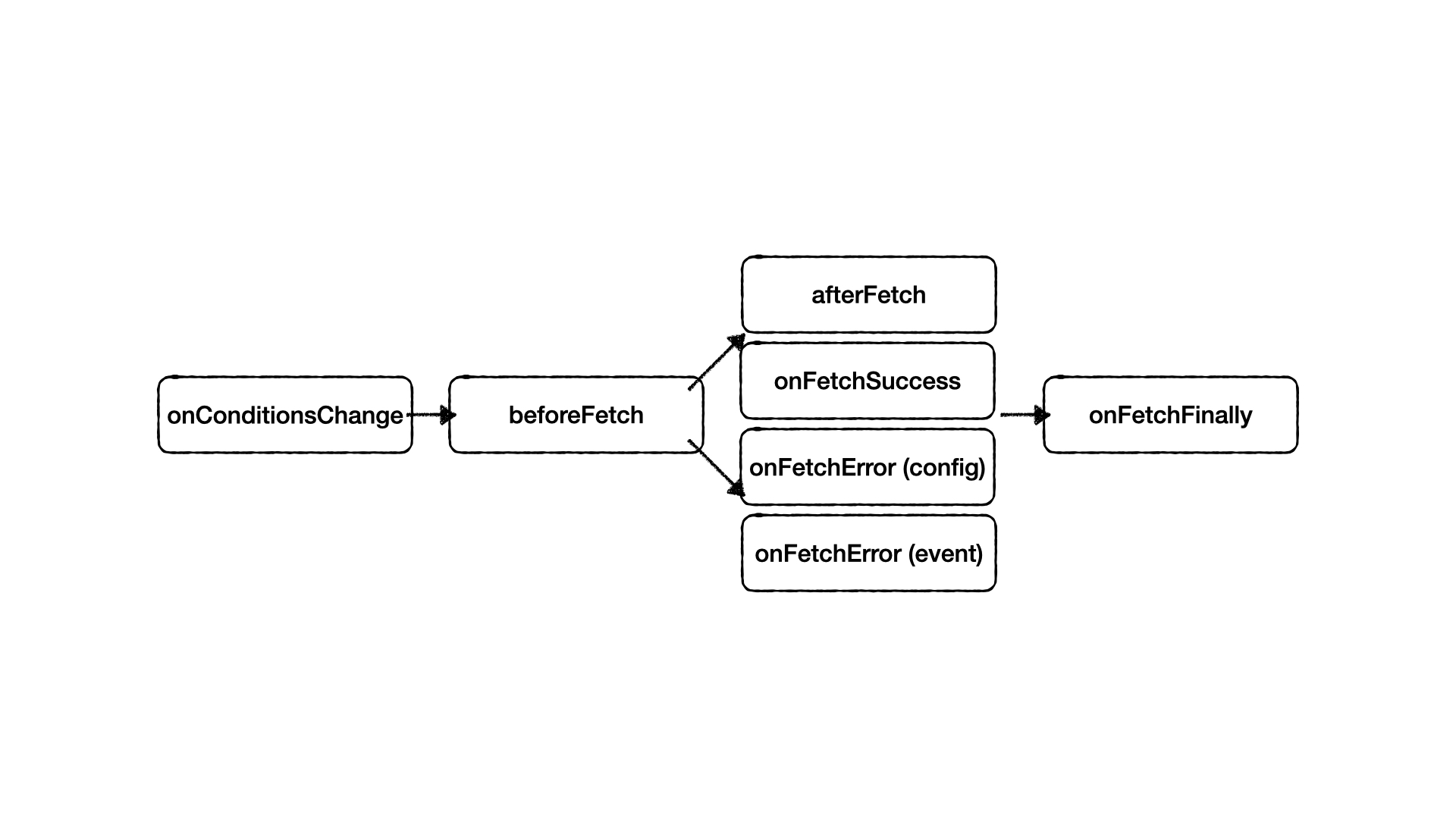
onConditionsChangeFires new and old condition values.
onConditionsChange((cond, preCond)=> { console.log(cond) console.log(preCond) })beforeFetchModify conditions before fetch or stop fetch.
const { conditions } = useConditionWatcher({ fetcher, conditions, beforeFetch }) async function beforeFetch(cond, cancel){ if(!cond.token) { // stop fetch cancel() // will fire onConditionsChange again conditions.token = await fetchToken() } return cond })afterFetch&onFetchSuccessafterFetchfire beforeonFetchSuccess
afterFetchcan modify data before update.Type Modify data before update Dependent request afterFetch config onFetchSuccess event <template> {{ data?.detail }} <!-- 'xxx' --> </template>const { data, onFetchSuccess } = useConditionWatcher({ fetcher, conditions, async afterFetch(response){ //response = { id: 1 } const detail = await fetchDataById(response.id) return detail // { id: 1, detail: 'xxx' } }) }) onFetchSuccess((response)=> { console.log(response) // { id: 1, detail: 'xxx' } })onFetchError(config)&onFetchError(event)config.onFetchErrorfire beforeevent.onFetchError
config.onFetchErrorcan modify data and error before update.Type Modify data before update Modify error before update onFetchError config onFetchError event const { onFetchError } = useConditionWatcher({ fetcher, conditions, onFetchError(ctx){ return { data: [], error: 'Error message.' } }) }) onFetchError((error)=> { console.log(error) // origin error data })onFetchFinallyWill fire on fetch finished.
onFetchFinally(async ()=> {
  //do something
})
Make It Reusable
You might need to reuse the data in many places. It is incredibly easy to create reusable hooks of vue-condition-watcher :
function useUserExpensesHistory (id) {
  const { conditions, data, error, loading } = useConditionWatcher({
    fetcher: params => api.user(id, { params }),
    defaultParams: {
      opt_expand: 'amount,place'
    },
    conditions: {
      daterange: []
    }
    immediate: false,
    initialData: [],
    beforeFetch(cond, cancel) {
      if(!id) {
        cancel()
      }
      const { daterange, ...baseCond } = cond
      if(daterange.length) {
        [baseCond.created_at_after, baseCond.created_at_before] = [
          daterange[0],
          daterange[1]
        ]
      }
      return baseCond
    }
  })

  return {
    histories: data,
    isFetching: loading,
    isError: error,
    daterange: conditions.daterange
  }
}
Use in components:
<script setup>
  const {
    daterange,
    histories,
    isFetching,
    isError
  } = useUserExpensesHistory(route.params.id)

  onMounted(() => {
    //start first time data fetching after initial date range
    daterange = [new Date(), new Date()]
  })
</script><template>
<el-date-picker
v-model="daterange"
:disabled="isFetching"
type="daterange"
/>
<div v-for="history in histories" :key="history.id">
{{ `${history.created_at}: ${history.amount}` }}
</div>
</template>Congratulations! You have learned how to use composition-api with vue-condition-watcher.
Now we can manage the paging information use vue-condition-watcher .
Pagination
Here is an example use Django the limit and offset functions and Element UI.
Create usePagination hook:
function usePagination () {
  let cancelFlag = false
  const { startLoading, stopLoading } = useLoading()
  const router = useRouter()

  const { conditions, data, execute, resetConditions, onConditionsChange, onFetchFinally } = useConditionWatcher({
    fetcher: api.list,
    conditions: { daterange: [], limit: 20, offset: 0 },
    immediate: true,
    initialData: [],
    history: { sync: router, ignore: ['limit'] },
    beforeFetch
  })

  const currentPage = computed({
    get: () => conditions.offset / conditions.limit + 1,
    set: (page) => conditions.offset = (page - 1) * conditions.limit
  })

  onConditionsChange((newCond, oldCond) => {
    if (newCond.offset !== 0 && newCond.offset === oldCond.offset) {
      cancelFlag = true
      conditions.offset = 0
    }
  })

  async function beforeFetch(cond, cancel) {
    if (cancelFlag) {
      cancel()
      cancelFlag = false
      return cond
    }
    await nextTick()
    startLoading()
    const { daterange, ...baseCond } = cond
    if(daterange.length) {
      [baseCond.created_at_after, baseCond.created_at_before] = [daterange[0], daterange[1]]
    }
    return baseCond
  }

  onFetchFinally(async () => {
    await nextTick()
    stopLoading()
    window.scrollTo(0, 0)
  })

  return {
    data,
    conditions,
    currentPage,
    resetConditions,
    refetch: execute
  }
}
Use in components:
<script setup>
  const { data, conditions, currentPage, resetConditions, refetch } = usePagination()
</script><template>
<el-button @click="refetch">Refetch Data</el-button>
<el-button @click="resetConditions">Reset Offset</el-button>
<el-date-picker
v-model="conditions.daterange"
type="daterange"
/>
<div v-for="info in data" :key="info.id">
{{ info }}
</div>
<el-pagination
v-model:currentPage="currentPage"
v-model:page-size="conditions.limit"
:total="data.length"
/>
</template>Reset offset when daterange or limit changes.
TODO List
- Error Retry
- Nuxt SSR SSG Support
Thanks
Inspired by vercel/swr
License
MIT License 2020-PRESENT Runkids