
vue-text-to-speech




The unified speech layer for Vue 3 — TTS, STT and AI streaming voice experiences through one composable API.
Web Speech API · OpenAI · ElevenLabs · Azure Cognitive Services — switch providers without rewriting your application.
Documentation · Live Playground · NPM
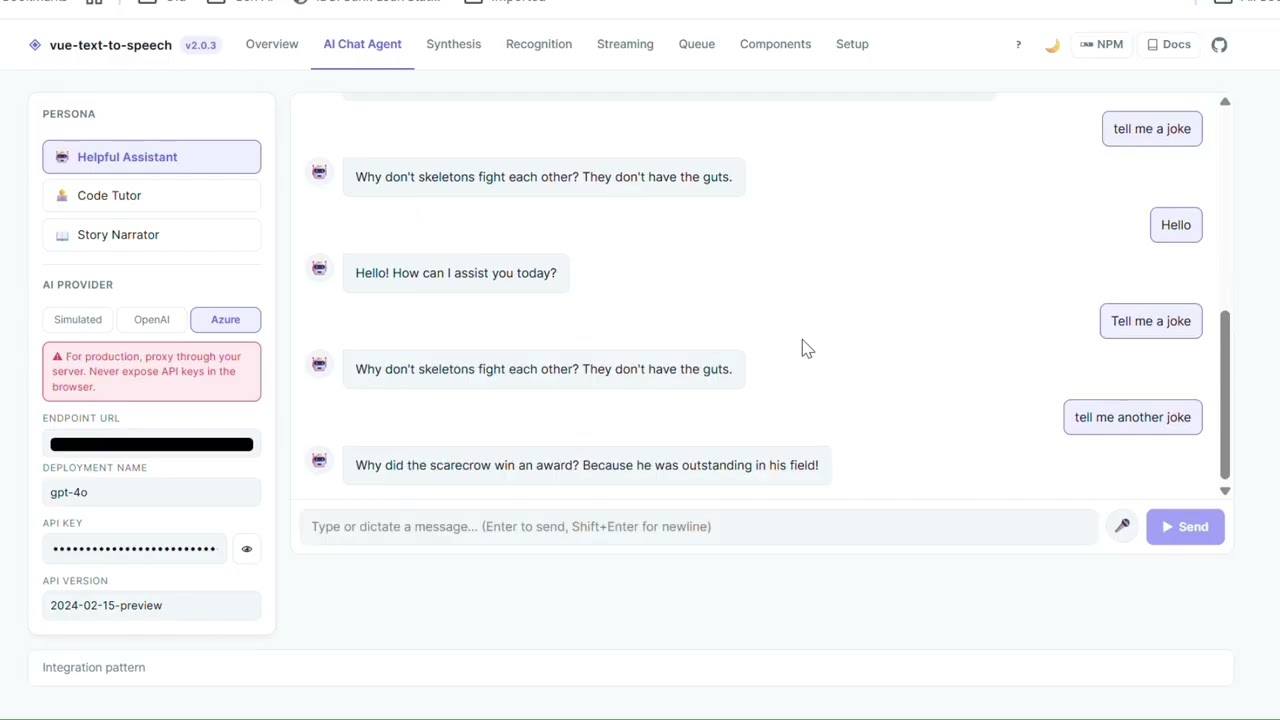
Watch the full playground walkthrough on YouTube
Features
- Four providers — Web Speech (zero config), OpenAI, ElevenLabs, Azure
- Composable-first —
useSpeechSynthesis,useSpeechRecognition,useStreamingTTS,useVoiceQueue - LLM streaming — pipe
AsyncIterable<string>token streams directly to speech - Drop-in components —
VueSpeechPlayer,VueSpeechRecorder,VueSpeechVoiceSelect - Security-first —
baseURLoverride on all AI providers for server-side proxying - TypeScript — full declarations shipped, no
@types/*needed - 207 tests — Vitest + @vue/test-utils, SSR-safe
Provider Architecture
One application API. Multiple speech providers underneath.
              Your Vue App
                   |
                   v
         vue-text-to-speech
                   |
      +-------+----+----+-------+
      |        |        |       |
      v        v        v       v
 Web Speech  OpenAI  ElevenLabs Azure
Switch providers by changing a single option in VueSpeech. Your components and composables stay unchanged.
Capabilities
| Capability | Support |
|---|---|
| Vue 3 | |
| Web Speech API | |
| OpenAI TTS | |
| ElevenLabs | |
| Azure Speech | |
| Speech recognition (STT) | |
| Streaming LLM → TTS | |
| Voice queue | |
| Drop-in components | |
| TypeScript | |
| SSR safe | |
| Provider abstraction |
Installation
npm install vue-text-to-speech
# pnpm add vue-text-to-speech
# yarn add vue-text-to-speech
Quick Start
// main.ts
import { createApp } from 'vue'
import { VueSpeech } from 'vue-text-to-speech'
import App from './App.vue'

createApp(App)
  .use(VueSpeech, { provider: 'web' })
.mount('#app')<script setup lang="ts">
import { useSpeechSynthesis } from 'vue-text-to-speech'
const { speak, stop, isSpeaking } = useSpeechSynthesis()
</script>
<template>
<button @click="speak('Hello, world!')">Speak</button>
<button @click="stop()">Stop</button>
</template>AI Providers
// OpenAI
createApp(App).use(VueSpeech, {
  provider: 'openai',
  apiKey: import.meta.env.VITE_OPENAI_KEY,
  voice: 'nova',
  model: 'tts-1-hd',
}).mount('#app')

// ElevenLabs
createApp(App).use(VueSpeech, {
  provider: 'elevenlabs',
  apiKey: import.meta.env.VITE_ELEVEN_KEY,
  voiceId: 'EXAVITQu4vr4xnSDxMaL',   // default voice; find IDs at elevenlabs.io/voice-library
}).mount('#app')

// Azure Cognitive Services
createApp(App).use(VueSpeech, {
  provider: 'azure',
  subscriptionKey: import.meta.env.VITE_AZURE_KEY,
  region: 'eastus',
  voice: 'en-US-JennyNeural',
}).mount('#app')
Never expose API keys in the browser. See Security below.
LLM Streaming
Speech starts before the LLM finishes — tokens are collected into sentences and spoken as they form.
LLM tokens → Sentence detection (Intl.Segmenter) → Speech queue → Audio outputimport { useStreamingTTS } from 'vue-text-to-speech'
const { pipeStream, isStreaming, stop } = useStreamingTTS()
// Pipe any AsyncIterable<string> — sentence boundaries detected automatically
await pipeStream(myOpenAIStream())Works with any AsyncIterable<string> — OpenAI, Anthropic, Ollama, or a custom stream.
Speech Recognition (STT)
import { useSpeechRecognition } from 'vue-text-to-speech'

const { start, stop, isListening, transcript, finalTranscript } =
  useSpeechRecognition({ lang: 'en-US', continuous: true })
Always uses the browser's SpeechRecognition API regardless of the TTS provider configured.
Drop-in Components
<!-- Full player: voice select + sliders + controls -->
<VueSpeechPlayer text="Hello from vue-text-to-speech!" />

<!-- Mic button with live transcript -->
<VueSpeechRecorder @final-transcript="onTranscript" />

<!-- Standalone voice selector (pair with useSpeechSynthesis) -->
<VueSpeechVoiceSelect v-model="selectedVoice" :voices="voices" :loading="isLoadingVoices" />
Register all three components globally in one go:
createApp(App)
  .use(VueSpeech, { provider: 'web', components: true })
  .mount('#app')
Why vue-text-to-speech?
Without it, you maintain separate integrations for every provider:
Vue App
├── OpenAI SDK       (custom stream + audio handling)
├── ElevenLabs SDK   (different audio API)
├── Azure SDK        (different auth pattern)
├── Web Speech API   (browser-only, different events)
└── Your own state management, queuing, error handling
With vue-text-to-speech, one API handles everything:
Vue App
     |
     v
vue-text-to-speech
     |
     +── Web Speech (zero config)
     +── OpenAI
     +── ElevenLabs
     +── Azure
Switch providers by changing one option. Your components stay unchanged.
Built for
| Use case | How |
|---|---|
| AI assistants & chatbots | Stream LLM responses directly into speech |
| Accessibility | Add voice output and mic input to any Vue app |
| Education & AI tutors | Natural sentence-by-sentence speech from AI responses |
| Enterprise | Use Azure Speech while keeping app code provider-independent |
| Rapid prototyping | Drop-in components — no custom UI needed |
Security
Never expose AI provider API keys in the browser.
Use the baseURL option to proxy all AI requests through your own backend:
createApp(App).use(VueSpeech, {
  provider: 'openai',
  baseURL: '/api/tts',   // your server — no API key exposed
}).mount('#app')
Vue Application
|
| No API key
v
Your Backend / Proxy
|
| Secret API key
v
Speech Provider (OpenAI / ElevenLabs / Azure)See the Security Guide for full proxy examples with Express, Nitro and Hono.
Documentation
Full API reference, provider guides and integration examples:
vue-text-to-speech-docs.vercel.app
Live Playground
Try all providers and components in the browser:
vue-text-to-speech-playground.vercel.app
Changelog
See CHANGELOG.md for release history and migration notes from v1.
If vue-text-to-speech saves you from building and maintaining multiple speech integrations, consider giving it a star — it helps other Vue developers discover the project.
License
MIT kunchamvasu