
Licence
—
Version
1.0.5
Deps
2
Size
149 kB
Vulns
0
Weekly
0
Getting Started
A ios Date picker for website in vue 3
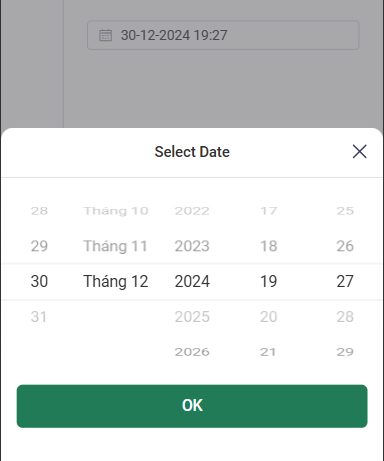
Features
- Single date picker
- Time picker
- Month picker
- Year picker
- Quarter picker
- Week picker
- Custom
v-model - SSR support
- Highly configurable
- Accessible
- Included type definitions
Installation
# npm
npm install vue3-ios-datepicker

# yarn
yarn add vue3-ios-datepicker

# pnpm
pnpm add vue3-ios-datepicker

# bun
bun add vue3-ios-datepicker
How to use
<template>
  <Vue3IosDatepicker v-model="value" />
</template>

<script setup lang="ts">
import { Vue3IosDatepicker } from "vue3-ios-datepicker"; // import component
const value = ref<Date>(new Date());
</script>
Props and attributes
| ID | Type | Default | Description |
|---|---|---|---|
placeholder |
String |
Select date |
Placeholder of native input |
id |
String |
Id of native input | |
name |
String |
Name of native input | |
format |
String |
YYYY-MM-DD |
Format of the displayed value in the input box |
iconClose |
String |
Custom close icon in bottom sheet of calendar | |
class |
String |
Custom class container | |
inputClass |
String |
Custom class native input | |
title |
String |
Select Date |
Custom title in bottom sheet of calendar |
defaultValue |
Date |
Optional, default date of the calendar | |
confirmLabel |
String |
OK |
Text of confirm button in bottom sheet of calendar |
icon |
String |
CalendarIcon |
Custom calendar icon |
disabledDate |
Function: (data: Date) => boolean |
a function determining if a date is disabled with that date as its parameter. Should return a Boolean | |
options |
Object |
See in below | |
lang |
String |
en |
language |
locale |
Object |
Locale Object |
Options
| ID | Type | Default | Description |
|---|---|---|---|
minDate |
Date |
disable confirm button if value less than minDate | |
maxDate |
Date |
disable confirm button if value greather than maxDate |
Events
onChange: Emitted value when click confirm button