
WebGL Path Tracing
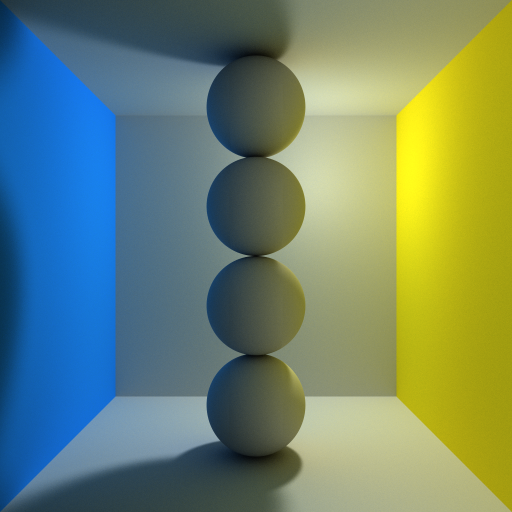
Path tracing is a realistic lighting algorithm that simulates light bouncing around a scene. This path tracer uses WebGL for realtime performance and supports diffuse, mirrored, and glossy surfaces. The path tracer is continually rendering, so the scene will start off grainy and become smoother over time.
The entire scene is dynamically compiled into a GLSL shader. Everything can be repositioned using the current shader, but any geometry or material change means a recompilation. To calculate a pixel color, a ray is shot into the scene and allowed to bounce around five times. At each bounce, the direct light incoming at that point (including shadows) is multiplied by all previous material colors and accumulated. Soft shadows come from jittering the light position per pixel at every bounce.
Rather than drawing those jitters independently at random, each pixel walks a scrambled Halton sequence, which spreads its samples out evenly instead of letting them clump and leave gaps. That takes roughly two to three times fewer samples to reach the same amount of grain.
The renderer also accumulates as many samples per animation frame as fit in a
frame's worth of time, instead of exactly one. A scene that costs a fraction of
a frame would otherwise spend the rest of every frame waiting for the next
vsync, capped at the refresh rate no matter how fast the hardware is. The count
is measured and adjusted continuously, and settles back at one sample per frame
on hardware that a single sample already saturates. Pass samplesPerFrame in
the config to pin it instead.
Samples accumulate into a floating point buffer where the browser can render to one, so the image keeps converging instead of settling at the precision of an 8 bit buffer. The canvas can be any size, square or not.
Rendering in a worker
The tracing runs in a web worker, against an OffscreenCanvas the page hands
over when the tracer starts. The page keeps the canvas element and its event
listeners and nothing else.
This is not just tidiness. Sizing the per-frame sample budget means knowing how long a frame of tracing really took, which means waiting for the GPU to catch up with the commands rather than for the commands to be queued, and that wait blocks whichever thread does it. On the main thread it blocks the page: with the budget aiming to fill most of a frame with tracing, scrolling, layout and everything else on the page have to wait for the tracer between every frame, and a scene heavy enough to run at a few frames a second takes the page down with it. In a worker it blocks nobody. Compiling the scene into a shader, which happens on every geometry or material change, moves off the main thread with it.
Browsers without OffscreenCanvas, or without WebGL inside a worker, fall back
to tracing on the main thread as before — the worker is asked whether it can
render before the canvas is handed over, since handing it over cannot be undone.
Pass worker: false to always trace on the main thread:
makePathTracer(canvas, objects, {worker: false});makePathTracer() returns a controller rather than the renderer itself, since
the renderer is usually on the other side of a message port: setObjects,
addSphere, addCube, addExtrudedRectangle, selectLight,
deleteSelection, setLightPosition, setLightVal, updateMaterial,
updateEnvironment, updateProjection, updateOrthoHeight,
updateGlossiness, renderer.pause(), renderer.resume() and dispose().
Calls made before the worker has started are queued and replayed, so there is
nothing to wait for.
Camera
The camera orbits the centre of the room and can project either way:
makePathTracer(canvas, objects, {projection: 'orthographic'});A perspective camera (the default) shoots all of its rays through one point,
so objects shrink with distance and the walls of the room converge. Pass fov
to change how wide it is.
An orthographic camera shoots parallel rays instead, so parallel edges stay
parallel and an object is the same size wherever it sits in the room, which is
the projection technical and isometric looking renders use. Its rays do not
spread out with distance, so anything the view frames beyond the walls of the
room is rays that pass the room by and hit nothing: by default the view is
sized to the room. Pass orthoHeight to set the height of the view in world
units yourself, which is what zooming means without a vanishing point (zoom
only moves an orthographic camera closer, it does not change what it frames).
Both are also switchable at runtime, through the object makePathTracer()
returns:
const ui = makePathTracer(canvas, objects);
ui.updateProjection('orthographic');
ui.updateOrthoHeight(1.5); // null goes back to the default framing
Shapes
Three shapes are available:
new Sphere(center, radius, id, color)new Cube(minCorner, maxCorner, id, color)new ExtrudedRectangle(minCorner, maxCorner, borderRadius, id, color, axis)
An extruded rectangle is a box whose cross section is a rectangle with rounded
corners, like a CSS border-radius extruded into a solid: the four edges
running along axis ('x', 'y' or 'z', defaults to 'z') are rounded off
by borderRadius and the two ends stay flat. The radius is clamped to half of
the smaller side of the cross section, and a radius of 0 gives a plain box.
color is optional and defaults to a neutral grey. id has to be unique within
a scene, since it is used to name the shape's uniforms in the generated shader.
Use the module
Install the module with npm install webgl-path-tracing
Use your favorite bundler or add to your page with:
<script type="importmap">
	{
		"imports": {
			"webgl-path-tracing": "./node_modules/webgl-path-tracing/webgl-path-tracing.js",
			"sylvester": "./node_modules/webgl-path-tracing/sylvester.src.js"
		}
	}
</script>

<script type="module">
	import {makePathTracer, Cube, Sphere, ExtrudedRectangle} from 'webgl-path-tracing';
	import {Vector} from 'sylvester';

	let objects = [];
	let nextObjectId = 0;
	objects.push(new Cube(Vector.create([-0.25, -1, -0.25]), Vector.create([0.25, -0.75, 0.25]), nextObjectId++));
  objects.push(new Sphere(Vector.create([0, -0.75, 0]), 0.25, nextObjectId++));
  objects.push(new ExtrudedRectangle(Vector.create([-0.5, -0.5, -0.1]), Vector.create([0.5, 0, 0.1]), 0.15, nextObjectId++));

	window.onload = function() {
		makePathTracer(document.getElementById('canvas'), objects);
	}
</script>
<canvas id="canvas" width="512" height="512"></canvas>